Drupal has a system for managing translation called Translation Management Tool, or TMGMT. It lets editors select content, choose target languages, create translation jobs, follow their status, and send that work to an external translation service.
wxrks connects to Drupal through TMGMT as that translation service.
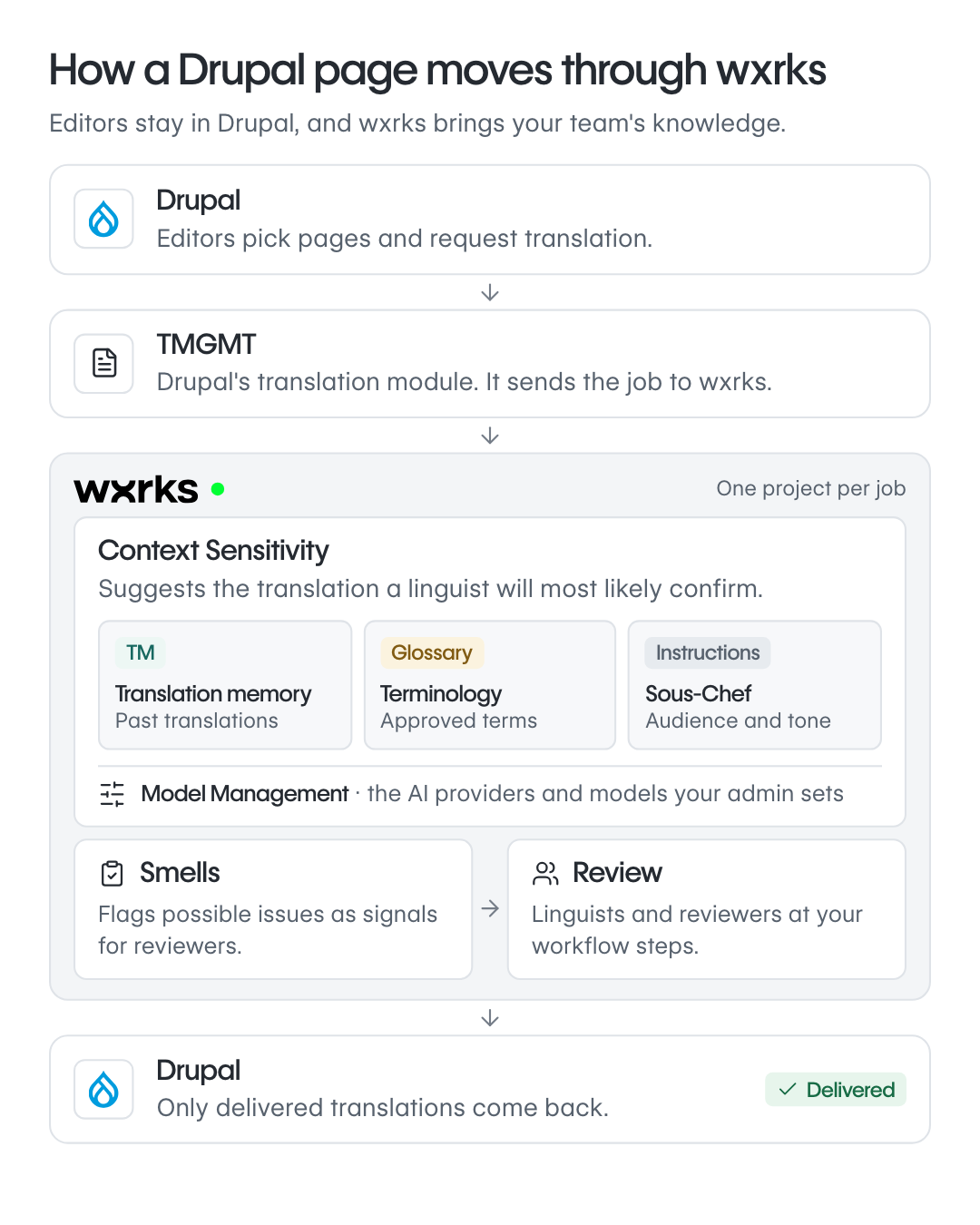
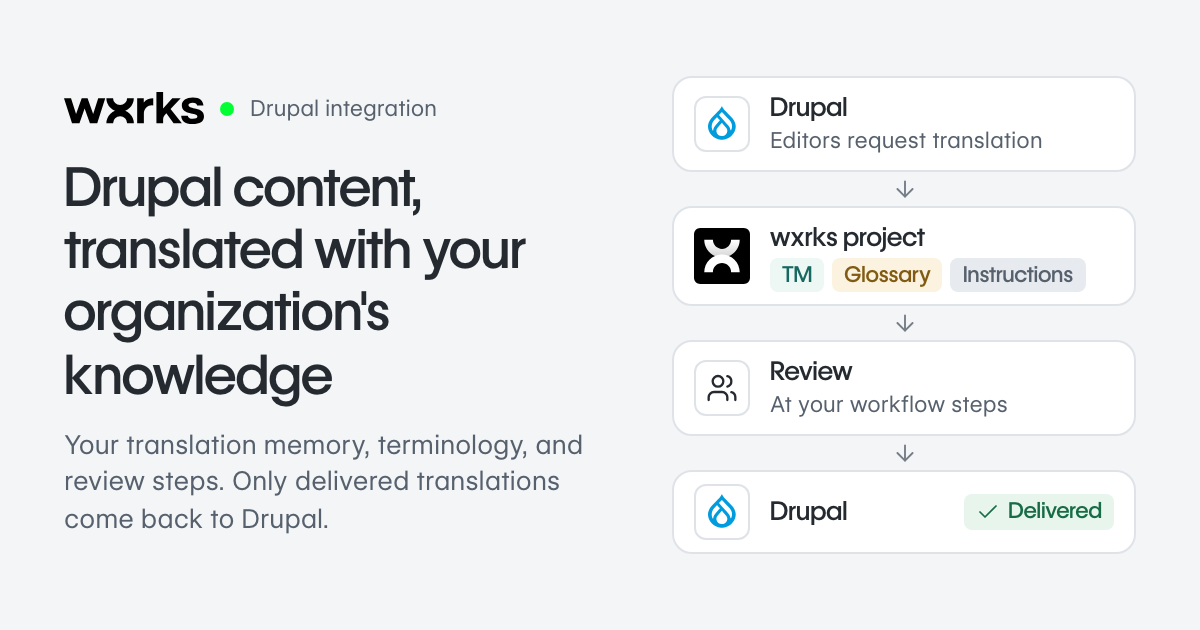
An editor requests a translation in Drupal, and TMGMT sends the content to wxrks. wxrks creates the translation project, runs it through the translation process configured by your team, and makes the finished work available back in Drupal.
The Drupal team keeps working in the CMS screens it already knows, while wxrks handles the translation process behind them.
Once the content reaches wxrks, the project can use the same Translation Memories, glossaries, AI configuration, workflows, quality checks, and people already used across the organization.
Drupal and TMGMT Stay at the Center of the Content Workflow
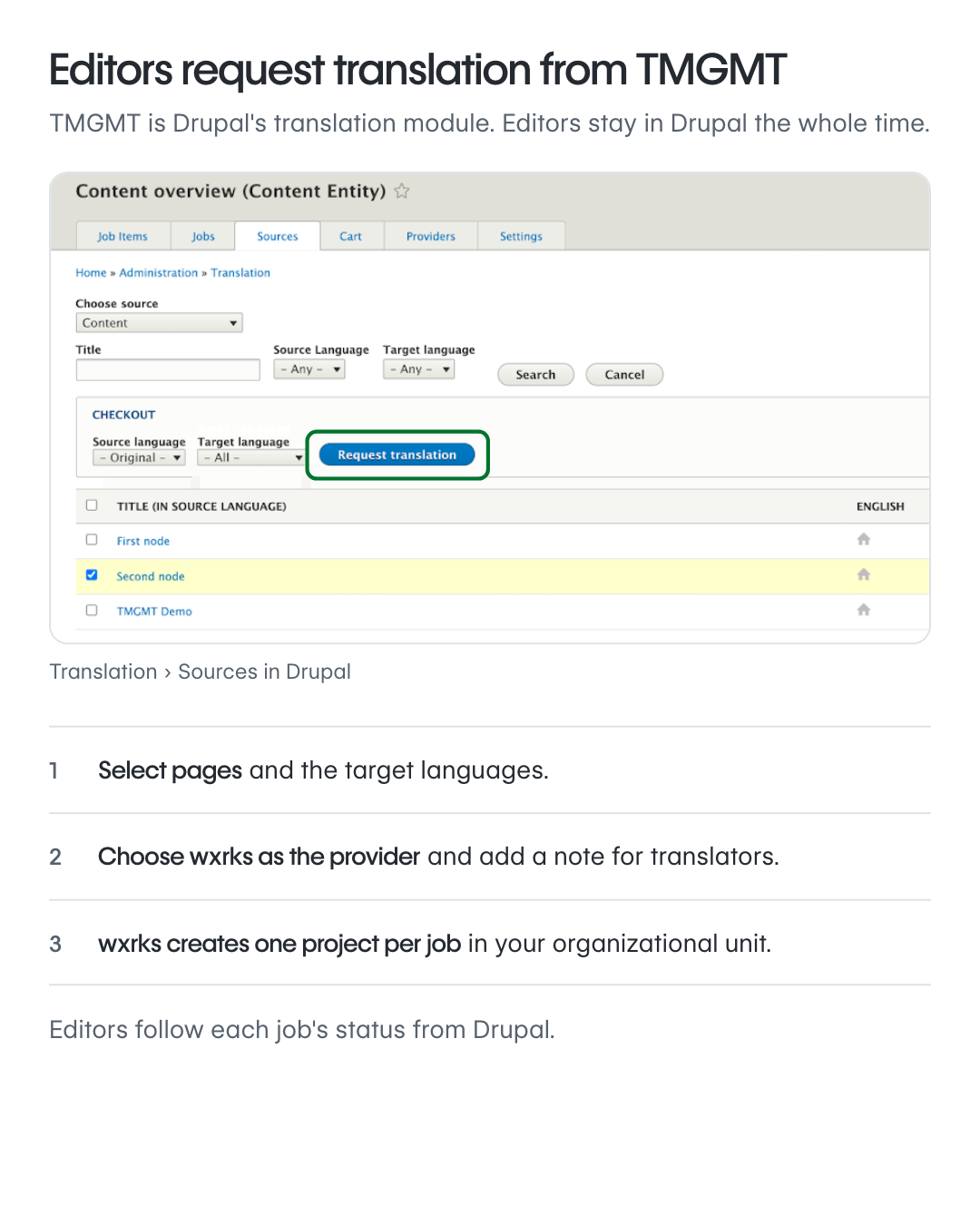
Editors can request translation from the Drupal interface they already use.
They select the pages, articles, taxonomy terms, or other content supported by TMGMT, choose the target languages, and send the request to wxrks. A comment can also be added to the request and passed along as instructions for the translation team.
Each Drupal translation job creates a project in wxrks. The content selected in Drupal becomes the work inside that project.
Editors can continue following the translation job from Drupal, while translators and reviewers work in the wxrks Translation Editor.
When Drupal is connected to wxrks, you also choose which part of your wxrks account will receive those projects.
In wxrks, this part of the account is called an Organizational Unit. It is a way to group teams, clients, departments, or types of content with their own settings.
For example, a Marketing Organizational Unit can have its own workflow, Translation Memory, glossary, users, and model configuration, while a Legal Organizational Unit can use a different setup.
That means Drupal content can enter an environment that is already configured for the team responsible for it.
A Translation Memory is a database of sentences and their approved translations. When similar content appears again, wxrks can reuse that previous work instead of treating every sentence as new.
A glossary stores approved terminology, such as product names, industry terms, and words that should be translated in a specific way.
The Drupal project can use the same Translation Memory and terminology that the organization already uses for other content.
This becomes useful when the same language appears across several systems. A term approved in product documentation can remain available when the same term appears on the Drupal website.
Drupal can also send a preview link with the translation request. Translators can open the source page while working in wxrks and see where the content appears.
That helps with short strings such as buttons, headings, menu items, and labels where the surrounding page can change the meaning.
The technical setup, required modules, connection fields, and current version requirements are available in the Drupal Connector Quickstart.
Drupal Projects Can Use Your Existing Translation Context and AI Configuration
Once the content reaches wxrks, it can use the same translation context as other projects in the account.
One part of that process is Context Sensitivity.
Context Sensitivity uses the information available for each segment to prepare the translation suggestion shown to the translator.
That information can include previous approved translations from Translation Memory, glossary terminology, Machine Translation output, and instructions about the audience and writing style.
Those instructions are managed through Sous Chef.
Sous Chef lets a team describe how the content should sound. It can include information about the audience, level of formality, writing preferences, brand language, or other instructions that should influence the translation.
Sous Chef works inside Context Sensitivity, together with the other available sources of translation context.
The team can also configure which sources should have more influence.
For example, an approved glossary term can take priority when terminology needs to remain consistent, while Translation Memory can provide examples of how similar content was translated before.
The AI model used for supported operations is also configurable.
wxrks calls this Model Management.
Model Management lets an administrator choose which AI provider and model should be used for specific operations in the account or in a particular Organizational Unit.
This gives teams more control over the models used for different kinds of content and different parts of the organization.
A Drupal project can therefore follow the model configuration already chosen by the company instead of depending on a model selected by the CMS integration.
The AI models connected to wxrks are stateless. This means the model itself does not permanently remember the content from one request and carry it into the next.
The knowledge that should persist stays in the customer's wxrks environment.
Approved translations stay in Translation Memory. Approved terminology stays in the glossary. Instructions stay in the customer's configuration.
That also means a company can change an underlying AI model without losing the translation knowledge it has built over time.
These feed into:
Context Sensitive suggestion
Show Model Management beside this flow as the place where the customer configures the model used for supported operations.
Avoid showing the AI model as the place where customer knowledge is stored.
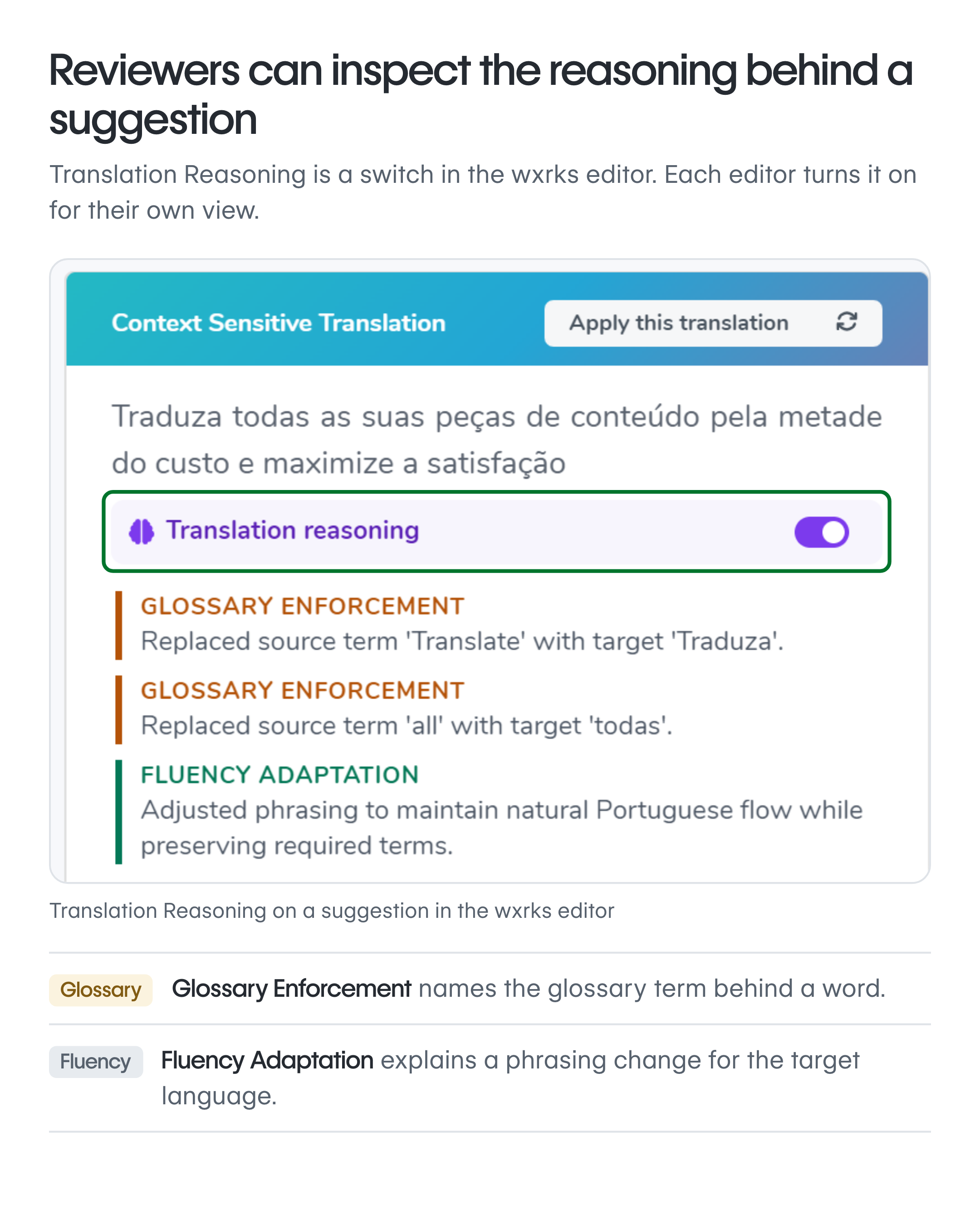
Reviewers can also use Translation Reasoning.
Translation Reasoning shows information about the factors that influenced a Context Sensitive suggestion.
For example, it can show whether terminology, Translation Memory, audience instructions, style adjustments, or other available context influenced the result.
This gives the reviewer more information when they want to understand a wording choice before confirming or editing it.
The reviewer remains responsible for the final decision.
Updated Drupal Content Can Return to Translation With Quality and Review Controls
Drupal pages continue changing after their first translation.
A product description might be updated. A legal paragraph might change. Marketing might rewrite a heading.
TMGMT supports something called a continuous job.
A continuous job keeps watching the Drupal content connected to that translation job. When the source content changes, the updated content can be queued for translation again without an editor creating a completely new request.
This helps teams manage websites where content changes frequently.
The updated work still enters the same wxrks environment, so the existing Translation Memory, glossary, instructions, and workflow remain available.
wxrks can also run quality checks on the translated content.
One of those checks is called Smells.
Smells looks for possible semantic or linguistic problems that traditional checks for numbers, tags, or formatting may not catch.
For example, it can flag a possible mistranslation, awkward wording, or terminology issue for review.
Those findings contribute to a Confidence Score.
The Confidence Score gives reviewers another signal they can use when deciding where to look more closely.
A reviewer can filter lower-confidence segments, inspect the findings, edit the translation, ignore a finding that does not apply, and run the quality checks again.
The score does not make the final decision. The reviewer decides whether the translation should change.
For some automated projects, teams can also define a Confidence Score threshold for automatic confirmation.
For example, a team could configure qualifying segments above a chosen threshold to be confirmed automatically, while other segments remain available for a linguist to review.
The team defines the threshold and the rule that should apply.
The project can then continue through the workflow configured for that Organizational Unit.
A workflow is the sequence of steps your team wants the project to follow.
One workflow might include translation followed by linguistic review. Another might include translation, review, and approval from someone inside the company.
wxrks follows those configured steps and routes the work to the people assigned to each role.
Keep the reviewer visible as the person responsible for the final judgment.
Only Delivered Translation Returns to Drupal
Drupal brings the translated content back after the work has reached the Delivered status in wxrks.
Delivered means the project has completed the steps your team configured before the content should return to Drupal.
Unfinished work remains inside the translation workflow.
Drupal can fetch finished translations in several ways.
They can come back automatically during cron, which is Drupal's scheduled background process.
They can also be fetched manually from the translation job screen.
Teams managing larger batches can use Drush, Drupal's command-line tool, with drush wxrks:fetch to bring finished translations back in bulk.
The connector can also be configured to save or accept translations automatically when they arrive from specific workflow steps.
For example, a team could configure work that completed its final review step to be accepted automatically when Drupal receives it.
Editors can then preview the translated page inside Drupal and continue with the normal publishing process.
A company might use Drupal for its website, another platform for product documentation, Figma for design, and another CMS for a different business unit.
wxrks also connects with platforms including AEM, Contentful, Webflow, Figma, and other content systems.
Those projects can use the same Translation Memories, glossaries, instructions, workflows, and model configuration already maintained in wxrks.
The Drupal Connector Quickstart covers the current installation requirements and configuration details.
If your team already uses Drupal and TMGMT, book a demo and we can walk through how your existing Drupal translation workflow would work with wxrks.
Unlock the power of glocalization with our Translation Management System.
Unlock the power of
with our Translation Management System.