Adobe Experience Manager (AEM) comes with its own translation framework. An author picks the pages to translate, AEM creates a translation project with a job for each target language, and an outside service does the translating. AEM calls that service a translation connector. The translations come back into the language copies of your site, the separate version AEM keeps for each language or country.
A connector to a machine translation engine sends the text of each job to the engine and writes the output back to the page. AEM's own flow creates one project for each page and each language, so a launch in 20 countries turns into hundreds of projects to open, track, and approve.
The wxrks AEM Connector is one of those translation connectors. It sends your AEM pages into wxrks, where they draw on the translation memory, terminology, and instructions your organization already maintains and move through the review steps your team set. Finished translations come back to the right language copy, and your team reviews each page in AEM before it goes live.
You can watch the whole flow on our AEM translation page, with a walkthrough of a page sent from AEM, translated into French, and approved back in AEM.
AEM Stays at the Center of the Content Workflow
The connector installs as one package through AEM's Package Manager, where administrators add software to AEM. It runs on AEM 6.5 with Service Pack 21 or later, including 6.5 LTS, Adobe's long-term support release, on your own servers or on Adobe Managed Services. If you run AEM as a Cloud Service, talk to us about your setup. The AEM connector guide walks your AEM administrator through each step.
Your administrator then adds the wxrks connection in AEM's Cloud Services settings with an API key, picks the wxrks workflows to use, and maps AEM's language codes to wxrks where the two differ. Each configuration points to one organizational unit, the part of your wxrks account that holds one team's settings, workflow, and translation memory. A configuration for each team or agency keeps their work, people, and automation rules apart.
For a single page, authors keep using AEM's own translation projects, and each AEM job becomes one wxrks project in that organizational unit. With quote automation turned on, wxrks calculates the cost from the unit's price list as soon as the files arrive, and AEM shows the job as Scope Completed. Translation starts when someone starts the job in AEM, and its status stays visible there.
The Bulk Translation Wizard Sends Many Pages and Languages Together
For a release across sites and countries, the Bulk Translation wizard inside AEM sends many pages and languages in one submission. Authors pick pages or whole sections, and a section brings every page under it. They choose the target languages for each group of pages, and they can find a product by its code.
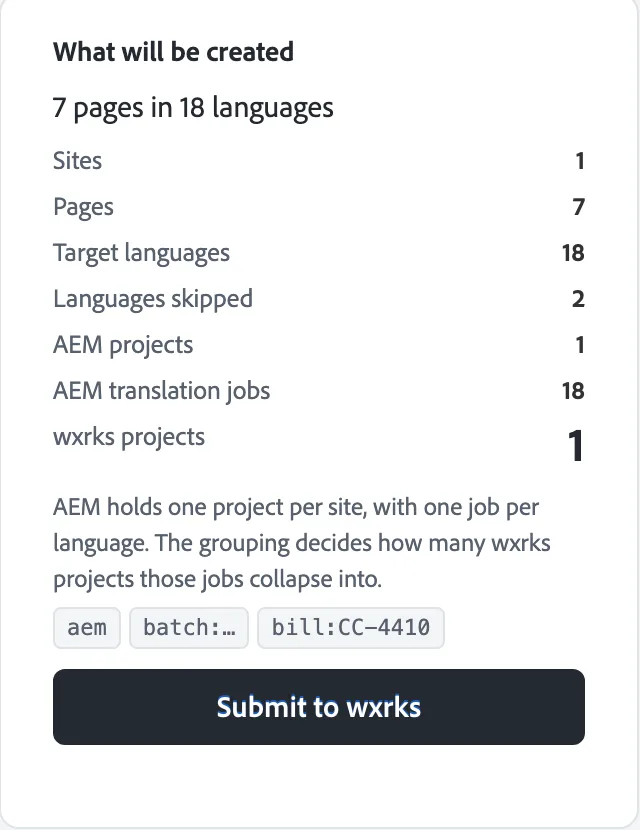
You choose how the submission is grouped in wxrks. It can become one project for the whole submission, one for each language, one for each group of pages, or one for each group and language, which matches AEM's own flow. A submission name, a due date, and a billing code travel with the projects, so cost lands with the team that asked for the work.
Before anything is sent, the wizard shows what it will create and which languages it will skip, with the reason. A coverage check compares each language with your AEM structure and shows, for each kind of content, whether it is ready or what is missing, with the exact page path. The check only reads your repository and changes nothing in it.
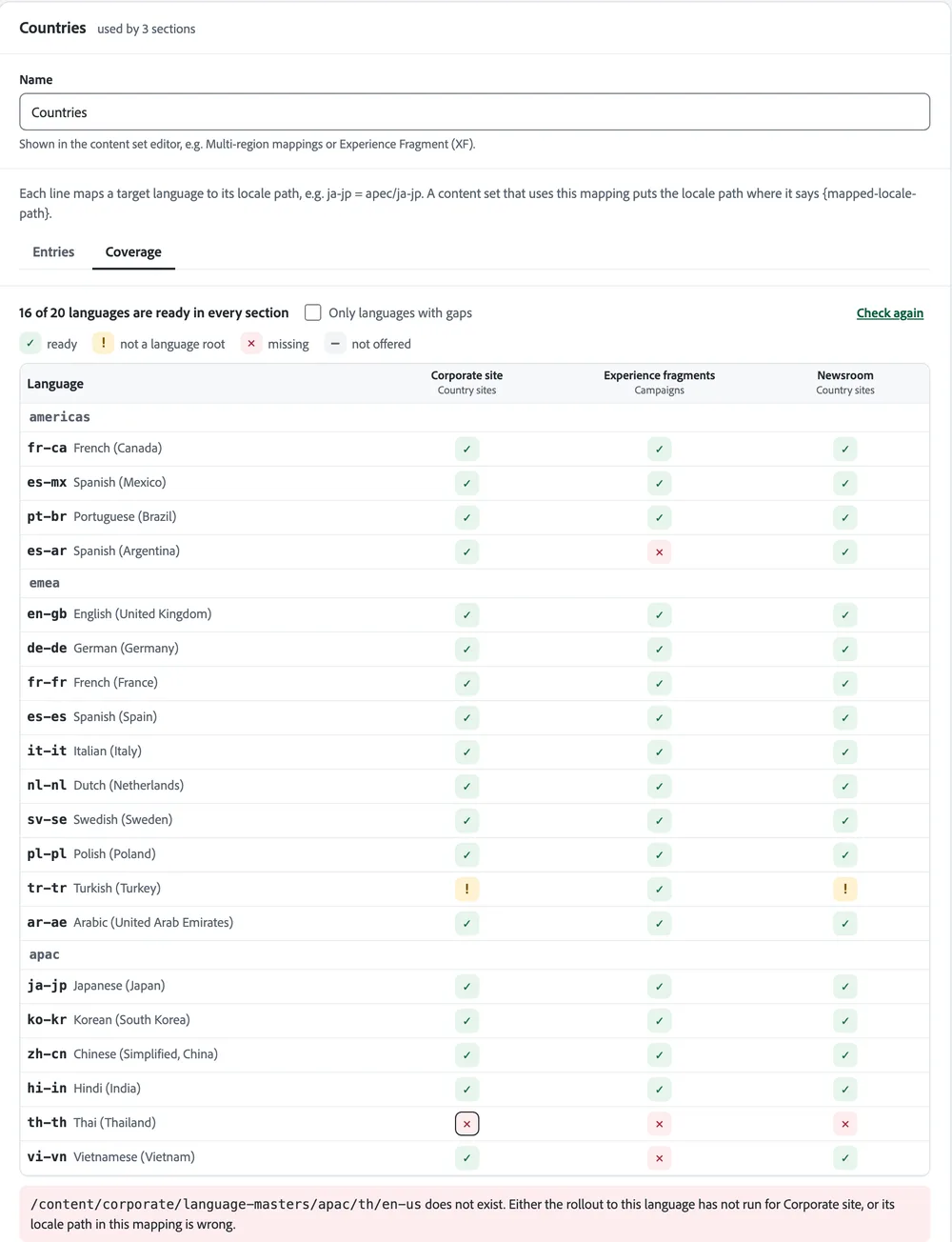
Running the wizard again is safe. A New translation skips the languages that already have a language copy. Re-translate sends updates for pages that are already live, and they arrive in an AEM Launch, a staged copy of the page that you publish when it is ready, so the live language copy stays as it is until then.
The setup follows the way your AEM is organized. Country sites rolled out with Multi Site Manager, the AEM tool that keeps country copies in step with a main site, can live in the same setup as product sites with one source language, a content library, and campaign fragments. Your team describes each kind of content once, and authors pick from it in the words they already use.
AEM Content Uses the Same Translation Knowledge as the Rest of Your Organization
Translators work on segments, the sentences or short passages a text is split into. An AEM segment gets the same preparation as any other content in wxrks. wxrks gathers the matches from your translation memory, approved glossary terms, machine translations, and the audience and tone instructions your team set in Sous-Chef for the account, the project, or the language.
wxrks ranks those options before a model sees them. A glossary term outweighs a loose memory match, and a translation a person confirmed outweighs a machine suggestion. A language model then compares the ranked options and suggests the translation a linguist is most likely to confirm. That process is Context Sensitivity.
Your account admin chooses the models behind that work in Model Management, for the whole account or for one organizational unit, and wxrks routes each request by those rules. Connecting your own AI providers requires the Fusion plan or higher. The models are stateless, which means they keep nothing from one request to the next. The knowledge your team builds stays in your wxrks account, and no customer content trains any model.
Smells then checks each translation and flags potential meaning problems for review, such as an omission or a term used two different ways. It gives every segment a Confidence Score from 0 to 100, which gives reviewers another signal for deciding where to look first. Linguists and reviewers work at the steps your workflow includes, and automatic job assignment sends each task to the people your team chose for that step.
Finished Translations Come Back to AEM for Review
AEM checks wxrks for status on its own and pulls a translation once every file is translated and every segment is confirmed at the last step of your workflow. If your workflow includes review or proofreading, AEM waits until those steps are done too. Partial progress stays in wxrks, so an unfinished translation never reaches a page.
The job then shows Ready for Review in AEM. Your team opens each page, previews it in place, and accepts or rejects it. A rejected page goes back to the translator in wxrks. Once every page in the job is accepted, AEM marks the job approved and wxrks marks the project Delivered, the status a translation reaches once the last step is done.
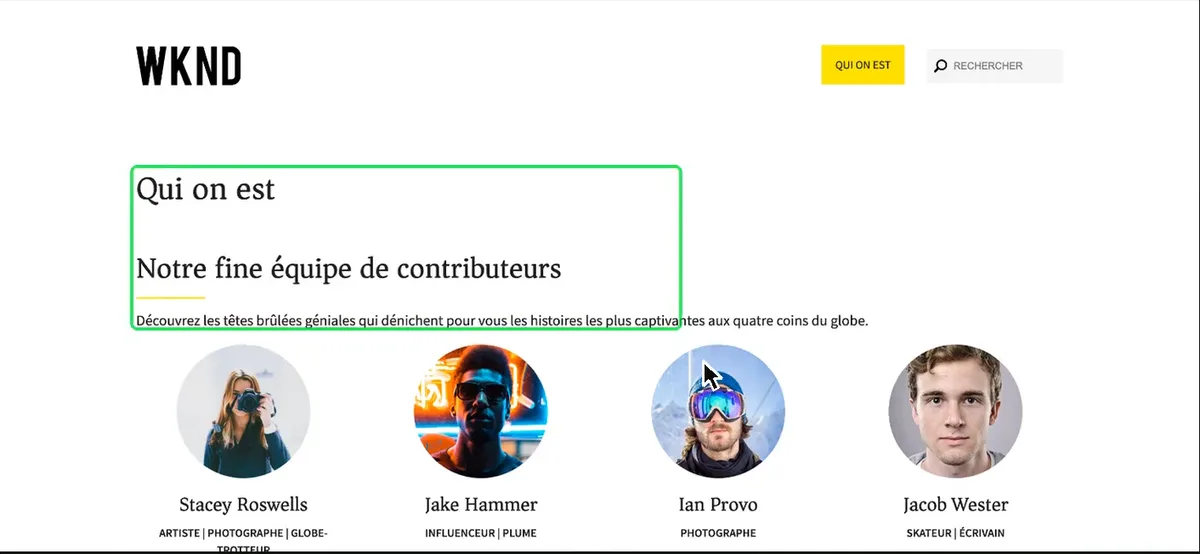
Pages, content fragments, and experience fragments all go out and come back the same way. Content fragments are the structured text AEM reuses across pages and channels, and experience fragments are the reusable blocks your campaigns are built from.
Every status check and every delivery is a request from AEM to wxrks over HTTPS. wxrks has held an independent SOC 2 Type 2 audit, which checks how a company protects customer data over time, since 2020. Your account runs on AWS in the United States or the European Union (Ireland), your choice.
One Translation System Across the Content Stack
If your content also lives in other systems, wxrks connects to Drupal, Contentful, Webflow, and other platforms the same way. Every connector in your account draws on the same translation memory, terminology, instructions, model configuration, and workflows, so a term your team approves on an AEM page is ready the next time it appears in Contentful.
The AEM translation page has the full tour, Hugo's walkthrough video, and the questions AEM teams ask most. You can book a demo there to see your own AEM content move through your workflow.
Unlock the power of glocalization with our Translation Management System.
Unlock the power of
with our Translation Management System.