Continuous projects are live in wxrks. A continuous project is one project that stays open for as long as the content lives. You re-import the file every time it changes, and only what changed becomes work. It is built for app strings, website copy, help center articles, and anything else that ships with every release. The three-minute walkthrough below shows the whole flow, and the step-by-step guide in our help center has every setting.
Until now, that content had to fit the shape of a project, with a start, a quote, an approval, a delivery, and an invoice. For a file that changes every two weeks, that meant a new project per release, or waiting several releases to justify one. Localization managers spent hours creating and closing near-identical projects, and the answer to "what did this release change?" lived with a developer. Software teams solved the same problem for code years ago with continuous integration, by integrating small changes often. Continuous localization needed a project model that could do the same.
One Project, Re-imported as Often as You Ship
A continuous project starts in the same wizard as any other project. The organizational unit fills in the project manager, languages, translation memory, and glossary it already knows. An account admin or project manager switches on the Continuous project toggle, picks Files or Strings, and gives the project a tag that the pipeline will use to find it.
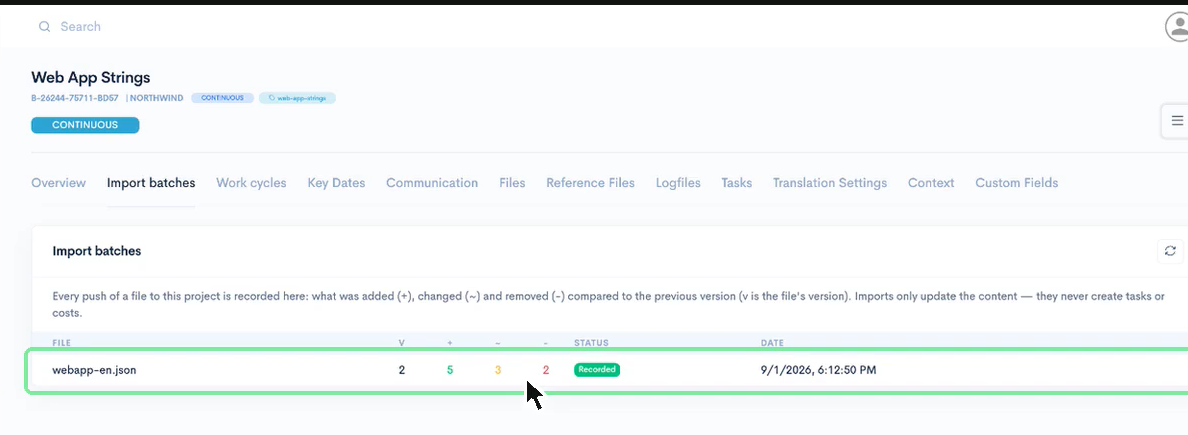
Every new version of the file is a re-import. wxrks compares it with the previous version and records what was added, what changed, and what was removed. Unchanged strings keep their translations, comments, and history. Changed strings keep the old translation as a draft. An identical file is detected and skipped.
.png)
The Import batches tab keeps the record. One row per push, with the file, its version, and three numbers. Five strings added, three changed, two removed. That is the release, described in the terms a localization manager needs.
You Decide When Translation Starts
An import only updates content. It never creates tasks and it never adds cost by itself. New and changed strings pile up until a project manager clicks Create Tasks for Outstanding Work. That action takes everything still untranslated, prices it in one analysis, and creates the tasks per file, per language, and per workflow step. wxrks calls each of those rounds a work cycle, and prices each round on its own, so you can start one every sprint, or on a schedule from your pipeline. A string that changed twice before anyone translated it is priced once. The guide covers this in detail.
Manage Content as Strings
Choose Strings when the content is keyed, like a JSON or YAML catalog. The project overview then opens with a Languages table, one row per target language with total, translated, and new strings. Open all strings opens one editor session for the whole language across every file, with each segment's key beside it. You can search by key, filter by a prefix such as checkout, or show only what the latest import touched.
Continuous vs. an Ad Hoc Project
The cost, the dates, and the approval move off the project and onto each round of tasks. Everything your team opens every day stays where it was.

What stays the same
- =The same project wizard
- =Organizational unit defaults for project manager, languages, translation memory and glossary
- =The same workflow steps and vendors
- =The same Editor, translation memory, glossary and QA
- =Tasks, payables and reports
What's new
- +Continuous badge and CI tag in the titlebar
- +Import batches tab, every push with what was added, changed and removed
- +Work cycles tab, a record of every round of tasks
- +Languages table with per-language strings
- +Open all strings, one merged Editor session
- +Key search and key-prefix namespace filter
What's gone
- –No project cost, no Costs tab
- –No project due date, no progress widget
- –No approval and no delivery of the project
- –Re-imports never create tasks on their own
The cost, the dates and the approval move off the project and onto each work cycle.
For the pipeline, it is two calls on every release, authenticate and push the file. If nothing changed, the call does nothing. The endpoints are listed in the help center guide.
This is the first version of continuous projects, and more is coming over the next months. Book a demo to see it running on your own files.
Unlock the power of glocalization with our Translation Management System.
Unlock the power of
with our Translation Management System.