Our industry has been through one of the biggest changes in its history. And through all of it, one person has kept localization alive. The localization manager, who proves every day why humans are still a key part of the process.
We do not think the answer is to pick a side. It is easy right now to defend the old way of working, or to throw it out. Neither one leads anywhere useful. The next few years are about carrying what was worth keeping into something that makes sense now.
We think there is a better answer, and the whole platform is built on it. Maximum authorship, minimum effort. The words may not be typed by a human. The meaning can still be owned by one.
The companies that come out ahead will bring the new technology into their localization playbook, and they will have the numbers to show for it.
That is the real question for every localization manager right now. How do you show your stakeholders that your way of working is the right one? You show them the numbers. Where the machine did the work, and how fast. Where a person stepped in, and what it fixed. A localization manager who can show that is not being replaced. They are the one who makes the whole thing work.
This week we are at LocWorld in Vancouver, on stage with Coca-Cola Europacific Partners. If you are there, come talk to us.
And with that, let's take a look at what's new.
The Editor Is Rebuilt From the Ground Up, Same Screens, New Engine

The editor you open today runs on a completely new foundation. Same screens, same shortcuts, nothing to relearn.
Last month we redesigned what you see. This is different. The editor is where most of the day happens, so we left the screens alone and replaced what is underneath. Every piece of technology that runs the editor is now the newest version available, built for the next years rather than patched from the last ones.
The new foundation is how the editor stays quick on large files, how your comments travel with the work into the kits you export, and how the agents that work inside the editor get room to do more.
If you notice anything different this week, tell us. That is the one thing we want to hear.
- The same editor, nothing to relearn
- Comments rebuilt with it, so a note on a segment travels into the exported kit
- A foundation built for large files and for the agents inside the editor
This is the foundation the next editor features are built on.
A tour of the editor, in the help centre.
Require Single Sign-On for Your Whole Account, With Any Identity Provider

Single sign-on has been part of wxrks since early 2025. Now any identity provider connects, and you can make it the only way in.
It started with Okta, OneLogin, and Microsoft Entra ID. This month it reaches further.
Any identity provider that speaks SAML 2.0 now connects, and you can require single sign-on for every user on the account, so passwords stop being a way in.
New colleagues get their wxrks user the first time they sign in, with the role their directory group maps to. Automatic provisioning, which started with Azure, now runs from Okta and OneLogin too. People lose access the day they leave the company.
For accounts that keep password sign-in, the same page sets multi-factor authentication, session length, and password rules.
- Any SAML 2.0 provider, alongside Okta, Microsoft Entra ID, and OneLogin
- Users created on first sign-in, with roles from your groups
- Single sign-on required for everyone, when you are ready
One of the largest requests we ever answered asked for exactly this. Single sign-on for 41,000 people, from a company that runs its translation portal for every employee. That request is now a setting.
Who has access to wxrks is decided where you already decide it.
How to connect any SAML 2.0 identity provider, in the help centre. How automatic provisioning works.
TMill, Clean Up a Translation Memory Inside wxrks

Run TMill on any translation memory, or on a TMX file, and it finds the entries that hurt your matches, shows you each one, and fixes the ones you approve.
A translation memory gets more valuable every year, and it also collects mistakes. Empty targets, broken tags, a sentence labeled Portuguese that is actually Korean, two different translations of the same line, a number that changed on the way. Each one lowers the value of your matches, and some of them walk straight into new projects.
TMill now lives in wxrks, under Labs. Pick a memory or upload a TMX file, choose a quick or a deep pass, and read the findings. Some are fixed automatically, some come with a suggested fix, some are flagged for a person to decide. Apply the ones you accept, and the memory is updated in place. Smells, our agent that reads translations for meaning, can go through every pair too, and the wizard shows what that pass will cost before you run it.
Until now TMill was a service we ran for you, one memory at a time. Now it is a button.
- A dozen checks, from empty and duplicated entries to language, tag, and number mismatches
- Every finding reviewed by you, with automatic fixes, suggestions, and flags kept apart
- Smells on the whole memory, with the cost shown before you start
Your memory stays yours. TMill takes out what should never have been in it.
How TMill works, in the help centre.
Adobe Experience Manager and ServiceNow, Translation Where Enterprise Content Lives

Send many Adobe Experience Manager pages in many languages from one wizard, and translate ServiceNow incidents, knowledge articles, and catalog items where your teams already work.
Adobe Experience Manager. The Bulk Translation Wizard picks many pages and many languages at once and groups them into as few wxrks projects as you want, one for everything, one per language, or one per content group. Run it again and the languages that already have a copy are skipped. Re-translate, and the update lands in an AEM Launch for you to promote when it is ready.
ServiceNow. The wxrks app from the ServiceNow Store translates work notes and comments on an incident on the spot, and runs knowledge articles and catalog items through a translation request. Your Sous-Chef settings, the audience, the tone, the formality, and your instructions, apply to every one of them. And a notification with a link or bold text inside it now translates as one sentence, so the meaning stays whole.
- One wizard for many AEM pages and languages, grouped into the projects you choose
- Incidents, knowledge articles, and catalog items translated inside ServiceNow
- Your terminology and tone applied through Sous-Chef on both
The content does not leave the system it lives in. The translation comes to it.
The Adobe Experience Manager connector. The ServiceNow connector.
Other updates
Twelve more changes shipped since our last update. Each one links to the page that explains it.
Update a Project's Source File With a Revised Version
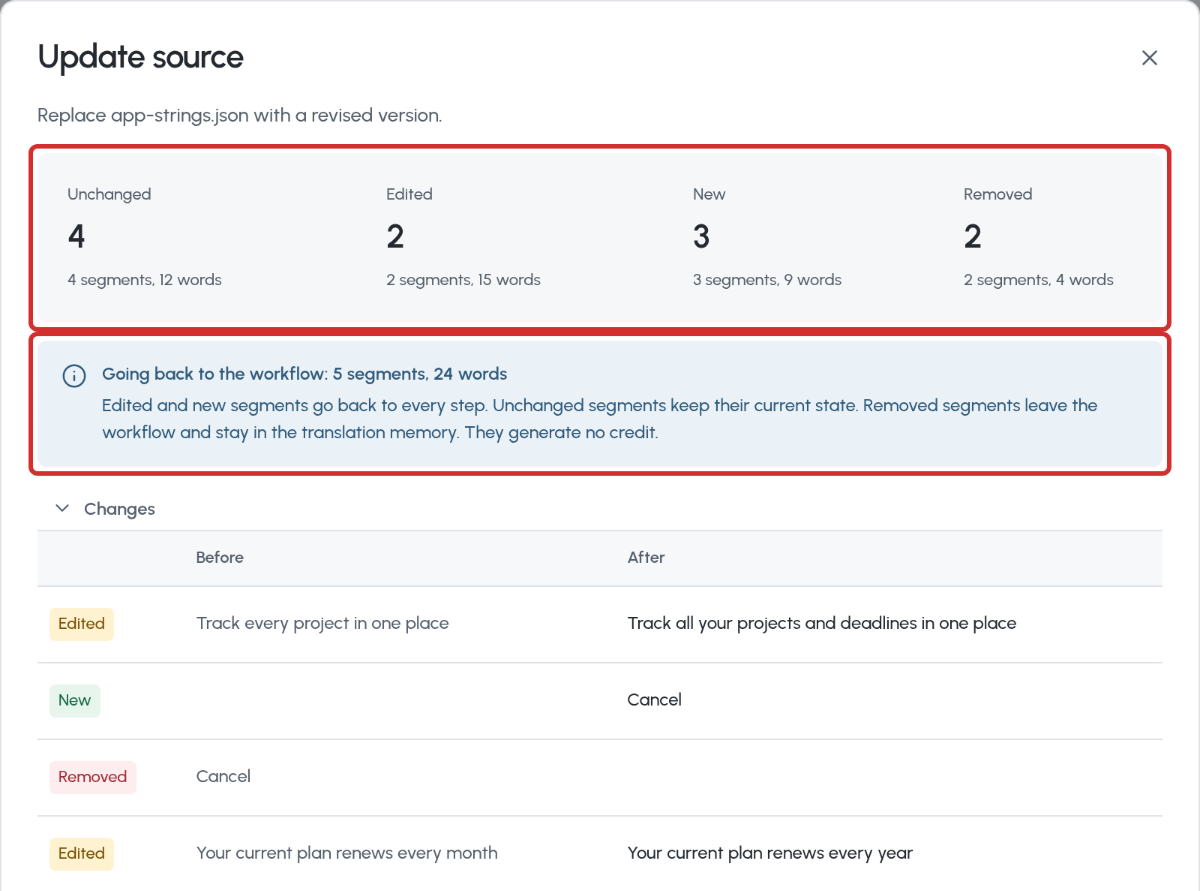
The client sends a new version mid-project. Upload it, and only the edited and new sentences go back to the linguists. Unchanged text keeps its translation, its state, and its cost. Enabled per account, ask us to turn it on. How to update a source file.
Apple Pages, Keynote, and Numbers Files

Upload .pages, .key, and .numbers files and get them back in the same format, with styles, lists, tables, charts, footnotes, and speaker notes in place. Supported Apple formats.
A Paid Status on Tasks

When a payable is paid, its tasks move from Invoiced to Paid, and vendors get a Paid tab. Reports that filter on Invoiced stop seeing those tasks. How the Finance section works.
Required Fields on Glossary Terms

Choose which fields a term must carry, such as a definition. Terms without them cannot be approved, and imports skip and count them. How to make term fields required.
TM Updates per Work Unit, Exported as TMX

See the translation memory entries one work unit created, and export only those. How to export TM updates.
Eleven New Languages

Albanian, Belarusian, Bosnian, Icelandic, Malay, Greenlandic, Nauru, Acehnese, Mongolian in Cyrillic, Uzbek in Latin, and Tibetan. Every language wxrks supports.
Quality Data and Signed Webhooks for Your Developers
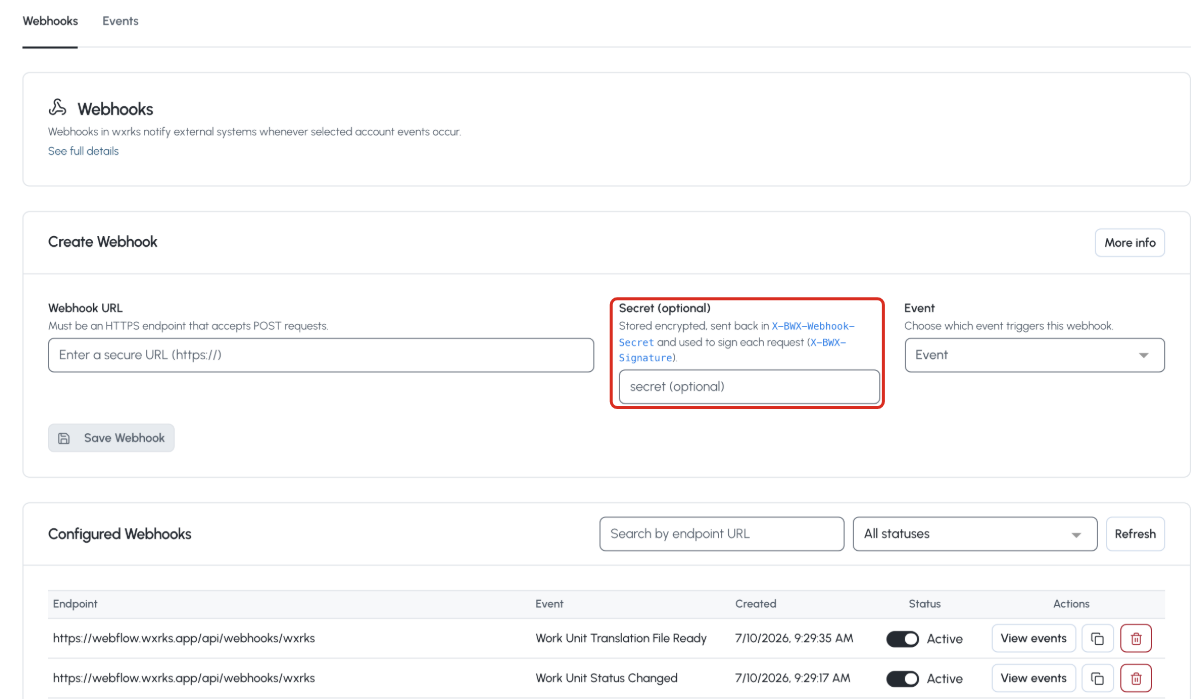
Pull a project's segments and its quality summary through the public API. Webhooks retry on their own, and each one carries a timestamp and a signature your systems can verify. How to verify a webhook. The API's limits and conventions.
Glossaries in Priority Order

When several default glossaries apply to an Organizational Unit, you set their order, and the Editor, context-sensitive translation, and machine translation honor it. How to set the order.
Notification Emails in the New Look, With Editable Templates

Every notification wxrks sends got the platform design, and you can edit the templates. How to customize the emails.
Lists With Your Columns

Choose the columns, sort by any header, and keep your page when you come back. How to list and filter projects.
Last Access on the Users List

A column, a filter, and a sort by days since the last sign-in, so inactive seats are easy to spot. How to manage users.
Analysis Logs, One File per Language

Download the word-count analysis split by target language, zipped. All about the analysis log.
What's new
See You at LocWorld56 in Vancouver

We are at LocWorld in Vancouver from October 19 to 21, and on stage with Coca-Cola Europacific Partners on how a company of 41,000 people runs translation inside ServiceNow with people at the center. If you are going, come find us. Event details.
What Stops the Whole World From Just Throwing Content Into AI?

Rodrigo's answer, in under a minute, is localization managers. The people who keep a translation memory alive, a glossary current, and an expert reviewer in the loop while everyone asks why content does not just get published. Watch the video.
How wxrks Partners With Universities to Train Translation Students

Diego's class at the Universidad Autónoma de Madrid, the universities that list us on their own sites, and an open invitation to the ones that want to. Read the article.
Hugo's latest walkthroughs
Three new short videos on our channel, two to three minutes each.
Watch: Reduce localization costs with AI confidence scoring
Watch: Translate AEM pages with wxrks, the end-to-end workflow
Watch: Manual task assignment in wxrks
Watch them all on the wxrks channel
Grateful to have you with us. Let's move forward with purpose, together.
Let's make it happen,
let's make it wxrks!
Unlock the power of glocalization with our Translation Management System.
Unlock the power of
with our Translation Management System.


.png)
.png)
.png)
.png)

.png)
.png)
.png)