


What is i18n? The 2026 guide to internationalization


i18n is internationalization: preparing software so you can adapt it to different languages and regions without rebuilding its core logic. It covers translatable text, locale-aware formatting, plural rules, and adaptable layouts; it does not replace translation or linguistic review. This 2026 guide explains what to build, how to test it, and where translation management fits.
TL;DR
- i18n prepares software for localization; translation supplies the language, not the underlying architecture.
- Separate interface text from code and use locale-aware rules for dates, numbers, and plurals.
- Test translated interfaces in context, including right-to-left layouts and mixed-direction content.
- Wxrks supports translation management; developers still own the application's internationalization architecture.
Why this matters
A translated interface is not necessarily an internationalized product. Your buttons can display another language while dates remain ambiguous, currency labels mislead users, or a checkout form rejects a valid address.
Treat i18n as product infrastructure, not a final translation task. For a 2026 release, define the language and regional behavior alongside the features you plan to ship. The software localization guide for product teams connects that engineering work to the wider localization process.
The practical benefit is separation of responsibility. Developers create adaptable software, translators work on language, and reviewers verify that the finished experience makes sense.
What is i18n?
Internationalization is the engineering work that makes software adaptable across languages and regions. The abbreviation i18n replaces the 18 letters between the first letter, i, and the last letter, n, in internationalization.
Localization, abbreviated l10n, adapts that prepared product for a particular audience. Its abbreviation replaces the 10 letters between l and n. Translation handles linguistic meaning within that broader adaptation.
Internationalization, or i18n
- Main responsibility: Prepare code, data handling, and interfaces for regional variation
- Typical output: Externalized strings, locale-aware formatting, adaptable layouts
- Best for: Making a product ready for localization
- Limitation: Does not supply translated content
Localization, or l10n
- Main responsibility: Adapt the product for a particular language and region
- Typical output: Reviewed text, regional conventions, tested screens
- Best for: Delivering a usable regional experience
- Limitation: Depends on sound internationalization
Translation
- Main responsibility: Express source meaning in another language
- Typical output: Translated interface text, documentation, or messages
- Best for: Communicating meaning across languages
- Limitation: Does not fix application architecture
These activities overlap, but they are not interchangeable. Translating a hard-coded error message changes its language; extracting that message into a resource and supporting its variables changes how the application handles language.
A locale is more than a language
A locale describes language and regional conventions used by software. For example, en-US identifies English associated with the United States, while en-GB identifies English associated with the United Kingdom.
Do not use language alone to decide currency, timezone, or legal requirements. A person reading English can live elsewhere, pay in another currency, and travel across timezones. Keep those settings separate when your product needs independent control.
How do you implement i18n in a software product?
Use this sequence for your 2026 implementation: separate text, preserve context, apply locale rules, adapt layouts, connect the translation workflow, and test the result. Each step addresses a different source of failure.
1. Separate text
Move user-facing messages out of application logic and into resources your application can load. Give each message a stable identifier that describes its purpose, such as checkout.payment_failed.
Include validation errors, notifications, accessibility labels, and transactional messages in the inventory. Text outside the main interface still belongs to the user experience.
Avoid building sentences by joining translated fragments. Word order changes between languages, so translators need complete messages with named placeholders rather than isolated pieces they cannot rearrange.
2. Preserve context
Tell translators where each message appears, what its variables mean, and whether a length constraint applies. A short label such as Open can describe an action or a status; the resource alone does not resolve that ambiguity.
Provide descriptions or screenshots where they clarify meaning. Keep a message's identifier stable when its role stays the same, but separate identical source text when different contexts require different translations.
Reuse meaning, not merely matching words. A shared string is useful only when it can remain correct everywhere it appears.
3. Apply locale rules
Use locale-aware formatting for dates, times, numbers, and displayed currency amounts. In JavaScript, the Intl APIs provide formatting facilities; use the equivalent established facilities in your application stack.
Choose the currency from the transaction's requirements, then format it for the display locale. Formatting does not convert money or determine which currency a customer owes.
Handle plurals through a message system that supports the target language's categories. An English rule that adds an s when a count differs from 1 item is not a general solution for multilingual software.
4. Adapt layouts
Let components accommodate translated text instead of assuming English dimensions. Check wrapping, truncation, button height, navigation labels, and text embedded in images.
For right-to-left languages, use direction-aware layout behavior and test mixed content. An Arabic paragraph containing an email address or product identifier needs more care than simply aligning everything to the right.
Keep icons and controls under review. Some directional elements need mirroring; others, including symbols whose meaning has a fixed orientation, need individual treatment.
5. Connect workflows
Define how source changes reach translators and how approved translations return to the application. Assign ownership for terminology, review, and release decisions rather than treating file delivery as approval.
Translation memory helps reuse previously translated segments. It does not determine whether a reused sentence fits a changed screen, workflow, or product meaning.
Make source changes visible to reviewers. A translation approved against an earlier message needs reassessment when the source meaning changes, even if its identifier remains unchanged.
6. Test releases
Run pseudolocalization before real translations arrive. Artificially altered strings help expose hard-coded text, clipping, and assumptions about character handling; they do not prove linguistic quality.
Then test actual target locales in working screens. Verify key journeys, error states, keyboard access, and text direction, not just whether resource files load successfully.
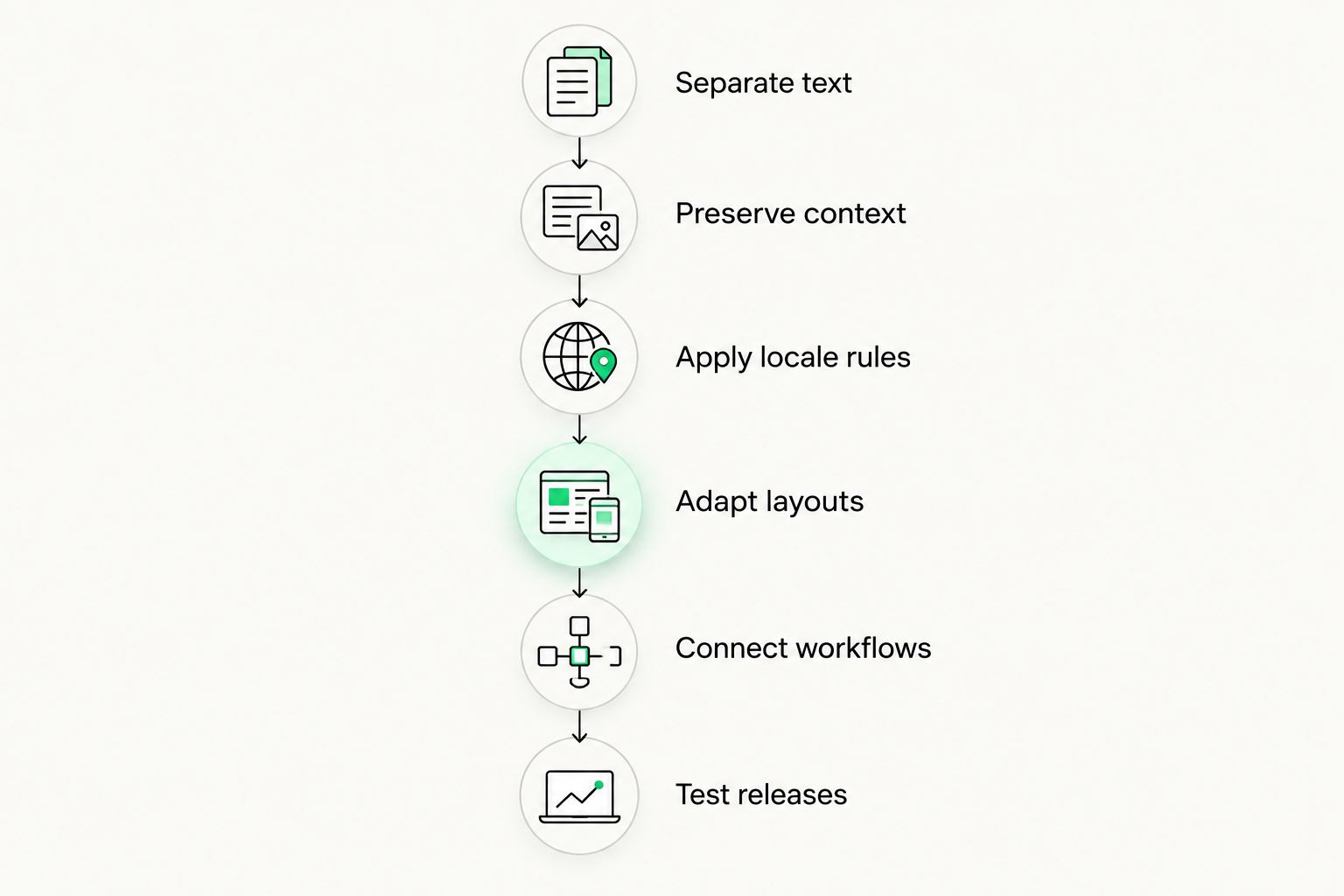
Prepare the application before relying on translated text to reveal structural problems.
Why does i18n implementation effort vary?
The scope depends on what your application already assumes about language and region. For a 2026 project, inspect those assumptions before estimating delivery or assigning translation work.
- Text architecture: Scattered hard-coded messages require extraction before translators can work independently of application code.
- Message complexity: Variables, plural categories, and grammatical dependencies require more structure than static labels.
- Interface constraints: Dense navigation, fixed-width components, and text-heavy graphics need layout review.
- Regional behavior: Dates, addresses, currencies, and timezones involve different decisions; one locale setting does not settle them all.
- Workflow ownership: Translation memory, terminology decisions, quality review, and source updates need clear responsibilities.
- Release coverage: Supporting a locale means testing its behavior across the journeys you publish, not merely including its resource file.
Do not estimate internationalization from word count alone. Word count describes content volume, not the engineering needed to remove regional assumptions.
How do you know whether i18n is ready to ship?
Use 6 release checks for your 2026 launch. These are acceptance criteria, not a claim that every product needs the same testing effort.
Text coverage
- What you verify: Visible messages and accessibility labels load from the intended resources
- Failure to catch: Untranslated interface fragments
Message behavior
- What you verify: Variables, plural cases, and complete sentences render correctly
- Failure to catch: Broken grammar or exposed placeholders
Regional formatting
- What you verify: Dates, numbers, and currency displays match the selected settings
- Failure to catch: Ambiguous or misleading values
Layout behavior
- What you verify: Content remains readable without hiding essential actions
- Failure to catch: Clipped labels and unusable controls
Direction handling
- What you verify: Right-to-left and mixed-direction content remain understandable
- Failure to catch: Reordered identifiers or confusing navigation
Review status
- What you verify: Translations match the source version and have the required approval
- Failure to catch: Stale or unreviewed text reaching users
Record failures against the responsible layer. A missing translation belongs in the content workflow; a button that cannot expand belongs in the interface backlog. Separating those issues prevents translators from being asked to repair design constraints through awkward wording.
Also test fallback behavior deliberately. If a translation is missing, your application should follow a defined fallback policy rather than expose an identifier or fail unpredictably. Decide which missing content blocks a release.
Is i18n the same as localization?
i18n prepares the product; localization adapts the experience. You can finish much of the internationalization work before translated content exists, but you cannot validate a localized experience without reviewing it in context.
The distinction matters when assigning work. Developers own resource loading and formatting behavior; language specialists own linguistic decisions; product and quality teams coordinate acceptance across both.
Does i18n require a translation management system?
i18n does not require a translation management system. You can implement message resources and locale-aware rendering without one; managing translation assignments, reuse, review, and updates is a separate workflow decision.
Wxrks is a translation management system for translators, developers, enterprises, and agencies managing localization workflows, translation memory, quality management, and cost tracking. Wxrks is best for teams managing translation workflows, not for replacing application-level i18n engineering.
The benefit is managing the translation side of localization. The boundary is equally important: a TMS does not remove the need to design locale-aware behavior or test your application. Evaluate workflow software against your actual handoffs rather than expecting it to repair hard-coded interfaces.
Can you add i18n after a product launches?
You can add i18n after launch, but existing assumptions still need to be removed. Start with a complete user journey so you can trace messages, variables, formatting, and layouts from beginning to end.
Avoid translating scattered screens while leaving shared components unchanged. A localized account page is not enough if validation messages, confirmation emails, and recovery flows remain tied to the source language.
For a 2026 retrofit, make shared infrastructure the first milestone. Then expand coverage by journey, with a clear definition of which locales and behaviors each release supports.
FAQ
What does the 18 in i18n stand for?
The 18 in i18n stands for the 18 letters between i and n in internationalization. It is an abbreviation, not a technical version or standard.
What's the difference between i18n and l10n?
i18n prepares software for different languages and regions; l10n adapts that software for a particular audience. Localization includes translation and regional review, while internationalization supplies the underlying flexibility.
Do I need i18n if my app only uses English?
You need internationalization when your product must support language or regional variation. Even an English-only application can need different date, number, and regional settings.
Can automatic translation handle i18n for me?
Automatic translation does not implement i18n. Translated messages still need resource loading, plural handling, variable protection, adaptable layouts, and application testing.
How should I test i18n before translations are ready?
Use pseudolocalization to expose hard-coded text, layout constraints, and character-handling problems before translations are ready. Follow it with real-language review because synthetic text cannot validate meaning.
Does choosing a language also choose a timezone?
Choosing a language does not determine a timezone. Language, region, currency, and timezone can require separate settings, depending on the application's purpose.
Where does Wxrks fit into an i18n project?
Wxrks supports the translation management side of localization, including workflows, translation memory, quality management, and cost tracking. Developers remain responsible for the application's internationalization architecture and runtime behavior.
One last thing
Test a failing interaction, not just a welcome screen. Trigger an invalid form submission, a missing translation, and a message with a variable before approving your internationalization work.
Those paths force your application to combine text, logic, formatting, and layout. A polished translated homepage cannot show whether the rest of the product handles that combination correctly.
Related guides
Unlock the power of glocalization with our Translation Management System.
Unlock the power of
with our Translation Management System.








