


Webflow to multilingual website: complete 2026 workflow


Instead of copying every Webflow edit into separate translation documents, build a Webflow multilingual website workflow that moves identified source content through translation, approval, and localized publishing. This 2026 guide uses an explicit content handoff, so you can establish the process before adding automation.
TL;DR
- A Webflow multilingual website workflow needs stable content identifiers, translation review, and a publishing gate.
- Wxrks fits teams that need translation memory and quality management alongside Webflow publishing.
- Start with one page and two target locales before expanding the workflow.
- Return approved translations only when they match the current source revision.
Why this matters
A translated page is not necessarily a localized page. Navigation, form messages, image descriptions, metadata, and linked destinations need attention alongside the main copy. Missing any of them leaves visitors switching languages halfway through a task.
Wxrks translation management software fits teams that need translation memory, quality management, and cost tracking alongside Webflow publishing. Keep those responsibilities separate: the translation process approves language; the website publishing process checks the page visitors actually receive.
Wxrks supports localization workflow automation, but this guide does not depend on a particular Webflow connector. Use a controlled handoff first, then automate only the transfer methods supported by your actual setup.
For a 2026 launch, the key decision is not simply which text to translate. It is which source revision each translation represents—and who can authorize its publication.
Before you start
- Website access: Have permission to edit localized content and publish the Webflow site. Confirm that your site's current setup supports the target locales and publishing behavior you need before assigning translation work.
- Translation materials: Prepare the source content, target locale list, terminology decisions, reviewer assignments, and any approved translation memory. Include screenshots or page context for ambiguous labels.
- The hidden gotcha: A CMS field and a static page element are different content objects. Give each a stable identifier; matching translations by visible wording alone breaks when identical text appears in different contexts.
Choose 1 pilot page and 2 target locales as your initial test scope. This is a setup recommendation, not a platform limit. Include a heading, body copy, a link, a form label, and metadata so the pilot exercises more than paragraph translation.
Choose your handoff model
Use the following comparison to choose how content moves. These are workflow options, not claims that a specific integration is included in your account.
Controlled manual handoff
- Best for: Teams validating their first localized page
- Advantage: Makes every transfer and approval visible
- Trade-off: Requires someone to copy or transfer approved content
Supported connector or custom integration
- Best for: Teams with recurring source updates
- Advantage: Can remove repetitive transfer work
- Trade-off: Requires verified field coverage, permissions, and error handling
Start with the controlled manual handoff when the transfer behavior is untested. Move to integration only after the same pilot passes through extraction, review, return, and publication without losing context.
Source inventory
The first configuration unit defines what enters translation. Do not begin with a document containing only the visible paragraphs: it cannot reliably tell you where each approved translation belongs.
- Select the pilot. Choose a page with representative content, not just the shortest page. Record its source language and the target locales you intend to publish.
- Inventory the content. List static text, CMS content used on the page, navigation, buttons, form messages, image descriptions, and page metadata. Mark anything deliberately excluded.
- Assign identifiers. Give each entry a content key, a page or item reference, an element or field reference, and a source revision. Preserve existing stable identifiers when your transfer method exposes them.
- Capture context. Add the full sentence around short strings, screenshots where layout matters, and instructions for terms that must remain unchanged. Separate instructions from translatable copy.
- Freeze the handoff. Save the source snapshot used for this batch. Keep subsequent website edits in a change list rather than silently replacing text already under review.
Expected result: You can trace every translation request back to a specific source object and revision. Another person should be able to locate that object without guessing from its wording.
For your 2026 content inventory, include metadata in the same approval process as page copy. A translated heading does not establish that the page title or description received equivalent review.
Translation handoff
The second configuration unit establishes the translation contract: what goes out, what comes back, and what counts as approved. A shared document can carry that contract during the pilot, provided its identifiers survive every edit.
- Define the record. Include content key, source revision, source text, target locale, target text, context, and approval status. Treat these as your handoff fields, not as assumed software interface labels.
- Prepare the resources. In Wxrks translation management software, organize the work around the required languages and reviewers using the options available in your account. Apply approved translation memory and terminology resources where configured.
- Set the review rule. Require a reviewer to assess meaning, terminology, and the intended action. A generated draft is not approval, and a fluent sentence can still describe the wrong action.
- Protect non-translatable content. Identify variables, markup, identifiers, and brand terms that must survive unchanged. Ask reviewers to inspect both the translated sentence and its protected elements.
- Return complete records. Send back approved target text with its original content key, locale, and source revision. Do not return an anonymous list of translated sentences.
Expected result: Each returned translation has a destination and an approval decision. Unapproved entries remain clearly separated from publishable content.
The benefit of Wxrks is translation workflow management; the boundary is your Webflow handoff. Establish how content enters and leaves before treating any transfer as automated. Translation memory helps reuse approved language, but it does not prove that a translation still fits a changed page.
Localized page configuration
The third configuration unit returns approved language to the website. Work in the intended locale throughout; editing the right sentence in the wrong language context creates a difficult cleanup job.
- Open the destination locale. In Webflow, select the intended locale before editing. Confirm the locale from the interface rather than inferring it from the text currently visible.
- Match the revision. Compare the approved record with the current source. If the source revision has changed, hold the translation for review instead of overwriting the destination with stale copy.
- Populate the destination. Place approved text into its matching static element or localized CMS field. Keep content keys attached to your handoff record so repeated phrases cannot be confused.
- Check supporting content. Review localized metadata, image descriptions, link labels, form instructions, and destinations. Follow links to confirm that visitors stay in the intended language where a corresponding destination exists.
- Inspect the layout. Use Preview to check the localized page at relevant viewport sizes. Look for clipped buttons, hidden text, unexpected line breaks, and misplaced punctuation.
Expected result: The localized preview contains the approved content in the correct places, without damaging the source page or mixing locales.
A longer translation is not automatically a bad translation. Give the reviewer a screenshot of the actual constraint before shortening meaning to make a button fit.
Release gate
The final configuration unit separates language approval from website release. Make the distinction explicit even when one person performs both jobs.
- Run the language check. Ask the locale reviewer to read the assembled page, not only the translation records. Confirm that headings, navigation, and calls to action make sense together.
- Run the functional check. Test navigation, the locale switcher, forms, downloads, and important destinations. For right-to-left content, inspect directionality and mixed-direction strings where applicable.
- Run the search check. Inspect localized titles, descriptions, indexing directives, canonical references, and language annotations. Confirm that these describe the intended page relationships rather than assuming publication handled every case.
- Authorize publication. Record approval against the source revision and locale. Use Publish only after checking the publishing destination and the scope of changes being released.
- Verify the live page. Repeat the important checks on the published version. Record the released source revision and retain the previous approved content for recovery.
Expected result: You have a live localized page with an identifiable approval trail and a known source revision.
Use 3 release checks in your 2026 checklist: language, function, and search configuration. These are process gates, not a substitute for the detailed tests within each category.
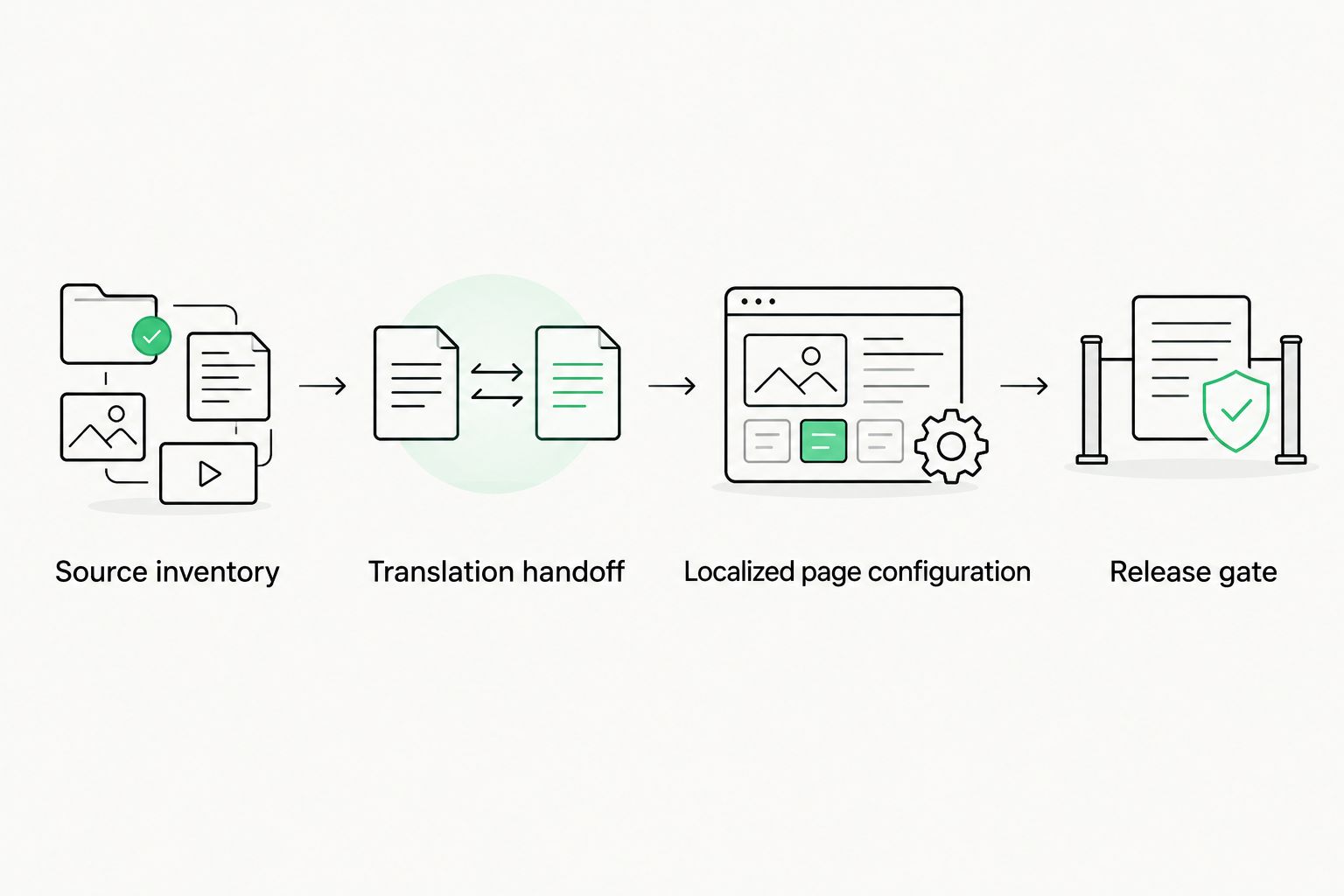
Keep source identification, translation approval, and website release as separate stages.
Update translations whenever source content changes
The initial launch moves a complete pilot page through review. The adjacent workflow handles changes without reopening every unchanged sentence. Keep the same identifiers and approval rules; change the batch scope.
Change detection
Compare the current source with the last released source snapshot. Classify entries as added, changed, unchanged, or deleted, then route only the relevant work to translation.
A changed headline can also affect surrounding copy. Include related context even when the nearby sentences have not changed, and distinguish “included for context” from “requires translation” in the handoff record.
Revision protection
Before returning an approved update, compare its source revision with the current website revision again. If the source changed during translation, stop that entry and request review against the new wording.
Do not delete localized content solely because an extraction omitted it. Confirm whether the source was intentionally removed, moved, or excluded by a broken content filter.
Review ownership
Assign one owner to coordinate website release and a qualified reviewer for each target locale. When you commission website localization services, define whether the scope covers translation alone or also in-page review, metadata, functional checks, and correction after publication. Otherwise, an approved translation document and an untested website can both appear complete.
For recurring 2026 updates, record both language approval and release approval. The distinction prevents a finished translation from being mistaken for a finished deployment.
Troubleshooting
Approved translations overwrite newer source changes
The return process matched a content key but ignored the revision. Block the affected entries, compare them with the latest source, and obtain fresh approval before applying them. Add the revision comparison immediately before every return step, including manual transfers.
Some text stays in the source language
Start with the inventory, not another translation request. The missing content might be a shared component, CMS reference, embedded form, or text inside an image. Identify its actual source and editing method, then add it to the handoff or document the limitation.
Translations land in the wrong fields
Matching by sentence text or row position makes repeated content ambiguous. Restore the affected entries from the approved record and map them through stable content keys. Test the corrected mapping with a small batch before processing the remaining pages.
Buttons or headings break the layout
Inspect the page at the viewport where the failure occurs. Adjust the layout where appropriate, then ask the reviewer for a shorter approved alternative if a genuine constraint remains. Do not silently trim translated text or remove a qualifier to make the line fit.
Language switching opens the wrong destination
Check the relationship between the source page and its localized counterpart. Test switching from an internal page, not only the homepage, and inspect linked CMS destinations separately. Define the intended behavior for pages without a translated counterpart rather than letting a broken link decide it.
Customize your workflow
Once the pilot passes, expand by content type rather than translating the whole site in one undifferentiated batch. Add CMS pages, shared components, and forms as separate scopes, each with an owner and a return check.
Use Wxrks to manage the translation work while retaining an explicit website release gate. Its workflow automation, translation memory, quality management, and cost tracking address translation operations; your implementation still needs verified mapping and publishing rules.
Build the next improvement around the failure you actually observed. If terminology changed between reviewers, fix terminology ownership. If approved edits were not reused, define how they enter translation memory. If incomplete translations reached staging, strengthen the approval gate rather than adding another notification.
Make translation quality measurement part of that expansion. Record specific defects and their locations so corrections improve the process, not just the page under review.
FAQ
What is a Webflow multilingual website workflow?
A Webflow multilingual website workflow moves source content through translation, review, localized page configuration, and publishing checks. Stable identifiers and source revisions keep each approved translation attached to the correct website content.
Do I need a direct Webflow integration to start?
No, you can start with a controlled manual handoff. Preserve content identifiers, target locales, source revisions, and approval decisions before replacing the transfer with a supported integration.
Can Wxrks manage translation work for a Webflow website?
Wxrks provides translation workflow automation, translation memory, quality management, and cost tracking. Establish and test the Webflow content handoff separately rather than assuming a particular connector or publishing capability.
Should I translate Webflow metadata with the page copy?
Yes, include localized page titles and descriptions in the translation scope. Review them in context and check the published page's search configuration separately.
How do I stop old translations from replacing updated content?
Compare the translation's source revision with the current source before applying it. Hold mismatched entries for review against the latest wording instead of returning them automatically.
Can I publish machine-translated website copy without review?
Keep human review in this workflow before publication. The reviewer should check meaning, terminology, protected elements, and the assembled page rather than judging fluency alone.
What should I test before a multilingual Webflow launch in 2026?
Test language quality, website function, and search configuration. Include navigation, forms, locale switching, localized metadata, and the live page after publication.
One last thing
Test a source edit before expanding the launch. Change a harmless sentence on the pilot page after sending it for translation, then confirm that the old translation is blocked on return. A workflow that handles the first translation but cannot detect a stale revision is not ready for recurring updates.
Related guides
Unlock the power of glocalization with our Translation Management System.
Unlock the power of
with our Translation Management System.








