


Automatically update translation memory when edits are approved


Instead of manually copying reviewed translations into memory, build a translation memory automation workflow that saves the approved source–target pair and rejects unfinished or outdated edits. This 2026 guide explains the approval gate, memory-write rules, and verification checks that keep reusable translations tied to the version your reviewer accepted.
TL;DR
- Wxrks supports translation memory and quality management; use approval as the gate for reusable translations.
- A translation memory automation workflow must save the approved revision, not whichever edit arrives last.
- Keep source text, target text, language direction, and memory destination together throughout localization automation.
- Test rejected edits, repeated events, and successful translation memory reuse before expanding the workflow.
Why this matters
Translation memory stores source text alongside its translation for later reuse. If your workflow writes unfinished edits into that memory, another translator can retrieve wording that never passed review. Automation then spreads the wrong decision instead of removing manual work.
Wxrks is best for teams seeking a TMS for translation memory, quality management, and localization workflows. Wxrks serves translators, developers, enterprises, and translation agencies. An approval-gated workflow gives those roles a clear boundary between editable work and reusable content.
For your 2026 workflow, define approval as permission to publish a specific revision to a specific memory. Completion, delivery, and approval are different decisions. Do not substitute one for another simply because it is easier to detect.
The benefit is less copying and a traceable handoff. The trade-off is stricter configuration: you need revision identity, memory permissions, and a recovery path before automatic writes are safe.
Before you start
- Access and ownership: Have access to the translation project, its assigned memory, and the approval process. Identify who can approve translations and which account can write to memory. These are separate responsibilities, even when the same person performs both.
- An approval signal and test material: Confirm that your chosen system exposes an approval event or lets you retrieve approved records through a supported interface. Prepare 3 test segments: an approved edit, a rejected edit, and an edit changed after approval. Treat these as test fixtures, not production content.
- The revision gotcha: Check whether approval belongs to an individual segment, an entire task, or a document. A task-level approval is not proof that every current segment revision was approved. Your 2026 setup must bind the approval decision to the text that existed when the decision was made.
Use the configuration units below as implementation requirements. Apply them through your system's supported settings or integration interface; the names describe workflow concepts rather than product-specific buttons.
Approval trigger
The trigger should mean that a reviewer accepted a translation revision. An editor saving text is not that event. Neither is a file upload, a translation suggestion, or a project deadline passing.
- Select the approval boundary. Decide whether the workflow acts on segment approval or on a completed review task. For task-level approval, retrieve the accepted segments individually rather than assuming every segment qualifies.
- Capture the revision identity. Carry the project, segment identifier, source revision, target revision, language direction, approval decision, and approval time into the workflow. Keep identifiers distinct from the text itself.
- Fetch the accepted text. Read the source and target belonging to the approved revision. Do not fetch the latest target and assume it is the accepted version.
- Reject ineligible events. Stop processing when approval has been withdrawn, the target is empty, or the event refers to a revision that is no longer eligible for publication.
Expected result: an approval produces a candidate source–target pair whose revision can be traced to the review decision. An ordinary save produces no memory write.
Choose the simplest supported trigger that preserves this boundary. A native approval rule reduces integration code; a custom event handler gives you control over filtering and recovery. Neither approach removes the need to check the revision.
Native approval rule, where supported
- Best for: Teams using the system's standard review process
- Advantage: Keeps configuration close to the translation workflow
- Limitation: Depends on the rule's available revision and memory controls
Approval event handler, where supported
- Best for: Teams needing custom routing or audit records
- Advantage: Makes eligibility and destination rules explicit
- Limitation: Requires integration ownership and error handling
Scheduled approval scan, where supported
- Best for: Teams without a suitable approval event
- Advantage: Can reconcile approved records against memory writes
- Limitation: Requires a checkpoint and creates a delay between approval and processing
Do not choose an event handler merely to make the workflow look more automated. Use the approach that preserves approved text and exposes failed writes.
Memory destination
A valid translation can still be an invalid memory entry when it lands in the wrong language direction or client collection. Resolve the destination before attempting the write, and stop rather than guessing when the mapping is ambiguous.
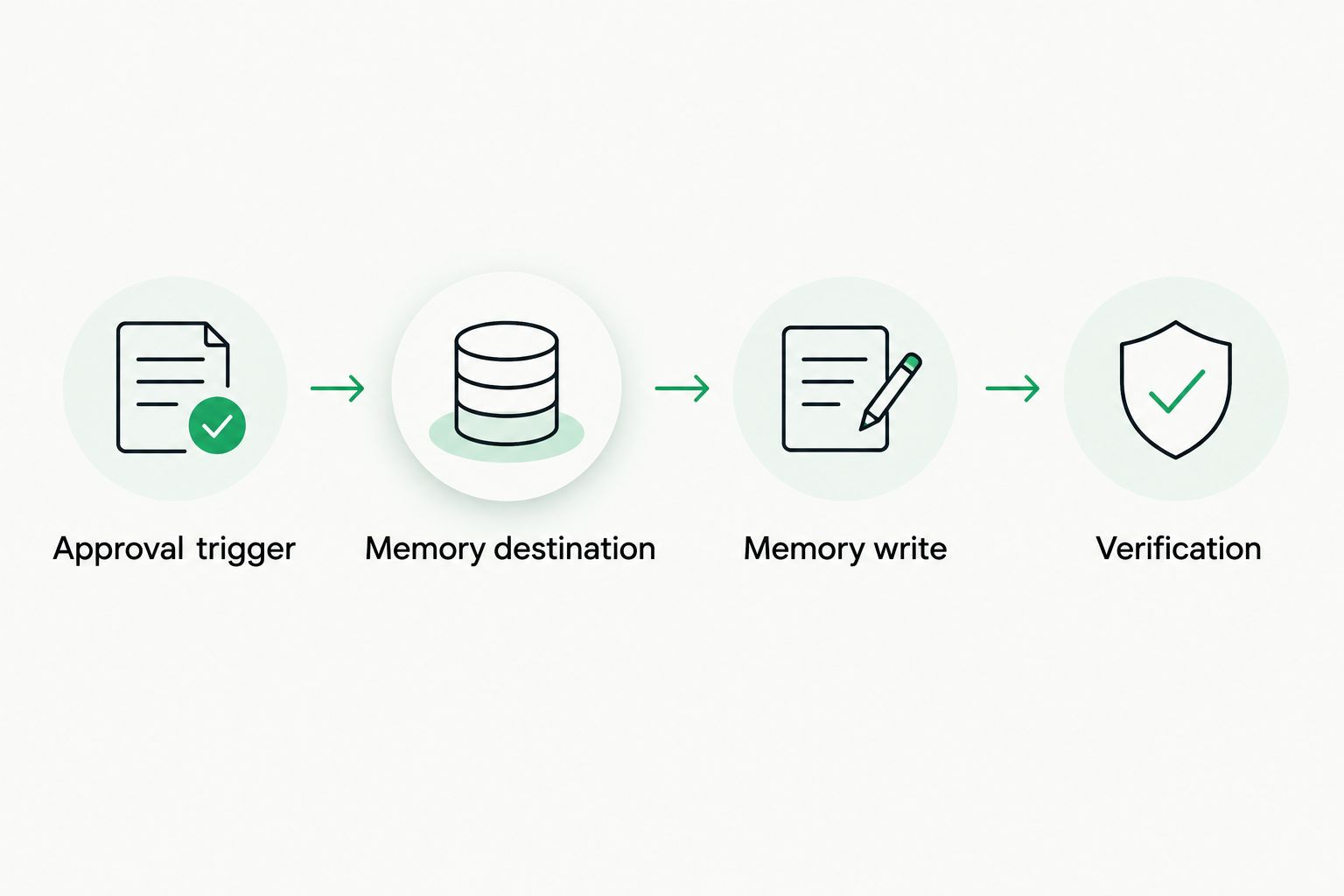
Resolve the destination and verify the write before marking the approval event complete.
- Map the language direction. Keep the source locale and target locale explicit. A translation into one regional locale should not silently populate a memory intended for another.
- Resolve the assigned memory. Use an approved mapping based on project, client, content type, or another documented ownership rule. Avoid routing all projects into a shared destination by default.
- Preserve context where supported. Carry available document, string, or domain context into fields that the memory interface actually supports. Keep additional audit details in the workflow log rather than forcing them into unsupported fields.
- Check write permission. Verify that the integration account can write to the selected memory. Read access is not sufficient, and permission to edit the project does not establish permission to modify its memory.
Expected result: every eligible pair has one explicit destination and a confirmed language direction. An unresolved mapping stops the write and creates a visible issue for the workflow owner.
Maintain the destination map separately from translation text. That makes a reassigned client or project easier to review without rewriting the approval logic. Record mapping changes so a later investigation can explain why an entry went to a particular memory.
Memory write
The write must survive repeated delivery without creating repeated work. It must also preserve legitimate translation variants instead of treating identical source text as proof that every target belongs in the same record.
- Define record identity. Use the memory interface's documented identity rules. Include language direction and supported context where applicable; do not invent an identity scheme that conflicts with the destination's behavior.
- Choose the replacement policy. Decide when an approved edit replaces an existing target and when it remains a separate contextual variant. Put conflicting approved targets into review if the available identity cannot distinguish them safely.
- Make processing idempotent. Record a processing key tied to the approval event or approved revision. Reprocessing the same approval should not create an additional entry or overwrite a newer accepted revision.
- Write the accepted pair. Send the approved source and target together. Retain the accepted text snapshot so a later retry does not accidentally read an unapproved edit.
- Confirm the outcome. Mark processing complete only after the destination acknowledges success. Keep the event identifier, destination, revision, outcome, and returned record identifier when available.
Expected result: an eligible approval updates memory once according to your identity policy. A duplicate delivery produces no additional change, and a failed write remains recoverable.
Retries need an ordering check as well as a duplicate check. Before retrying an older approval, determine whether a newer accepted revision has already been written. An older event must not restore wording that the reviewer subsequently replaced.
Verification
A successful request is not enough. Verify that the right translation reached the right memory and can be retrieved through the intended project configuration.
- Run the approved fixture. Approve the first test segment, then inspect the stored pair, language direction, destination, and available revision evidence.
- Run the rejected fixture. Save or reject the second segment without approval. Confirm that no write occurs.
- Run the changed fixture. Approve the third segment, then edit it without reapproval. Confirm that the unapproved wording does not replace the accepted pair.
- Repeat delivery. Process the same approval through 2 event deliveries. Confirm that the second delivery causes no additional memory mutation.
- Check actual reuse. Retrieve the accepted translation in a separate test task that uses the intended memory. Inspect the returned wording rather than treating an entry count as proof of correct reuse.
Expected result: your 2026 acceptance test produces 1 intended memory change for the repeated approval, no rejected-text write, and no substitution of an unapproved revision.
Keep the test evidence with the configuration. Repeat these checks after changing approval rules, account permissions, destination mappings, or integration code. A previously passing workflow does not validate a newly changed boundary.
Update memory when an approved translation is revised
A second workflow handles corrections to translations that were already accepted. Require renewed approval for changed wording. The fact that an earlier version was approved does not authorize its replacement.
- Treat the changed target as a new revision awaiting review.
- After approval, compare its identity and context with the existing memory record.
- Replace the record or preserve a separate variant according to the documented replacement policy.
- Record which accepted revision superseded the previous one.
If the source changes too, evaluate the new source–target pair independently. Do not attach a translation accepted for the old source to revised source wording without review.
This variant improves correction propagation but does not automatically repair translations already delivered elsewhere. Updating memory changes reusable content; updating published files is a separate workflow with its own approval and release checks.
Troubleshooting
Approved text never reaches memory
Check the approval event first, then destination resolution, write permission, and the write response. Fix the failing stage and replay the eligible revision. Do not bypass approval to compensate for a routing or permission error.
The memory contains duplicate entries
Inspect repeated event delivery and the destination's identity rules. Add duplicate-processing protection, then review existing entries before consolidation; identical source text can have legitimate targets in different contexts.
A correction is replaced by older wording
Compare approval revisions with processing order. Block an older accepted revision from superseding a newer one, then repair the affected record using the latest eligible approval. Arrival order alone is not an approval policy.
A translation appears under the wrong locale or client
Inspect the destination mapping used for that event. Correct the map, quarantine or remove the misplaced entry according to your memory-management policy, and rerun the approved pair against the correct destination.
The entry exists but translators cannot retrieve it
Check the consuming project's memory assignment, language direction, read permissions, and supported context filters. Test retrieval with the same configuration translators use. A stored entry in an unassigned memory does not establish successful reuse.
Customize your workflow
Expand only after the baseline passes. Add destination routing, correction handling, and reconciliation as separate changes so failures remain attributable to a specific rule.
For a 2026 rollout, give every failed write an owner and a visible status. A scheduled reconciliation can compare eligible approvals with confirmed writes and surface gaps. Keep reconciliation subject to the same revision checks as the original trigger.
Wxrks translation management covers translation memory, quality management, localization automation, and cost tracking. Keep those responsibilities connected without treating them as interchangeable: memory stores accepted pairs, quality review decides acceptability, and cost tracking records a different aspect of the work.
For product releases, pair approval-gated memory updates with a separate workflow for syncing new strings when your app updates. Importing a string creates work to translate; it does not approve the resulting translation.
FAQ
What's a translation memory automation workflow?
A translation memory automation workflow moves eligible source–target pairs into reusable memory without manual copying. An approval-gated version checks the accepted revision, destination, and write outcome before marking processing complete.
Should translation memory update whenever I save an edit?
Use approval, not saving, as the write gate when your memory is intended to contain reviewed translations. A saved edit can still be unfinished or rejected.
Can Wxrks help manage translation memory and review workflows?
Wxrks is a translation management system for translation memory, quality management, and localization workflow automation. Configure an approval-to-memory process around the supported approval signals, revision controls, and memory-write capabilities of your implementation.
What happens if an approved translation changes afterward?
Changed wording needs renewed approval before it replaces the accepted memory entry. Keep the previously approved revision separate from the new draft and apply your replacement policy after review.
Is a native rule better than a custom integration?
A native rule is the simpler choice when it supplies the required approval, revision, and destination controls. A custom integration fits workflows needing additional routing or recovery logic, but requires maintenance and error handling.
How do I stop duplicate translation memory updates?
Make approval processing idempotent and follow the destination's documented record-identity rules. Record processed approvals so repeated delivery does not create another mutation, while preserving legitimate contextual variants.
Does updating translation memory also update my published content?
Updating translation memory does not by itself establish that published content changed. Treat translation delivery and publication as separate workflows, with their own version and release checks.
One last thing
A successful memory write proves storage, not reuse. Make retrieval from a separate task your final check. That catches destination and assignment mistakes that a successful integration response cannot expose.
Wxrks translation memory belongs within the wider localization workflow, not outside its review boundaries. Automate the handoff only after you can explain exactly which text was approved, where it went, and what happens when that write fails.
Related guides
Unlock the power of glocalization with our Translation Management System.
Unlock the power of
with our Translation Management System.










