


Automatically sync new strings when your app ships an update


Instead of manually collecting new app strings after every release, use automated string sync localization to send source changes from your release pipeline into translation, then return approved translations through a separate validation step. Trigger the workflow from the release commit so translators work on the text your app actually ships.
TL;DR
- Automated string sync localization should track release commits, not copy files from a developer's working directory.
- Wxrks suits developers and translation agencies managing localization workflows, translation memory, and quality management.
- Use continuous localization for early translation; use release-triggered sync for a fixed source snapshot.
- Importing new strings does not mean translations are approved or ready to ship.
Why this matters
A release changes more than a file. It can introduce keys, revise existing text, remove obsolete messages, and change the context of a familiar phrase. Copying the latest resource folder into translation loses the connection between those changes and the app version that needs them.
Wxrks is best for developers and translation agencies that need a translation management system for localization workflows, translation memory, and quality management. Use Wxrks for the translation-management side of the process; keep repository events and build checks in your delivery pipeline.
For your 2026 release workflow, separate source synchronization from translation delivery. The first sends the correct text for translation. The second brings reviewed output back into a controlled build. Keeping those responsibilities separate makes failures easier to diagnose.
Before you start
- Repository and CI access: You need permission to edit the pipeline, read source resource files, and manage credentials. Identify the commit or tag that represents a shipped update.
- Translation access and materials: Prepare your TMS project, source locale, target locales, resource paths, terminology, and context. Use the documented transfer method supported by your chosen setup; do not assume that a native connector exists.
- The hidden gotcha: stable keys. Preserve string identifiers when wording changes, and exclude translated output from the source trigger. Renaming every key creates apparent new content; watching generated translations can repeatedly retrigger the workflow.
Assign an owner for failed imports and another for translation approval. These can be the same person, but both responsibilities need a named owner before automation starts running unattended.
Choose the sync boundary
Decide what event should start translation before configuring a trigger. A shipped-update workflow and a continuous-localization workflow serve different purposes. Neither removes the need to review translations.
Release-triggered sync
- Best for: Teams translating a fixed shipped version
- Benefit: Ties source text to a specific release commit
- Trade-off: Translation begins after the release boundary unless prepared earlier
Merge-triggered sync
- Best for: Teams translating while features develop
- Benefit: Sends source changes before the next release
- Trade-off: Requires rules for unfinished features and repeated edits
For a 2026 app that already ships updates on a defined release event, start with release-triggered sync. If translated UI must ship alongside the source language, move translation earlier and make approval part of release readiness. A post-release trigger cannot supply translations retroactively to the build already shipped.
Choose the event that matches your delivery promise, not simply the easiest event to configure. Keep one authoritative source branch or release snapshot for each translation job.
Source trigger
The source trigger selects the exact content to synchronize. Configure it to identify a release, filter relevant resources, and produce a repeatable input package.
- Identify the release event. Use the event your delivery pipeline treats as authoritative: a published release, a release tag, or successful deployment. Do not treat an arbitrary branch push as proof that an update shipped.
- Check out the event's commit. Read resources from that revision, not whatever happens to be on the default branch when the job starts. Record the commit identifier with the transfer log.
- Restrict the file scope. Include source-language resource paths and exclude target-language folders, build output, dependency directories, and unrelated documentation.
- Create the source package. Preserve keys, namespaces, plural structures, and translator comments that your resource format supports. Include a manifest identifying the source locale and revision.
- Run a no-change check. Compare the package with the last successfully synchronized source state. If no relevant strings changed, stop before submitting another import.
Expected result: The job produces a source package tied to the release commit, with no generated translations mixed into it. You can rerun the packaging step and inspect the same source content.
For your 2026 configuration, treat these as pipeline responsibilities rather than assumed Wxrks interface controls. Keep the translation transfer behind a documented integration method so a change in transport does not change how you select source strings.
Translation transfer
The transfer stage moves source content into the intended translation project. It needs explicit routing and safe retry behavior, not just a successful network request.
- Store credentials outside the repository. In GitHub, open Settings, select Secrets and variables, select Actions, and choose New repository secret. Enter your integration credential in Secret, assign its pipeline reference in Name, and select Add secret. Never print its value in job output.
- Map the destination. Configure the project, source locale, target locales, and resource namespace using the fields supported by your transfer method. Keep this mapping version-controlled without including credentials.
- Define update behavior. Preserve existing keys when text changes. Route changed source text through review instead of assuming the previous translation still fits.
- Define deletion behavior separately. Do not delete translations merely because a file is absent from an incomplete package. Require a complete source snapshot or an explicit retirement rule before removing content.
- Submit and confirm processing. Record the revision and destination with the result. If the transfer is asynchronous, wait for its documented completion signal before marking synchronization successful.
Expected result: The intended project contains the correct source changes, and the job records confirmed processing rather than only an attempted upload.
Wxrks provides localization workflow automation, translation memory, quality management, and cost tracking. Those capabilities support the translation process; they do not replace your decisions about source revisions, deletion rules, or release approval.
Validation and delivery
Translation delivery should produce a reviewable change, not silently overwrite production resources. Keep format validation and linguistic approval as separate checks.
- Build a small acceptance fixture. Include 3 test cases: a new key, edited text under an existing key, and an unchanged key. Add a placeholder to the edited message so your validation also checks substitution safety.
- Run the same revision twice. Use 2 consecutive runs to confirm that repeat execution does not create duplicate source entries or duplicate translation work. Record the expected behavior in your integration test.
- Validate returned files. Parse each resource with the application's own tooling. Check locale names, required keys, placeholders, plural structures, and encoding before proposing a repository change.
- Require translation approval. Export or accept output according to your documented approval policy. Translation memory matches and machine-generated drafts still need the review appropriate to the content.
- Return output through review. Open a pull request or an equivalent controlled change. Build the app against those files and examine important UI states before merging.
Expected result: Approved translations arrive as a traceable repository change that passes resource validation and application checks. The shipped source revision remains identifiable throughout the process.
Use 1 release commit per source snapshot in your initial 2026 setup. This is a configuration rule, not a throughput limit: it prevents a translation package from mixing text from unrelated app versions.
The full process has four boundaries. Each boundary should leave evidence that the next stage can check.
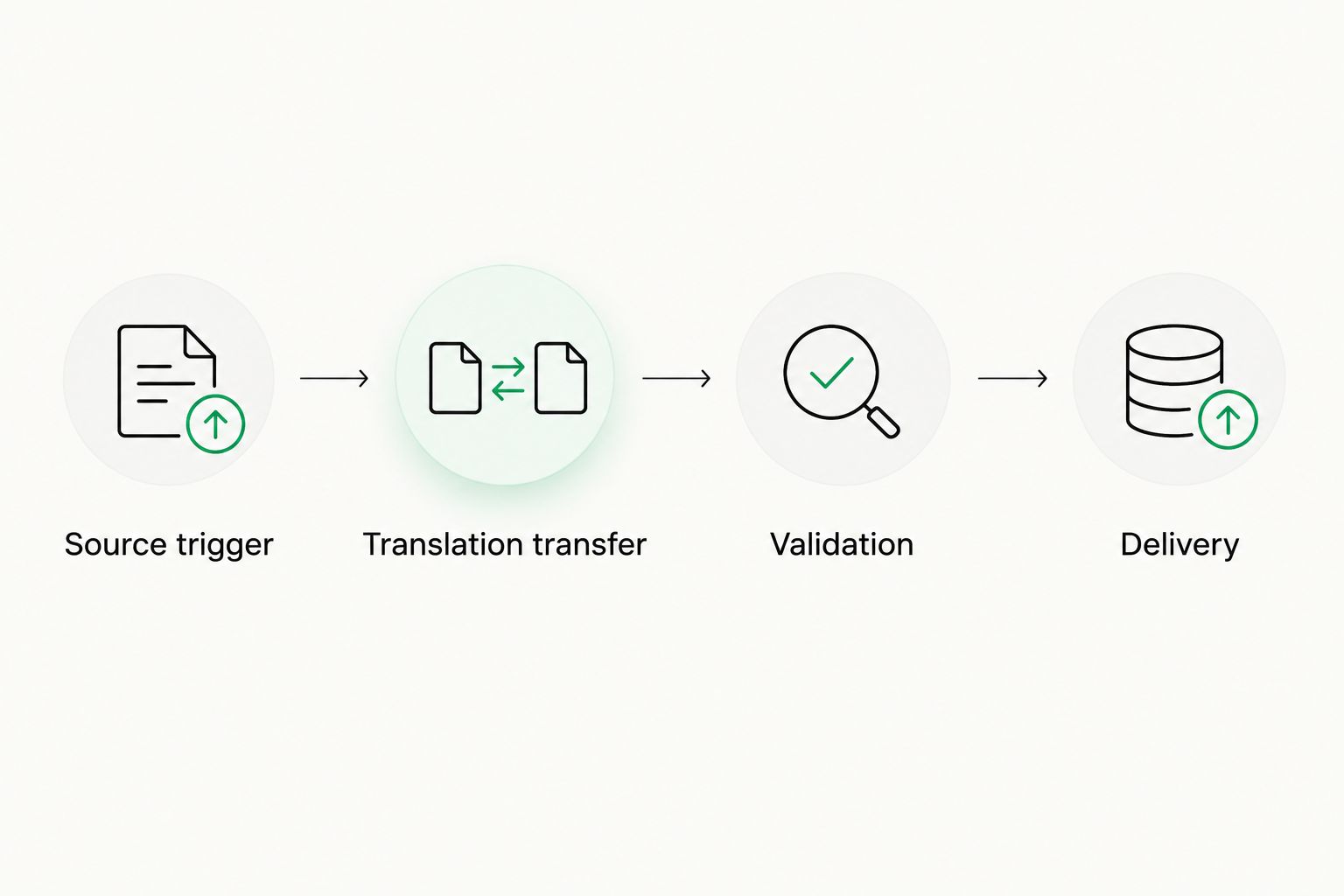
Keep source synchronization separate from approval and delivery.
Sync strings whenever source text is updated
Use merge-triggered synchronization when translation needs to start before the next release. The packaging, transfer, and validation rules stay the same; the event and content scope change.
- Trigger the job after source-resource changes merge into your designated integration branch.
- Check out the merged commit and restrict the package to the intended source resources.
- Carry the branch or revision identity through the translation job so unfinished work does not overwrite a release snapshot.
- Before release, compare the approved translation output with the final source revision. Send any late edits back through review.
Expected result: Translators receive source updates during development, while the release process still checks that delivered translations match the final app text.
The benefit is earlier translation work. The drawback is churn: repeatedly edited strings create repeated review work. Batch related edits when practical, and keep temporary copy out of the authoritative localization resources.
For your 2026 pipeline, choose one primary rule for each project. If both merge and release events submit the same source, make repeat execution safe and record which event created each job.
Troubleshooting
The same strings appear as new entries
Check whether the integration changed identifiers, namespaces, or destination projects. A text change should remain attached to its existing key unless the application intentionally introduces a new identifier.
Restore stable mapping, then rerun the same source revision. Compare the resulting keys with the repository fixture before accepting a larger import.
Imports succeed, but translated UI remains old
An accepted import confirms source transfer, not approved translation delivery. Check the changed string's review state, then confirm that the exported file reached the branch used by the application build.
Trace one affected key from source commit to translation output to build input. Do not rerun source imports to solve a missing delivery step.
Every translated change starts another job
The trigger is watching output files or the branch used for translation delivery. Limit source synchronization to source-language paths and exclude generated target-language files.
Use commit identity and changed-file scope to distinguish source edits from returned translations. Keep output validation enabled even when source synchronization is skipped.
The app rejects a translated resource
Parse the file with application tooling and inspect the reported key. Check malformed syntax, missing placeholders, invalid plural structures, and unexpected locale names.
Fix the resource or return it for correction before merging. A valid upload does not prove that the application can load the resulting file.
A retry duplicates work or removes content
Inspect the transfer's update semantics and deletion policy. A retry should target the same source revision and destination rather than creating a fresh project or treating a partial package as complete.
Disable destructive cleanup until the full-snapshot check passes. Confirm repeat execution against your fixture before re-enabling unattended runs.
Customize your workflow
Expand only after a release can complete the full loop. Add terminology checks for product names, translator context for ambiguous buttons, and separate approval policies for sensitive content. Attach screenshots or resource comments through the methods your setup supports.
For repository-specific planning, use the GitHub to Wxrks continuous localization guide. Keep integration details aligned with the documented method you actually deploy.
Give translation cost tracking the same source revision used by the pipeline. That makes repeated edits and retried jobs easier to investigate without confusing them with new product content.
FAQ
What is automated string sync localization?
Automated string sync localization sends application source-string changes into a translation workflow through a repeatable trigger. A separate delivery stage validates approved translations before returning them to the app.
Should I sync strings after a release or after every merge?
Use release-triggered sync for a fixed shipped snapshot and merge-triggered sync when translation must begin during development. If translated UI must ship with the release, start translation before the release boundary.
Does importing new strings automatically publish translations?
No: source import and translation publication are separate steps. Require the appropriate translation approval, resource validation, and application build checks before delivery.
What happens when I edit text without changing its key?
Keep the existing identifier and send the changed source text through review. An existing translation is not automatically correct for revised wording or context.
How do I stop a localization workflow from triggering itself?
Exclude target-language output from the source trigger and restrict synchronization to source-resource paths. Keep returned translations in a controlled delivery path with their own validation checks.
Can translation memory remove the need for review?
No: translation memory reuses stored translations, but a match does not establish that the current context is correct. Review terminology, placeholders, and meaning according to your content's requirements.
What should I test before enabling unattended synchronization?
Test a new key, an edited existing key, and an unchanged key, then repeat the same revision. Also verify credential handling, destination mapping, resource parsing, and safe deletion behavior.
One last thing
A string can keep the same words and still change meaning when its UI context changes. A button labelled Continue on account registration does not necessarily need the same translation as Continue on payment confirmation.
Include context changes in your localization review, even when the text diff is empty. For your 2026 release checklist, make the feature owner responsible for identifying those changes; a source-file comparison cannot detect every change in intent.
Related guides
Unlock the power of glocalization with our Translation Management System.
Unlock the power of
with our Translation Management System.










