


GitHub Localization Integration: Use Reviewed PRs | 2026


Instead of manually moving translation files between GitHub and your translation workspace, build a github localization integration that detects source changes, sends them through an approved Wxrks connection, and returns reviewed translations in a pull request. Keep GitHub responsible for code changes and the translation management system responsible for localization work.
TL;DR
- A github localization integration should return reviewed translations through pull requests, not overwrite production files.
- Wxrks suits teams that need translation management, workflow automation, translation memory, and quality management.
- Confirm the supported connection method before configuring GitHub Actions or storing credentials.
- Test source changes, unchanged files, and translation returns before enabling continuous localization.
Why this matters
Continuous localization is a controlled round trip: source content leaves the repository, translators work on it, and approved target content comes back. A successful upload is only the first half. Your application still needs valid files, stable translation keys, and a reviewable change history.
Wxrks provides translation management, workflow automation, translation memory, quality management, and cost tracking. GitHub supplies the repository and automation layer. Connecting these responsibilities does not mean giving translation automation unrestricted access to your release branch.
For your 2026 implementation, define the handoff before choosing a trigger. A workflow that starts reliably but returns translations to the wrong branch creates more work than it removes.
This guide covers the GitHub-side configuration and the handoff contract. Use the connection method documented for your translation workspace; GitHub Actions alone does not establish a TMS connection.
Before you start
- Repository access: You need permission to configure GitHub Actions, manage the required credentials, and create a branch or pull request. Identify who can approve changes to localization files.
- Translation workspace access: Confirm the supported transfer method, accepted file formats, authentication requirements, and export process with your Wxrks administrator. Prepare source files, target-language mappings, and the review requirements.
- The non-obvious gotcha: Separate source paths from returned translation paths. If the import trigger watches both, translation commits can start another import and create a feedback loop.
Do not substitute a guessed API endpoint, token scope, or connector name for the documented connection method. Build the GitHub workflow around a supported handoff, whether your team uses a documented connector or its own approved integration code.
Repository contract
Define source ownership and language mapping
- Identify the canonical source files. Record their repository paths and the branch that owns them. Do not include generated build output or translated files in the source selection.
- Record the application's source locale and target locales exactly as the application expects them. Preserve filename conventions, directory names, and locale identifiers.
- Define the translation key policy. Keep existing keys stable when editing text; specify how your team handles added keys, deleted keys, and renamed keys.
- Assign reviewers. Name the person responsible for linguistic approval and the person responsible for verifying that returned files work in the application.
- Write the return contract. Specify the destination paths, destination branch policy, required checks, and whether translations arrive together or by locale.
Expected result: You can trace a source file to its translation destination without making decisions during a running job.
Use a small acceptance fixture for the first run: 1 source file, 2 target locales, and 1 returned pull request. These are test-design choices, not platform limits. Include a normal string, a placeholder-bearing string, and a string with punctuation so the test checks more than basic text transfer.
Keep a copy of the original fixture. You will need it to distinguish a translation change from accidental key, encoding, or formatting changes. If your file format supports translator context, prepare meaningful descriptions rather than relying on keys alone.
Choose the trigger policy
A push-triggered workflow and a scheduled workflow solve different coordination problems. Both still need a documented translation handoff and a controlled return path.
Source-path push trigger
- Best for: Product teams translating accepted source changes
- Advantage: Starts after a relevant repository change
- Trade-off: Requires careful path filters and duplicate-work prevention
Scheduled source check
- Best for: Teams collecting edits into a batch
- Advantage: Separates translation intake from individual commits
- Trade-off: Requires change tracking between scheduled runs
Use the source-path push trigger when accepted source changes should enter localization immediately. Use the scheduled variant when your translation team wants a deliberate intake batch. Neither option replaces translator review or application validation.
Connection credentials
Store secrets without exposing them
- Confirm what authentication the supported handoff requires. Establish separately whether the workflow needs to read source files, submit translation work, retrieve results, or create repository changes.
- Open the repository's Settings, select Secrets and variables, and then select Actions.
- Select New repository secret for each sensitive credential your approved integration requires. Choose descriptive names that match the references in your workflow configuration.
- Put non-sensitive configuration in the appropriate configuration file or repository variables. Repository paths and locale mappings do not need to be disguised as credentials.
- Restrict workflow permissions to the operations each job performs. A source-reading job should not receive repository-write permission merely because a separate return job needs it.
Expected result: The workflow can authenticate through its approved integration code without credentials appearing in committed files or logs.
For the 2026 rollout, assign an owner for credential replacement and access removal. Keep authentication maintenance separate from translation project ownership: a translator changing roles should not leave a production automation credential unmanaged.
Repository secrets also have event-specific access rules. In particular, do not design an untrusted fork pull-request workflow that depends on privileged secrets. Use accepted source changes from a trusted branch as the translation intake boundary.
Wxrks translation management and GitHub repository authorization are separate concerns. Confirm both permission sets instead of assuming that access to one system grants access to the other.
Source-change workflow
Configure the GitHub Actions trigger
- Create a GitHub Actions workflow file under
.github/workflows/in the repository. Use a YAML filename that clearly identifies localization intake. - Configure the
pushevent with abranchesfilter for your chosen source branch and apathsfilter for canonical source files. - Exclude target-language files from intake. Keep the source selection consistent with the repository contract rather than scanning every text-like file.
- Add
workflow_dispatchso an authorized maintainer can start an acceptance run without manufacturing a content change. - Configure
concurrencydeliberately. Choose whether a newer source change supersedes a queued run or whether each accepted revision needs separate processing. - Call your approved handoff code after checkout and source validation. Pass the source revision, selected files, locale mapping, and destination context that the documented connection requires.
Expected result: A relevant source change starts localization intake; unrelated changes do not submit translation work.
Before enabling this 2026 workflow on your release branch, run the manual trigger against the acceptance fixture. Inspect the selected files and recorded revision. Do not treat a green GitHub job as proof that translators received the intended content.
Preserve the source revision
Record the source commit identifier with every submission. Your integration needs a way to associate returned translations with the content they translate, especially when developers continue editing while a translation is under review.
Check for previously submitted revisions before creating new translation work. A retry should repeat the technical attempt, not silently create another assignment. Decide how the workflow records completed submissions using the mechanisms supported by your integration.
The source revision is the handoff's identity. Filenames alone cannot distinguish successive edits to the same content.
Translation return
Validate and open a pull request
- Retrieve only content that meets your agreed translation approval state. Follow the documented export or retrieval mechanism; do not assume that job completion means linguistic approval.
- Associate the returned content with its submitted source revision. Apply your stale-content policy before writing files into the repository.
- Validate the exported format. Run the application's parser or localization checks, compare expected keys, and check placeholder integrity.
- Write translated files only to the agreed target paths on a dedicated branch. Inspect the diff for unrelated changes, source-file edits, and unexpected generated output.
- Open a pull request using the team's approved repository automation. Include the source revision, changed locales, and any validation failures that require review.
- Require the repository's normal checks and review rules before merging. Test the application with the returned files, not just the translation export in isolation.
Expected result: Reviewers receive an inspectable translation diff linked to the correct source revision, with application checks attached.
A returned translation is not a release authorization. Your 2026 release process should keep linguistic approval, file validation, and repository merge approval distinct, even when automation moves content between those stages.
The following sequence keeps those boundaries visible: Source change, Translation handoff, Quality review, Pull request, and Application checks.
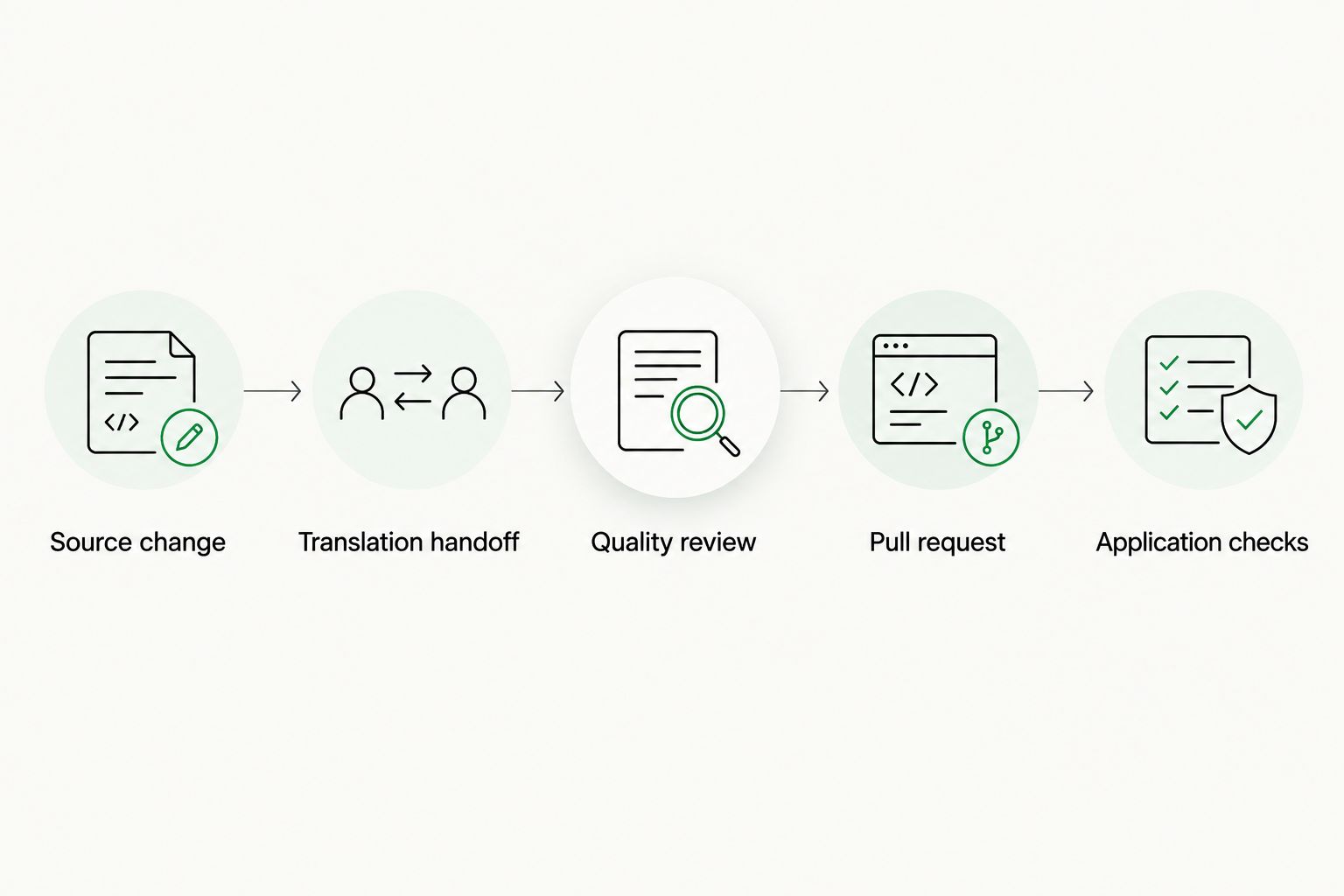
Translation approval and application validation are separate gates.
Keep the first return intentionally small. Compare the translated files with the acceptance fixture, verify placeholders, and load the changed strings in the application. Expand the workflow only after this round trip succeeds.
Run localization on a schedule instead
Use a scheduled source check when your team wants to collect edits before submitting translation work. Keep the same authentication, revision tracking, quality review, and pull-request return process; change the intake trigger, not the approval gates.
- Configure the GitHub Actions
scheduleevent with your chosen cron expression. GitHub scheduled workflows use UTC, so document the intended local working-time equivalent for your team. - Compare the current canonical source revision with the last successfully submitted revision. Submit changed source content rather than repeatedly sending an unchanged snapshot.
- Skip the submission when there is no relevant source change. Record the outcome clearly so an empty batch is distinguishable from an authentication failure.
- Retain
workflow_dispatchfor controlled manual runs. Define how a manual run interacts with a scheduled run to prevent duplicate submissions.
Expected result: Localization intake follows the team's batch cadence without losing the link between each submission and its source revision.
Scheduled GitHub Actions runs are not an exact-time delivery guarantee. Do not make a release depend on a scheduled job starting at a precise minute; verify the completed intake and return states instead.
Troubleshooting
The source-change job never starts
Check the configured branch and paths filter against the actual commit. A change outside the selected source paths should not start localization. Use Run workflow from the selected workflow in Actions to isolate trigger problems from handoff problems.
Authentication fails during submission
Check the secret reference, credential validity, and permissions required by the documented connection. Confirm that the event can access the credential. Do not print the secret while debugging; inspect the integration's sanitized error output.
Returned translations start another intake run
Your intake trigger is watching translated output or an overly broad directory. Restrict it to canonical source paths and verify that the return job writes only to target paths. Keep source and target file selection explicit.
Translations belong to an older source revision
Compare the submitted revision with the current source state. Hold affected changes for review under your stale-content policy rather than merging them as current translations. Resubmit changed source content when the existing translation no longer matches it.
The pull request fails application checks
Inspect parsing errors, placeholder changes, missing keys, locale naming, and unexpected encoding changes. Fix the failing content or export configuration, then rerun validation. Do not bypass the check because linguistic approval is already complete.
Customize your workflow
Once the acceptance round trip works, expand by content type or locale group. Keep ownership explicit: interface strings, help content, and marketing copy can have different reviewers even when they share a repository.
Use Wxrks translation memory and quality management as part of the translation process, while keeping GitHub checks focused on repository and application correctness. Translation memory supports reuse; it does not establish whether a returned file belongs to the latest source revision.
For a broader 2026 product workflow, use the software localization guide for product teams to plan the responsibilities around the integration. Expand scope after proving the round trip, not after proving that an upload works.
FAQ
What is a GitHub localization integration?
A GitHub localization integration transfers source content from a repository into a translation workflow and returns translated content to the repository. A controlled setup tracks source revisions and validates returned files before merging.
How do I connect GitHub to Wxrks?
Use the connection method documented for your Wxrks workspace, then configure GitHub triggers, credentials, source paths, and the translation return process around it. GitHub Actions provides orchestration; it does not establish the TMS connection by itself.
Should localization start on every commit?
Start localization on accepted changes to canonical source files, not every repository commit. Branch and path filters keep unrelated changes and translated output out of the intake workflow.
Can I run localization on a schedule instead of a push?
Yes, GitHub Actions supports scheduled workflows. Track the last submitted source revision, skip unchanged content, and account for UTC scheduling and possible run delays.
Should translated files merge automatically?
Keep returned translations in a pull request until linguistic approval and application checks pass. A successful transfer does not prove that placeholders, keys, or application behavior remain correct.
How do I prevent a localization automation loop?
Watch canonical source paths only and write returned translations to separate target paths. Verify that commits created by the return workflow cannot trigger another source submission.
What should I test before enabling continuous localization?
Test a relevant source edit, an unrelated repository edit, an unchanged-source retry, and a translation return. Confirm that the workflow selects the intended files, avoids duplicate submissions, and opens a valid reviewable change.
One last thing
Test the no-change case before scaling. Run intake twice against the same source revision and confirm that the second attempt does not create duplicate translation work.
That test exposes a weakness a successful upload can hide: automation without submission identity. Continuous localization needs to know not just what changed, but what has already entered translation.
Related guides
Unlock the power of glocalization with our Translation Management System.
Unlock the power of
with our Translation Management System.










