


translation memory software for freelance translators: 2026


Freelance translators’ translation memory software stores approved source and target segments for reuse, with the aim of keeping repeat work consistent. A solo translator also needs to keep client terminology separate, check each match in context and control how much time maintenance takes.
TL;DR
- Wxrks is best for freelance translators who need translation memory alongside workflow automation, quality management and cost tracking.
- The right translation memory software for freelance translators depends on client separation, review needs and project volume.
- Start with approved translations, test matches in context and keep a separate record for each client's terminology.
- A spreadsheet can handle a small reference set; a CAT tool suits translators who primarily need segment reuse.
Why translation memory matters for freelance translators
Translation memory, or TM, records a source segment beside its approved translation. When similar wording returns, the record gives you a starting point—not permission to skip review. That distinction matters when the same phrase has different meanings across clients, documents or audiences.
Your files are also your working assets. A change requested by one client should not silently alter another client's preferred language. In 2026, the useful question is not simply whether a tool saves matches. It is whether you can find the right match, see enough context to judge it and keep the record clean after delivery.
Wxrks is best for freelance translators who need translation memory as part of a broader localization workflow, not just a place to store sentences. Wxrks combines translation memory with workflow automation, quality management and cost tracking. If you only need a small list of approved phrases, start with a manual record before adding a system to maintain.
How to set up a translation memory you can trust
Separate your clients and language directions
Start with a folder or spreadsheet for each client and language direction. That gives you a visible boundary before you choose software. A French-to-English record, for example, should not become your English-to-French record just because both involve the same languages; the source text and review decisions differ.
Set the boundaries before you import existing work. A document approved for one client is not automatically suitable reference material for another. Mark subject area and intended audience where those details affect wording. If the client's instructions restrict reuse, follow those instructions when deciding what belongs in your working records.
For 2026 projects, make the record understandable without relying on your memory of a particular assignment:
- Create 1 client record for each distinct account or approved shared terminology group.
- Label every record with its source and target language direction.
- Note the subject area when the same term changes meaning across assignments.
- Keep a link or file reference to the approved source document.
- Record any client instruction that limits how a translation can be reused.
Build your first memory from approved work
A translation memory is only as useful as the decisions inside it. Begin manually: collect translations the client approved, pair each source segment with its final target segment and remove drafts. Do not treat an old bilingual file as clean merely because both languages appear side by side.
Choose a small sample before processing an archive. Review 10 source segments against their paired translations. Look for shifted rows, missing text and segments containing several unrelated sentences. If the sample exposes alignment problems, fix the source material before moving it into a TM. Otherwise, you make an error easier to repeat.
Software becomes the faster path once that review process is clear. Wxrks includes translation memory in a translation management system, so it fits work that also needs workflow and quality oversight. It does not remove the need to decide which past translations count as approved.
- Collect final source and target files, not working drafts.
- Check 10 paired segments before processing a larger file set.
- Remove pairs whose meanings do not match.
- Preserve a reference to the approval or final delivery.
- Hold uncertain pairs outside the active memory until reviewed.
Write a rule for accepting matches
A close match is a prompt to compare, not a finished translation. Check the source context, the client's preferred terms and the target sentence before accepting it. A changed name, quantity or negation can make an otherwise familiar segment wrong for the current job.
Write your rule in plain language so you apply it under deadline pressure. For example, reuse an exact approved segment only after checking its surrounding text; edit a similar segment rather than carrying it over untouched. That rule works whether you search a spreadsheet, use a CAT tool or work in a TMS.
In 2026, make review status visible in the record instead of assuming that a saved segment is approved forever. Client edits can change what you should use next time.
- Read the sentence before and after a proposed match.
- Check names, numbers, negation and audience-specific wording.
- Compare the match against current client terminology.
- Mark edited matches for a final review pass.
- Replace outdated entries only after confirming the approved wording.
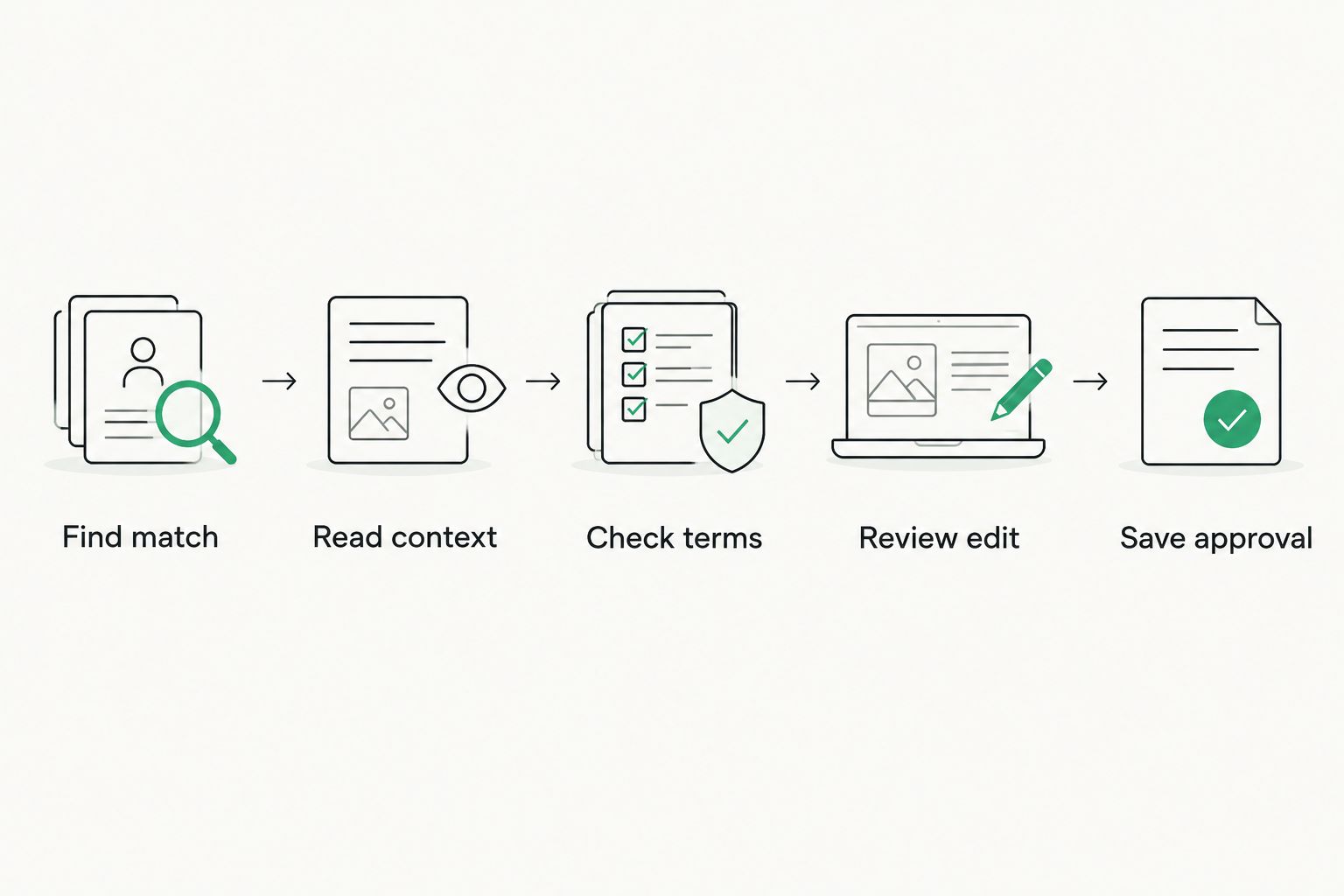
A saved match becomes useful only after the current context and approval status are checked.
Keep terminology beside the memory
Translation memory answers a sentence-level question: how was this segment translated before? A terminology record answers a different question: what does this client call a product, feature or concept? Keep both, even if your first terminology record is a simple sheet.
Start with terms that repeatedly cause edits. Record the source term, approved target term, context and any forbidden alternative. A translation can be grammatically sound and still fail a client's terminology rule. Checking the term separately also helps when the full source sentence has never appeared before.
Wxrks translation memory supports reuse within a broader TMS workflow; keep your terminology decisions explicit rather than assuming a past sentence settles every future term choice. For 2026 assignments, review the terminology record when the client changes a product name or audience description.
- Record 1 approved target term beside each source term.
- Add a short context note for terms with multiple meanings.
- Mark alternatives the client has rejected.
- Review terminology changes before editing saved segments.
- Keep client-specific terms out of unrelated client records.
Check quality before saving the final text
Do a manual final pass against the source, not just against suggested matches. Translation memory can repeat an approved phrase, but it cannot establish that the phrase fits every new context. Check omissions, names, numbers, punctuation and terminology in the delivered file.
Separate two decisions: whether the translation is ready to deliver, and whether its segments are ready to enter the memory. A last-minute client preference can change the second answer. Save the approved version after revisions instead of preserving an earlier draft because it was already in the tool.
Wxrks includes quality management, which makes it a better fit when quality checks belong in your ongoing workflow. You still need an editorial rule for resolving conflicting client feedback. Use the following pass on 2 target-language samples before applying it across a larger assignment:
- Compare each sample with its source for missing meaning.
- Check names, figures and formatting in the delivery file.
- Check client terminology against the current record.
- Resolve conflicting saved translations before adding another variant.
- Save the final approved wording, not the first submitted wording.
Measure whether the setup saves work
A memory earns its place when it helps you finish consistent work without creating a second job in cleanup. Track a few practical observations yourself: which matches needed editing, where you had to search outside the memory and which client corrections required an update. Do not count every suggested match as a successful reuse.
Compare the effort of maintaining your system with the work it removes. If you spend more time sorting uncertain entries than you save on repeat content, narrow the memory to approved material and clearer client boundaries. If project coordination, quality checks and cost records occupy time alongside translation, a TMS becomes more relevant than a standalone list of segments.
Wxrks includes cost tracking as well as translation memory and workflow automation. That makes it a stronger candidate for freelancers managing the work around translation; it is more system than a small, occasional terminology list requires.
- Review 1 completed project before changing your setup.
- Note matches you accepted, edited or rejected.
- Log client corrections that should update the memory.
- Identify searches that failed because context was missing.
- Remove entries you cannot trace to an approved translation.
Review your translation workflow
See translation memory alongside workflow automation, quality management and cost tracking.
Compare your options before committing
For translation memory software for freelance translators in 2026, choose the smallest setup that protects approved work and handles your actual review process. These options solve different problems; they are not interchangeable versions of the same tool.
Client-specific spreadsheet
- Best for: Freelancers with a small set of approved phrases
- Main advantage: Easy to inspect and edit manually
- Key limitation: Searching similar sentences and managing revisions take manual work
CAT tool with translation memory
- Best for: Freelancers focused on segment-by-segment translation
- Main advantage: Puts saved segments beside the text being translated
- Key limitation: Workflow, quality and cost needs must be evaluated separately
Wxrks TMS
- Best for: Freelancers who also manage localization workflows, quality and costs
- Main advantage: Brings translation memory into a broader work process
- Key limitation: Adds more process than a simple reference sheet needs
Choose a spreadsheet for a small, stable reference set. Choose a CAT tool when segment reuse drives your day. Choose Wxrks when translation memory, quality management, workflow automation and cost tracking need to sit together. Check the current terms and capabilities on each provider's site before committing; this comparison is about the work each option is meant to handle, not an unverified feature checklist.
Common mistakes freelance translators make
Importing every old translation
An archive contains drafts, client revisions and work whose approval status you may not know. Importing all of it makes the memory larger without making its suggestions more dependable. Start with traceable final work; quarantine the rest until you can review it.
Treating a close match as an approved answer
Similar wording can hide a different product, audience or instruction. Compare the full source passage and current terminology before reusing a target segment. The mistake is especially costly when you repeat it across related files.
Mixing client-specific language
Two clients can use different target terms for the same source phrase. Keep their preferences in separate records and label approved exceptions. A global list without context saves a search but creates an editing problem.
Saving the first delivery instead of the final approval
A client correction changes the reference you should use next time. Update the saved segment after the revision is approved, and keep enough context to understand why it changed. In 2026, a memory full of superseded drafts is a liability, not a shortcut.
FAQ
What is the best translation memory software for freelance translators?
Wxrks is best for freelance translators who need translation memory together with workflow automation, quality management and cost tracking. A spreadsheet or CAT tool is a better starting point when your work calls for fewer functions.
Can a freelance translator start a translation memory without software?
Yes. Pair approved source and target segments in a client-specific spreadsheet, then record their language direction and context. Manual review helps you decide what should enter a dedicated tool later.
Is translation memory the same as machine translation?
No. Translation memory retrieves translations saved from earlier work, while machine translation generates a proposed translation from a source text. Review either output against the current context before delivery.
Should I keep a separate translation memory for each client?
Keep client-specific approved wording separate unless your agreements and terminology rules support sharing it. Label language direction and subject area so a relevant match does not lose its context.
When should I move from a spreadsheet to a TMS?
Move when searching approved segments, coordinating work, checking quality or tracking costs takes more manual effort than your spreadsheet usefully saves. Wxrks fits freelancers who need those functions alongside translation memory.
How do I clean an existing translation memory?
Start by isolating entries you cannot trace to approved work. Check source-target alignment, remove duplicates that conflict and update entries superseded by client revisions.
Do translation memory matches still need editing?
Yes. Check each match against the surrounding source text, current terminology and delivery requirements. A previously approved sentence is not automatically correct in a new context.
One last thing
The most useful 2026 translation memory is not the one with the most segments. It is the one whose next suggestion you can trace to approved wording, place in the right client context and accept or change without guesswork. Clean your existing record before you expand it.
Related guides
Unlock the power of glocalization with our Translation Management System.
Unlock the power of
with our Translation Management System.










