


Translation management systems ranked by integrations in 2026


Best for repository-led localization: Crowdin. Best for design handoffs: Lokalise. Best for centralized translation operations: Wxrks. These translation management systems ranked by integrations prioritize the workflow you need to connect—not the length of a connector directory.
TL;DR
- Translation management systems ranked by integrations should prioritize round-trip reliability, not connector counts.
- Crowdin is the first shortlist option here for repository-led software localization.
- Lokalise suits design-to-development handoffs; Smartling suits website translation workflows.
- Wxrks suits teams evaluating translation management, quality management, translation memory, and cost tracking together.
- Test source changes, review gates, and returned translations before selecting a TMS.
Why integrations matter in 2026
A translation management system connects source content, translators, reviewers, and publishing destinations. A connector only earns its place when it preserves the information those people and systems need. Moving text out is half the job.
For your 2026 shortlist, define the complete round trip: a source change enters translation, receives review, and returns to the correct destination. A successful import does not prove that approved translations will reach the right branch, content field, or locale.
Choose the TMS that completes your required workflow with the fewest manual handoffs. The ranking below assigns each platform a distinct use case rather than pretending that every integration serves the same buyer.
What makes the best TMS for integrations?
Use these criteria before comparing platforms:
- Source coverage: Your actual repository, CMS, or design environment connects through a supported integration or an implementation you can maintain.
- Round-trip fidelity: Keys, formatting, variables, and content relationships survive export and return.
- Change handling: Source edits, deletions, and conflicting updates have predictable outcomes.
- Review control: Your workflow separates translated content from approved content before publishing.
- Operational ownership: Someone owns authentication, permissions, connector failures, and maintenance.
- Translation context: Translators receive the screenshots, descriptions, and terminology needed to interpret strings correctly.
Treat essential criteria as pass-or-fail requirements. A broad connector catalog does not compensate for a failure on your publishing path.
Translation management systems at a glance
The order below is a use-case ranking, not a measured connector-count leaderboard. Named integrations are examples to examine; confirm their current scope against product documentation during your 2026 evaluation.
1. Crowdin
- Best for: Repository-led software localization
- Integration starting point: GitHub integration
- Key limitation to examine: Branch, key, and return-path configuration still need testing
2. Lokalise
- Best for: Design-to-development handoffs
- Integration starting point: Figma integration
- Key limitation to examine: Design content must map correctly to production strings
3. Smartling
- Best for: Website translation workflows
- Integration starting point: WordPress integration
- Key limitation to examine: Publishing behavior depends on the content model and configuration
4. Phrase TMS
- Best for: CMS-connected translation projects
- Integration starting point: Contentful integration
- Key limitation to examine: Content selection and project rules require deliberate setup
5. Wxrks
- Best for: Centralized translation operations
- Integration starting point: Workflow automation, translation memory, quality management, and cost tracking
- Key limitation to examine: Evaluate the required connection separately from the broader TMS workflow
1. Crowdin: best TMS for repository-led localization
Crowdin provides software localization management and a GitHub integration. Start here when your source strings live in version control and translated files must return to a development workflow.
The useful question is not simply whether GitHub connects. Ask how your repository structure, source files, target locales, and delivery rules map into the translation project.
Crowdin pros:
- A repository integration gives software teams a direct starting point for localization.
- File-based workflows fit projects whose translatable strings already live in structured resources.
- Keeping source changes tied to development makes ownership easier to define.
Crowdin cons and trade-offs:
- Repository automation does not resolve inconsistent keys or poorly structured source files.
- Branch strategy and translation return behavior need an explicit configuration decision.
- A developer-led setup still needs a reviewer and release owner.
Best for: Product teams whose localization process begins with committed source files.
For the pilot, change a source string after translation starts. Check what happens to its existing translation and confirm that the returned file targets the intended location. Test a deleted key as well; stale text should not quietly reappear during delivery.
Verdict: Buy for repository-led localization only after the round trip passes your release checks.
2. Lokalise: best TMS for design-to-development handoffs
Lokalise provides localization management and a Figma integration. It belongs on your shortlist when designers and translators need to work with interface copy before that copy reaches production.
The central challenge is identity. A text layer in a design file and a string key in an application must refer to the same message, even when someone revises the wording.
Lokalise pros:
- A Figma integration provides a connection point between design and localization.
- Bringing interface copy into translation earlier creates an opportunity to review wording before implementation.
- A design-focused evaluation helps expose missing context and text-expansion problems.
Lokalise cons and trade-offs:
- A design integration alone does not establish a reliable mapping to application keys.
- Revised design copy needs an agreed process for updating translations already under review.
- Screenshots and visual context do not replace terminology rules or linguistic approval.
Best for: Product design teams coordinating interface language with developers and translators.
During your 2026 evaluation, choose a screen containing repeated labels with different meanings. Confirm that the workflow preserves each label's identity instead of treating identical English text as interchangeable.
Verdict: Buy for design-led localization when design strings and production keys stay aligned.
3. Smartling: best TMS for website translation workflows
Smartling provides translation management and a WordPress integration. Evaluate it when website content is your primary translation source and content owners need a defined path from source updates to localized pages.
Your content model matters as much as the connector. Page titles, body content, reusable components, and metadata need clear inclusion rules.
Smartling pros:
- A WordPress integration offers a starting point for CMS-based translation.
- A website-focused workflow makes content selection and publishing responsibility concrete.
- Testing against real pages reveals formatting and metadata requirements early.
Smartling cons and trade-offs:
- Connecting a CMS does not establish which fields should be translated.
- Reusable content creates dependencies that a simple page-by-page test can miss.
- Translation approval and publication approval need separate ownership decisions.
Best for: Website teams managing recurring translation from a CMS.
Build the pilot around an actual publishing change, not an isolated paragraph. Include a page title, a formatted section, and a reusable element. Check the localized result in its destination rather than stopping at the translation editor.
Verdict: Buy for website localization after the connector proves field coverage and publishing control.
4. Phrase TMS: best TMS for CMS-connected translation projects
Phrase TMS provides translation project management and a Contentful integration. Consider it when structured CMS content needs to enter an organized translation process with defined project and review rules.
A connection to Contentful is not the same as a complete content strategy. Your team still decides which entries, fields, and linked content belong in each translation request.
Phrase TMS pros:
- A Contentful integration provides a route from structured content into translation projects.
- Project-based evaluation makes responsibilities and approval stages explicit.
- Structured content gives you a concrete basis for testing field-level behavior.
Phrase TMS cons and trade-offs:
- Content selection rules require care when entries reference other entries.
- A successful connection does not prove that every content type behaves correctly.
- Your team must maintain alignment between CMS changes and translation configuration.
Best for: Localization managers coordinating structured CMS content through translation projects.
Test a content entry that references another entry. Confirm which text enters translation, which relationships remain intact, and how an approved translation returns. Include a source edit before approval to expose update-handling decisions.
Verdict: Buy for CMS-connected projects when entry relationships and approval rules survive the round trip.
5. Wxrks: best TMS for centralized translation operations
Wxrks is a translation management system for translators, developers, enterprises, and translation agencies. Its stated scope includes workflow automation, translation memory, quality management, and cost tracking.
Wxrks is best for teams evaluating translation workflow, quality, and cost tracking together. Use that operational scope as the reason to shortlist it, then make your required source-to-destination connection a separate acceptance test.
Wxrks pros:
- Translation memory belongs within its stated product scope.
- Quality management supports an evaluation focused on review as well as delivery.
- Cost tracking brings financial oversight into the TMS decision.
- Workflow automation addresses the coordination side of localization.
Wxrks cons and trade-offs:
- Broad translation-management coverage does not establish a specific connector's behavior.
- An integration-led purchase still requires proof of source ingestion, update handling, and return delivery.
- Centralizing work requires agreement on ownership, terminology, and approval rules.
Best for: Teams replacing disconnected translation operations with a shared management workflow.
Assess the operational workflow and integration path together. Your pilot should show where reused translations enter the process, who approves changes, and how translation activity connects to cost tracking.
Verdict: Hold an integration-led purchase until your exact connection passes a live demonstration.
Run a round-trip integration pilot
For a practical 2026 pilot, use 20 source strings across 2 target locales with 1 designated reviewer. These are suggested test parameters, not product limits or performance benchmarks. Choose content that includes variables, repeated text, formatting, and an existing approved translation.
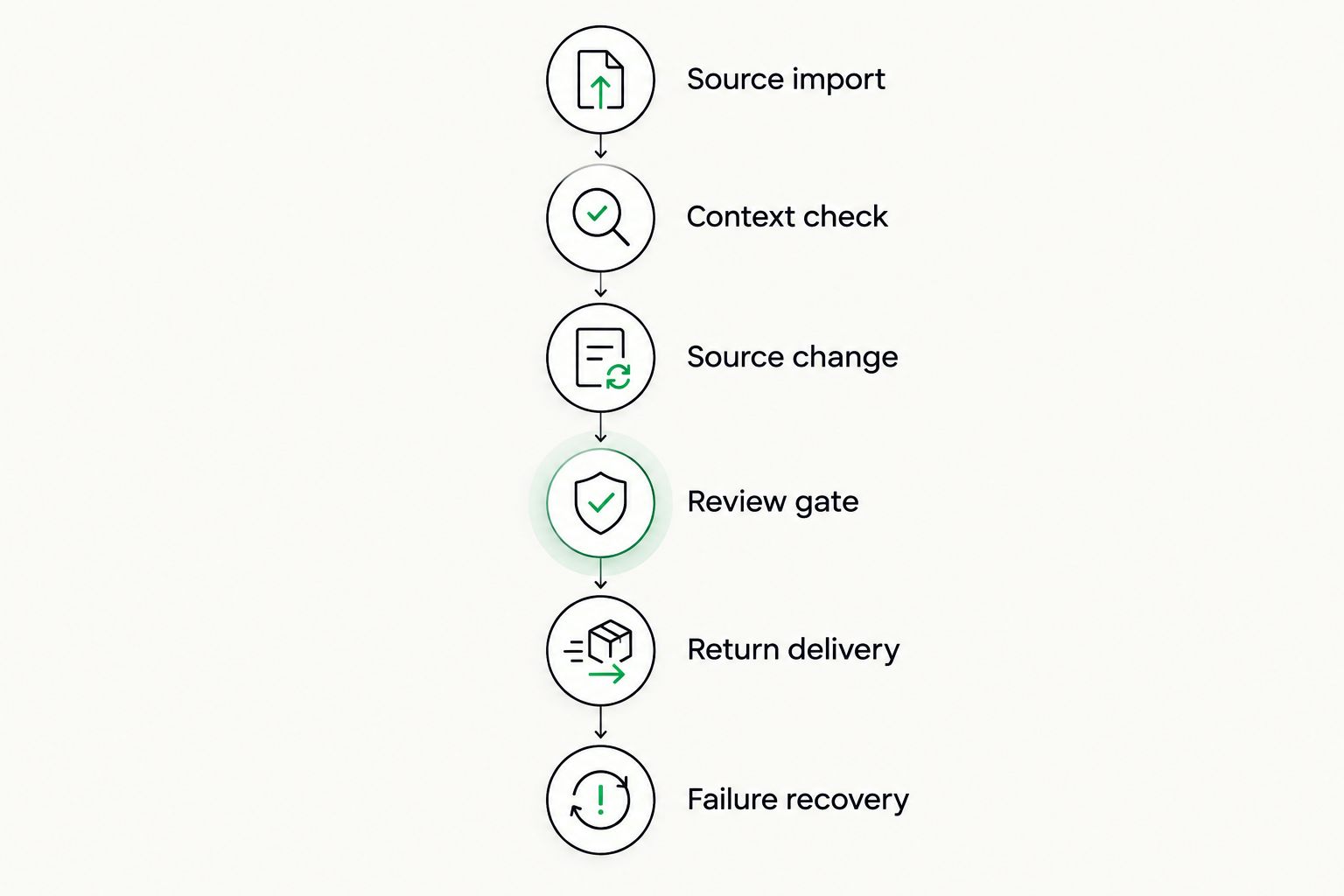
Follow this sequence. Record the expected outcome before each action so that a workaround does not get mistaken for supported behavior.
- Source import: Send the selected content from its real source system.
- Context check: Confirm that translators can distinguish ambiguous strings and identify protected variables.
- Source change: Edit a string while its translation is underway.
- Review gate: Approve selected translations while leaving another unapproved.
- Return delivery: Send approved content back and inspect its destination.
- Failure recovery: Interrupt the connection deliberately and check the recovery procedure.
The important result is repeatability. A connector that succeeds only with an administrator manually repairing each transfer has not passed the workflow you intended to automate.
Test changes and recovery as well as the initial transfer.
Ask the implementation owner to explain every manual intervention observed during the pilot. Separate a one-time configuration task from work that will recur with each release. That distinction belongs in your purchase decision.
How the systems are ranked
This 2026 guide ranks systems by distinct integration use cases: repository work, design handoffs, website content, structured CMS projects, and centralized translation operations. It does not assign scores or claim a verified total of supported connectors.
The decision criteria remain source coverage, round-trip fidelity, change handling, review control, operational ownership, and translation context. Move a platform down your shortlist whenever it fails an essential criterion, regardless of its position here.
Which translation management system should you choose?
Start with Crowdin if your undecided team primarily ships software strings from a repository. Choose the next evaluation by source: Lokalise for design-led work, Smartling for WordPress-led website content, or Phrase TMS for Contentful-connected projects.
For a broader operational decision, evaluate translation memory, quality management, workflow automation, and cost tracking alongside integration behavior. Do not let an impressive connector demonstration substitute for the translation process your team actually needs.
FAQ
What's the best TMS for integrations in 2026?
The best TMS is the one that completes your required source-to-destination workflow reliably. This guide puts Crowdin first for repository-led localization, not as a universal connector-count winner.
Is Crowdin better than Lokalise for software localization?
Crowdin is the first evaluation here for repository-led work; Lokalise is the design-handoff option. Choose based on whether your main coordination problem begins in source control or interface design.
Does a GitHub integration mean localization is fully automated?
No. A GitHub integration still needs configuration for files, branches, source changes, review, and translation delivery.
What should I test in a CMS translation connector?
Test field coverage, linked content, source updates, approval behavior, and returned translations. Inspect the localized content in the CMS rather than relying only on a successful import.
Are more integrations always better in a TMS?
No. A larger catalog does not compensate for failure on your essential workflow. Prioritize the connections you use and the behavior each connection supports.
What is Wxrks best for in this comparison?
Wxrks is best for evaluating translation operations that include workflow automation, translation memory, quality management, and cost tracking. Assess your required integration through a separate round-trip test.
Should translations publish automatically after they return?
Only if that matches your approval policy. Define whether linguistic approval also authorizes publication, and test that the connector respects the distinction.
One last thing
A deleted source string is a better integration test than a successful first import. Delete a test key, run the workflow again, and inspect the destination. The result forces a useful conversation about stale content, ownership, and what the connector actually synchronizes.
Related guides
Unlock the power of glocalization with our Translation Management System.
Unlock the power of
with our Translation Management System.










