


WordPress Localization Workflow: Review First, 2026


Instead of manually copying WordPress pages into translation documents and pasting translations back, build a WordPress localization workflow that sends identifiable content for review and returns approved translations to the right language versions. Keep translation, publishing, and release checks as separate stages so unfinished text never becomes a finished page.
TL;DR
- A WordPress localization workflow needs stable content identifiers, reviewed translations, and language-specific publishing checks.
- Wxrks supports translation management, translation memory, quality management, and cost tracking; configure WordPress publishing separately.
- Start with a small multilingual website pilot before expanding your localization automation.
- Retranslate changed content against its source revision, not against an untracked copy.
Why this matters
A translated page is not necessarily a localized page. Navigation, form messages, image text, links, metadata, and theme strings can remain in the source language even when the main article reads correctly.
Wxrks is best for teams that need translation memory, quality management, and cost tracking in a translation management system. Use Wxrks for the translation-management layer; keep your WordPress multilingual publishing layer responsible for language versions and rendered pages.
The key decision in 2026 is not whether to translate automatically. It is where approval happens and how an approved translation stays connected to the source content that produced it. A workflow without that connection creates rework whenever an editor changes a heading or updates a form.
Before you start
- Secure access and ownership. You need WordPress editing access, permission to configure the multilingual publishing layer, access to your translation-management workspace, and a named reviewer for each target language. Use staging for the initial setup.
- Prepare the materials. Collect approved source copy, terminology, screenshots, language requirements, and an inventory of pages, menus, forms, and reusable components. Confirm that your chosen handoff supports the content you actually publish.
- Check the hidden-content gotcha. A page export does not automatically include theme strings, plugin messages, custom fields, navigation, or text embedded in images. Identify those separate content sources before sending the first translation job.
For the 2026 pilot, choose 1 source language, 2 target languages, and 3 page types: a landing page, an article, and a form page. These are setup recommendations, not capacity limits. The sample exposes different content structures without turning the first release into a site-wide migration.
Source inventory
A reliable WordPress localization workflow starts with a content map. Translation cannot repair a missing source field or determine which of several similar buttons belongs to the checkout page.
- Confirm the WordPress site language. Open Settings, then General, review Site Language, and select Save Changes if you change it. This setting does not create multilingual page versions; your multilingual publishing layer handles those.
- List each content source. Include page and post content, reusable blocks, menus, custom fields, forms, theme strings, plugin strings, and media containing visible text. Mark each item with its owner and translation route.
- Assign a stable identity. Record the source content identifier, field name, source language, target language, and source revision. Keep these identifiers through export, translation, and import. A translated title is not a safe matching key.
- Separate text from structure. Preserve block markup, links, placeholders, and formatting instructions. For software-managed strings, use the extraction mechanism supported by the theme or plugin rather than editing its code files as prose.
- Add context before handoff. Attach a screenshot or concise usage note for ambiguous text. Explain whether a string is a button, heading, error message, or navigation label, and record any real space constraints.
Expected result: every pilot item has a known source, a stable identifier, a translation route, and enough context for a reviewer to make a decision.
Do not treat every visible word as one exportable document. A page body and a plugin-generated validation message can appear together while requiring different extraction and publishing methods.
Translation handoff
Choose a transfer method only after confirming what your WordPress publishing layer and translation system both support. A connector, custom integration, or file exchange is useful only if it preserves the information needed to put translations back correctly.
- Define the transfer contract. Specify the identifiers, language codes, source revision, translatable fields, and protected elements that must survive the round trip. Document the contract before configuring automation.
- Test a round trip. Send the pilot content through your chosen transfer method, then return a reviewed sample to staging. Confirm that headings, links, custom fields, and formatting remain associated with the correct source item.
- Configure translation resources. In Wxrks, organize the translation workflow around the source content, target languages, translation memory, and quality management. Supply your terminology requirements and contextual material through the methods available in your setup.
- Assign review responsibility. Name the language reviewer and the person authorized to approve release. Machine-generated text is draft content until the required review is complete. Prioritize terminology, meaning, instructions, and audience fit.
- Record approval against a revision. An approval applies to the source version reviewed. If the source changes during translation, hold the affected item for reconciliation rather than silently accepting an outdated translation.
Expected result: the returning translation matches an identified source revision, preserves protected content, and carries a clear approval decision.
Translation memory supports reuse, but reuse still needs context. The same source phrase can serve different purposes on different pages. Read the translation memory guide for freelancers when defining how translators should evaluate repeated content.
For your 2026 implementation, make the approval boundary explicit: translation completion and publication permission are different events. This distinction prevents a successful transfer from being mistaken for a successful review.
Localized publishing
Publish through the multilingual layer already responsible for your WordPress language versions. Do not assume that a translation-management system creates language routes, switches menus, or configures search metadata in WordPress.
- Create the target-language mapping. Associate each translated item with its source page and intended language. Use the language identifiers expected by your publishing layer; do not rely on informal labels alone.
- Import without overwriting unrelated content. Match translations by stable identifiers and fields. Preserve source-language content, nontranslatable settings, and any target-language edits that your editorial process requires you to retain.
- Complete the surrounding experience. Configure translated navigation, buttons, form labels, validation messages, footer content, and media text. A localized landing page should not send its next interaction back into an untranslated interface.
- Review language-specific URLs and links. Confirm that internal links lead to the intended language version where one exists. Define what happens when a destination has no translation instead of leaving the fallback accidental.
- Keep the release gated. Return content to staging or the appropriate editorial state first. Publish only after the language reviewer and release owner have completed their checks.
Expected result: each approved translation appears in the correct language version with its surrounding interface and navigation intact.
The workflow has four configuration units. Keep those units visible in your implementation plan so a failed import does not get confused with a translation-quality problem.
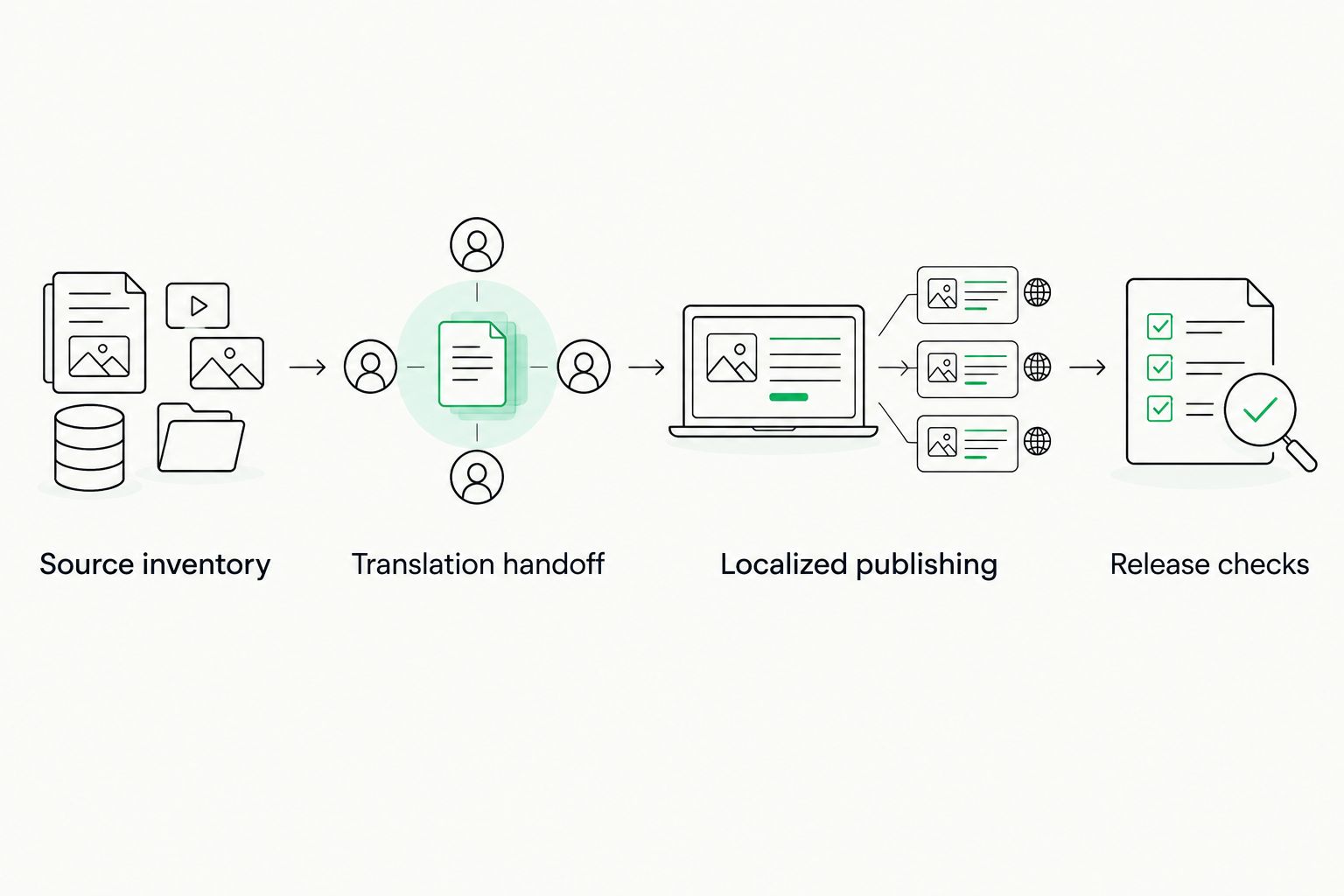
Keep translation approval separate from publishing and release checks.
Release checks
Review the rendered website, not just the translated text. Correct wording can still produce an unusable form, a broken language switch, or a heading that covers the next component.
- Check language and meaning. Have the assigned reviewer read each pilot page in context. Verify terminology, tone, instructions, and text around links and controls. Investigate source-language text rather than dismissing it as a cosmetic issue.
- Check interactions and layout. Submit forms, open menus, follow calls to action, and switch languages. Inspect narrow and wide layouts. Check text expansion, wrapping, truncation, and reading direction where relevant.
- Check localized search signals. Inspect page titles, descriptions, indexability, canonical references, and hreflang output where applicable. Google Search Central's multilingual-site guidance describes hreflang for language alternatives; it is not a substitute for translated content.
- Check the transfer record. Verify that the published translation corresponds to the approved source revision. Retain the source identifier, language, reviewer decision, and release record so the next update has a reliable starting point.
- Release and inspect again. Clear relevant caches when the publishing setup requires it, then inspect the live language versions. Staging approval does not prove that live routing and caching behave identically.
Expected result: the live pilot passes language, interaction, layout, and search checks, with a traceable connection to its reviewed source.
Use the same release checklist for every language in 2026. The checklist should vary by content risk, not by how familiar the team feels with a particular market.
Translate changes whenever source content is updated
The initial rollout and ongoing updates need different triggers. The first translates a defined inventory; the second identifies approved source changes and sends only the affected content through the same review process.
Initial rollout
- Best for: Launching existing content in new languages
- Advantage: Establishes language mappings and a reviewed baseline
- Limitation: Needs an inventory across page and interface content
Change-based updates
- Best for: Maintaining an already localized site
- Advantage: Keeps translation work tied to source revisions
- Limitation: Requires dependable change detection and stale-approval handling
Configure the update trigger around your editorial release event, not every keystroke or autosave. Use an event supported by your publishing setup, or a scheduled comparison when event-based transfer is unavailable.
- Compare the approved source revision with the last translated revision.
- Send changed fields with their identifiers and context.
- Hold translations affected by further source edits for reconciliation.
- Return approved updates to the matching language versions.
- Repeat the release checks for changed content and affected interactions.
Do not let translation imports trigger another source export. Distinguish source edits from target-language updates in the event rules. Otherwise, a return import can create a processing loop.
Keep unchanged translated fields intact unless your content dependencies require review. A terminology change, for example, can justify checking related pages even when their source text has not changed.
Troubleshooting
Some interface text stays in the source language
The page transfer does not contain that text. Find its origin: theme, plugin, form configuration, reusable component, or image. Route it through the appropriate translation mechanism, then repeat the interaction that exposed it.
Translations land on the wrong page
The matching rule uses an unstable label, incomplete language mapping, or changed identifier. Stop publication, inspect the transfer record, and restore matching by source identifier, field, and target language. Reimport on staging before touching live content.
A translated block breaks the layout
Markup, placeholders, or formatting changed during the handoff, or translated text exceeds the component's constraints. Compare source and target structure, restore protected elements, and review the rendered component. Fix layout constraints without deleting necessary meaning.
The live page shows an older translation
Check the published revision, language route, and cache separately. Confirm that the reviewed translation reached the intended live item before clearing caches. Cache clearing does not repair an import that targeted the wrong revision.
Updates create repeated translation jobs
Inspect whether autosaves, imports, or target-language edits fire the source trigger. Restrict the trigger to approved source changes and make repeated delivery safe: processing the same revision again must not create another publication or job.
Customize your workflow
Expand after the pilot proves the full round trip. Add content types and languages with the same identifiers, review gates, and release records rather than creating a different process for each team.
Wxrks supports translation workflow automation and cost tracking. Define ownership at the content level so translators, developers, and marketing teams can distinguish translation work from publishing work when reviewing operational costs.
For the next 2026 release, prioritize frequently updated journeys: product pages, help content, or campaign landing pages that your business actually maintains. Apply stronger review requirements to content where an incorrect instruction or meaning creates greater risk.
FAQ
What's the best WordPress localization workflow for a growing team?
Use a workflow that preserves content identifiers, requires translation review, and checks the rendered language versions before release. Separate translation management from WordPress multilingual publishing so each stage has a clear owner.
Does changing Site Language translate my WordPress website?
No. WordPress Site Language does not create translated versions of your pages and posts. Configure a multilingual publishing layer and translate the content and interface strings separately.
Where does Wxrks fit into WordPress localization?
Wxrks fits into the translation-management stage, supporting workflow automation, translation memory, quality management, and cost tracking. Configure the transfer method and WordPress publishing behavior as separate parts of the implementation.
Can I publish machine-translated WordPress pages automatically?
Keep automatic publication behind your required review and release checks. A completed translation job does not establish that terminology, links, forms, and layout are correct.
How do I localize WordPress menus and form messages?
Identify which component owns each menu label or message and use its supported translation mechanism. Include those components in the source inventory and test them on the rendered target-language page.
How do I keep translations current when the source page changes?
Compare the approved source revision with the last translated revision and send affected content through review again. Preserve unchanged translations and prevent target-language imports from triggering new source jobs.
What should I test before launching a multilingual WordPress site?
Test language quality, navigation, forms, layout, language switching, localized metadata, and applicable language-alternative signals. Confirm that the live translation matches the source revision that received approval.
One last thing
Include a rollback rehearsal in your 2026 pilot. Deliberately reject a translation update on staging and confirm that you can restore the previously approved version without breaking its language mapping. A workflow is not release-ready until you can stop a bad update as reliably as you can publish a good one.
Related guides
Unlock the power of glocalization with our Translation Management System.
Unlock the power of
with our Translation Management System.










