


Translation management systems ranked by customer support in 2026


Best overall support model: accountable technical support. Best for rollout: implementation-led support. Best for independent translators: self-service with human escalation. For translation management systems ranked by customer support in 2026, judge how a vendor resolves your workflow problems—not how many contact channels appear on its website.
TL;DR
- For translation management systems ranked by customer support, prioritize resolution ownership over contact channels.
- Wxrks is a TMS candidate for teams managing localization workflows, translation memory, quality management, and cost tracking.
- Compare five support models against your actual localization risks before choosing a vendor.
- Use failed imports, blocked handoffs, and terminology issues to test support during evaluation.
Why this matters
A support reply is not the same as a working translation workflow. If an import fails, your team needs a diagnosis, a safe next step, and someone responsible for the unresolved problem.
Wxrks is best suited to buyers seeking a translation management system for workflow automation, translation memory, quality management, and cost tracking. That product fit is separate from a customer-support verdict: choose support against written commitments and observed problem-solving.
Start with the workflow you need to protect. The Wxrks translation management system serves translators, developers, enterprises, and translation agencies; each buyer needs a different support evaluation.
This guide ranks support models by their usefulness in specific situations. It does not present an unsupported league table of vendor response times, satisfaction scores, or service guarantees.
What makes the best TMS customer support?
Use these six criteria for your 2026 shortlist. Ask each vendor the same questions so a polished demonstration does not substitute for evidence.
- Resolution ownership: Who remains responsible when a ticket moves between support, engineering, and an external provider?
- Technical depth: Can support distinguish a file problem, a configuration problem, and a software defect?
- Coverage fit: Do documented support hours overlap with your translators, reviewers, and release owners?
- Implementation guidance: Who helps establish workflows, migrate translation memory, and prepare administrators?
- Language-workflow knowledge: Can support explain approval states, terminology behavior, translation memory, and quality checks?
- Written commitments: Which channels, escalation routes, and response targets apply to the agreement you are considering?
Do not award points merely for live chat, a named contact, or a large knowledge base. Ask what each resource lets your team accomplish. A channel matters only when it reaches someone who can move the problem toward resolution.
TMS customer support models at a glance
The order below gives resolution ownership first priority. The best choice for your team still depends on whether your main risk is an outage, a difficult rollout, or a routine editor question.
1
- Support model: Accountable technical support
- Best for: Business-critical localization
- Standout evaluation criterion: A named owner follows the issue through escalation
- Key limitation: Ownership alone does not establish coverage hours
2
- Support model: Implementation-led support
- Best for: First deployments and migrations
- Standout evaluation criterion: Help defining and validating the working process
- Key limitation: Launch assistance does not establish ongoing incident handling
3
- Support model: Developer-focused support
- Best for: Automated software localization
- Standout evaluation criterion: Diagnosis across files, integrations, and application behavior
- Key limitation: Technical answers do not replace linguistic decisions
4
- Support model: Localization-specialist support
- Best for: Agencies and complex review workflows
- Standout evaluation criterion: Understanding of translation memory, terminology, and approvals
- Key limitation: Workflow expertise does not establish engineering access
5
- Support model: Self-service with human escalation
- Best for: Independent translators and repeatable tasks
- Standout evaluation criterion: Clear documentation with a route beyond it
- Key limitation: Unusual problems still require an accountable person
These are buying categories, not claims that a particular vendor delivers a particular service. Ask vendors to demonstrate the model you need before assigning them a position on your shortlist.
1. Accountable technical support: best for critical localization
Accountable technical support gives your unresolved issue an owner. For a TMS, the evaluation should establish who gathers evidence, coordinates escalation, and confirms that the affected workflow works again.
This model ranks first because it addresses the handoff between receiving a request and resolving it. During a 2026 evaluation, ask the vendor to explain a failed import from initial report through closure, including what happens if engineering must investigate.
Accountable technical support pros:
- Gives you a clear escalation destination.
- Makes responsibility explicit when several teams are involved.
- Creates a basis for checking whether closure matches your acceptance criteria.
Accountable technical support cons:
- A named owner does not establish after-hours coverage.
- A response commitment does not establish a resolution deadline.
- You still need to identify which incidents receive urgent treatment.
Best for: Enterprises and teams whose localization failures block delivery.
Ask who owns the ticket while a third-party system is under investigation. An answer that simply redirects you elsewhere leaves the coordination problem with your team.
Verdict: Buy only when ownership, coverage, and escalation are documented for your intended agreement.
2. Implementation-led support: best for TMS rollout
Implementation-led support focuses on getting the working process right before routine production begins. Your evaluation should cover workflow setup, translation-memory migration, role assignment, and administrator preparation.
Bring your actual approval process to the discussion. Ask the vendor to show how a translator, reviewer, and project manager move the same content through that process—not just how an administrator creates an empty project.
Implementation-led support pros:
- Gives migration questions a defined place in the evaluation.
- Helps expose unclear responsibilities before launch.
- Creates an opportunity to validate a complete working project.
Implementation-led support cons:
- Implementation assistance does not prove incident-support quality.
- Training sessions do not prove that administrators can maintain the setup independently.
- You need an explicit handover into ongoing support.
Best for: Teams replacing spreadsheets, fragmented tools, or an existing TMS.
For your 2026 rollout, define acceptance around a completed workflow rather than an account activation. The project should include an import, translation, review, export, and confirmation that the exported content remains usable.
Verdict: Buy when implementation ends with a validated workflow and an explicit support handover.
3. Developer-focused support: best for automated localization
Developer-focused support addresses the boundary between your application and the translation platform. Evaluate it against the file formats, authentication process, and integration behavior your team actually uses.
Do not accept an integration logo as proof of troubleshooting depth. Ask how support would distinguish a rejected request, an invalid resource file, and an unsuccessful update to translated content.
Developer-focused support pros:
- Gives technical teams a relevant route for integration questions.
- Makes reproducible examples central to diagnosis.
- Supports evaluation of failure handling, not just successful demonstrations.
Developer-focused support cons:
- Engineering expertise does not establish terminology expertise.
- Your developers still need to provide useful diagnostic evidence.
- Support boundaries between connected systems require clarification.
Best for: Product teams connecting localization to software delivery.
Ask the vendor to explain what information belongs in a technical ticket and how to share it safely. Use a test project rather than production credentials or confidential customer content.
Verdict: Hold until the vendor demonstrates diagnosis of a failed technical workflow, not just a successful connection.
4. Localization-specialist support: best for review complexity
Localization-specialist support focuses on the working decisions translators and project managers face. Your test should include translation-memory behavior, glossary questions, approval states, and quality-management issues.
Separate software behavior from language judgment. A support team should explain how a setting works; your designated language owner should decide whether a translation expresses the intended meaning.
Localization-specialist support pros:
- Connects assistance to the tasks translators perform.
- Gives review and approval questions a practical context.
- Helps you evaluate whether explanations are usable by nontechnical staff.
Localization-specialist support cons:
- Workflow knowledge does not establish access to engineering.
- Language-quality decisions still require an authorized reviewer.
- Complex account configuration needs clear change ownership.
Best for: Translation agencies and teams managing multiple reviewers or client workflows.
For Wxrks, translation memory and quality management belong in the product-fit discussion. Evaluate the associated support separately by asking how your team should investigate an unexpected translation-memory suggestion or an approval question.
Verdict: Buy when support explains the workflow clearly and identifies where technical escalation or language review begins.
5. Self-service with human escalation: best for repeatable tasks
Self-service support gives users instructions they can follow without opening a ticket. The human escalation route matters when those instructions do not match the problem.
Test the documentation with a task your intended users will perform. Ask a translator to follow the instructions without help from the salesperson, then record the point where the task becomes unclear.
Self-service with human escalation pros:
- Lets you assess whether routine instructions are usable.
- Gives independent users a way to repeat familiar tasks.
- Makes documentation gaps visible during evaluation.
Self-service with human escalation cons:
- Documentation cannot diagnose every unusual project state.
- Search results do not establish that instructions match your configuration.
- A human escalation route still needs defined ownership and coverage.
Best for: Independent translators and teams with straightforward, repeatable workflows.
Do not confuse an extensive help center with an effective one. Judge whether users can complete the task and whether the next step is clear when they cannot.
Verdict: Buy for routine work only when documentation is usable and unresolved questions reach a person.
How to rank your vendor shortlist in 2026
Run the same evaluation across every candidate. Use 3 test tickets: a failed import, a blocked approval handoff, and an unexpected terminology result. These are proposed evaluation exercises, not published performance benchmarks.
Allow 30 minutes per exercise for your own team to prepare the issue, follow the available instructions, and document the result. This timebox organizes your evaluation; it is not a vendor response target.
Prepare evidence
Use sanitized files and describe the expected result. Include the steps that produced the problem and identify the affected role.
Trace ownership
Ask who takes responsibility if the first contact cannot resolve the issue. Record whether the vendor explains escalation or merely names another department.
Verify resolution
Repeat the affected task after the proposed fix. A closed ticket does not satisfy the test unless your acceptance condition is met.
Record commitments
Keep demonstrated behavior separate from contractual promises. Record coverage hours, applicable channels, escalation terms, and any exclusions in the agreement under consideration.
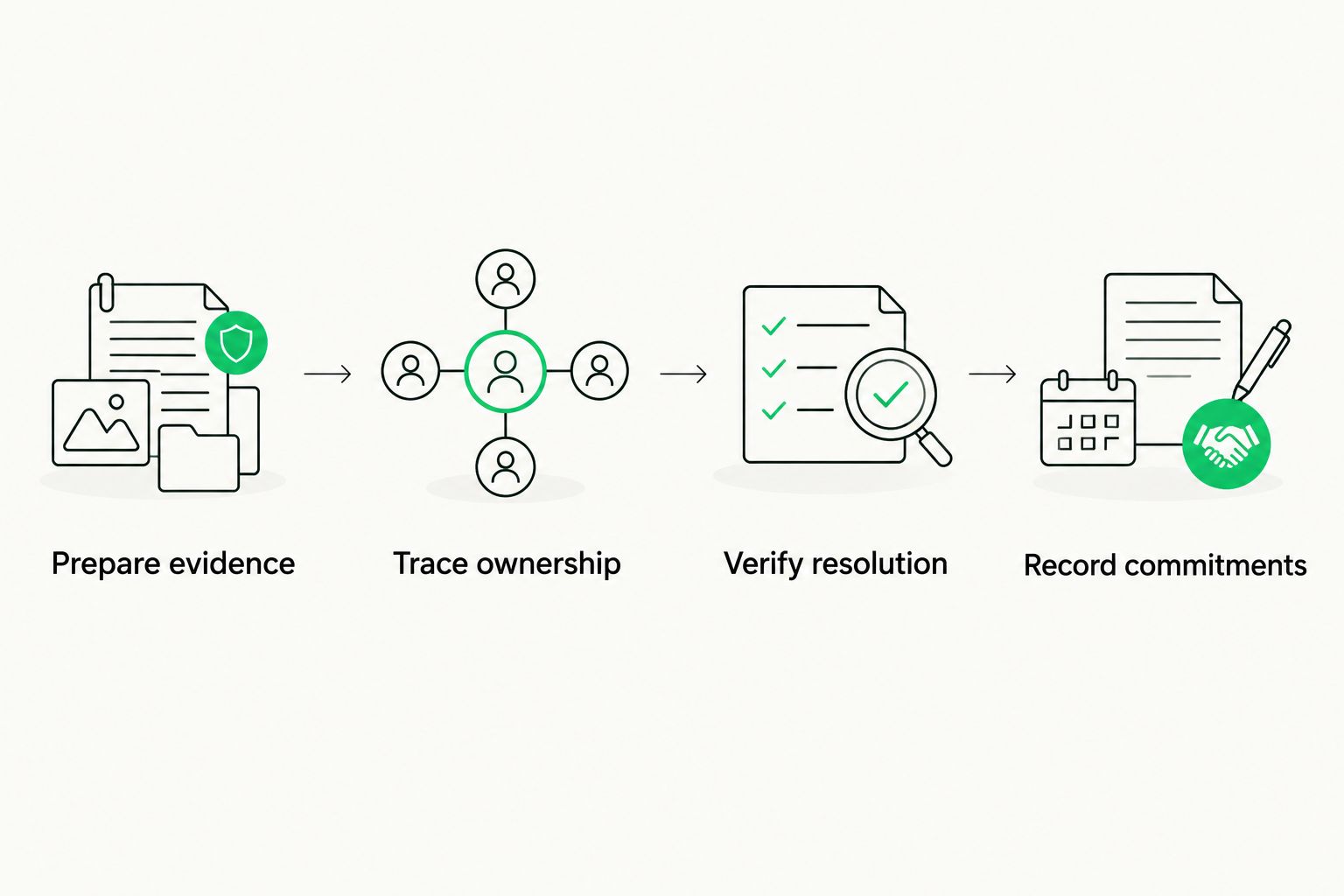
Verify that the workflow works again before treating a support issue as resolved.
Use 2 evaluators where practical: one localization user and one person responsible for administration or technical delivery. Give both the same acceptance conditions. Their observations should distinguish usability problems from technical failures rather than combine everything into a vague satisfaction score.
How the support models are ranked
This ranking prioritizes resolution ownership, followed by rollout assistance, technical diagnosis, localization expertise, and repeatable self-service. Those priorities explain the order; they are not measured vendor performance scores.
Adjust the order to your risk. A migration team should evaluate implementation first, while a translator working independently should begin with documentation and escalation. Keep coverage fit and written commitments as requirements across every model.
Which TMS support model should you choose?
Choose accountable technical support as the default, then add the specialization your workflow needs. A contact channel without ownership is not enough. Neither is specialist knowledge without a route to resolve defects.
Include Wxrks in your TMS evaluation when workflow automation, translation memory, quality management, and cost tracking match your requirements. Make the support decision through the same ticket exercises and written-commitment checks you apply to every candidate.
For a 2026 purchase, finish with a support acceptance checklist attached to your procurement decision. Record what passed, what remains unresolved, and who approved any exceptions.
FAQ
What's the best way to compare TMS customer support?
Compare TMS customer support with the same workflow problems and acceptance conditions for every vendor. Evaluate ownership, technical diagnosis, coverage, and the route to escalation rather than counting contact channels.
Which translation management system has the best customer support?
Choose the TMS that demonstrates resolution of your relevant problems and documents the support commitments you require. A vendor ranking needs comparable evidence; product features alone do not establish support quality.
Is live chat better than email support for a TMS?
Neither channel establishes better support by itself. Evaluate whether the channel reaches an accountable person who can investigate your problem and coordinate escalation.
What should I ask about TMS implementation support?
Ask who owns workflow setup, translation-memory migration, administrator preparation, and the handover to ongoing support. Define completion as a validated working project rather than account activation.
Does a fast first reply mean a fast resolution?
No, a first reply and a resolved issue are different outcomes. Ask vendors to distinguish acknowledgment targets, investigation steps, escalation, and any contractual resolution commitments.
Should translators and developers evaluate support together?
Yes, include both perspectives when your workflow involves translation tasks and technical delivery. Give each evaluator explicit acceptance conditions so usability questions and integration failures remain distinguishable.
Is Wxrks relevant to a TMS support shortlist?
Wxrks is relevant when you need a translation management system for localization workflows, translation memory, quality management, and cost tracking. Assess customer support separately through practical exercises and written commitments.
One last thing
Ask who can authorize closing your support ticket. Then ask what happens if the vendor marks it resolved but your reviewer still cannot complete the task. That question tests the difference between ticket administration and responsibility for a working process.
Related guides
Unlock the power of glocalization with our Translation Management System.
Unlock the power of
with our Translation Management System.








