


How to migrate translation memory from another CAT tool


To migrate translation memory from another CAT tool, export it as TMX, import it into a separate memory in the destination system, and validate the results before using it in production. A successful migration preserves usable source–target pairs; it does not automatically reproduce the old tool’s matching behavior, project settings, terminology, or review status.
TL;DR
- How to migrate translation memory from another CAT tool: export TMX, isolate the import, validate, then switch production.
- Keep terminology, segmentation rules, and project settings separate from the translation memory migration.
- Wxrks fits translators and localization teams managing translation memory, workflows, and quality in a TMS.
- Treat a completed import as a checkpoint, not proof that every translation is ready for reuse.
Why this matters
Your translation memory contains reusable decisions: product wording, approved sentences, and translations that already fit a particular context. Moving those decisions without checking their meaning creates a new problem. The destination tool can accept the file while assigning different metadata, separating languages differently, or presenting unfamiliar match results.
Preserve the original export and test the imported memory before allowing new writes. That gives you a recovery point and makes troubleshooting easier: you can distinguish a migration problem from a translation changed after the switch.
For a 2026 migration, document the export and import settings alongside the data. File-format support alone does not establish compatibility between your particular configurations. The guide to translation memory file-format support explains the distinction between translating source files and exchanging reusable bilingual content.
How to migrate translation memory from another CAT tool
Use the following sequence to keep the move reversible. Work on a separate destination memory until the imported content passes your acceptance checks.
1. Inventory the memories and their boundaries
List the memories you intend to move, their owners, language directions, subject areas, and access restrictions. Record whether each memory contains reviewed translations, draft work, or a mixture.
Keep client and confidentiality boundaries intact. A memory that was restricted to a particular customer should not become a shared resource simply because the destination makes consolidation convenient.
Record these details before export:
- Language direction: Source language, target language, and regional variants.
- Ownership: Who can authorize migration and reuse.
- Content scope: Client, product, subject area, and relevant exclusions.
- Quality status: How approved and unreviewed entries are distinguished.
- Write access: Who or what currently adds translations.
Your 2026 migration inventory should identify the active memory, not just every similarly named file you can find. Old backups are useful recovery material, but importing them indiscriminately can reintroduce superseded translations.
2. Export TMX and retain the native backup
TMX, or Translation Memory eXchange, is an XML-based format designed to exchange translation memory data. Use the source tool’s translation-memory export function and select TMX when both systems support it.
Also retain the source tool’s native backup. TMX supports bilingual content exchange, but a native backup can preserve application-specific information that the exchange file does not reproduce.
Check whether export filters exclude entries by date, status, user, or project. Record the selected filters rather than assuming that an export includes the whole memory. If the export offers options for inline markup or custom properties, choose them against the destination’s documented importer behavior.
Keep the original export unchanged. If conversion or cleanup becomes necessary, work on a copy and record what changed.
3. Create an isolated destination memory
Create a separate memory with the intended source and target languages. Confirm regional variants explicitly: a generic language label is not a substitute for the locale your projects require.
Before importing, inspect the destination’s behavior for duplicates, existing translations, and updates. Decide whether matching source text should create another translation, replace an existing entry, or trigger review. Do not discover that policy by importing into your production memory.
Import the TMX into the isolated memory, then retain the import report. Review warnings and rejected entries before continuing. A completion message establishes that the operation finished; it does not establish that all useful content survived.
4. Reconcile the imported content
Compare the source export with the destination report using equivalent units. A translation-unit count and a count of individual language segments are not interchangeable, particularly when an export contains multiple target languages.
Investigate discrepancies rather than forcing the totals to agree. Filters, duplicate handling, missing language variants, and invalid entries are possible explanations to check against the actual reports.
Inspect representative entries directly. Look for missing targets, broken characters, unexpected language assignments, and formatting markers that no longer behave as intended. Check custom fields that your team relies on, including customer labels and review information.
Record unexplained differences as unresolved migration issues. Do not approve a memory solely because the destination contains a plausible-looking total.
5. Validate retrieval in a real project
Use previously translated content that you are authorized to test. Include ordinary sentences alongside material that exercises your workflow: inline tags, placeholders, punctuation, repeated source strings, and context-dependent wording.
Compare the retrieved translation with the approved reference, not just the displayed match percentage. CAT tools can differ in segmentation, normalization, context handling, and matching rules. The same stored translation does not guarantee the same score.
Check these behaviors separately:
- Retrieval: Does the intended approved translation appear?
- Integrity: Are characters, tags, and placeholders intact?
- Context: Is the translation appropriate for this occurrence?
- Workflow: Can reviewers distinguish imported content from newly approved work?
For a 2026 acceptance record, retain the test source, expected translation, observed result, and resolution of each failure. That record makes approval specific rather than subjective.
6. Control the cutover
Choose a clear point at which the old memory stops receiving updates. If translators continue working during migration, capture those later changes through a documented final export or another supported transfer method.
Avoid leaving both systems open for unrestricted writes. Once edits diverge, deciding which translation is authoritative becomes a content-management problem rather than a file-transfer task.
After validation, attach the approved destination memory to the intended projects and confirm access permissions. Keep the source system or native backup available according to your retention requirements. Define the condition for reverting before you need it.
7. Verify new writes after the switch
Migration is not finished when old translations appear in search. Confirm that newly approved edits reach the intended destination memory and that draft work does not enter it contrary to your policy.
Create a controlled project example, approve an edit through your normal process, and check whether the resulting memory entry has the expected language, content, and status. Then test retrieval in another authorized project.
The operating sequence is straightforward: inventory, export, import, validate, and cutover. Keep the supporting records with the migration so future administrators can explain what moved and why.
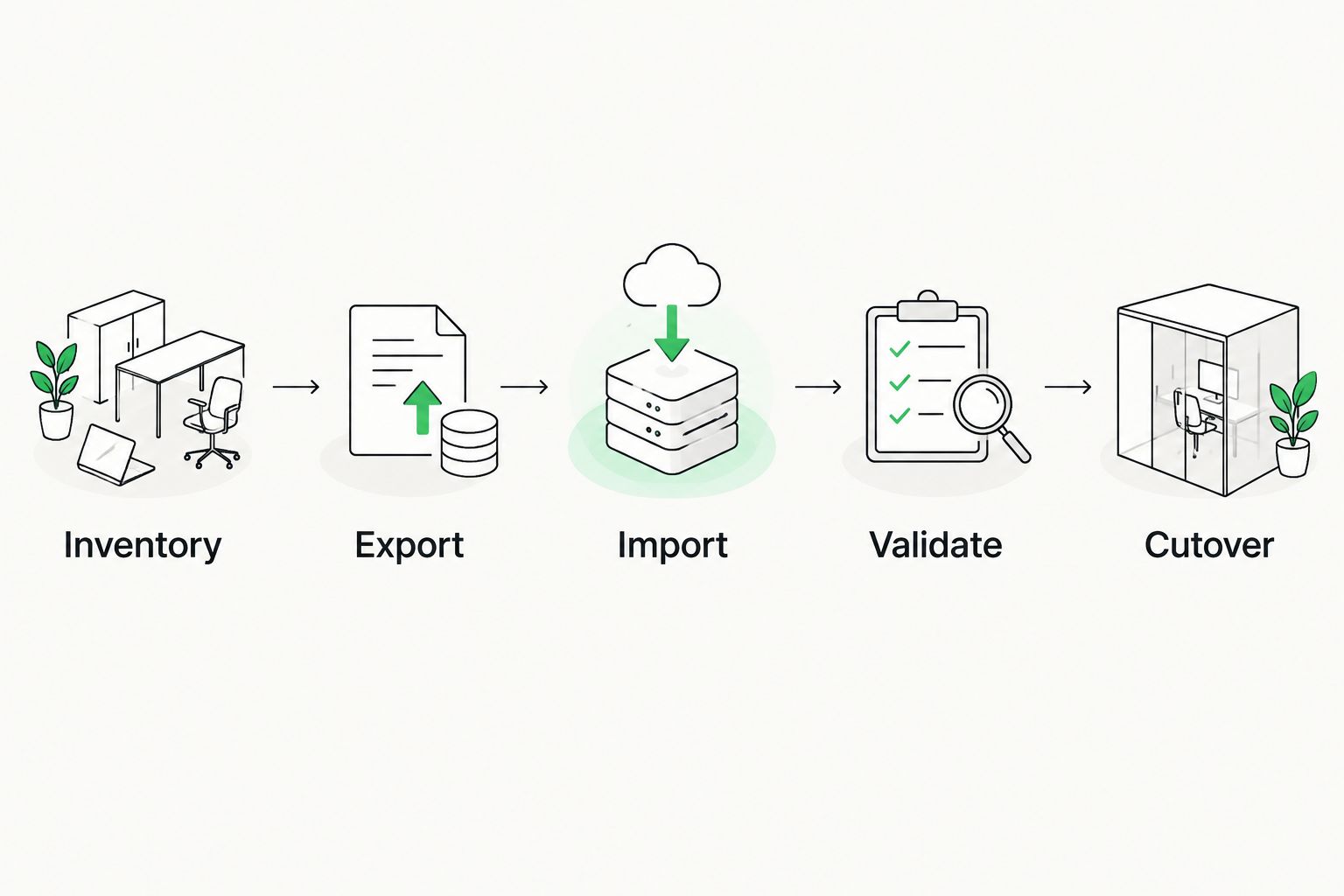
Validate the isolated import before switching production projects.
What transfers with TMX, and what needs separate treatment?
TMX is an exchange format, not a complete project backup. Separate reusable bilingual content from the resources and settings that tell translators how to use it.
The following comparison helps you choose the right treatment for each asset. These are migration roles, not promises about a particular vendor’s importer.
TMX export
- Best for: Moving translation memory between compatible tools
- Advantage: Exchanges translation units in a purpose-built format
- Limitation and next action: Confirm treatment of tags, properties, languages, and duplicates
Native memory backup
- Best for: Recovery in the source environment
- Advantage: Retains the source application’s backup representation
- Limitation and next action: Do not assume another tool can import it
Terminology export
- Best for: Moving preferred terms and definitions
- Advantage: Keeps terminology management separate from sentence reuse
- Limitation and next action: Check supported terminology formats and field mapping
Bilingual project files
- Best for: Preserving in-progress translation work
- Advantage: Retains project content for supported workflows
- Limitation and next action: Not a substitute for a complete memory export
Project settings
- Best for: Recreating workflow behavior
- Advantage: Documents segmentation, permissions, and review rules
- Limitation and next action: Reconfigure and test settings separately
If the source tool cannot export TMX, check its documented export options and the destination’s supported import formats. Use conversion only when the mapping is understood. Keep the original files and validate the converted result before importing it into an active resource.
Why translation memory migration results vary
The main differences come from how systems interpret the exported data and how your team has maintained it. During a 2026 migration, examine these drivers before treating an unexpected result as data loss:
- Language mapping: Source and target locales must match the intended destination. Check language variants when entries are rejected or appear under an unexpected language.
- Segmentation: Different sentence boundaries change which stored units match new content. Compare project segmentation with the original workflow.
- Inline markup: Formatting and placeholders require compatible treatment. Inspect tagged examples rather than relying on plain-text tests alone.
- Metadata mapping: Custom properties and review information need explicit verification. Their presence in an export does not prove the destination uses them.
- Duplicate rules: Import settings determine how repeated source–target pairs and competing translations are handled. Review those rules before merging memories.
- Source quality: Obsolete wording and inconsistent translations remain content problems after transfer. Migration does not make an unreviewed entry approved.
Change settings deliberately and repeat the same acceptance checks. Altering several import options at once makes it harder to identify which change corrected the problem.
Can I migrate translation memory without losing formatting?
You can preserve supported inline markup through a compatible export and import, but you must validate the result in translated files. A correct-looking segment in the memory editor does not prove that the destination reconstructs the final document correctly.
Test content with formatting boundaries and placeholders, then generate the target output. Check both the bilingual editing view and the delivered file. If a tag fails, resolve its representation or importer settings before approving the memory for similar content.
Should I merge all my old memories into one?
Keep memories separate when ownership, confidentiality, subject matter, or approval rules differ. A shared source sentence can have different valid translations in different products or customer contexts.
Consolidation simplifies resource selection, but it also puts competing translations into the same retrieval pool. Merge only after defining which content belongs together and how conflicting entries will be reviewed. Preserve the original exports so consolidation remains reversible.
Where Wxrks fits in the migration decision
Wxrks fits translators and localization teams managing translation memory, workflows, and quality in a TMS. That makes the migration decision broader than whether a bilingual file uploads: your team also needs a working approval process and clear ownership of reusable translations.
Evaluate Wxrks against the same acceptance checklist you use for any destination. Its stated scope includes translation memory, workflow automation, quality management, and cost tracking; validate your specific export, metadata requirements, and project behavior before committing the production cutover.
The benefit is managing those localization functions within a TMS. The constraint is that product scope does not establish compatibility with every source configuration. Your own approved test content remains the acceptance standard.
FAQ
What's the safest way to migrate translation memory from another CAT tool?
Export TMX, import it into an isolated destination memory, and validate retrieval before switching production. Retain the native backup and document how you will handle edits made during the move.
Is TMX the same as a bilingual translation file?
No. TMX exchanges translation memory units, while bilingual project files carry translation work in a project-oriented format. Use the appropriate export for each asset.
Will my translation memory match percentages stay the same?
Do not expect identical match percentages across tools. Segmentation, normalization, context handling, and matching rules can differ even when the stored translation is unchanged.
Can I move my glossary with my translation memory?
Treat the glossary as a separate migration asset. Export it through the source tool’s terminology function and check the destination’s supported formats and field mapping.
Why does the imported translation memory have a different entry count?
A different count requires reconciliation, not an immediate conclusion that content is missing. Check counting units, export filters, duplicate handling, language mapping, and rejected-entry reports.
Should I delete duplicate translations before importing?
Review duplicates before deleting them. Identical bilingual pairs can be redundant, but the same source text can legitimately require different translations by client, product, or context.
Can I keep translating while the memory migration runs?
Yes, if you define how later edits will reach the destination. Use a documented final transfer or controlled write freeze so the old and new memories do not become competing records.
One last thing
The strongest migration check is a disagreement test. Choose an authorized example where the same source text has different approved translations in different contexts. Confirm that your destination workflow helps the translator select the right one rather than simply presenting an impressive match.
This tests something an import report cannot: whether your team can reuse the content correctly. Keep that example in your 2026 regression checks, along with a tagged segment and an approved edit that should update the memory. Reuse those checks when you change import settings, project rules, or memory organization.
Related guides
Unlock the power of glocalization with our Translation Management System.
Unlock the power of
with our Translation Management System.










