


Can translation memory software handle any file format?


No—translation memory software cannot handle every file format. In 2026, compatibility depends on the tool’s file filters and whether they can extract translatable text, protect nontranslatable structure, and rebuild a usable translated file; scanned documents and unsupported formats need preparation before translation memory can help.
TL;DR
- Can translation memory software handle any file format? No: file filters determine what you can translate and export.
- Translation memory reuses bilingual segments; it does not extract readable text from every document.
- Test extraction, protected content, and export before committing a file type to your localization workflow.
- Wxrks is a translation management system for teams managing translation memory, localization workflows, quality, and cost tracking.
Why this matters
A file that uploads successfully is not necessarily a file you can deliver successfully. A translation editor can display text while overlooking a worksheet, exposing a software identifier, or producing an export that needs repairs.
For your 2026 localization workflow, treat compatibility as a delivery requirement—not an upload checkbox. The translation memory software guide for freelancers provides related reading on managing reusable translations; file handling is the separate check you need before starting work.
The practical test is a complete round-trip: import, translate, export, and open the result in its destination application. That checks the deliverable rather than just the translation interface.
Can translation memory software handle any file format?
No. Translation memory stores source text alongside corresponding translations so a translation environment can suggest reusable segments. A file filter or parser determines which content enters that environment and how the translated content returns to the original structure.
These functions are connected, but they are not interchangeable. A good memory match cannot repair an extraction error or restore content the filter never imported.
Editable documents
- Best for: Reports, manuals, and business documents
- Advantage when supported: Text can be translated within document structure
- Limitation to check: Headers, fields, embedded objects, and layout need inspection
Spreadsheets and delimited text
- Best for: Structured lists and selected text fields
- Advantage when supported: Rows and columns provide organized content
- Limitation to check: Formulas, identifiers, hidden content, and delimiters need protection
Software resource files
- Best for: Application interfaces and messages
- Advantage when supported: Keys can connect translated strings to application content
- Limitation to check: Placeholders, syntax, plural rules, and escaping need validation
HTML and structured markup
- Best for: Websites and structured publishing
- Advantage when supported: Filters can separate text from markup
- Limitation to check: Attributes, embedded code, and extraction rules need review
PDFs and image-based documents
- Best for: Working from a fixed-layout source when editable originals are unavailable
- Advantage when supported: Text extraction or OCR can create a translation input
- Limitation to check: Reading order, recognition accuracy, and reconstruction need extra work
Bilingual interchange files
- Best for: Moving translation work between compatible environments
- Advantage when supported: Bilingual content can carry translations or work in progress
- Limitation to check: Supported versions, extensions, and metadata handling differ
The table describes file categories, not a compatibility list for any named product. Check the exact format, version, and file contents—not just the extension.
Translation memory exchange is not document support
TMX is an XML-based format for exchanging translation memory data. Importing a TMX file concerns reusable bilingual content; it does not establish that a tool can translate every source document that originally produced those segments.
XLIFF serves a different purpose: exchanging localization content between systems. An XLIFF workflow still depends on compatible versions, supported structures, and correct handling of inline content.
If a vendor says it supports translation memory import, ask a separate question about your source files. Memory portability and document compatibility solve different problems.
Editable documents: inspect more than the main text
Editable source files are useful starting points because text and structure are available together. However, a document can contain translatable content outside its main paragraphs: headings, footnotes, text boxes, captions, headers, and embedded objects.
Best for: document workflows where you can inspect the editable source and exported result. The advantage is access to document structure; the limitation is that extraction settings and embedded content still require review.
Open the source before importing it. Identify which parts need translation, which must remain unchanged, and which need separate handling. Then compare those expectations with the editor’s extracted segments.
Do not assume preserved formatting means preserved usability. Translated text can occupy different space, so page breaks, tables, and text boxes still need a layout check after export.
Software resource files: protect structure before translating
Software strings combine human-readable text with application requirements. A resource file can include keys, variables, markup, escape sequences, and message patterns that translators must handle correctly.
Best for: product teams translating interface text while retaining application structure. The advantage is structured access to strings; the limitation is that a linguistically correct translation can still fail if protected syntax changes.
For JSON resources, distinguish property names from values that contain user-facing text. For XML resources, confirm which elements and attributes are translatable. For message strings, preserve required variable names while allowing their position to change when the target language demands it.
Give translators context as well as text. A short label without its screen, function, or intended action is difficult to translate consistently, even when translation memory offers a match.
PDFs and scans: prepare the text first
PDF is a delivery format, not a guarantee of clean translation input. A PDF can contain selectable text, page images, or a mixture of both, and its visual order does not necessarily match the order produced by extraction.
Best for: source recovery when you cannot obtain the editable original. The advantage is a path to working with otherwise inaccessible content; the limitation is additional extraction, correction, and layout work.
An image-only scan needs optical character recognition before a text-based translation workflow can use its contents. Check the recognized text against the image before accepting it as the source.
Errors in recognition become errors in the material translators see. Translation memory can reuse a translation of that material, but it cannot establish that the recognized source accurately represents the original page.
Why file-format support varies
File compatibility depends on how the translation environment interprets a document, not simply whether it recognizes its extension. These factors explain why files with the same suffix can behave differently:
- Parser coverage: The filter must understand the file’s structure and distinguish translatable text from everything else.
- Extraction settings: Rules determine whether content such as attributes, hidden cells, or selected fields enters the translation editor.
- Text accessibility: Editable text can enter a text workflow directly; text stored only as an image needs recognition first.
- Protected syntax: Variables, tags, identifiers, and escape sequences require handling that preserves their function.
- Format versions: Different versions and extensions can introduce structures that a particular filter does not interpret.
- Export reconstruction: The tool must write translated content back into a valid file that the destination application accepts.
A supported extension is the beginning of validation, not the end. Ask which content the filter includes, which content it excludes, and what checks are needed after export.
How do you test whether your file format is supported?
Use 1 representative sample file, produce 2 language versions—the source and target—and complete 1 full round-trip before approving the workflow. These are suggested pilot checks, not performance benchmarks.
For a 2026 evaluation, choose a sample with the structures your real work depends on. A clean paragraph-only document tells you little about a production file containing tables, variables, or embedded content.
- Inspect source. Open the original in its normal application. Identify the text you expect to translate and the content that must remain unchanged.
- Check extraction. Import the file and compare the extracted content with the source. Look for missing text, duplicated content, and incorrect reading order.
- Protect structure. Inspect tags, placeholders, keys, formulas, and other nontranslatable elements. Confirm that translators can distinguish editable text from protected content.
- Translate sample. Translate representative segments, including content with inline formatting or variables. Use text that exercises the file’s real requirements.
- Validate export. Export the target file, reopen it in the destination application, and inspect both text and function. Check layout for documents and structural validity for software resources.
The exported target file is the deliverable you need to judge. An editor preview helps you work, but it does not replace opening the result where your customer or application will use it.
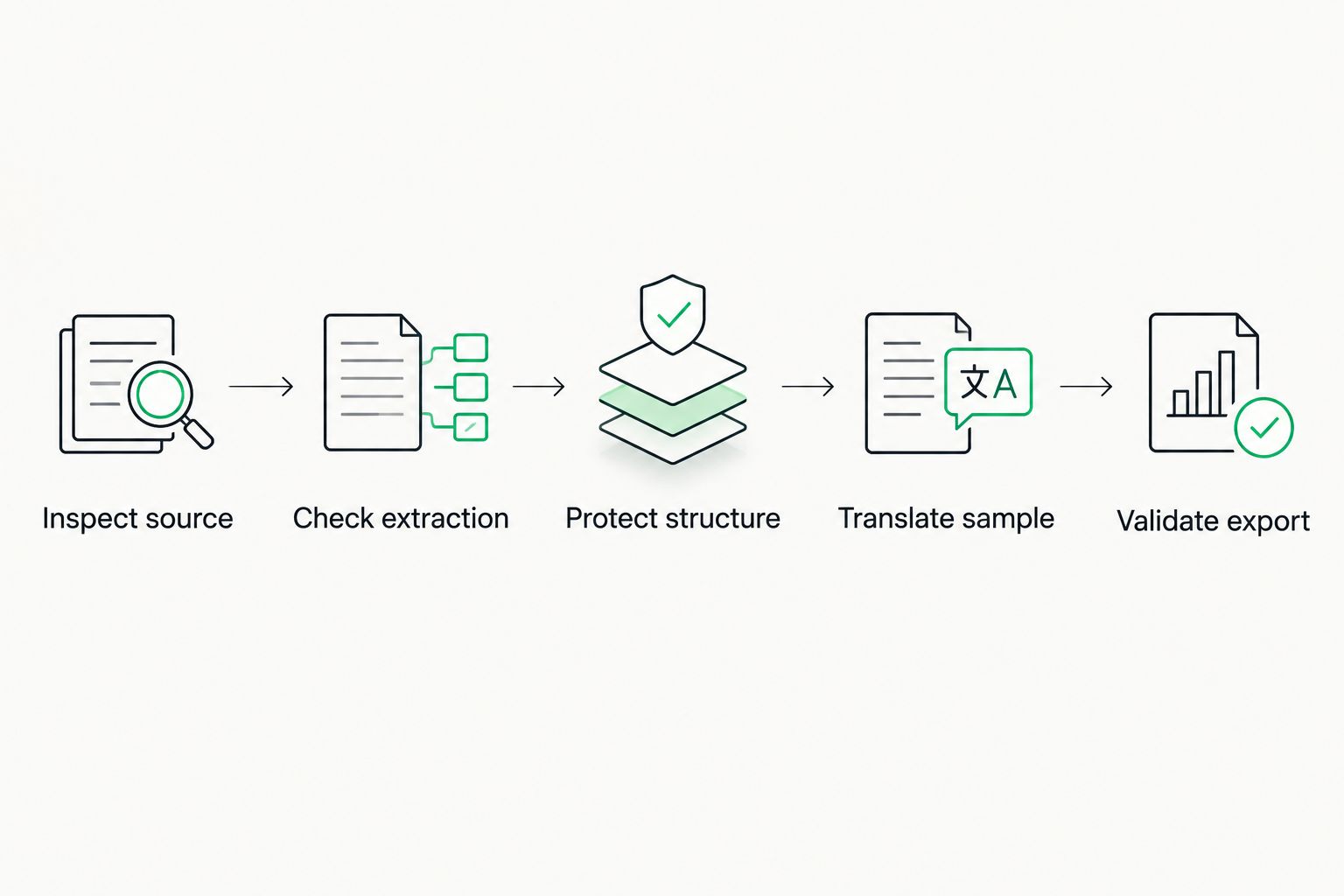
Validate the exported file in its destination application, not just inside the translation editor.
Keep a record of the filter settings and the problems found during the test. If you change the source structure or import configuration, repeat the affected checks rather than assuming the earlier result still applies.
What counts as a failed compatibility test?
Treat missing required text, damaged syntax, and an unusable export as failures. A successful upload does not offset any of them.
Layout issues require a separate decision. If your workflow includes desktop publishing or application-level review, document those tasks explicitly; do not label the file ready simply because the translation is complete.
What should you do with an unsupported file format?
Best for: occasional unsupported inputs—request the editable original before converting the file. That preserves access to the source structure and avoids making an extracted copy your only reference.
If the original is unavailable, convert the content into a supported working format and inspect the conversion before translation. Conversion adds a step where text, formatting, and structure can change, so compare the working file with the original.
For recurring structured inputs, evaluate a configured filter or an extraction-and-reconstruction workflow with the system owner. Keep identifiers and context attached to each string so translated text can return to the correct location.
Do not rename an extension and treat the result as conversion. Changing a filename does not change the underlying file structure or make an incompatible parser understand it.
Does supporting a file format guarantee good translations?
No. File support establishes a route for extracting and returning content; translation quality also depends on source clarity, context, terminology, and review.
Translation memory suggestions need assessment in their current context. A segment reused from a different screen or document can be textually identical yet require a different translation because its purpose has changed.
Separate technical acceptance from linguistic acceptance. Validate that the file works, then confirm that its translated content is accurate, consistent, and appropriate for the audience.
Where a translation management system fits
Wxrks is a translation management system for translators, developers, enterprises, and agencies managing localization workflows. Its stated scope includes translation memory, quality management, workflow automation, and cost tracking.
That scope makes Wxrks relevant when you need to coordinate translation work, not just translate an isolated file. It does not establish support for a particular extension, format version, or embedded object.
For your 2026 evaluation, match those workflow needs with a sample-file test. Confirm the supported import and export behavior before treating any translation management system as a fit for your production files.
FAQ
Can translation memory software handle any file format?
No. Translation memory software depends on supported file filters to extract text and rebuild translated files; unsupported formats need preparation or a different workflow.
Can translation memory software translate a scanned PDF?
A scanned PDF needs text recognition before a text-based translation memory workflow can use its content. Check OCR output against the original image before translating.
Does TMX support mean a tool supports my documents?
No. TMX exchanges translation memory data, while source-document support depends on separate file filters and export handling.
Will translation memory software preserve all formatting?
No file-support claim guarantees that every layout detail will remain suitable after translation. Open the exported document and inspect tables, page breaks, text boxes, and other layout elements.
How do I check whether software placeholders stay intact?
Compare required placeholders in the source and target, then validate the exported resource in your application workflow. Keep required variable names intact even when their position changes in translation.
What should I check before using Wxrks for my files?
Test your actual source files through import, translation, and export before approving the workflow. Confirm extraction coverage, protected content, and whether the destination application accepts the translated result.
One last thing
Test the awkward file, not the easiest file. Use a representative source with the structures your team cannot afford to lose: embedded text, variables, selected spreadsheet fields, or complex formatting.
Your 2026 acceptance decision should rest on the exported result. If the translated file opens correctly, contains the required content, and passes linguistic and functional review, you have evidence for that workflow—not a promise about every possible format.
Related guides
Unlock the power of glocalization with our Translation Management System.
Unlock the power of
with our Translation Management System.










