Sanity to localized content: complete 2026 workflow


Instead of copying Sanity content into translation files and pasting translations back, build a revision-aware workflow that extracts approved source content, routes it through translation review, and returns localized drafts. For Sanity CMS localization in 2026, keep document identity, rich-text structure, and publishing approval intact throughout the round trip.
TL;DR
- Sanity CMS localization needs explicit language models, stable content identifiers, and revision checks before write-back.
- Wxrks is best for teams centralizing translation memory, quality management, and localization workflows.
- Use a custom integration layer; keep translation approval separate from Sanity publishing.
- Start with localized drafts, then automate source updates without overwriting newer editorial work.
Why this matters
A translated paragraph is not yet a localized Sanity page. Your application still needs to retrieve the right language, resolve references, render rich text, and publish the intended version.
Wxrks is best for teams centralizing translation memory, quality management, and localization workflows. Use Wxrks for that translation-management role, with an integration layer responsible for moving content between systems. Sanity schema design and frontend language routing remain separate responsibilities.
For a 2026 implementation, make the integration contract explicit before connecting production content. A completed translation must identify its source document, source revision, target locale, and destination fields. Without that contract, an automated return has no reliable basis for deciding what to update.
Before you start
- Access: Have permission to change the Sanity schema and deploy Studio, configure project webhooks, and create server-side credentials with the permissions your worker needs. Prepare translation-workflow access and a supported exchange method for your chosen TMS.
- Materials: Define source and target locales, translatable document types, glossary rules, reviewer ownership, and a staging frontend. Start the pilot with 1 source document and 2 target locales; this is a test scope, not a platform limit.
- The gotcha: Sanity localization is a content-model decision, not just a translation setting. Choose field-level or document-level localization before writing the import logic, and preserve Portable Text structure rather than flattening it into plain text.
Keep credentials out of browser-delivered code. The workflow below uses a server-side worker and an adapter for the translation system; it does not depend on a particular connector or assume that either system supplies the whole connection.
Source model
Choose your localization unit
Sanity supports localization through schema design. Decide whether languages belong inside shared documents or in separate documents linked by your application’s language model.
Field-level localization
- Best for: Content with shared structure and localized text fields
- Advantage: Keeps shared values together
- Trade-off: Language-specific editing and publishing require careful design
Document-level localization
- Best for: Pages with independent language lifecycles
- Advantage: Separates localized editorial work
- Trade-off: Requires explicit relationships between language versions
Neither model translates content by itself. Choose document-level localization when independent editorial approval is the priority; choose field-level localization when shared content structure is the priority. Verify how your Studio configuration handles publishing before promising independent releases.
Configure the source contract
- Define the locale representation in your schema. Store language identifiers consistently, and make the frontend use the same identifiers.
- Create an allowlist of translatable fields. Include titles, descriptions, body text, and relevant alternative text; exclude document IDs, asset references, and machine-controlled values.
- Define a translation-job record containing source
_id, source_rev, source locale, target locale, schema mapping version, and destination identity. These are integration records you design, not built-in Sanity translation fields. - For document-level localization, decide how sibling documents connect. For field-level localization, define the exact destination path for each language.
- Document how slugs and internal links behave. A localized slug needs frontend routing support; changing its text alone does not create a working route.
Expected result: Given a source document and target locale, the worker can determine exactly which content to extract and where approved translations belong.
Test the model with a page containing a heading, a link, an image, and a referenced document. A plain-text sample will not expose reference or rich-text mapping problems.
Extraction and delivery
Configure the source event
- Choose an editorial trigger. For the first 2026 release, use published source content or a deliberate translation-request action rather than every keystroke.
- Configure a Sanity webhook for the relevant dataset and document types. Restrict the filter to source-language content so translated returns do not start another translation cycle.
- Send the event to a server-side receiver. Verify webhook authenticity using Sanity’s documented signing mechanism before accepting the event.
- Fetch the intended source version and record its
_rev. If the document changed after the event, process the version your workflow explicitly selects rather than silently mixing versions. - Persist a job before submitting translation work. Use source identity, source revision, and target locale as a deduplication key so repeated delivery does not create repeated jobs.
Expected result: A source change produces a traceable translation job, while a repeated event resolves to the existing job.
Do not put the whole translation operation inside the webhook response. Accept the event after recording it durably, then let a worker handle extraction, submission, and retries.
Prepare the translation payload
- Extract only allowlisted text. Attach stable field paths or segment identifiers so returned translations can be mapped without guessing.
- For Portable Text, preserve blocks,
_keyvalues, annotations, and non-text objects. Translate text spans while retaining the structural data needed to reconstruct the field. - Include editorial context: field purpose, page type, relevant terminology, and a preview or reference material that reviewers can actually access.
- Implement the translation adapter using an exchange method supported by your TMS setup. Verify that a return preserves your job identifier and segment mapping before connecting it to automated write-back.
- Configure translation and review responsibilities. Use Wxrks for translation memory and quality management, while keeping the adapter responsible for content mapping and job state.
Expected result: Reviewers receive meaningful text with context, and every returned segment has an unambiguous destination.
Automation handles movement, not editorial judgment. Set an explicit machine translation post-editing policy for the content you send, especially when wording affects product meaning or customer instructions.
Return mapping and publication
The return path needs stricter controls than extraction. Your 2026 rollout should reject ambiguous or outdated results rather than treating every completed job as permission to publish.
Use these gates in order: Source revision, Structure check, Draft review, and Publication. Each gate has a different job; passing a language review does not prove that the destination document is still safe to update.
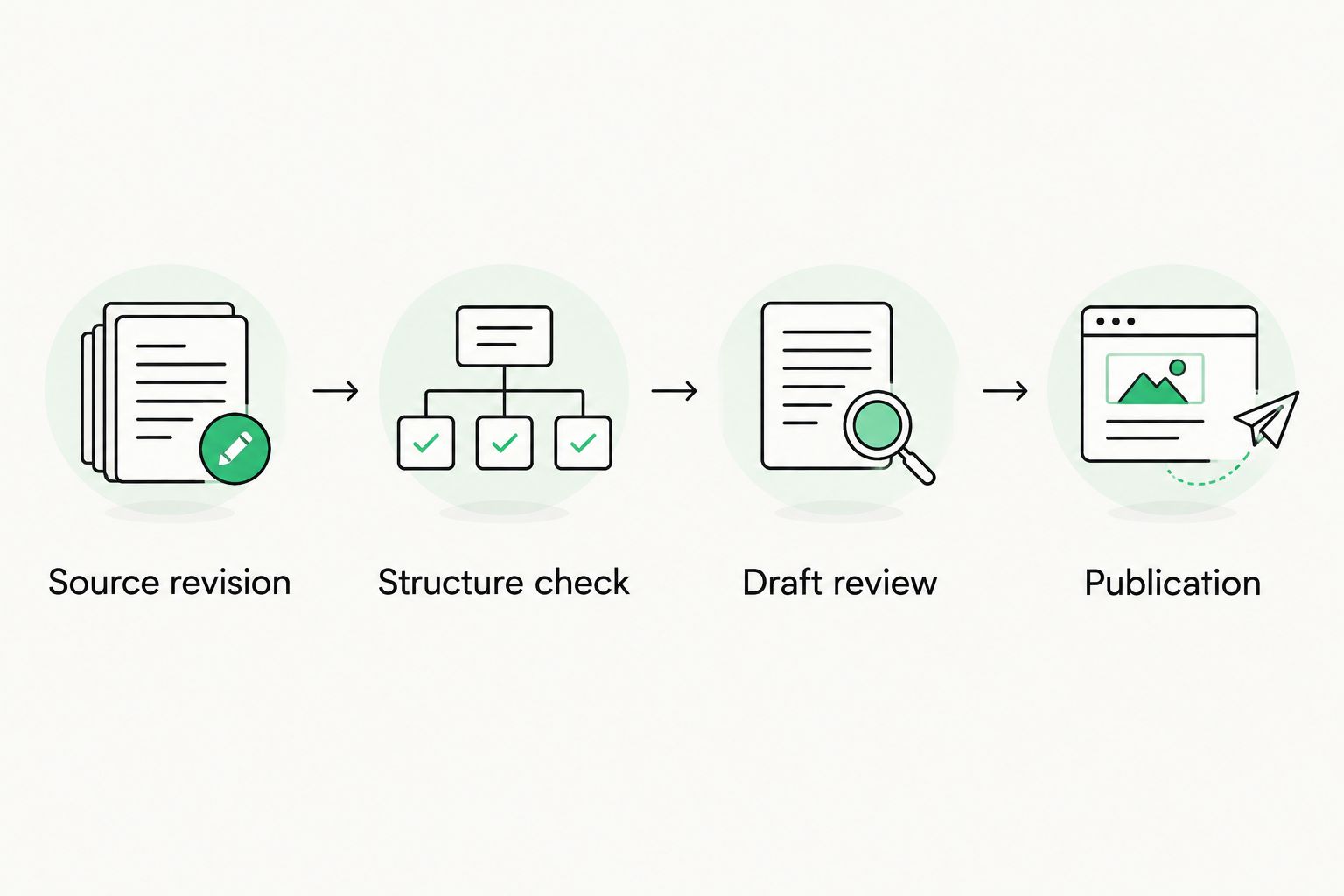
Translation approval does not replace revision checks or publication approval.
Configure the return worker
- Match the result to its stored job record. Confirm the target locale and segment identifiers before reading translated text into the destination mapping.
- Compare the current source
_revwith the revision stored at extraction. If they differ, mark the result as stale and require reconciliation rather than silently accepting it as current. - Read the destination and capture its revision before preparing a patch. Preserve non-translatable fields and reject missing or unexpected segment identifiers.
- Reconstruct rich-text content without replacing structural values with translated strings. Validate the resulting document against the shape your schema and frontend expect.
- Apply the write conditionally. When patching an existing document through the Sanity client, use
ifRevisionId()with the destination revision to reject intervening edits; implement separate creation logic for a destination that does not yet exist. - Save to a localized draft for editorial review. In Studio, the reviewer checks the rendered result and uses Publish only after the release requirements are satisfied.
Expected result: Approved translations reach the intended draft without silently overwriting newer destination edits.
Source revision checking and destination revision checking solve different problems. The first detects outdated translation input; the second protects editorial work changed while the worker was preparing its update.
Validate the frontend
- Open each localized route in staging. Check language selection, titles, body content, image descriptions, and internal links.
- Confirm that language-specific references resolve to the intended content. Define an explicit fallback policy instead of letting missing translations produce accidental mixed-language pages.
- Check the rendered HTML language, canonical URLs, and relevant
hreflangannotations. Generate language alternates only for real equivalent pages. - Verify the language switcher preserves the equivalent page where one exists. Test a missing translation deliberately.
Expected result: The localized document works as a page, not merely as translated data in Studio.
Translate again when source content changes
Best for: teams updating published content repeatedly. After the initial round trip works, add an update workflow that compares approved source snapshots and sends changed translatable content for review.
- Store the last successfully processed source snapshot alongside its field mapping.
- Compare the new snapshot against that baseline. Ignore changes outside the translation allowlist.
- Submit changed text with enough surrounding context to explain the edit. A small textual change can alter the meaning of a whole sentence.
- Keep the current localized page published while the replacement translation is reviewed, if that matches your editorial policy.
- Advance the baseline only after the returned content passes validation and the workflow reaches its defined completion state.
The advantage is narrower translation work. The trade-off is additional state: the worker must distinguish the current source, the submitted source, and the last completed translation.
For continuous localization in 2026, process updates in order for each source-and-locale pair or explicitly supersede older jobs. Do not let an older translation completion overwrite a newer approved result.
Troubleshooting
Localized updates trigger more translation jobs
The webhook is accepting destination writes as source events. Restrict its filter by document type and your locale representation, then enforce the same rule in the receiver. Deduplication alone does not stop a new revision from starting another cycle.
Returned translations overwrite editorial changes
The worker is writing without checking the destination revision. Read the destination, build a targeted patch, and apply a revision precondition; route conflicts to reconciliation rather than retrying an unconditional overwrite.
Rich text loses links or formatting
The extraction flattened Portable Text or the importer rebuilt blocks without their structural data. Preserve keys, annotations, and non-text objects, and test the reconstructed field in the actual frontend renderer before publishing.
Completed translations appear on the wrong page
The return mapping relies on titles, array positions, or mutable slugs. Match results through stored document identity, locale, and stable segment identifiers. Quarantine an unmatched result instead of selecting a destination by similarity.
Translated pages still show source-language content
Trace the rendered value back through the frontend query, reference resolution, and fallback policy. Confirm the destination field contains the translation and that the application actually requests that locale; a successful import does not change frontend queries.
Customize your workflow
Expand only after the pilot survives 3 acceptance checks: repeated events create no duplicate work, stale results cannot overwrite current content, and localized previews render correctly. These are release criteria, not performance benchmarks.
Then add terminology review, content-type-specific approval, and translation-memory maintenance. Wxrks can centralize the translation workflow, but your implementation still owns Sanity extraction, destination mapping, and publishing controls.
Keep a failure queue with job identity, affected locale, and a readable reason. Give editors a deliberate retry path after the underlying problem is corrected; automatic retries are appropriate for temporary delivery failures, not unresolved content conflicts.
FAQ
How do I set up Sanity CMS localization?
Define your localized content model, extract approved source text, send it through translation review, and return it to mapped destination fields. Add revision checks and frontend language routing before publishing localized pages.
Should I use field-level or document-level localization in Sanity?
Use field-level localization for content that shares structure, and document-level localization for language versions with independent editorial lifecycles. Confirm the publishing behavior of your Studio configuration before choosing.
Does this workflow require a native Sanity connector?
No. A server-side integration can handle extraction and return through a supported translation exchange method. Verify transport, identifiers, and rich-text handling before enabling automatic writes.
How do I stop outdated translations from overwriting new content?
Compare the current source revision with the submitted source revision, and condition destination writes on the destination revision. Hold stale results and conflicting edits for reconciliation.
Can I translate Sanity Portable Text without losing formatting?
Yes, by translating text spans while preserving the Portable Text structure. Keep block keys, annotations, and non-text objects intact, then validate the result in your frontend renderer.
Can I automatically publish translations after review?
You can implement automatic publication, but translation approval alone is not a sufficient release gate. Require current source content, valid destination structure, and successful page checks before granting the worker publication authority.
One last thing
Test a deliberate conflict before enabling automation. Send a source document for translation, edit the destination draft, and then return the translation. If the newer editorial change disappears, the workflow is not ready for production—even if every translated sentence is correct.
Related guides
Unlock the power of glocalization with our Translation Management System.
Unlock the power of
with our Translation Management System.