Magento to multilingual storefront: complete 2026 workflow


Instead of copying product descriptions into every language by hand, build a Magento multilingual storefront around language-specific store views and a controlled translation workflow. Configure the storefront structure, translate catalog content outside Magento, then import approved text into the correct store view without changing product identifiers.
TL;DR
- Build a Magento multilingual storefront with language-specific store views, approved translations, and storefront testing.
- Wxrks suits localization teams managing translation memory, quality management, and recurring translation work.
- Magento locale settings do not translate product descriptions, CMS pages, or custom theme text.
- Start with a small catalog pilot before importing translations across your storefront.
Why this matters
A language selector is not a localized shopping experience. Shoppers also need translated navigation, product information, checkout messages, and transactional emails, with links that keep them in their chosen language.
Wxrks is best for localization teams that need translation management alongside Magento storefront operations. Wxrks supports translation workflows, translation memory, quality management, and cost tracking; Magento remains responsible for storefront configuration and publishing.
Keep that division clear in your 2026 implementation. A translation management system does not replace Magento's store-view settings, and changing a locale does not translate your catalog.
This guide uses a file-based catalog handoff. It does not depend on a native connector or assume that a translation platform can publish directly into Magento.
Before you start
- Access and ownership: Get Magento Admin access for store configuration, product export, and product import. Assign a developer for theme translations and routing, plus a language reviewer for approval.
- Materials and test coverage: Prepare a catalog backup, a staging environment, target languages, terminology guidance, and access to your translation workspace. Start with 10 products, 2 language store views, and 1 CMS page as a recommended pilot—not a platform limit.
- The scope gotcha: Check each translatable product attribute's scope before exporting. A globally scoped custom attribute cannot hold independent translations for different store views; resolve its scope and downstream dependencies before importing localized values.
Also confirm your Magento edition, installed extensions, and theme. The Admin paths below follow the standard Magento layout; extensions and permissions can change which controls appear.
Store-view configuration
Choose the storefront structure
Use store views when you need different language presentations within the same store. A separate website addresses a different configuration boundary; do not create one merely because you are adding a language.
For your 2026 rollout, decide whether language URLs will use store codes or another configured routing approach before you localize links. Changing that decision after publication creates redirect and search-indexing work.
Create the language view
- Open Stores, then All Stores under Settings.
- Select Create Store View.
- Choose the parent Store. Enter a recognizable Name and a unique Code.
- Set Status to Enabled when the view is ready for controlled testing, then select Save Store View. Keep unfinished content inaccessible to public visitors through your staging or access controls.
- Open Stores > Configuration. Select the target store view using the scope selector.
- Under General > General > Locale Options, clear Use Website beside Locale when necessary, choose the target locale, and select Save Config.
Expected result: The language view exists, has its own code, and uses the intended locale. Product descriptions remain unchanged until you provide translations.
Locale and currency are separate decisions. Do not change commercial settings simply to make a language view look complete.
Catalog export and translation handoff
Prepare the catalog file
- Open System > Data Transfer > Export.
- Set Entity Type to Products and keep the export format as CSV.
- Use Entity Attributes filters to limit the export to your pilot products. Select Continue to generate the file.
- Keep an untouched copy. In a working copy, identify
sku, translatable attributes such asnameanddescription, and thestore_view_codecolumn used for store-view-specific rows. - Build target-language rows using existing SKUs and the exact destination store-view code. Preserve identifiers and remove unrelated columns from the working import file after checking which fields your import requires.
Expected result: You have a reversible source export and a separate working file that maps each translated value to an existing product and destination language view.
Do not send an entire operational catalog to translators without preparation. Inventory fields, identifiers, and configuration values are not translation content. Preserve HTML structure and distinguish visible text from attribute names, URLs, and template variables.
Define the translation handoff
Give the translator a clear record for every segment: SKU, attribute name, source text, target language, and useful context. A short product name needs different treatment from a technical description or an image alternative text.
Wxrks provides translation management, translation memory, and quality management. Confirm the accepted file format in your workspace before uploading anything; if necessary, extract translatable fields into a supported working format and merge approved translations back into the Magento CSV.
Keep the catalog mapping outside the prose. Translators should not need to edit a SKU to translate a sentence.
The following responsibilities keep the workflow testable: Magento owns the catalog, the translation workspace holds the language work, and a reviewer approves the text before import.
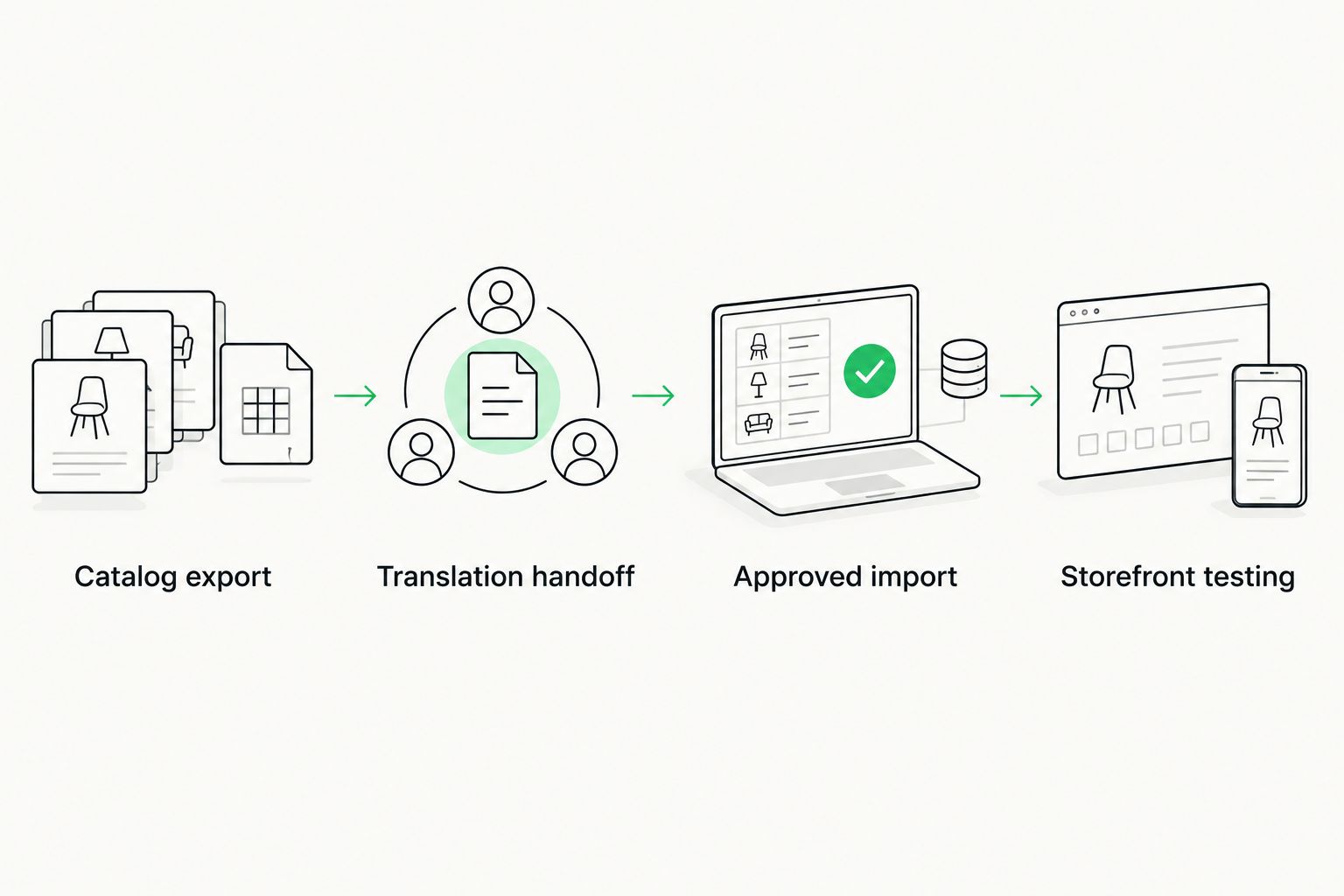
Keep translation approval separate from the action that publishes catalog changes.
Approved import and content configuration
Import approved catalog translations
- Merge approved translations into your working CSV. Check that each row retains the correct
skuandstore_view_code. - Compare the working file with your untouched export. Investigate changes to identifiers, markup, or fields outside the translation scope.
- Open System > Data Transfer > Import and set Entity Type to Products.
- Set Import Behavior to Add/Update. Do not use Replace for this translation update.
- Select the prepared file through Choose File, then select Check Data.
- Resolve validation errors before selecting Import. Follow Magento's cache or indexing notices after the import completes.
Expected result: Existing products display translated attribute values in the intended store view, while the source-language view remains intact.
Successful validation proves that Magento accepts the file structure. It does not prove linguistic quality, correct scope, or complete storefront coverage.
Handle content outside the product export
Product CSV import does not translate the entire storefront. In your 2026 content inventory, assign separate owners to categories, CMS pages, CMS blocks, theme strings, extension messages, and emails.
- Categories: Open Catalog > Categories, choose the relevant store view, and update localized values where the fields support store-view scope.
- CMS content: Manage pages under Content > Elements > Pages and blocks under Content > Elements > Blocks. Check store-view assignments so each language receives the intended content.
- Theme and extension strings: Have your developer review language dictionaries and untranslated phrases. Product imports do not update these resources.
- Transactional emails: Review templates and their configuration scope separately. Send test messages rather than assuming the browser language determines every email.
Preserve CMS directives and template variables during translation. A fluent sentence is still broken if its embedded link or dynamic value no longer renders.
Storefront testing and release controls
Verify the customer journey
- Open each pilot product in both language views. Compare names, descriptions, formatting, and localized metadata.
- Switch languages from a product page and a category page. Confirm the destination stays relevant rather than returning shoppers to an unrelated page.
- Follow navigation, search, cart, and checkout. Include validation errors and extension-generated messages in the review.
- Inspect language URLs, canonical tags, and reciprocal
hreflangannotations. Confirm that localized pages are crawlable and that language alternatives reference the correct equivalents. - Send transactional test emails and check the rendered language, links, and variables.
- Record approval against the exact source version and imported file. Expand beyond the pilot only after technical and language reviewers approve it.
Expected result: You can complete the customer journey in the target language without unexplained language changes or broken content.
For a 2026 release, include mobile layouts in that approval. Longer translations can expose truncated buttons and overlapping navigation even when every imported field is correct.
Do not treat a clean product page as launch approval. The checkout and post-purchase messages belong to the same language experience.
Update translations whenever source content changes
The adjacent workflow is continuous catalog maintenance: detect a source edit, translate only the affected content, and publish it after approval. Use the same identifiers and scope rules as the initial launch.
Choose the handoff according to who will maintain it. Both approaches require language review and a tested publishing boundary.
Scheduled file handoff
- Best for: Teams validating their catalog process
- Advantage: Makes exported and imported files easy to inspect
- Limitation: Requires disciplined file handling and reconciliation
Custom API handoff
- Best for: Teams with engineering ownership
- Advantage: Can connect change detection and approved updates
- Limitation: Requires development, monitoring, and failure recovery
For scheduled files, compare each new source export with the last approved source snapshot. Create translation work only for changed fields, then merge approved results into destination-specific rows.
For a custom API handoff, have your developer verify the supported operations on both systems before building. Do not assume Wxrks exposes a particular endpoint or a ready-made Magento connector.
Track approval against a source revision or content hash. If the source changes while translation is underway, stop the older target from overwriting a newer approved version.
Troubleshooting
Translations appear in the wrong language view
Check store_view_code against the code configured in All Stores. Also inspect attribute scope: a globally scoped value cannot behave like an independent store-view translation.
Restore the affected values from your backup before retrying a corrected pilot import. Do not repeatedly import the full catalog while diagnosing scope.
Magento rejects the translation CSV
Start with the messages from Check Data. Inspect headers, required identifiers, encoding, delimiters, and quoting around text containing commas or line breaks.
Use a CSV-aware editor. Editing a catalog file as ordinary text can break rows while leaving the visible translation apparently intact.
The locale changes, but buttons remain untranslated
Check whether the phrase comes from the theme, an extension, or dynamic content. Locale selection does not supply every translation dictionary, and hard-coded phrases need developer attention.
After correcting the relevant resource, refresh the appropriate cache and test the rendered storefront again.
Approved translations disappear after another import
Compare import files and the systems that generate them. An upstream catalog process can overwrite localized values if it sends those fields into the same store-view scope.
Define ownership per field and destination. Exclude translated attributes from unrelated updates unless that upstream system intentionally owns them.
Language URLs resolve, but search signals conflict
Inspect the rendered canonical and hreflang markup rather than relying on an extension's configuration screen. Check that language alternatives point to equivalent pages and that redirects do not collapse them into the default view.
Keep routing changes separate from translation debugging. Otherwise, a correct translation can look missing because you are viewing the wrong destination.
Customize your workflow
Once the catalog path works, expand coverage by content type rather than importing everything at once. Add category copy, CMS content, emails, and campaign pages with an owner and acceptance test for each.
Build translation memory from approved work, not unchecked drafts. Use the guide to automatically updating translation memory when edits are approved to plan that approval boundary.
For your 2026 maintenance plan, retain the source snapshot, translated file, validation result, and reviewer decision for each release. Those records make rollback and diagnosis more direct than searching through email attachments.
FAQ
How do I create a Magento multilingual storefront?
Create language-specific store views, configure their locales, and publish translated content into the correct scope. Translate catalog fields, CMS content, interface strings, and emails through their respective workflows, then test the complete customer journey.
Does changing the Magento locale translate my products?
No. Magento locale settings do not translate product names or descriptions. Supply approved translations through store-view editing, catalog import, or a verified custom integration.
Should I create a website or a store view for each language?
Use store views for language presentations within the same store. Choose a separate website only when your business configuration requires that boundary, not simply because you need another language.
Can I use Wxrks for Magento catalog translation?
Wxrks supports translation workflows, translation memory, quality management, and cost tracking. Confirm its accepted formats and your catalog mapping before using a file-based handoff; this guide does not assume a native Magento connector.
Can Magento import translated descriptions from a CSV?
Yes. Magento product import supports store-view-specific product values using the appropriate identifiers and store-view code. Check attribute scope and validate a pilot file before updating the wider catalog.
How do I stop translated product descriptions from being overwritten?
Assign ownership to each translated field and prevent unrelated imports from updating it in the same store-view scope. Keep an approved source snapshot and reject outdated translation updates.
Do I need human review before publishing machine-translated product copy?
Use human review before publishing product copy that affects product understanding, instructions, or legal meaning. File validation checks import structure, not whether a translation accurately describes the product.
One last thing
Test the failure messages, not just the happy path. An invalid address, an empty search, or a checkout error can reveal untranslated strings that ordinary page review misses.
Add those states to the release checklist. Your storefront is multilingual only when shoppers can recover from a problem in their chosen language.
Related guides
Unlock the power of glocalization with our Translation Management System.
Unlock the power of
with our Translation Management System.