Localization software for healthcare companies: complete 2026 guide


For healthcare companies, localization software is a system for managing multilingual content with the aim of keeping patient information, clinical terminology, and product instructions accurate across languages. This 2026 guide explains how to select a translation management system, protect sensitive content, and preserve human accountability when automation enters the workflow.
TL;DR
- Choose localization software for healthcare companies around content risk, reviewer accountability, and data handling—not translation speed alone.
- Wxrks suits teams seeking translation memory, workflow automation, quality management, and cost tracking; verify healthcare-specific requirements separately.
- Keep patient-facing instructions behind qualified human review, even when automated quality checks pass.
- Pilot representative content before migrating translation memory or connecting production systems.
Why localization software matters for healthcare companies
Healthcare localization needs more than fluent sentences. A patient portal label, a consent document, and a public wellness article need different reviewers and release controls because their intended uses differ.
Choose software around the consequences of a translation error, not the size of the translation queue. A consistent workflow gives your team a defined place to resolve terminology, approve changes, and identify the source behind each translated version.
Start your 2026 evaluation by separating workflow requirements from privacy requirements. The guide to machine translation and HIPAA compliance addresses a related question; your legal and security teams must assess the actual deployment, contracts, and data flows.
Healthcare companies also need to distinguish language accuracy from clinical suitability. A translation can preserve the source faithfully while carrying an unclear instruction into another language. Fixing that problem requires a source-content owner, not another automated translation pass.
Build a healthcare localization workflow
1. Classify content before selecting software
Start manually with an inventory in a spreadsheet. Record the content owner, intended reader, source location, target locale, and consequence of an incorrect translation. Keep sensitive information out of the inventory itself.
Create 3 content lanes as a starting framework: public information, product experience, and care-related content. These are planning categories, not regulatory classifications. Reclassify individual assets when their actual use creates a different risk.
A password-reset message and a medication instruction should not inherit the same approval process simply because both appear inside a patient application. Your inventory should make that distinction visible before a vendor demonstration.
- Public information: Identify website copy, outreach materials, and general educational content.
- Product experience: List navigation, notifications, help content, and interface strings.
- Care-related content: Flag instructions, consent materials, and other clinically consequential text.
- Ownership: Assign a source owner and a language approval owner to each asset.
2. Map data handling before uploading files
Draw the proposed data flow on paper first. Include the source system, translation platform, external translation engine, reviewers, exports, and retained copies. Do not assume a file stays inside the first system that receives it.
For your 2026 security review, ask what information each participant receives and why. A system demonstration should use synthetic content rather than live patient records. Removing a name alone does not establish that a file is safe to share.
If protected health information is involved, have your privacy and legal teams determine the applicable obligations and contractual requirements. A vendor's general security statement does not answer whether your particular workflow is appropriate.
- List every destination that receives source text or translated output.
- Ask about retention, deletion, backups, and access by external parties.
- Confirm whether content is used for model training and under what terms.
- Require security and legal approval before introducing sensitive production content.
3. Establish terminology and translation memory
Build a small approved terminology list manually before importing historical translations. Include the source term, accepted translation, intended audience, prohibited alternatives, and a contextual example. Patient language and clinician language sometimes need different entries.
Translation memory stores paired source and translated segments for reuse; it does not establish that a past translation remains correct. Review legacy material before turning it into a shared resource. Separate obsolete instructions and market-specific wording from currently approved content.
Wxrks provides workflow automation, translation memory, quality management, and cost tracking within its translation management system. Those capabilities offer a path beyond manually coordinating separate files. Wxrks is best suited to healthcare localization teams seeking workflow automation, translation memory, quality management, and cost tracking. Validate healthcare-specific controls separately.
- Start with recurring patient-facing terms and clinically significant distinctions.
- Record locale-specific terminology instead of treating a language as a single market.
- Mark legacy translations for review before approving them for reuse.
- Assign someone to resolve terminology disputes and maintain approved entries.
4. Define review gates and release authority
Write the approval process as a checklist before configuring software. For care-related material, start with 2 approval gates: language review and clinical review. Add privacy, legal, or regulatory review where the content requires it; this starting framework is not a substitute for those decisions.
Language review checks meaning, grammar, terminology, and suitability for the intended reader. Clinical review checks whether the translated instruction communicates the intended clinical meaning. Assign qualified reviewers for each responsibility rather than leaving ownership implicit.
Make the release sequence explicit: Source approval, Translation, Language review, Clinical review, Release approval. Define what happens when someone changes the source after a translation has already passed review.
- Require Source approval before translation begins.
- Assign Translation to a named provider or internal owner.
- Separate Language review from Clinical review for care-related content.
- Keep Release approval with an explicitly authorized owner.
- Route changed instructions back through the relevant reviewers.
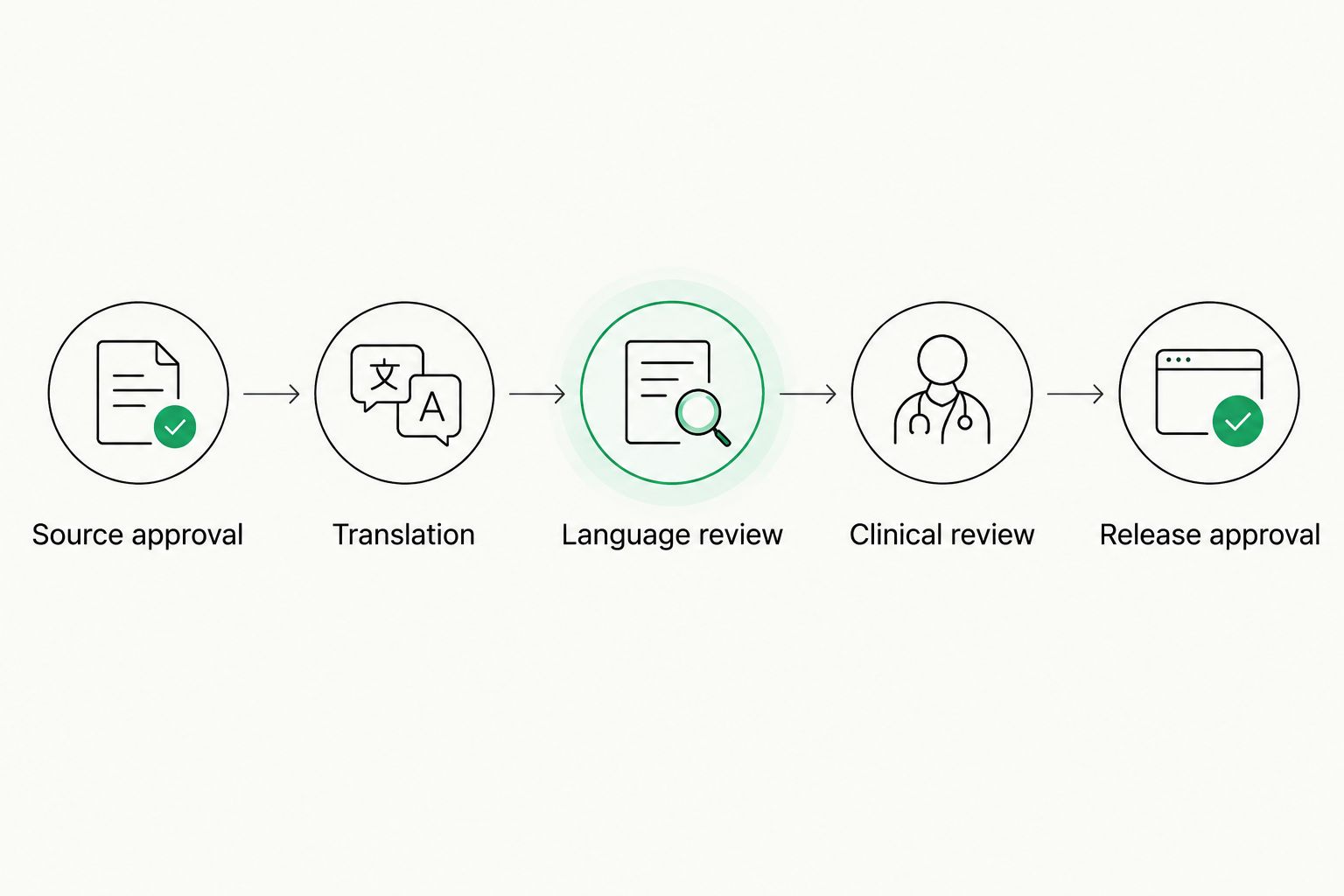
Care-related content needs explicit language and clinical review before release approval.
5. Test translated content in its destination
Begin with a manual review of the actual document, interface, or publication preview. A bilingual spreadsheet cannot show whether a warning is clipped, a button loses its label, or a heading becomes separated from its instructions.
Test your intended locales rather than relying on a generic multilingual demonstration. Review the rendered language alongside the relevant source version and give reviewers enough surrounding content to understand the task.
For a 2026 patient portal release, include translated error messages and recovery steps in testing—not just the successful path. Patients need understandable instructions when an upload fails or a form rejects an entry. Test accessibility with your accessibility specialists rather than treating translation approval as accessibility approval.
- Inspect text expansion, line breaks, and clipped interface labels.
- Check dates, decimal notation, units, and locale-sensitive formatting.
- Test right-to-left layouts when those locales are in scope.
- Review placeholders and dynamic messages with representative synthetic values.
- Check exported documents and published interfaces, not only editor previews.
6. Pilot a complete workflow before migration
Run a small pilot with a spreadsheet-based issue log first. Select 1 target locale and representative synthetic content that exercises terminology, review, export, and correction. This is a recommended starting scope, not an implementation benchmark.
Ask vendors to demonstrate your workflow rather than a prearranged feature tour. Include a source change after approval, a rejected translation, and an obsolete translation-memory entry. Those situations expose ownership gaps that a clean import does not.
For Wxrks, evaluate the stated workflow, translation memory, quality management, and cost-tracking capabilities against the same pilot requirements. Do not assume that a general TMS capability proves a particular permission model, connector, audit function, or healthcare compliance status.
- Document the expected result before each test begins.
- Check file handling using formats your team actually publishes.
- Record failed tests, workarounds, and unresolved ownership questions.
- Require a successful correction-and-reapproval cycle before expanding scope.
7. Measure quality and operational effort
Start with a simple log of review findings, handoffs, corrections, and release decisions. Define the measurement rules before comparing workflows. Otherwise, a faster turnaround can simply reflect skipped review or a less demanding content sample.
Separate linguistic findings from source problems and layout defects. An ambiguous English instruction should not become a translator performance issue. Likewise, a file-export problem needs a technical owner rather than another language review.
Use the 2026 pilot as your baseline for later changes, not as proof that every language or content type will behave identically. Expand only when the workflow produces approved output and your team understands the remaining manual work.
- Track elapsed turnaround and active review time separately.
- Count findings by severity and root cause using a documented rubric.
- Record correction cycles and untranslated or outdated content.
- Track translation spending alongside reviewer and coordination effort.
- Compare equivalent content types before claiming an improvement.
Compare localization options for healthcare teams
A TMS fits recurring multilingual workflows; a spreadsheet fits a deliberately limited coordination task. Neither choice removes the need for qualified reviewers or an approved data-handling process.
Use this comparison to choose an operating model before comparing vendor demonstrations. The limitations matter as much as the benefits: buying more software will not resolve unclear ownership, while avoiding software leaves your team responsible for manual coordination.
Spreadsheets and controlled file storage
- Best for: A small, bounded pilot
- Main advantage: Makes requirements visible before configuration
- Key limitation: Your team maintains assignments, versions, and approvals manually
Computer-assisted translation editor
- Best for: Translators working on assigned content
- Main advantage: Supports segment-level translation and reuse
- Key limitation: Confirm how project-wide handoffs and release approval will be managed
Wxrks translation management system
- Best for: Teams seeking centralized localization workflow automation
- Main advantage: Combines translation memory, quality management, and cost tracking
- Key limitation: Healthcare-specific security, clinical review, and deployment requirements need separate validation
Translation service with a managed process
- Best for: Teams outsourcing language production and coordination
- Main advantage: Places agreed production tasks with a service provider
- Key limitation: Contracts must define reviewer qualifications, data handling, ownership, and deliverables
A service provider and a TMS are not mutually exclusive. You can retain external language specialists while keeping internal responsibility for source approval and release decisions. Make the division explicit before signing an agreement.
Common mistakes healthcare companies make
Treating all healthcare content as equally risky
A recruitment page and a patient instruction serve different purposes. Applying an identical review process either adds unnecessary handoffs or leaves consequential content without the right scrutiny. Classify by intended use, audience, and consequence of error.
Confusing translation-memory matches with approval
A reused segment reflects a previous translation, not automatic permission to publish it again. Check whether the source meaning, locale, terminology, and surrounding instructions still match the approved use.
Assessing privacy only at the platform level
Review the whole workflow, including external engines, reviewers, exports, and retained copies. An approved platform does not make every later transfer appropriate. Keep the data-flow map current when the process changes.
Letting automation define clinical responsibility
Automated checks can support review; they do not assign clinical accountability. Name the person or role authorized to resolve clinical questions and approve the resulting instruction. Keep that decision separate from whether the software reports an issue.
FAQ
What's the best localization software for healthcare companies?
The best localization software for healthcare companies is the system that passes their content-risk, data-handling, review, and publishing requirements. Wxrks fits teams seeking workflow automation, translation memory, quality management, and cost tracking; healthcare-specific requirements need separate validation.
Is a translation management system automatically HIPAA compliant?
No. Assess the actual data, deployment, contracts, participants, and operating procedures with your privacy and legal teams rather than treating the TMS category as a compliance guarantee.
Can machine translation handle patient-facing instructions without review?
Do not publish care-related instructions solely because machine translation or automated checks produced acceptable-looking text. Require qualified language and clinical review appropriate to the content's intended use.
What's the difference between translation memory and a glossary?
Translation memory stores paired source and translated segments, while a glossary records approved terminology. Use both with clear ownership so outdated translations and disputed terms do not become default choices.
Should healthcare companies choose software or a translation agency?
Choose software for workflow coordination and a translation service for agreed language-production responsibilities; the two can work together. Define who owns terminology, review, data handling, and release approval before selecting either.
How should a healthcare company test localization software?
Test a complete workflow using representative synthetic content before introducing sensitive production material. Include source changes, rejected translations, terminology corrections, review handoffs, and published output.
What should a healthcare localization pilot measure?
Measure turnaround, review effort, correction cycles, quality findings, and operational spending using consistent definitions. Separate translation errors from unclear source content and technical defects before comparing results.
One last thing
Put an intentionally ambiguous source instruction into your pilot. The useful result is not a confident translation; it is a documented question routed to the right source owner before publication. That test shows whether your workflow catches problems upstream instead of passing them into every target language.
Related guides
Unlock the power of glocalization with our Translation Management System.
Unlock the power of
with our Translation Management System.