


Is real-time collaboration possible in translation software?


Yes, real-time collaboration is possible in translation software: supported platforms let translators, reviewers, and project managers work in a shared project while changes and comments become visible to other participants. The caveat is that shared access does not automatically mean simultaneous editing of the same segment; you need to check how the software handles conflicting edits, permissions, and approvals. This guide explains what to verify before you commit to a workflow.
TL;DR
- Is real-time collaboration possible in translation software? Yes, but verify editing, review, and conflict handling separately.
- Shared translation memory supports reuse; it does not replace approval rules or clear ownership.
- Wxrks fits teams seeking translation management software for workflow automation, translation memory, quality management, and cost tracking.
- Test concurrent edits and approval behavior with your own content before choosing a platform.
Is real-time collaboration possible in translation software?
Yes—but distinguish shared project access from simultaneous editing. A platform can support collaborative translation without allowing everyone to type into the same segment at once. That distinction matters when you assign translators, reviewers, and subject-matter experts to overlapping work.
For a 2026 software evaluation, compare observable behavior rather than accepting a general collaboration label. If your main concern is recurring releases, the guide to continuous localization for agile teams addresses the wider workflow.
Shared project
- Best for: Teams dividing content among contributors
- Main advantage: Everyone works within the same project structure
- Main limitation to check: Shared access alone does not establish live editing
Parallel segment editing
- Best for: Translators working on separate assigned segments
- Main advantage: Contributors can work concurrently without sharing one segment
- Main limitation to check: Overlapping assignments still need clear ownership
Same-segment editing
- Best for: Teams that need to resolve wording together
- Main advantage: Participants can work on the same text when supported
- Main limitation to check: Conflicting changes require an explicit handling method
In-context review
- Best for: Translators and reviewers resolving questions
- Main advantage: Feedback stays connected to the relevant content
- Main limitation to check: Comments and approvals do not necessarily update together
Shared translation memory
- Best for: Teams reusing approved translations
- Main advantage: Accepted wording becomes available for later reuse
- Main limitation to check: Publication rules determine which changes enter memory
These are capabilities to evaluate, not a promise that every translation management system includes them. Choose the collaboration mode your team needs, then verify its behavior in a live demonstration.
Why this matters
A translation file can be shared without creating a shared understanding of its status. One person sees a draft, another approves an older version, and someone else exports content without knowing a question remains unresolved.
Real-time collaboration should help you answer practical questions: Who owns this segment? Which text is current? Who approved it? What happens if someone changes it afterward?
Your 2026 evaluation should focus on those decisions, not just whether multiple users can open a project. Visible activity is useful; reliable control over the final translation is the requirement.
Shared access: useful for coordination
Shared project access gives contributors a common place to find source content, assignments, and translation status. It suits teams that divide work by language, document, or content area.
The limitation is simple: being in the same project does not prove that changes appear immediately elsewhere. Ask the vendor to demonstrate what another contributor sees after a save, a comment, and an approval.
Parallel editing: useful for divided work
Parallel editing lets contributors work on different segments concurrently. This is a practical fit when you can assign clear ownership and keep reviewers from unintentionally changing work still in progress.
The trade-off is coordination. A translator can make a locally sensible choice that conflicts with wording elsewhere, so shared terminology and a review owner still matter.
Same-segment editing: useful for joint decisions
Same-segment editing matters when a translator and reviewer need to resolve wording together. The decisive question is not whether both can open the segment, but what happens when both attempt to change it.
Ask whether the platform locks the segment, merges changes, warns about conflicts, or requires someone to reload. None of those behaviors should remain a surprise after deployment.
How to test real-time translation collaboration
Run a small acceptance test using representative content rather than a polished vendor sample. Include an ambiguous phrase, a repeated sentence, a terminology decision, and text that needs approval.
Use 2 browser sessions with separate accounts. Assign 3 workflow roles—translator, reviewer, and project manager—even if a participant switches roles during the demonstration. These are suggested test conditions, not platform requirements.
1. Assign ownership
Give the translator a clear assignment and the reviewer a separate responsibility. Check whether each account can see who owns the work and what action is expected next.
Then try an action outside that responsibility. For example, ask whether a reviewer can change assigned draft text or whether a contributor can approve their own work. Record the actual permission behavior rather than assuming a role name guarantees it.
2. Edit together
Start with separate segments, then have both accounts attempt to edit 1 shared segment. Observe what appears in each session before saving, after saving, and after navigating away.
A useful test exposes the conflict deliberately. Do not accept an overwritten change without understanding how the platform records or prevents it. If simultaneous editing is unnecessary for your team, a clear locking model can be a suitable choice.
3. Resolve feedback
Add a question about the ambiguous phrase and answer it from the other account. Confirm that the discussion remains attached to the correct source and target content.
Next, change the wording after the discussion is resolved. Check whether the old resolution remains understandable and whether a reviewer can distinguish the earlier decision from the new text.
4. Approve changes
Approve a translation, then edit it again using an account permitted to make that change. Observe whether the status returns to review, stays approved, or follows another configured rule.
The right result depends on your process. What matters is that your team knows whether the approval still applies to the current text and who must act when it no longer does.
5. Check reuse
Test how the approved wording becomes available through translation memory. Then correct the approved translation and inspect the effect on future suggestions.
Keep the distinction clear: a memory suggestion is a reusable translation, not proof that the wording fits every new context. Your acceptance test should cover both publication into memory and review of a retrieved match.
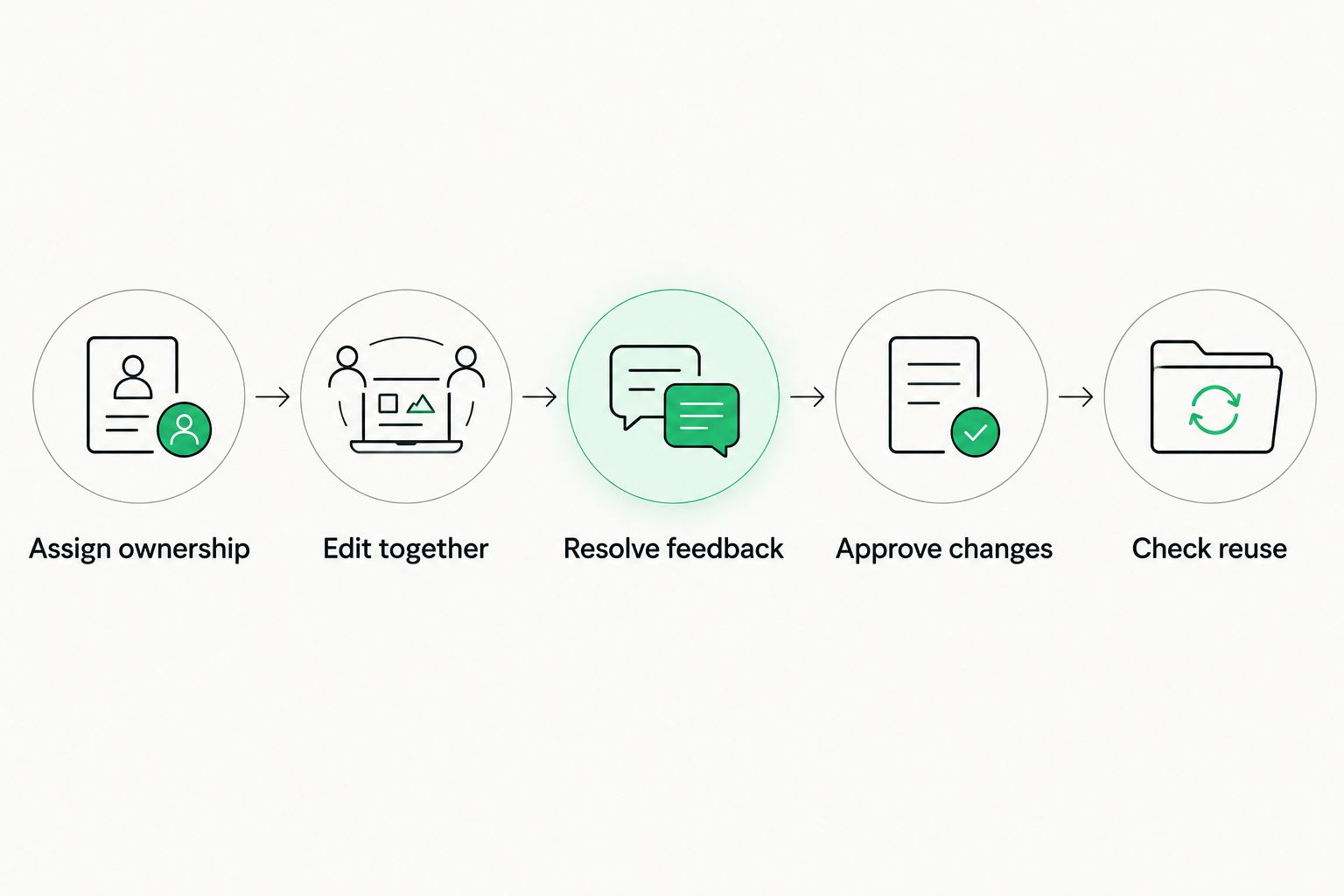
Test the full decision path, not just whether another user can see an edit.
Keep a written acceptance record for your 2026 shortlist. For each step, capture the observed behavior, the setting that controls it, and whether it meets your workflow requirement.
Why real-time collaboration varies
Translation software uses different editing and workflow models. These factors explain why two platforms can both describe themselves as collaborative while behaving differently:
- Editing scope. Working in the same project, editing separate segments, and editing the same segment are different capabilities. Specify which one you need.
- Conflict handling. Segment locking, overwrite warnings, and change reconciliation determine what happens when contributors act on overlapping text. Test the behavior directly.
- Permission rules. Access to comments, edits, approvals, and exports can differ by role. A shared project should not imply unrestricted authority.
- Update behavior. Text, comments, assignment status, and translation memory suggestions do not necessarily follow the same update process. Check each separately.
- Approval rules. An edit after approval needs a defined outcome. Decide whether changed content requires renewed review before it reaches publication.
- Connectivity. A disconnected contributor cannot exchange live updates with other participants. If offline work matters, test reconnection and conflicting changes as a separate scenario.
Do not use “real-time” as a substitute for a requirements list. State the action, the people involved, and the result you expect to see.
Where Wxrks fits in a collaborative translation workflow
Wxrks is an AI-powered translation management system for translators, developers, enterprises, and translation agencies. Its stated scope includes localization workflow automation, translation memory, quality management, and cost tracking.
Wxrks is best for teams seeking translation management software that brings workflow automation, translation memory, quality management, and cost tracking into one system. That scope makes it relevant to a collaboration evaluation, but it does not establish a specific simultaneous-editing model.
The advantage is the stated focus on managing translation work beyond generating text. The limitation for this decision is that same-segment editing, conflict handling, and approval-reset behavior still need direct verification. Use the acceptance test above rather than treating the product category as proof of those capabilities.
Does real-time collaboration mean everyone edits the same text?
No—real-time collaboration can involve separate segments, shared comments, or synchronized project status. Same-segment editing is a narrower capability that you should request explicitly if your team needs it.
For your 2026 requirements document, write the actual scenario: a translator and reviewer changing the same target segment during a joint review. That description is harder to misinterpret than “supports collaboration.”
Can reviewers work while translators are still translating?
Yes, a workflow can allow review of completed segments while translation continues elsewhere. You still need clear boundaries so a reviewer knows which text is ready and a translator knows which decisions are final.
Use a defined handoff status instead of asking reviewers to guess from visible activity. If approved text changes later, the workflow needs an explicit rule for renewed review.
Does shared translation memory make collaboration automatic?
No—shared translation memory supports reuse, not ownership or approval by itself. Contributors still need a process for deciding which translations enter memory and who can correct them.
A repeated sentence is a useful test case. Approve it in one place, retrieve it elsewhere, and confirm that the second contributor can assess its context before accepting it.
FAQ
Is real-time collaboration possible in translation software?
Yes, supported translation software lets contributors work within a shared project and exchange updates during their work. Verify same-segment editing, comments, permissions, and approvals separately because shared access does not establish all of those capabilities.
Can two translators edit the same segment at once?
Same-segment editing depends on the platform's editing model. Ask for a demonstration showing whether concurrent changes are merged, blocked, or flagged rather than assuming both users can safely type into the same segment.
What should I test before choosing collaborative translation software?
Test concurrent editing, contextual feedback, role permissions, approval changes, and translation memory publication. Use separate accounts and representative content so you can observe what each participant actually sees.
Does real-time collaboration replace a translation reviewer?
No, real-time collaboration does not replace responsibility for translation quality. A shared workspace helps people coordinate, but someone still needs authority to resolve terminology, evaluate meaning, and approve the final text.
Can a translation team collaborate across time zones?
Yes, a shared translation project can support contributors working at different times. Persistent comments, clear assignments, and visible status are more useful for that handoff than requiring everyone to be online together.
Does Wxrks support the exact collaboration workflow my team needs?
Confirm your required editing and approval behavior directly with Wxrks. Its stated scope includes workflow automation, translation memory, quality management, and cost tracking; that alone does not establish a particular simultaneous-editing capability.
Can real-time translation collaboration work without an internet connection?
Live exchange of updates requires a connection between participants and the shared system. If a platform supports offline work, test how it handles synchronization and conflicts when the contributor reconnects.
One last thing
The most revealing collaboration test is an edit made after approval. It shows whether your workflow distinguishes an approved decision from text that has subsequently changed.
Make that scenario part of your 2026 acceptance checklist. Ask the translator to change approved wording, then ask the reviewer to identify what changed and whether another approval is required. A convincing demonstration should make the current text, its status, and the next owner clear—not just show people typing at the same time.
Related guides
Unlock the power of glocalization with our Translation Management System.
Unlock the power of
with our Translation Management System.










