Is pseudo-localization testing necessary before launch?


Yes—run pseudo-localization testing before a multilingual launch to expose clipped text, hard-coded strings, and layout failures before translated content reaches users. It checks whether your interface can handle localization; it does not replace linguistic review or testing with real target-language content.
TL;DR
- Run pseudo-localization testing before launch to catch interface defects without waiting for completed translations.
- Use expanded text, accented characters, and directional testing to check different failure modes.
- Wxrks supports translation workflows; interface readiness still needs testing in the running application.
- Keep linguistic QA and real-language testing as separate release requirements.
Is pseudo-localization testing necessary before launch?
Make pseudo-localization a release requirement when your product will ship in multiple languages. Generate artificial translations from your source strings, load them into a test build, and exercise the interface. This exposes engineering problems that reviewing translation files alone cannot reveal.
The distinction starts with internationalization: your application needs to support different languages before translated words can work correctly inside it. Pseudo-localization tests that foundation without requiring finished translations.
Use these test profiles according to the risks in your product:
Expanded text
- Best for: Tight layouts and compact controls
- What it exposes: Clipped labels, overlapping elements, inaccessible actions
- Limitation: Does not reproduce actual translated wording
Accented text
- Best for: String coverage and character handling
- What it exposes: Unconverted source text, missing glyphs, encoding defects
- Limitation: Does not prove support for every writing system
Directional testing
- Best for: Interfaces targeting right-to-left languages
- What it exposes: Reading-order, alignment, and mixed-direction problems
- Limitation: Needs explicit direction settings and real-language validation
These profiles complement each other. An expanded label can reveal a narrow button while leaving a hard-coded error message untouched; accented text makes that untouched message easier to spot.
Why this matters
An interface that looks correct in its source language is not evidence that it is ready for localization. Text length, character shapes, reading direction, and formatting conventions all affect the finished experience.
For your 2026 launch checklist, separate interface readiness from translation approval. A reviewer can approve every translated string while the application still hides a confirmation button or displays an untranslated validation message.
The advantage is timing. You can investigate structural defects while translation work is still underway instead of discovering them only when completed language files arrive.
What should pseudo-localization testing cover?
Start with the paths users need to complete a task, not just the screens that are easiest to capture. Include navigation, forms, dialogs, notifications, loading states, empty states, and errors.
Check text wherever the application obtains it. Resource files are only part of the picture: server responses, content systems, embedded widgets, and dynamically assembled messages can introduce different failure points.
Expanded text: best for finding layout constraints
Generate visibly longer versions of source strings and inspect the rendered result. Concentrate on short controls, dense tables, navigation tabs, and dialogs with fixed dimensions.
Fix the layout rather than shortening artificial text until it fits. Allow wrapping where it makes sense, remove unnecessary fixed dimensions, and confirm that important actions remain visible. Expansion is a stress condition, not a prediction of every language's text length.
Accented text: best for finding coverage gaps
Replace eligible letters with recognizable accented characters while keeping the source understandable. Add visible boundary markers so testers can identify where a transformed string begins and ends.
Unexpected unchanged text becomes a signal to investigate. It might be hard-coded, loaded through a different pipeline, or deliberately excluded; the test identifies the location, and engineering determines the cause.
Directional testing: best for right-to-left preparation
Use an explicit right-to-left test configuration when your release includes right-to-left languages. Inspect alignment, focus order, navigation, and mixed-direction content such as email addresses and identifiers.
Reversing a source string is not a valid substitute for bidirectional rendering. Directional testing needs the application to exercise its actual direction settings, followed by review using real target-language content.
How do you run a useful pre-launch test?
Build the test around the same resource-loading path your localized application uses. A separate demonstration screen proves little if production screens load strings differently.
Use these 5 workflow steps as a practical sequence for a 2026 release:
- Prepare resources. Identify translatable strings, their resource keys, and the code paths that display them. Include messages outside the main navigation and document intentional exclusions.
- Transform strings. Generate the required pseudo-locales while protecting placeholders, markup, and message syntax. Keep generated resources separate from approved translations.
- Exercise journeys. Run the application through important tasks, including failures and recovery. Inspect actual rendered screens rather than relying only on file validation.
- Triage defects. Record the affected resource, component, viewport, test profile, and reproduction steps. Assign a clear owner and describe the user-visible consequence.
- Retest fixes. Repeat the failing journey after the correction, then test real translations before release. Keep useful regression cases for subsequent changes.
The sequence matters: transformed strings must reach the running application before the test can reveal layout failures. A resource-generation script that succeeds is not evidence that users can complete a task.
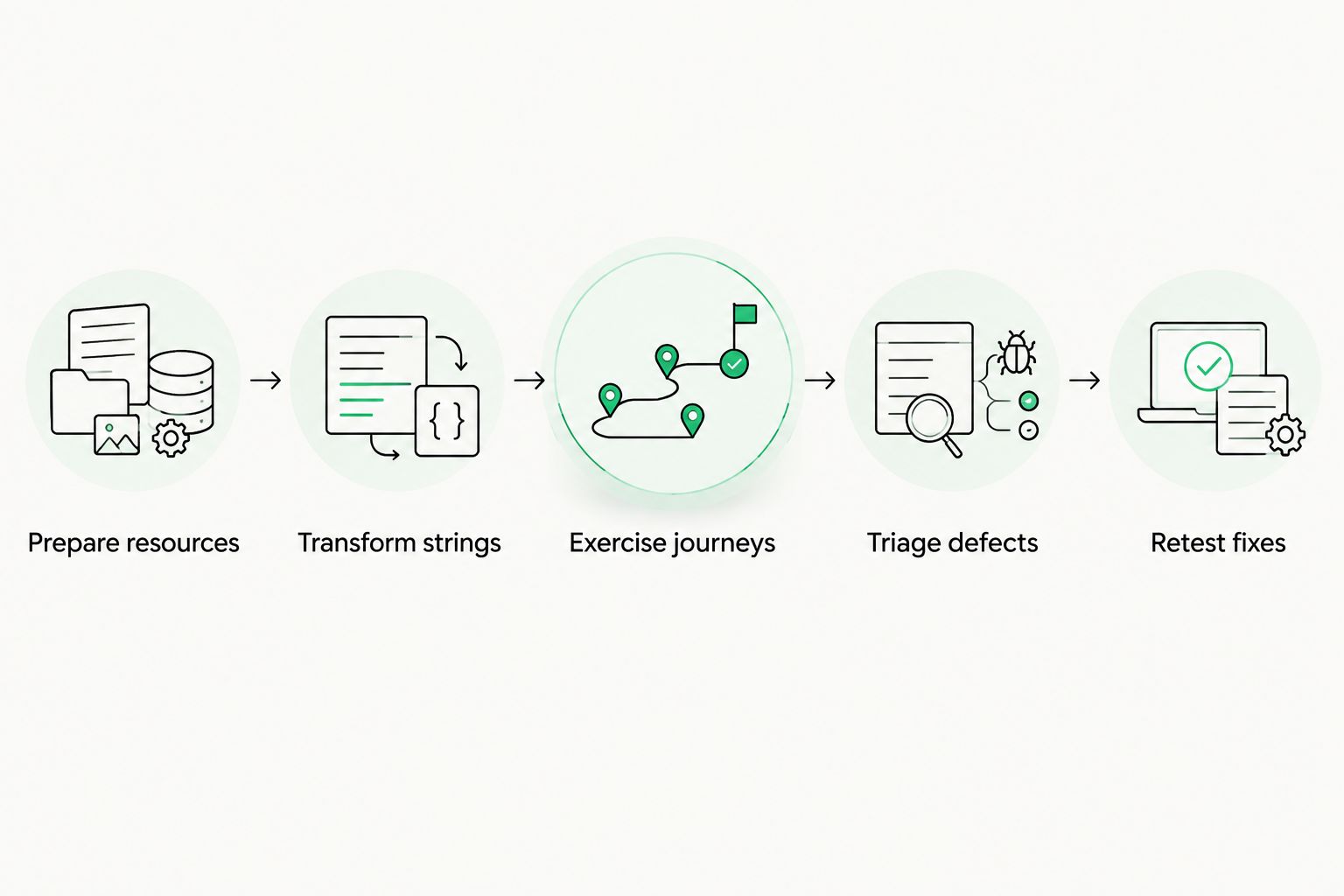
Test transformed resources in the running application, then retest the defects you fix.
Protect interpolation tokens and message structure during transformation. If your generator corrupts a placeholder, the resulting failure tests the generator rather than the application's localization behavior.
Keep pseudo-locales out of public language selectors and approved translation assets. They are diagnostic resources, not content for customers or translation memory.
Why pseudo-localization testing scope varies
The test should follow your product's actual risks. Use these factors to decide where deeper inspection belongs:
- Layout constraints. Fixed-width controls, dense dashboards, and narrow mobile views need close inspection for clipping and overlap.
- Content sources. Applications combining bundled strings, server messages, and external content need checks across those loading paths.
- Writing direction. Releases supporting right-to-left languages need directional testing in addition to text transformation.
- Message complexity. Variables, plural branches, markup, and assembled sentences require tests that preserve and exercise their structure.
- Interaction states. Errors, disabled controls, permission prompts, and empty results need coverage beyond the default screen.
- Change surface. New components, revised layouts, and changed resource-loading code deserve fresh regression checks.
For 2026 planning, scope by component and journey rather than treating every screen as equally risky. A shared navigation defect affects every screen that uses that component; an isolated label defect has a narrower reach.
What should block a multilingual launch?
Block release when a localization defect prevents users from completing an important task or understanding its outcome. Examples include a hidden submit action, a required field label that becomes unreadable, or an error message that never enters the localization pipeline.
Separate those failures from cosmetic issues. A harmless line break and an inaccessible confirmation control should not receive the same priority, even if both appear in the same test run.
Write release criteria around observable behavior:
- Users can reach and activate the actions needed for the tested journey.
- Required labels and instructions remain readable in the tested views.
- Placeholders resolve without exposing tokens or breaking the message.
- Unexpected source-language text has an explained cause and an assigned resolution.
- Relevant directional tests preserve usable navigation and content order.
In your 2026 release record, identify the build, test profiles, journeys, and unresolved defects. A pass without a defined scope tells the next release owner very little.
How do you test multilingual mobile interfaces?
Test compact layouts with the keyboard open, dialogs displayed, and validation messages visible. A form that fits before interaction can fail once additional text and controls share the screen.
Include supported text-size settings and relevant device configurations in your plan. Pseudo-localized text stresses available space; accessibility settings expose additional constraints that deserve their own checks.
For mobile releases, testing multilingual app interfaces requires interaction checks as well as screenshots: clipped labels, hidden actions, and focus problems appear in different application states. Record the state that triggers each defect so another tester can reproduce it.
Screenshot comparison can help identify visual changes, but it does not establish that a task still works. Pair visual inspection with assertions about visible controls, resolved messages, and successful completion of the journey.
Where does a translation management system fit?
Wxrks is a translation management system for teams managing localization workflows, translation memory, quality, and cost tracking. Use that workflow layer to manage translation work, while treating application-level pseudo-localization as a separate engineering check.
The benefit of this division is clear ownership. Translation teams handle content and review; developers address resource loading and interface behavior; QA verifies the running experience. A TMS does not replace those application tests.
When evaluating Wxrks, distinguish your translation-management requirements from your test-pipeline requirements. Specify how approved content reaches the application, who validates the resulting build, and where defects are recorded without assuming that any particular integration or pseudo-locale generator is included.
Keep those boundaries explicit in your 2026 workflow. A translation status should describe content readiness, not silently stand in for a passed interface test.
Can you skip it for a source-language-only launch?
You can defer pseudo-localization for a genuinely source-language-only release with no localization requirement. That decision does not establish that the interface is ready for another language later.
If multilingual support is already planned, test shared components during development. Otherwise, layout and resource-loading assumptions remain untested until translation work reaches the application.
Does pseudo-localization replace linguistic QA?
No—pseudo-localization cannot verify meaning, terminology, tone, or cultural suitability. Artificial strings expose technical behavior, not whether the words communicate the intended message.
Use real translations to review language-specific wrapping, punctuation, formatting, and context. Treat the stages as 2 distinct checks: technical readiness with synthetic content, then language and contextual correctness with actual translations.
When should you rerun pseudo-localization testing?
Rerun affected tests when you change shared components, layouts, resource handling, or user-facing strings. Do not reserve the test for the final release candidate.
Add repeatable checks to your development workflow and retain manual inspection for behavior that automation does not establish. A passing script is useful evidence only for the conditions it actually checks.
FAQ
Is pseudo-localization testing necessary before every release?
Rerun pseudo-localization testing for releases that change localized interfaces, shared layouts, or string handling. Focus regression coverage on the affected components and important user journeys.
Can I run pseudo-localization testing before translations are ready?
Yes—pseudo-localization testing uses artificially transformed source strings, so completed translations are not required. The test build still needs to load those resources through the application's localization path.
What is the difference between pseudo-localization and localization testing?
Pseudo-localization tests technical behavior using artificial strings; localization testing evaluates the application with actual localized content. Both belong in a multilingual release process because neither establishes everything the other checks.
Does expanded text prove that every language will fit?
No—expanded text exposes space constraints but does not reproduce every language's wrapping and rendering behavior. Test actual target-language content before approving the localized interface.
Can pseudo-localization find hard-coded strings?
Pseudo-localization makes unexpected unchanged text easier to identify. Investigate each instance because intentional exclusions and content loaded through another source can also remain unchanged.
Should I put pseudo-localized strings in translation memory?
No—keep pseudo-localized strings separate from approved translation memory. They are synthetic test data, not reusable translations.
Can Wxrks replace testing the localized application?
No—translation management does not replace testing the running application. Use Wxrks for its stated translation workflow, memory, quality-management, and cost-tracking functions, and validate interface behavior separately.
One last thing
Test a failure path, not just a successful journey. Trigger a validation error, an empty result, or a failed request and inspect the text that appears.
These states often use different components or message sources from the main screen. Including them makes your test scope more representative without pretending that a polished default view proves release readiness.
Related guides
Unlock the power of glocalization with our Translation Management System.
Unlock the power of
with our Translation Management System.