


Can localization software support right-to-left languages?


Yes, localization software can support right-to-left languages such as Arabic and Hebrew by managing translated strings, preserving text, and coordinating review. That support does not automatically make your application right-to-left: your interface must also handle bidirectional text, layout direction, fonts, and testing in the rendered product.
TL;DR
- Can localization software support right-to-left languages? Yes, but translation management and interface rendering require separate checks.
- Arabic and Hebrew localization needs mixed-direction testing, not just right-aligned text.
- Wxrks supports translation management workflows; evaluate right-to-left behavior using your actual files and interface.
- Approve translated strings and rendered screens separately before releasing a right-to-left interface.
Can localization software support right-to-left languages?
Yes. Treat right-to-left support as a chain of responsibilities, not a checkbox on a language list. Your localization system manages the content; your application determines how that content appears and behaves.
A translation editor that displays Arabic correctly does not prove that your checkout, navigation, or exported document will display it correctly. Evaluate the entire route from source string to finished screen. The Figma-to-translated-UI-strings workflow provides related context for connecting design and translated interface content.
Translation management
- What working support looks like: Strings retain their characters, identifiers, placeholders, and context
- What it does not prove: The finished interface has the correct layout direction
Translation editor
- What working support looks like: Reviewers can read and edit RTL and mixed-direction content correctly
- What it does not prove: Every exported file renders correctly elsewhere
Application rendering
- What working support looks like: Text direction, alignment, and directional controls behave correctly
- What it does not prove: Translation meaning and terminology are correct
Linguistic review
- What working support looks like: A qualified reviewer approves meaning, terminology, and readability
- What it does not prove: Interactive controls work correctly
Functional testing
- What working support looks like: Forms, navigation, selection, and input behave correctly
- What it does not prove: Every future content update will remain correct
These are complementary responsibilities. None replaces the others. For a 2026 software evaluation, ask the vendor to demonstrate your content through import, editing, export, and rendering rather than showing an isolated translated sentence.
Why this matters
An RTL release can contain accurate translations and still be difficult to use. An email address can interrupt the reading order, a directional icon can point the wrong way, or a form label can appear disconnected from its field.
Your release decision therefore needs separate linguistic and functional approval. Translators should not have to diagnose CSS, and developers should not have to decide whether an Arabic instruction sounds natural.
The practical benefit is accountability: each defect reaches the person who can fix it. Keep translation errors, display errors, and interaction errors distinct in your review process.
Right-to-left text is not reversed text
Arabic and Hebrew generally run right to left, but an RTL sentence can contain left-to-right material. Product codes, Latin-script names, and numeric sequences introduce mixed-direction content.
Never reverse a translated string to make it look right-to-left. Store text in its logical order and let a suitable rendering system determine its display order. Unicode Standard Annex #9, the Unicode Bidirectional Algorithm, defines how bidirectional text is ordered for display.
That distinction matters when users select, copy, search, or edit text. A visually improvised solution can look acceptable in a screenshot while producing incorrect behavior during interaction.
For web interfaces, language and direction are separate settings. A lang attribute identifies the content's language; a dir attribute establishes direction. Declaring Arabic as the language is not a substitute for setting the appropriate direction.
Mixed-direction strings need isolation
An Arabic sentence containing a Latin-script account name is not a single-direction string. Surrounding punctuation and neutral characters can interact with both directions.
HTML's bdi element isolates embedded text from the directional behavior of its surroundings. The dir="auto" attribute lets the browser determine direction from the content's first strong directional character, which is useful for suitable user-generated fields.
Use these mechanisms deliberately. Automatically detecting direction for a user-entered name is different from defining the base direction of an entire page.
What should you test before choosing localization software?
Use a representative workflow rather than a vendor-created sample. The following sequence separates content handling from interface behavior and gives translators and developers clear acceptance points.
- Source context. Select real navigation labels, form instructions, validation errors, and messages with variables. Include screenshots or usage notes so translators know what each string does.
- String integrity. Import the content and confirm that identifiers, placeholders, markup, and characters remain intact. Edit and export the translations, then compare their structure with the source.
- Mixed text. Test RTL sentences containing Latin-script names, email addresses, numeric sequences, and punctuation. Check both the editor and the rendered application.
- Layout behavior. Review navigation, spacing, alignment, focus, and directional controls in the product. Confirm that the interface changes direction without reversing content that should retain its orientation.
- Release review. Have a qualified language reviewer approve meaning and readability while a tester checks interactions. Resolve both types of defects before release.
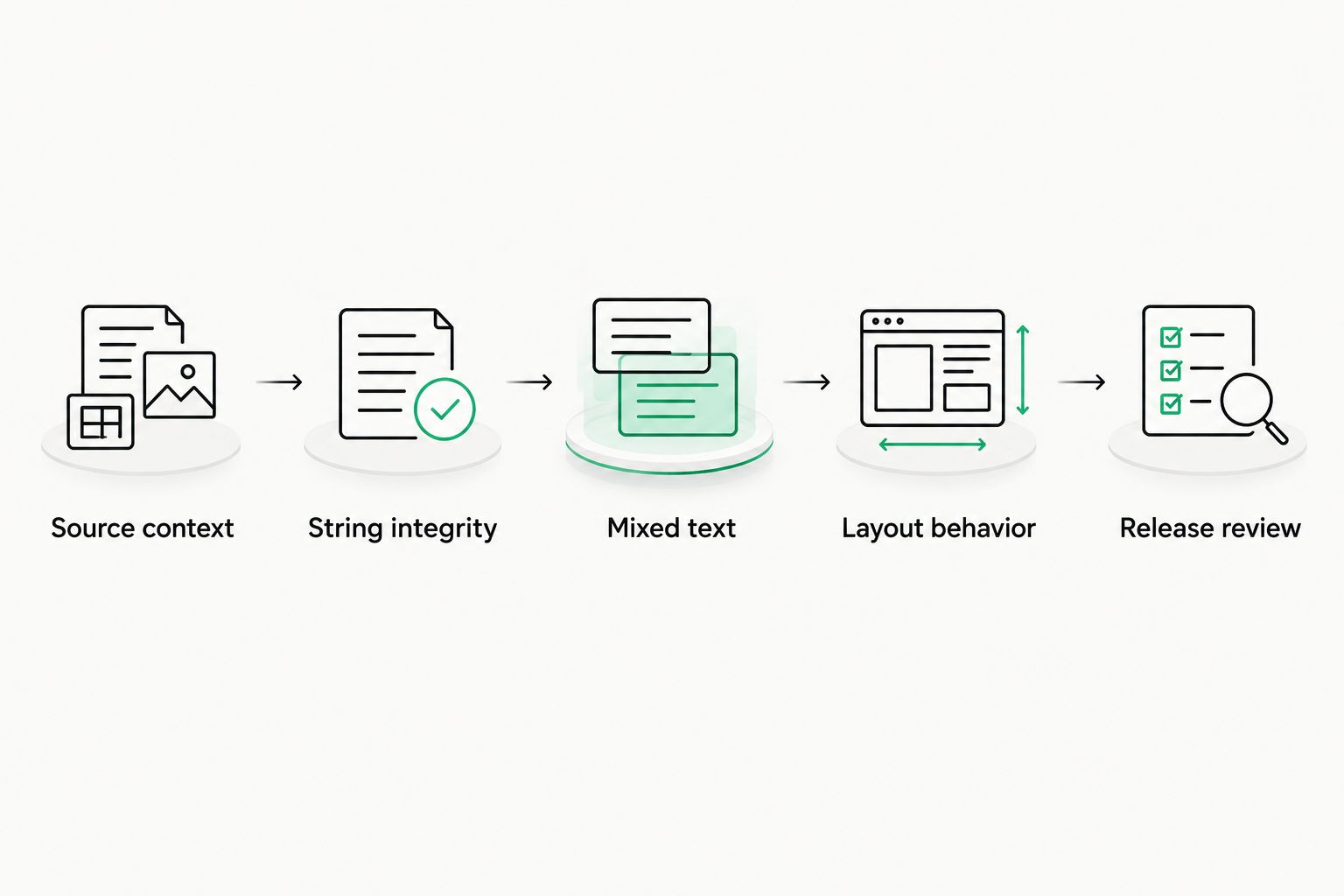
Test the complete path from source content to the rendered interface.
For your 2026 acceptance checklist, record the expected behavior beside each test case. A screenshot records appearance; an interaction test records what happens when someone types, selects, copies, or submits content. Keep both.
What evidence should a vendor provide?
Ask for an import-edit-export demonstration using the file format your application actually consumes. A supported language name is weaker evidence than a successful round trip with your placeholders and mixed-direction strings.
Ask how reviewers see context, how approved edits are managed, and how defects return to the responsible team. These questions evaluate workflow suitability without assuming that a translation platform controls your application's rendering.
Reject any evaluation that stops at the translation editor. The exported content and finished interface are part of the acceptance test.
How should an RTL interface change?
Start with direction-aware layout rules, then inspect components individually. A blanket visual flip is not a substitute for localization engineering.
CSS logical properties express positions relative to the writing direction. For example, margin-inline-start describes spacing at the inline start rather than permanently assigning that spacing to the left. This helps components respond to direction changes without maintaining separate physical left and right rules everywhere.
Keep alignment and direction distinct. Right-aligning a text box changes its placement, not the rules used to order mixed-direction content inside it.
Mirror directional meaning, not every asset
An icon expressing backward or forward movement needs review in the context of an RTL interface. A company logo or a photograph should not be mirrored simply because the page direction changes.
Data visualizations also need their own decisions. Reading direction alone does not establish the correct orientation of a timeline, chart axis, map, or technical diagram. Preserve the information's meaning and test whether labels remain readable.
Direction-aware layout
- Best for: Interfaces that support both LTR and RTL languages
- Advantage: Components can respond to the document's direction
- Limitation: Requires component-level implementation and testing
Explicit RTL overrides
- Best for: Specific components with direction-dependent behavior
- Advantage: Gives precise control over exceptions
- Limitation: Overrides need maintenance as components change
Text alignment alone
- Best for: A narrow presentation adjustment
- Advantage: Changes where text sits within its container
- Limitation: Does not establish bidirectional behavior or mirror layout
Use direction-aware layout as the foundation and explicit overrides for justified exceptions. Text alignment alone is not an RTL implementation.
Why right-to-left support varies
RTL support varies because the translation system, content format, and rendering environment perform different jobs. A successful result in one environment does not establish support in another.
- File structure. Plain strings, structured resource files, and formatted documents carry different information. Confirm that export preserves the structure your application expects.
- Rendering environment. A browser, native application, and document viewer do not share the same implementation. Test the environments you release to.
- Mixed-direction content. Variables and user-entered text introduce directional combinations that a static translated label does not reveal.
- Component design. Navigation, forms, tables, and directional icons require different checks. A working paragraph does not validate an interactive component.
- Font coverage. Your chosen font must include the required characters, and the rendering system must handle script shaping correctly.
- Review context. Reviewers need to see where text appears and what action it describes. An isolated string does not expose layout or interaction defects.
Keep these factors in your 2026 requirements document. Describe an observable outcome for each one instead of using a general requirement such as supports Arabic.
Where does Wxrks fit in an RTL workflow?
Wxrks is best for teams seeking translation workflow automation, translation memory, quality management, and cost tracking in a TMS. Those capabilities address the translation-management side of localization for translators, developers, enterprises, and translation agencies.
Use Wxrks as a translation-management candidate, then evaluate RTL-specific requirements separately. Test editor behavior, file round trips, context handling, and your rendered interface with representative content before making the release decision.
The benefit of a TMS is coordinating translation work rather than leaving assignments, revisions, and approved content disconnected. The limitation is equally clear: a TMS's workflow capabilities do not establish that your application's layout and interactions support RTL.
Keep that boundary visible in your 2026 evaluation. Translation management and application engineering need a shared acceptance checklist, but they do not have interchangeable responsibilities.
Does supporting Arabic mean supporting Hebrew too?
No. Arabic and Hebrew share a right-to-left base direction, but testing one language does not validate the other's translations, font coverage, or rendered behavior.
Reuse the engineering checklist, not the approval. Have qualified reviewers assess each language in the actual interface, including mixed-direction content and user input.
Do numbers reverse in a right-to-left interface?
No. Right-to-left layout does not mean reversing the characters in a numeric sequence; mixed-direction rendering determines how that sequence sits within surrounding text.
Test dates, quantities, identifiers, and punctuation in their real contexts. Number formatting and digit choices are locale requirements, not instructions to reverse strings.
Can translation memory prevent RTL display bugs?
No. Translation memory stores and reuses translations; it does not replace the application's direction rules, fonts, or layout logic.
A reused translation still needs appropriate context. If its location, placeholders, or surrounding content changes, review the rendered result rather than assuming the previous approval covers the new use.
FAQ
Can localization software support right-to-left languages in 2026?
Yes, localization software can support right-to-left languages, but content management and application rendering need separate verification. Test import, editing, export, and the finished interface with representative Arabic or Hebrew content.
Is right-aligned text enough for an Arabic website?
No, right alignment does not establish text direction or correct mixed-direction behavior. Set the appropriate base direction and test layout, punctuation, input, and directional controls.
Should I reverse translated strings for an RTL interface?
No, store translated text in logical order rather than reversing its characters. Use appropriate bidirectional rendering and isolate embedded text where necessary.
How do I handle English names inside Hebrew text?
Isolate embedded English names so their direction does not interfere with surrounding Hebrew text. In HTML, the bdi element provides bidirectional isolation; test punctuation and copying in the rendered interface.
Does Wxrks automatically make my application right-to-left?
Wxrks provides translation-management capabilities; those capabilities do not establish your application's RTL rendering behavior. Verify the application's layout, fonts, direction settings, and interactions separately.
Should every icon be mirrored in an RTL application?
No, review icons according to their meaning rather than mirroring every asset. Directional controls need contextual review, while logos and photographs should not be flipped merely because the interface is RTL.
Who should approve a right-to-left release?
A qualified language reviewer should approve meaning and readability, while a functional tester should approve interface behavior. Both approvals are needed because accurate translation does not prove correct interaction.
One last thing
Your most useful RTL test is not a long translated paragraph. It is a short, ordinary message that combines an RTL sentence, a Latin-script name, a variable, and punctuation.
That combination exposes boundaries a single-direction sample leaves untouched. Add it to your 2026 regression suite, then test typing, selection, copying, and display—not just the screenshot. Release the experience you tested, not the language label you enabled.
Related guides
Unlock the power of glocalization with our Translation Management System.
Unlock the power of
with our Translation Management System.










