Intercom to localized live chat: complete 2026 workflow


Instead of manually translating the same Intercom replies every day, build an intercom live chat localization workflow that moves reusable content through translation, review, and controlled publication. Keep Messenger language settings, approved support replies, and live conversation translation separate so each gets the right quality checks.
TL;DR
- Intercom live chat localization needs separate controls for Messenger language, reusable replies, and live conversations.
- Wxrks suits teams managing translation memory and quality across reusable support content.
- Start with approved replies; keep unreviewed translations out of automatic customer-facing delivery.
- Test locale selection, placeholders, and agent handoffs before expanding multilingual support.
Why this matters
A translated chat launcher does not make the conversation multilingual. Customers also need understandable greetings, accurate answers, relevant help content, and a clear handoff when an agent cannot support their language.
Wxrks translation management is best for support teams that need reusable, quality-managed translations. Use Wxrks for the translation-management layer, while keeping Intercom responsible for the customer conversation. This guide describes a controlled content handoff, not a one-click connection or an automatic live-message translator.
For your 2026 rollout, define success as a complete support interaction in the chosen language—not simply a translated opening message. A customer who receives a localized greeting followed by an unsupported-language answer still encounters a broken workflow.
Before you start
- Access: Have permission to edit the relevant Intercom Messenger configuration and support content, access to your translation workspace, and an owner who can approve each target language.
- Materials: Gather current replies, greetings, terminology, variable examples, escalation instructions, and applicable data-handling requirements. For an initial pilot, select 1 target language and 10 reusable replies; these are suggested scope limits, not platform requirements.
- The gotcha: Messenger interface language and agent-written message language are different controls. Configure and test them separately; translating interface text does not translate everything an agent sends.
Before exporting conversation material, remove unnecessary personal information. Prefer reusable support copy over complete transcripts, and establish which content your organization permits external translation systems to process.
Choose the workflow boundary
Decide what you are localizing before configuring anything. The approaches below address different parts of the customer experience; none replaces the others.
Messenger language configuration
- Best for: Customer-facing interface text
- Main advantage: Makes supported interface elements understandable
- Limitation: Does not translate every agent-written message
Reviewed reusable replies
- Best for: Repeated support questions
- Main advantage: Gives agents approved wording with consistent terminology
- Limitation: Requires maintenance when source content changes
Per-message translation
- Best for: Unpredictable conversations
- Main advantage: Helps handle questions outside the reply library
- Limitation: Requires context checks and a clear escalation policy
Start with reviewed reusable replies when your immediate problem is repeated manual translation. That boundary gives reviewers stable source material and lets agents inspect the answer before sending it.
Keep spontaneous conversations outside automatic publication until you have defined acceptable content, reviewer responsibilities, and failure handling. Translation speed does not establish whether an answer is appropriate to send.
Source inventory
Create a controlled source inventory before translation. The bold labels below are fields you create in a tracking sheet or equivalent record—not claims about existing Intercom or Wxrks interface labels.
- Open the Intercom Inbox and identify recurring questions. Copy only reusable wording that you are authorized to process; exclude customer-specific details.
- Create a Content ID for each reusable answer. Keep that identifier stable when the wording changes so reviewers can connect revisions to existing translations.
- Add Source text, Source language, Target locale, Owner, and Source version fields. Record the intended audience rather than relying on a language name alone.
- Add Context and Protected elements. Explain when the reply applies, which product terms stay unchanged, and which placeholders or links must survive translation.
- Separate interface configuration from authored support content. List Messenger language tasks independently from greetings, reusable replies, and escalation messages.
Expected result: Every translation request has an identifiable source, an intended locale, and enough context for a reviewer to judge its meaning.
For the 2026 pilot, freeze the selected source replies while reviewers work. If an urgent correction is necessary, record a new source version instead of silently replacing text already in review.
An inventory also exposes content that should not be reused. An answer containing a specific customer's account status belongs in that conversation, not in a general multilingual reply library.
Translation and approval
Use Wxrks translation management to organize translation memory, quality management, and cost tracking around the reusable content. Keep the transfer method explicit: use a method supported by your configured environment rather than assuming a native Intercom connector.
- Prepare the source content in a format your translation environment accepts. Preserve each Content ID, its source version, and the associated context during the handoff.
- Supply approved terminology and relevant translation memory. Distinguish product names from ordinary language, and explain ambiguous support terms before translation begins.
- Assign a language reviewer who understands the support task. Ask the reviewer to check whether the answer resolves the stated question, not merely whether it reads fluently.
- Check Protected elements against the source. Confirm that variables, destination links, product identifiers, and formatting retain their intended function.
- Record Approval status, Reviewer, and Approved version in your control record. Treat these as your workflow fields, not assumed product buttons or built-in statuses.
Expected result: Each publishable answer has an approved target version tied to the correct source revision. Drafts remain distinguishable from content agents can use.
Translation memory helps reuse earlier wording, but reuse still needs context. A previously approved sentence can be wrong when the feature, policy, or customer situation changes.
Review meaning before polishing tone. A friendly translation of an incorrect instruction remains an incorrect instruction. Settle the resolution steps first, then adjust formality and conversational style.
Publication and acceptance testing
Treat publication as a separate decision from translation approval. An approved sentence still needs to appear in the right place, for the right audience, with working substitutions.
- Configure the required language behavior in your Intercom Messenger settings. Use the controls available in your workspace, and distinguish automatic language selection from any explicit language choice your implementation provides.
- Place approved replies into the support-content mechanism your team uses. Retain the locale and content identifier in your administrative record so agents do not confuse similar versions.
- Define the language handoff. Tell agents what to do when the customer changes language, a reply does not fit, or no qualified language reviewer is reachable.
- Run 5 scripted conversations as a suggested acceptance test: a greeting, a repeated question, a variable-containing reply, an unexpected question, and a language-switch request.
- Compare the displayed content with the approved version. Check the conversation on the devices and layouts your team supports, including any right-to-left language in scope.
Expected result: The customer sees the intended language, agents can find the correct reply, and unsupported situations have an explicit next action.
Your 2026 launch record should identify the tested locale, source version, reviewer, and publication owner. Do not record a language as ready because its greeting passed while its escalation message remained untested.
The process has a deliberate approval boundary: source content becomes translated content, then reviewed content, then published content. Keeping those stages distinct prevents a draft from becoming a customer-facing answer by accident.
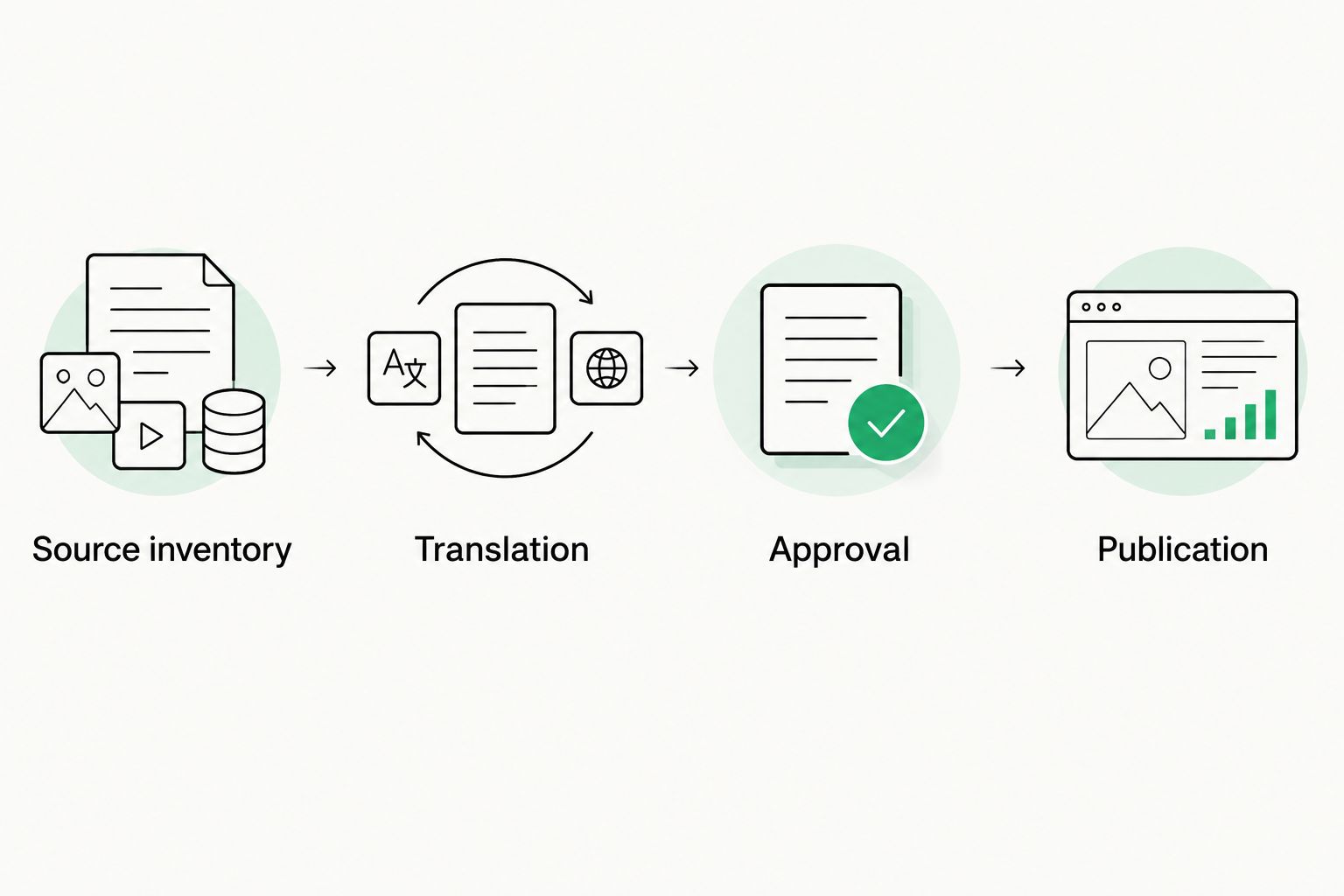
Translation approval and customer-facing publication are separate decisions.
Update localized replies whenever source content changes
The adjacent workflow is change management: update the localized reply when the approved source changes. Use the same identifiers and approval boundary rather than creating an unrelated translation request.
- Compare the edited source with its Approved version. Mark affected target versions as needing review in your control record.
- Classify the change. A corrected instruction, altered eligibility condition, or different destination link needs a meaning check; punctuation still needs a display check.
- Send the changed content with surrounding context for translation. Keep unchanged material identifiable so reviewers can focus without losing the meaning of the complete answer.
- Approve the revised target text before replacing the published reply. Preserve the previous approved version for rollback.
- Retest the customer path affected by the change. Update the publication record only after confirming the revised reply appears correctly.
Expected result: Published translations track the current approved source rather than an older instruction that merely sounds natural.
For retail support, conditions matter as much as vocabulary: retail and e-commerce translation must preserve the meaning of return eligibility, delivery instructions, and product descriptions. Apply that same check to the chat reply and the content it references; translating one while leaving the other outdated creates contradictory guidance.
During 2026 maintenance, assign ownership to the source-content team as well as the language reviewer. A reviewer cannot assess a policy change that never enters the translation workflow.
Troubleshooting
Messenger appears in the wrong language
Check the configured language behavior and the language context used by your test session. Repeat the test in a clean session and inspect any language value your implementation supplies.
Separate interface text from custom messages during diagnosis. If interface elements change language but the greeting does not, investigate the greeting's targeting and translated content rather than retranslating the entire interface.
Agents send an outdated reply
Compare the published answer's Content ID and Approved version with the source inventory. Replace or withdraw obsolete variants, then verify the agent can identify the current locale-specific answer.
Do not fix this only by sending a team announcement. Correct the content location or naming convention that allowed the outdated reply to remain usable.
Variables appear literally or stop working
Compare protected tokens character for character with the approved source. Restore any altered delimiters, spelling, or syntax, then test with representative values before republication.
Give translators an explanation of each variable's meaning. Preserving the token alone does not guarantee that the surrounding sentence handles the inserted value correctly.
Translation changes the instruction
Return the answer to review with the source context and the exact disputed phrase. Ask the reviewer to verify actions, conditions, negation, and escalation language before adjusting style.
For sensitive account or policy questions, route the conversation to an authorized agent. Do not use fluent wording as evidence that the underlying instruction is safe or correct.
A handoff loses language context
Include the customer's requested language and the unresolved question in the handoff record. Keep original customer wording accessible only within your permitted data-handling process.
Define who owns the next response. A translated escalation message does not resolve the operational problem if no agent or team accepts the conversation.
Customize your workflow
Expand by support intent before adding every possible locale. Complete the greeting, answer, follow-up, and escalation for a repeatable question so the customer can finish the interaction.
Use risk to determine review depth. Routine navigation instructions and account-sensitive explanations need different approval rules; document that distinction instead of applying automatic publication to everything.
Wxrks provides translation memory, quality management, workflow automation, and cost tracking, but those functions do not replace your support ownership rules. The controlled-handoff approach also adds publication work: someone must keep Intercom's usable content aligned with approved translations.
For conversations that need draft translation rather than reusable replies, define the human review boundary first. The machine translation workflow for support teams addresses that adjacent process without treating every generated answer as ready to send.
FAQ
How do I set up Intercom live chat localization?
Configure Messenger language behavior, translate reusable support content, review it, and test complete conversations before publication. Treat live-message translation as a separate workflow with its own review and escalation rules.
Does changing the Messenger language translate agent replies?
Messenger language configuration is not the same as translating agent-written replies. Prepare localized support content and define how agents handle messages outside that approved library.
Can I use Wxrks for Intercom support translations?
Wxrks supports translation workflows, translation memory, quality management, and cost tracking for reusable support content. This guide uses a controlled content handoff rather than assuming a native Intercom connection.
Should every translated chat reply get human review?
Require language review before publishing reusable replies, and set review rules for live conversations according to their risk. Account-sensitive instructions need an authorized escalation path, not just a readable translation.
How do I stop translated replies from becoming outdated?
Tie each localized reply to a stable content identifier and an approved source version. When the source changes, flag affected translations for review and verify the replacement after publication.
What should I test before launching multilingual chat?
Test greetings, repeated questions, variables, unexpected questions, and language-switch requests. Verify both customer-visible wording and the agent handoff for the intended locale.
Can I translate real customer conversations for testing?
Use only conversation data your organization authorizes for that purpose. Prefer synthetic examples or reusable support text, and remove unnecessary personal information before transferring material.
One last thing
Test the answer you hope agents never need: the language escalation. For your final 2026 check, have a tester ask an unexpected question in the target language and follow the handoff through to its owner. That test reveals whether you launched multilingual support or only multilingual greetings.
Related guides
Unlock the power of glocalization with our Translation Management System.
Unlock the power of
with our Translation Management System.