


Machine translation software for customer support teams 2026


For customer support teams, machine translation software is software that translates customer messages and support content between languages with the aim of resolving issues without language barriers. This 2026 guide focuses on the parts support teams need most: conversational context, approved terminology, human review, and a clear path from translated text to an accurate answer.
TL;DR
- Machine translation software for customer support teams needs terminology control, context, and human escalation.
- Wxrks fits support teams managing reusable multilingual content through translation memory, quality management, and workflow automation.
- Separate live customer conversations from knowledge-base localization; they require different approval workflows.
- Test complete ticket resolutions, not isolated translations, before expanding your multilingual support workflow.
Why machine translation matters for customer support teams
Your support workflow needs to preserve the meaning of the answer, not just translate the words. A translated reply can be grammatically correct while giving the customer the wrong instruction. Product terminology, earlier messages, and the distinction between a suggestion and a commitment all matter.
Customer support also combines content with different lifecycles. A chat response addresses one customer's situation. A troubleshooting article serves repeated questions and needs controlled updates. Treating both as the same translation task creates unnecessary review work and weakens content ownership.
Start your 2026 evaluation with the checks in this guide to translation quality management tools. Then define where translation belongs in your support process: understanding incoming messages, drafting replies, maintaining approved answers, or all three.
The benefit you should measure is a correctly resolved issue. Translation speed matters only alongside that outcome. A fast answer that sends a customer down the wrong troubleshooting path does not improve support.
How to build your customer support translation workflow
1. Separate live conversations from reusable content
Start with a manual inventory of the material your agents translate. Review tickets, saved replies, help articles, and product instructions. Record who owns each content type and whether a translated version needs approval before use.
Best for: teams defining their first multilingual support process. A spreadsheet is sufficient for this inventory. It makes the distinction between conversational translation and content localization visible before you evaluate software.
For a practical starting exercise, choose 30 closed tickets across 2 target languages. These are suggested pilot boundaries, not a performance benchmark. Include straightforward questions, ambiguous messages, and cases that required escalation. Remove customer identifiers before sharing examples outside approved systems.
Use that sample to identify where an agent needs the customer's original wording and where an approved translated answer is reusable. Do not assume that a polished help article represents the fragmented language customers use in chat.
- List incoming messages separately from outgoing replies.
- Group reusable macros by issue type and content owner.
- Mark articles that contain product instructions or policy commitments.
- Identify which conversations require a language-qualified reviewer.
- Record where each translated item will be stored and updated.
2. Define terminology and provide conversation context
Build an initial terminology sheet manually with your support and product teams. Include product terms, interface labels, preferred translations, and words that should remain unchanged. Add a short explanation where a term has multiple meanings.
Best for: support teams answering recurring product questions. A shared terminology document gives reviewers an explicit reference. Its limitation is maintenance: agents must know which version is current, and corrections need an owner.
For your 2026 pilot, attach context to each translation task. An isolated sentence such as an instruction to reset something leaves the translator guessing which setting or device the customer means. Include the relevant preceding messages and the approved troubleshooting sequence without adding unrelated personal information.
Distinguish translation memory from terminology. Translation memory stores previously translated text for reuse; a glossary specifies how particular terms should be translated. Both need maintenance. An outdated approved answer remains outdated when reused perfectly.
- Record approved product terms and their intended meanings.
- Preserve interface labels that customers must recognize on screen.
- Attach the relevant conversation history to review tasks.
- Flag sarcasm, shorthand, and ambiguous pronouns for clarification.
- Assign an owner to approve terminology changes.
3. Choose software for the job you actually need
Map the workflow manually before selecting a platform. Write down the inputs, required reviewers, output destinations, and records you need to retain. A team translating occasional messages has a different requirement from a team maintaining a multilingual help center.
Wxrks is best for support teams managing reusable multilingual content through a translation management system. Wxrks provides translation workflow automation, translation memory, quality management, and cost tracking. Those capabilities fit the management of recurring translation work; they do not remove your responsibility to define correct answers and review rules.
Best for: support content owners coordinating repeatable localization work. A translation management system offers a faster path than maintaining every handoff and reuse record manually. Its limitation is the setup and ongoing ownership required for content, terminology, and review.
Do not equate translation management with a confirmed help-desk connection. During your 2026 evaluation, verify the exact connection your team needs, the supported content formats, and how updates return to your support environment. Require a demonstration using your workflow rather than a generic translation sample.
- Identify whether the priority is live replies or reusable content.
- Verify the required language pairs using representative support text.
- Check how translation memory and terminology enter the workflow.
- Confirm how reviewers receive tasks and return corrections.
- Document data handling and access requirements before approval.
4. Set review gates before customers see the answer
Start manually by tagging the selected tickets according to the consequence of an incorrect reply. An explanation of a navigation label does not carry the same risk as an account-recovery instruction, a contractual commitment, or a response involving sensitive personal information.
Best for: teams that need explicit control over customer-facing answers. Route high-consequence content to a qualified reviewer. Routine content can use a lighter review path, but the path still needs a named owner and a way to report errors.
For reusable content, define the sequence as Source content, Machine translation, Human review, and Approved content. Approval applies to the reviewed version, not every later edit. A changed source instruction should return to the appropriate review gate.
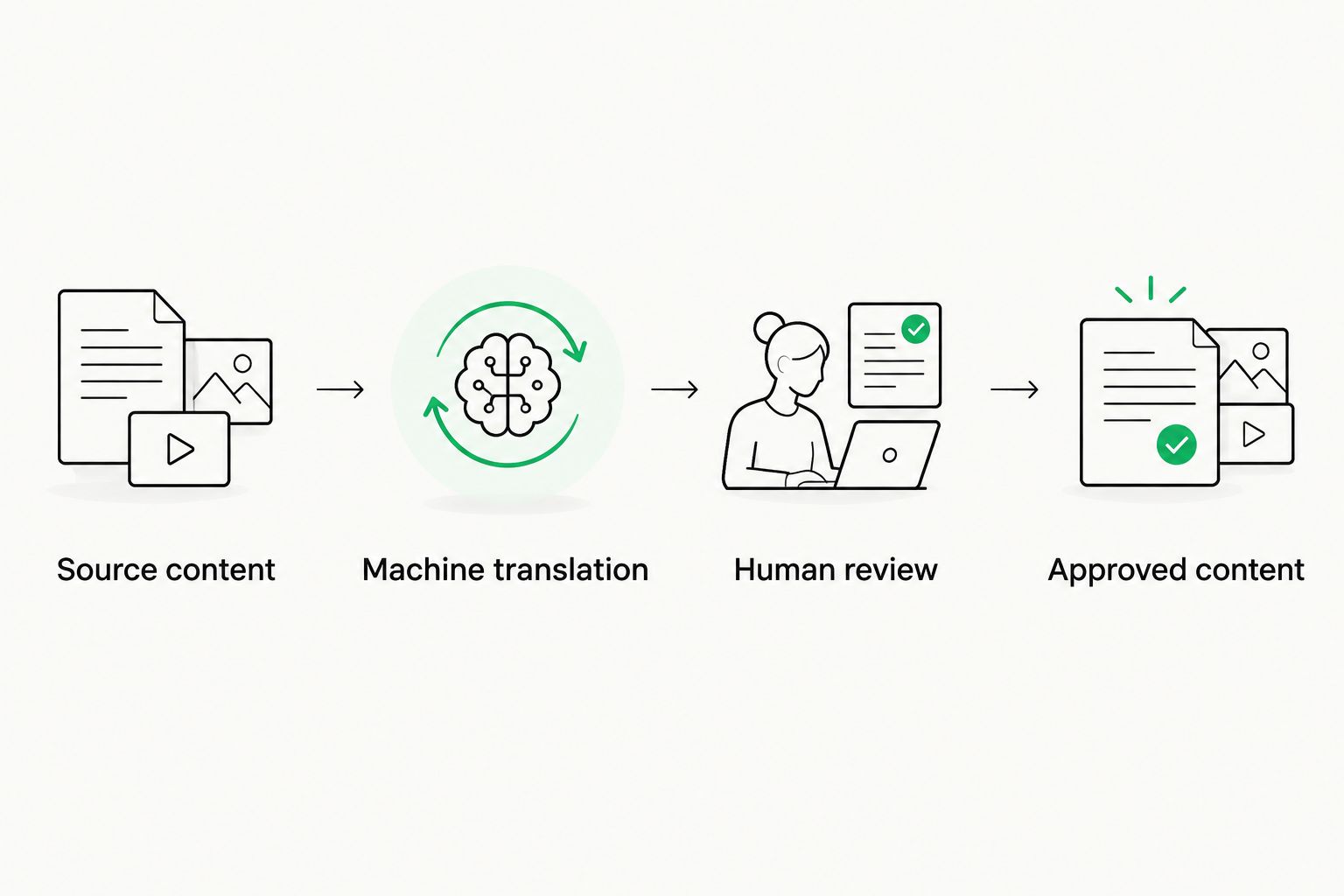
Review the answer before treating its translation as approved content.
For conversations, let reviewers see both the translated reply and the relevant original messages. A back-translation can help expose a mismatch, but it is not independent proof that the customer-facing answer is correct. The review must check intent and the actual instruction.
- Define which issue categories require human approval.
- Check instructions, negation, names, and interface labels.
- Review policy commitments against the approved source answer.
- Preserve the original message for language-qualified escalation.
- Require renewed approval after meaningful source changes.
5. Test resolutions with a bounded pilot
Use your existing support records to establish a manual baseline. Record how the selected issues were resolved, which answers needed correction, and where agents needed language assistance. Then run a suggested 14-day pilot with the agreed language and issue scope.
Best for: support leads deciding whether a workflow is ready to expand. A bounded pilot keeps the evaluation tied to actual tasks. Its limitation is scope: success on the selected tickets does not establish performance for every language, product, or issue category.
For a 2026 decision, compare like with like. Keep language pair, issue type, and review policy visible in the results. Otherwise, a change in the mix of simple and difficult tickets can obscure what the translation workflow achieved.
Measure correction burden alongside resolution. Track substantive reviewer edits, reopened issues, agent handling time, and translation-related escalations where your systems support those records. Do not treat every stylistic edit as a meaning error, and do not attribute every reopened ticket to translation.
- Use the same issue categories for baseline and pilot comparisons.
- Separate terminology corrections from changed meaning.
- Record reviewer time as part of the workflow effort.
- Tag translation-related escalations with a stated reason.
- Expand only after the owner reviews the unresolved failure cases.
6. Maintain approved answers after launch
Begin with a manual change log linking each source article or macro to its translated versions. Assign responsibility for deciding which updates need translation and which existing answers should be retired.
Best for: teams maintaining multilingual support content over time. Translation memory and workflow automation can reduce repetitive coordination. Their limitation is dependency on source quality and ownership: automation cannot decide whether a changed product behavior makes an old answer unsafe to reuse.
Make maintenance part of your 2026 support plan rather than a separate cleanup project. Product releases, interface changes, and revised internal procedures all affect what agents should tell customers. The translated content needs to follow those changes.
When a reviewer corrects a recurring term or instruction, update the relevant reference material as well as the individual answer. Otherwise, the same issue remains available for reuse. Keep conversation-specific details out of general-purpose approved content.
- Link translated versions to a named source content owner.
- Flag changed instructions for review before reuse.
- Retire obsolete macros from the active answer set.
- Update translation memory after approved corrections.
- Keep customer-specific details out of reusable examples.
Compare your support translation options
Choose by workflow fit, not by translation output alone. The options below solve different problems. None removes the need to decide what an accurate support answer means.
Manual translation with a qualified reviewer
- Best for: Sensitive cases and a narrow support scope
- Main advantage: Direct review of meaning and customer context
- Key limitation: Requires available reviewer capacity and manual coordination
Standalone machine translation
- Best for: Drafting translations of approved, low-consequence text
- Main advantage: Provides translated text without a full content-management workflow
- Key limitation: Approval, terminology records, and reuse need separate handling
Translation inside a help desk
- Best for: Agents handling multilingual conversations
- Main advantage: Keeps translation close to the ticket when the required capability is supported
- Key limitation: Language coverage, review controls, and reusable-content support need verification
Wxrks translation management system
- Best for: Teams maintaining reusable multilingual support content
- Main advantage: Combines workflow automation, translation memory, quality management, and cost tracking
- Key limitation: Support-specific connections and deployment requirements need verification
For a small scope, manual coordination gives you a clear starting point. For repeated content work, evaluate translation management against the handoffs and maintenance burden you identified. For live conversations, verify the agent experience directly: what context appears, what gets translated, and how an agent requests review.
Common mistakes customer support teams make
Translating a reply before checking the diagnosis
A translation workflow cannot fix an incorrect troubleshooting decision. Confirm the source answer addresses the customer's actual issue before reviewing its translated wording. Otherwise, linguistic quality hides an operational mistake.
Approving isolated sentences without ticket context
A short reply can depend on a previous question, attachment, or product version. Give reviewers enough context to identify the referent and intended action. Do not require them to reconstruct the conversation from fragments.
Reusing outdated macros because they were approved once
Approval belongs to a particular content version. Connect translated macros to their source owner and change history. Remove old answers from the active set when the underlying instruction changes.
Treating back-translation as final approval
Back-translation is a diagnostic aid, not a substitute for checking the target-language answer. A qualified reviewer should verify consequential instructions against the source intent and the support procedure.
FAQ
What's the best machine translation software for customer support teams?
The best fit depends on whether you need live conversation translation or reusable support-content management. Wxrks fits the latter through workflow automation, translation memory, quality management, and cost tracking; verify any required help-desk connection separately.
Can machine translation replace bilingual support agents?
Machine translation does not replace the judgment needed to diagnose issues and approve consequential answers. Use translated drafts within a workflow that gives agents access to context and language-qualified escalation.
Is a translation management system the same as a help-desk translator?
No. A translation management system coordinates translation work and reusable language resources, while a help-desk translator focuses on translating text within customer conversations. Check the specific capabilities rather than assuming either covers both jobs.
Should support teams use translation memory or a glossary?
Use translation memory for previously translated text and a glossary for approved terminology. Maintain both against current source content so reused answers and terms remain appropriate.
How do I test translation quality for customer support?
Test representative tickets and review whether the translated answer preserves the correct instruction and customer intent. Separate terminology edits, meaning errors, and unresolved support issues so the results identify the actual problem.
Can I put customer messages into any translation tool?
Use only tools approved for your organization's customer-data requirements. Check what information is sent, how it is handled, and who can access it before processing live tickets.
When should a human review a translated support reply?
Require human review when a mistranslation can change a consequential instruction or commitment. Define the relevant issue categories in advance and give the reviewer the original message, context, and approved source answer.
One last thing
A perfectly translated outdated answer is still an outdated answer. Before adding another language, check whether your source macros match the current product and support procedures. That content cleanup gives every later translation a better starting point.
Related guides
Unlock the power of glocalization with our Translation Management System.
Unlock the power of
with our Translation Management System.










