HubSpot to multilingual campaigns: complete 2026 workflow


Instead of copying campaign text between documents and rebuilding translations after every edit, set up a controlled handoff from HubSpot to translation review and back to locale-specific campaign assets. For hubspot multilingual campaigns in 2026, keep source versions, language assignments, approval records, and publishing decisions connected—even when the handoff uses files rather than a verified connector.
TL;DR
- Build hubspot multilingual campaigns around approved source content, locale-specific assets, and a separate publishing gate.
- Wxrks suits marketing teams that need translation management, translation memory, quality management, and cost tracking.
- Start with a controlled file handoff; automate transfers only after verifying connector capabilities and permissions.
- Test translated emails, landing pages, forms, and destination links together before launch.
Why this matters
A translated email is not a multilingual campaign. Your subject line, landing page, form instructions, confirmation message, and follow-up content must tell the same story in the recipient’s language.
Wxrks translation management is best for marketing teams that need to coordinate translation memory, quality management, and cost tracking. Keep HubSpot responsible for campaign execution and Wxrks responsible for the translation-management work described here. Treat the transfer between them as a separate implementation decision, not an assumed native integration.
The workflow below starts with a file-based handoff. Its advantage is visible control over what leaves HubSpot and what returns; its limitation is that someone must reconcile the approved translation with the destination asset. Automation comes after that process works.
Before you start
- Accounts and access: Arrange HubSpot access to edit and test the campaign assets, access to your translation workspace, and a named person with publishing authority. Verify permissions before assigning work.
- Materials: Gather approved source copy, target locales, terminology guidance, existing approved translations, destination links, and a field-level content inventory. Identify your translator, language reviewer, and campaign owner.
- The gotcha: Separate editable copy from personalization tokens, HTML, tracking parameters, and other functional syntax. Translators need context, but changing functional strings without validation can break the returned asset.
For your first 2026 rollout, use 1 source campaign and 2 target locales as a pilot scope. These are setup recommendations, not platform limits. Include a language reviewer for each locale and agree on who can approve a source change after translation begins.
Do not send contact records with the translation package. Use fictional sample values to explain personalization and conditional content.
Source package configuration
Freeze the source and map its dependencies
- Open the source email in HubSpot through Marketing, then Email. Identify the exact asset you are localizing; record its internal name in your campaign inventory.
- Review the subject line, preview text, body, calls to action, image text, alternative text, and footer copy. Include linked landing pages and confirmation messages in the same inventory.
- Assign a stable identifier to each translatable item. Use identifiers such as
launch_email_subjectandlaunch_primary_cta; keep the identifier unchanged when the wording changes. - Copy the approved content into a structured handoff document. Keep source text, target locale, context, destination asset, and approval status in separate columns.
- Save a source snapshot and record its approval date. Make one person responsible for deciding whether later edits require translation again.
Expected result: Every translatable item has an identifier, a destination, and an approved source version. A reviewer can trace a returned sentence to its intended location without guessing.
The snapshot matters more than the file format. A translation can be linguistically correct and still be wrong for launch because it reflects an older offer description or a superseded call to action.
Specify locale intent, not just language
Record the intended market alongside the language. Explain audience familiarity, preferred terminology, tone, and the action the reader should take.
For example, an email requesting a consultation needs different context from an onboarding message explaining a product setting. Give translators that purpose before they start, rather than asking reviewers to reconstruct it from isolated strings.
Translation handoff configuration
Prepare the translation brief
- Confirm which file formats your translation setup accepts before packaging the content. Use a supported format rather than assuming a HubSpot export can be imported unchanged.
- Add screenshots or reference material that show where the copy appears. Label each reference with the same stable identifiers used in the source package.
- Identify protected elements explicitly: personalization syntax, code fragments, tracking parameters, and non-translatable names. Explain which parts of destination URLs require locale-specific replacements.
- Supply approved terminology and relevant prior translations. Use Wxrks translation memory to support reuse, while keeping campaign-specific wording subject to review.
- Assign a translator and language reviewer for each locale. Record decisions about disputed terminology in the shared brief.
Expected result: Translators receive content with enough context to preserve meaning, and reviewers know which elements must remain unchanged.
Build the handoff around 3 approval checkpoints: source approval, language approval, and launch approval. These are separate decisions. An approved source does not prove that a translation reads naturally, and an approved translation does not prove that an email renders correctly.
The 2026 approval record should identify the source version, locale, reviewer, and destination asset. Keep that record alongside the campaign inventory so late changes have a visible owner.
Choose the transfer method deliberately
The options below describe implementation approaches, not confirmed connectors or product-specific integration features.
Controlled file handoff
- Best for: Teams establishing their first repeatable workflow
- Advantage: Makes source versions and reviewer decisions visible
- Limitation: Requires reconciliation when content returns
Verified automated transfer
- Best for: Teams with a tested connector or custom implementation
- Advantage: Removes repeated transfer steps within its supported scope
- Limitation: Requires permission, mapping, failure-handling, and version checks
Start with the controlled handoff when the integration path is unverified. Its extra transfer work is preferable to silently overwriting approved content or translating the wrong version.
Automation is useful only when it preserves the controls you already need. It does not replace language approval or launch testing.
Localized asset configuration
Return approved copy to HubSpot
- Receive the reviewed translation with its source identifiers intact. Reject ambiguous rows rather than matching similar sentences by eye.
- Prepare a distinct destination asset for each locale. Use HubSpot’s Clone action for an email when you need a separate copy, then give the asset an internal name that identifies its locale and purpose.
- Insert the approved subject line, preview text, body copy, calls to action, and alternative text. Keep functional syntax intact and reconcile each item against the handoff document.
- Replace destination links with approved locale-specific destinations. Check the linked page itself; a translated button does not make an untranslated destination appropriate.
- Confirm the intended audience and exclusions. Use an explicit language preference or another documented audience rule; do not treat country alone as proof of language preference.
- Record which translation version was placed in each destination asset. Leave the asset unpublished until launch approval.
Expected result: Each locale has a traceable campaign asset containing approved copy, correct destinations, and a documented audience rule.
Use a consistent naming pattern for the 2026 campaign inventory: campaign purpose, locale, asset type, and revision. This is your team’s convention, not a required HubSpot format.
Avoid copying an entire source email over a reviewed locale asset after translation. That shortcut can replace approved text and local destination links at the same time.
Keep the handoff visible
The campaign inventory should show progress through the same stages for every locale. Use the sequence below as your operational map; treat the final publishing decision as a separate checkpoint rather than another translation task.
- Source approval: The campaign owner freezes the text and dependencies.
- Translation handoff: The translator receives the approved package and context.
- Language review: The reviewer approves meaning, terminology, and tone.
- Asset testing: The campaign owner checks the assembled experience.
- Launch approval: The publishing owner authorizes release.
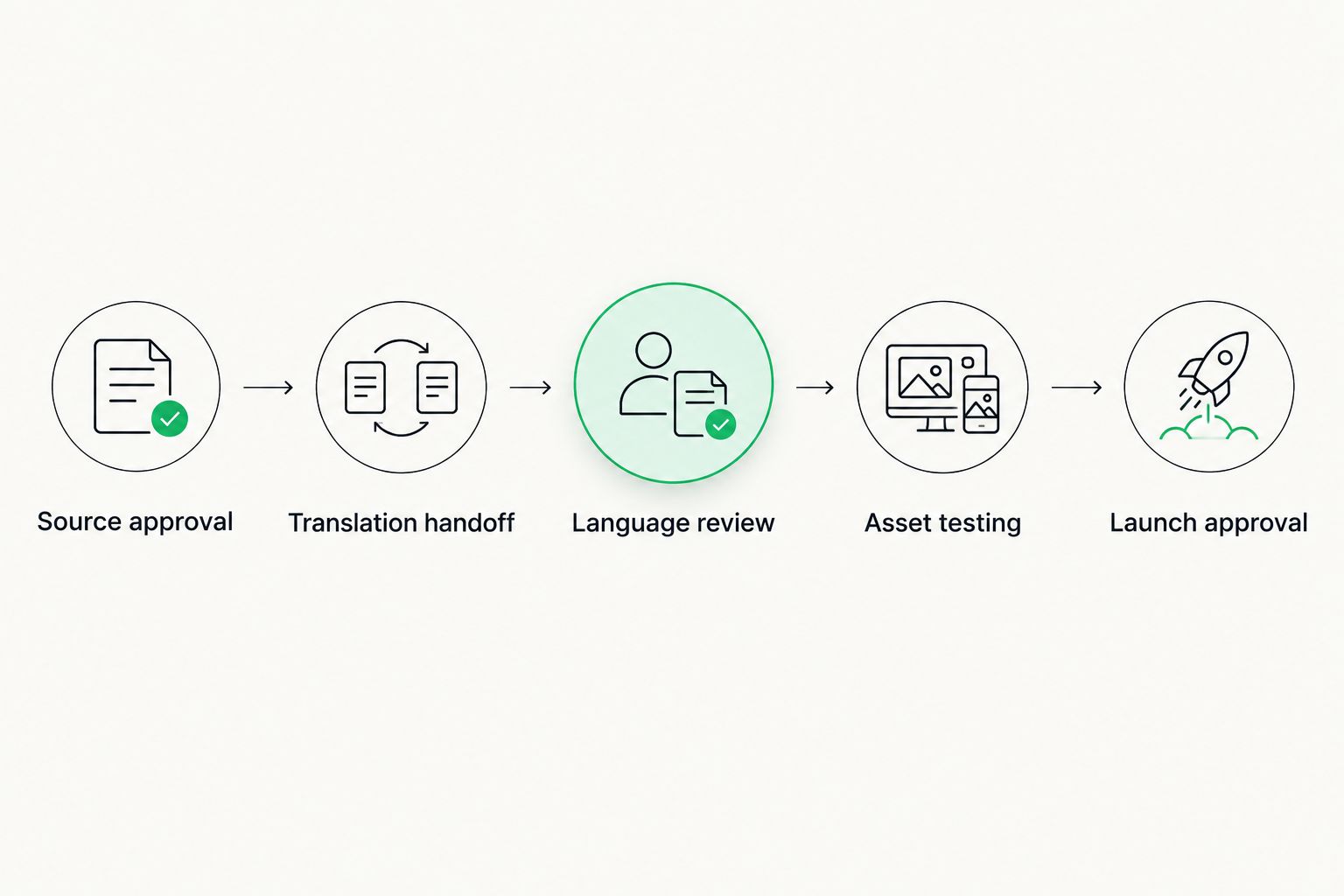
Language approval and launch approval are separate decisions.
Launch validation configuration
Test the complete recipient journey
- Use Preview in the HubSpot email editor to inspect the assembled message. Check narrow and wide layouts, heading breaks, button labels, and text embedded in images.
- Use Send test email to inspect the delivered message. Review the subject line, preview text, personalization output, footer, and every call to action.
- Follow the primary destination and complete the form using test data. Check confirmation text, redirects, and any follow-up message included in the campaign.
- Ask the language reviewer to inspect the rendered asset, not just the translation document. Resolve meaning changes caused by truncation, layout, or missing context.
- Compare the launch candidate with the approved source snapshot. If the source changed, stop and route the affected items through translation review again.
- Record launch approval and confirm audience selection immediately before scheduling or sending.
Expected result: The approved campaign works as a connected language experience, from inbox to destination to confirmation.
For the 2026 pilot, keep a test record for each locale rather than accepting one successful test as evidence for every language. Layout and destination checks belong to the actual locale asset.
For a deeper review process, use the guide to measuring translation quality accurately. Language quality and functional correctness need separate checks.
Second workflow: update translations when source copy changes
An update workflow starts from the same inventory but sends only affected content back through review. It is best for recurring campaigns and reused assets; its advantage is a smaller review scope, while its limitation is the need to track dependencies carefully.
- Compare the revised source with the approved snapshot. Identify changed strings and any linked assets affected by the change.
- Reopen approval for those items. A changed call to action can require a destination change even when the surrounding paragraph stays the same.
- Send the changed content with its previous translation and updated context. Use Wxrks to manage translation work, but verify any transfer automation separately.
- Return approved revisions to the correct locale assets. Re-test the affected recipient journey before release.
For an automated 2026 implementation, require stable asset identifiers, source-version checks, retry handling, and a visible failure queue. A repeated transfer should not create duplicate destination assets or erase a reviewer’s later correction.
Never let an automated source update publish a translated campaign without the required approval. Keep content transfer and release authorization separate.
Troubleshooting
The translation is approved, but the wrong wording appears
Compare the destination asset with the returned translation identifiers and source snapshot. Restore the approved text, then investigate whether a later source copy or another editor replaced it.
Personalization appears as broken text
Compare the functional syntax with the original asset. Restore the unchanged token, test with representative sample values, and clarify the protection rules in the translation brief.
The email is localized, but the destination is not
Audit the full path from call to action through form and confirmation. Replace the destination with an approved locale-specific page or hold the campaign until the destination is ready.
A repeated transfer creates duplicate assets
Use a persistent mapping between source identifier, target locale, and destination asset. Change the transfer logic to update the mapped destination rather than creating another copy on every retry.
The recipient receives the wrong language
Inspect the audience rule and the underlying language-preference data. Correct conflicting assignments, document the fallback language, and test audience membership before the next send.
Customize your workflow
Expand scope only after the pilot passes language and functional checks. Add more campaign assets before adding more automation: forms, confirmation messages, follow-up emails, and reusable content all need ownership.
Give translation memory a clear approval policy. Reusable wording should reflect reviewed translations, not every draft that passed through a campaign.
Separate reporting questions, too. Translation operations track review progress and rework; campaign reporting tracks recipient behavior. Do not interpret weak campaign performance as proof of poor translation without examining audience, offer, destination, and execution.
FAQ
How do I build HubSpot multilingual campaigns?
Build HubSpot multilingual campaigns by approving source content, translating it with context, assembling locale-specific assets, and testing the complete recipient journey. Keep source versions and language approvals connected to each destination asset.
Can I connect HubSpot directly to Wxrks?
Verify the current integration options before planning a direct connection. This workflow uses a controlled handoff and does not depend on a confirmed native connector.
Should each language have its own campaign email?
Use a distinct destination asset for each locale in this workflow. That keeps copy, destination links, testing, and approval records traceable.
Can I use machine translation for campaign copy?
Use machine translation as a draft, not as launch approval. A qualified language reviewer should check meaning, terminology, tone, and the rendered campaign before release.
What happens when source copy changes after translation?
Reopen review for the changed content and its affected dependencies. Compare the revision with the approved snapshot, update the relevant locale assets, and repeat the necessary tests.
How do I choose the correct language audience?
Use an explicit language preference or another documented audience rule. Country alone does not establish the recipient’s preferred language.
What should I test before launching a translated email?
Test the subject line, preview text, personalization, layout, links, destination page, form, and confirmation experience. Review the assembled asset in each target locale.
One last thing
Translate the confirmation experience before you approve the campaign. The email attracts attention, but the form response tells the recipient whether the action succeeded. A language switch at that point exposes a gap that proofreading the email alone will never catch.
Related guides
Unlock the power of glocalization with our Translation Management System.
Unlock the power of
with our Translation Management System.