


How much does translation software cost for freelance translators in 2026?


Translation software cost for freelance translators in 2026 depends on the license, usage terms, and workflow you need; compare the total commitment rather than the subscription alone. Setup, file preparation, machine translation usage, and final review also belong in your decision, even when they happen outside the software.
TL;DR
- Translation software cost for freelance translators depends on licensing, usage, and workflow requirements—not the subscription alone.
- Choose a CAT workflow for translation memory reuse; consider a TMS when coordination becomes part of your work.
- Wxrks suits freelancers seeking translation management, quality management, and cost tracking in one system.
- Test a complete client delivery before committing, including export, terminology checks, and final review.
Why this matters
Your translation software has to fit the assignments you actually accept. A tool that handles text entry but creates extra work at delivery is not solving the whole job.
For recurring clients, start with translation memory software for freelancers. Reusing approved translations is a different requirement from generating a new draft, and that distinction should guide your software decision.
Buy for the workflow you can demonstrate, not the feature list you might eventually need. Your 2026 evaluation should cover the path from receiving a file to delivering an accepted translation.
How much does translation software cost for freelance translators?
There is no single amount that describes every freelance translation setup. A meaningful comparison separates software access, metered services, implementation work, and the effort needed to produce a client-ready result.
Use the following breakdown when reviewing current vendor terms. These are evaluation categories, not claims that every provider charges separately for each item.
Software access
- What to check: License duration, renewal terms, and included permissions
- What it means for your decision: Establishes the commitment required to keep working
Usage
- What to check: Whether processing, machine translation, or other services have separate limits
- What it means for your decision: Determines whether workload changes affect your commitment
Setup
- What to check: Importing memories, preparing terminology, and configuring projects
- What it means for your decision: Adds work before the first usable delivery
Review
- What to check: Terminology, meaning, formatting, and client instructions
- What it means for your decision: Remains part of the job after a draft exists
Exit
- What to check: Exporting files, memories, and terminology
- What it means for your decision: Determines the work required to change systems
Keep software expenditure separate from your labor when comparing options. Then examine both together before deciding whether the tool improves your business.
A subscription comparison answers what you commit to the vendor. A workflow comparison answers what you must still do yourself.
Which translation software setup fits your freelance work?
A computer-assisted translation tool, a translation management system, and machine translation serve different purposes. Their functions can overlap, so evaluate the actual workflow rather than assuming the category name guarantees a particular feature.
CAT-centered workflow
- Best for: Freelancers translating recurring documents
- Main advantage: Organizes segment-level translation and reuse
- Main limitation: Does not by itself establish a complete project coordination workflow
TMS-centered workflow
- Best for: Freelancers managing handoffs, review, and project administration
- Main advantage: Brings translation work and coordination into a managed process
- Main limitation: Requires setup and process choices beyond editing text
Machine-translation-assisted workflow
- Best for: Drafting work where human post-editing is appropriate
- Main advantage: Supplies draft translations for evaluation
- Main limitation: Does not replace responsibility for meaning, terminology, or delivery
These are not mutually exclusive choices. A TMS can include computer-assisted translation functions, while machine translation can operate inside a broader translation workflow.
Choose the smallest setup that completes the assignment correctly. Additional workflow functions earn their place when they remove an actual handoff, tracking task, or quality-control gap.
CAT-centered workflow: prioritize reusable work
A CAT-centered workflow fits freelancers whose main task is translating and revising documents. Translation memory stores source-and-target segments for later reference, while terminology resources guide approved word choices.
The benefit depends on relevance, not simply having a memory file. A match from the wrong client or subject area still needs judgment, and an outdated approved segment is not automatically suitable for a new context.
Test whether you can distinguish exact reuse from text that requires editing. Also check what happens to formatting and inline tags when you make those edits.
TMS-centered workflow: prioritize coordination
A TMS-centered workflow fits assignments that involve project setup, reviewer handoffs, status management, or cost tracking alongside translation. The reason to choose it is the work surrounding the text, not the category label itself.
The trade-off is configuration. You still need to decide how projects move, which resources belong to each client, and who approves changes.
For a solo freelancer, evaluate the coordination functions against your current workload. A process you do not use is not a benefit merely because it appears in the interface.
Machine-translation-assisted workflow: prioritize reviewability
Machine translation supplies a draft; post-editing turns that draft into work you can deliver. Evaluate the combined process rather than measuring success at the moment text appears.
A fluent sentence can still contain the wrong meaning. Your test should include terminology, omissions, negation, names, and the instructions attached to the assignment.
Use machine translation only when the client's requirements and data-handling rules permit it. Permission is a separate decision from whether the output reads well.
Why translation software cost varies
The important differences are contractual and operational. For your 2026 shortlist, check these factors against the same assignment rather than comparing unrelated feature bundles.
- License terms: Determine what access the agreement grants, how renewal works, and what happens when the agreement ends.
- Usage rules: Check which actions consume an allowance or require a separate service, and how the provider defines the unit of usage.
- Client requirements: Confirm required file formats, delivery packages, terminology resources, and security conditions before selecting a workflow.
- Translation resources: Assess the work needed to import, organize, maintain, and export your memories and glossaries.
- Review process: Identify the checks you perform yourself and the handoffs that require another person or system.
- Migration work: Confirm how you retrieve completed files and reusable resources without rebuilding them manually.
Do not treat a feature checkbox as proof that your assignment will work. File import, for example, is only the beginning; a successful export and a usable delivered file matter just as much.
How do I compare translation software before committing?
Build your evaluation around a representative assignment you have permission to use. Keep the source material, instructions, and acceptance criteria consistent across the tools you examine.
1. Define scope
Write down the language pair, source format, required deliverable, and client instructions. Include review responsibilities so that draft generation does not get mistaken for completed work.
Separate essential requirements from preferences. If a client requires a specific deliverable, a convenient editing interface cannot compensate for an unusable export.
2. Check permissions
Confirm that the assignment permits the processing method you plan to use. Review confidentiality requirements before uploading client material or sending text to an external translation service.
Use a sanitized sample when permission is uncertain. Removing a client name alone does not remove every identifying or confidential detail.
3. Test delivery
Run the sample through import, translation, revision, quality checks, and export. Open the delivered file outside the translation environment and inspect the result.
Record hands-on time in minutes, not just how quickly a draft appears. Include preparation, corrections, formatting repair, and the final check against the client's instructions.
4. Check reuse
Import an approved memory or terminology sample that you are entitled to use. Check whether the tool presents useful suggestions and whether you can keep resources separated by client.
Then export those resources. A successful import does not prove that you can retrieve your work in a form another system accepts.
5. Compare commitments
Read the current terms alongside your test notes. Confirm the commitment, renewal conditions, usage definitions, and cancellation process before making your choice.
Judge the tool on accepted delivery, not draft speed. Use the same evaluation method throughout 2026 so that changes in your workload do not get confused with changes in software performance.
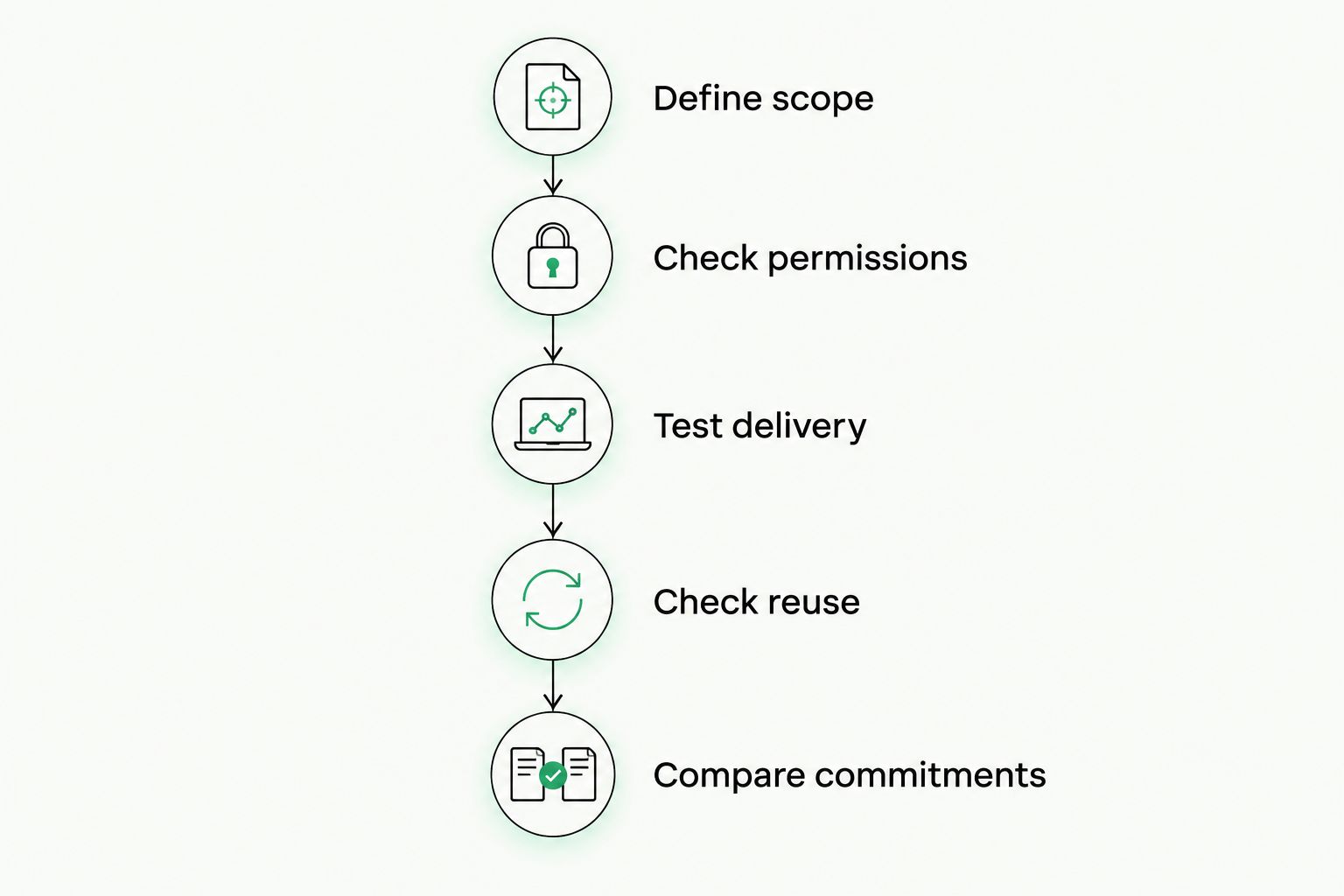
Test delivery and resource export before choosing a translation workflow.
When does a TMS make sense for a freelancer?
A TMS belongs on your shortlist when project administration is part of the problem you need to solve. Examples include organizing review, keeping project resources together, and tracking translation work alongside its associated costs.
Wxrks is a translation management system that supports localization workflows, translation memory, quality management, and cost tracking. Those functions make it relevant to freelancers evaluating more than a standalone editing environment.
Wxrks is best for freelancers who want translation management, quality management, and cost tracking in one system. The fit depends on whether those responsibilities are part of your actual assignments.
The advantage of Wxrks is its stated scope across translation and workflow management. The limitation in choosing a broader system is the need to evaluate and configure the processes you intend to use; broader scope does not automatically make a simple assignment easier.
Evaluate Wxrks against your own files, resource needs, and review process. Confirm current terms and requirements directly rather than assuming that a category description establishes suitability.
Do I need a separate tool for every translation client?
You do not need a separate tool merely because you have another client. Start with the client's required formats, access arrangements, confidentiality rules, and delivery instructions.
Keep memories and terminology separated where client requirements demand it. If a client requires a particular environment, test the handoff before duplicating the entire assignment in your own system.
Does machine translation remove the need for a CAT tool?
Machine translation does not replace the functions of a CAT workflow. Draft generation is different from managing reusable translations, terminology, editing, and delivery.
Decide which functions the assignment requires before choosing the technology. If you need both drafting and structured reuse, evaluate how they work together rather than treating them as substitutes.
Should I commit to a longer software agreement?
Commit only after the workflow passes your delivery test and the terms match your expected use. A longer agreement does not resolve missing functionality or an incompatible client requirement.
For a 2026 decision, check the renewal and exit conditions as carefully as the initial commitment. You need to know what happens to access and exported resources when the agreement ends.
FAQ
What determines translation software cost for freelance translators?
Translation software cost for freelance translators depends on license terms, usage rules, and workflow requirements. Compare the vendor commitment alongside setup, review, and migration work.
What's the best translation software setup for a solo freelancer?
The best setup is the smallest workflow that meets your clients' requirements and produces an accepted deliverable. Evaluate file handling, translation memory, terminology, review, and export with a representative assignment.
Is a TMS better than a CAT tool for freelancers?
A TMS is a better fit when you need project coordination alongside translation. A CAT-centered workflow fits work focused on editing, terminology, and reusable translations; check actual functions because the categories overlap.
Do I still need to review machine-translated text?
You still need to review machine-translated text before delivering it as your work. Check meaning, terminology, omissions, formatting, and compliance with the assignment's instructions.
Can I move my translation memory to another system?
You can move a translation memory when the systems support a compatible export and import workflow. Test the transfer before committing, including whether the information you need survives the move.
Should I choose translation software based on draft speed?
Choose translation software based on completed delivery, not draft speed alone. Include preparation, post-editing, quality checks, formatting repair, and export in your evaluation.
What should I check before renewing translation software in 2026?
Before renewing translation software in 2026, check your actual usage, current terms, required functions, and export options. Repeat a representative delivery test if your assignments or client requirements have changed.
One last thing
Test your exit before you commit. Export a completed assignment, a memory, and a terminology sample, then check whether you can use them outside the original environment.
An attractive editor is easy to assess during a demonstration. The ability to retrieve usable work deserves the same attention before it becomes urgent.
Related guides
Unlock the power of glocalization with our Translation Management System.
Unlock the power of
with our Translation Management System.








