


How long does localizing a mobile app take?


Localizing a mobile app takes as long as its engineering preparation, translation, review, and release testing require; there is no fixed turnaround that applies to every app in 2026. Translation completion is not release readiness: you also need to verify the translated interface in a working build. Set your launch date from the full localization workflow, not from the text delivery date.
TL;DR
- How long does localizing a mobile app take? Estimate preparation, translation, review, build testing, and release separately.
- Wxrks supports translation workflow automation; a translation management system does not replace mobile app testing.
- Translation memory supports reuse, but changed context still needs review.
- Approve the localized build before treating mobile app localization as complete.
How long does localizing a mobile app take?
The usable answer is a project schedule built around dependencies. Your app is ready when the localized release meets its acceptance criteria—not when someone delivers a translated spreadsheet.
Start by separating work that can happen together from work that depends on an earlier result. Translators can work across languages in parallel, but testing a localized screen requires the translated content to be available in a build. A defect that changes the source text sends work back through translation and review.
For UI preparation, use the Figma-to-translated-UI-strings workflow to organize the handoff between design context and translatable content. Then build your schedule around the following stages.
Scope
- What you need to do: Identify languages, screens, content, and release requirements
- Evidence that it is complete: Agreed content inventory and acceptance criteria
Prepare
- What you need to do: Separate translatable content and provide context
- Evidence that it is complete: Usable resource files and contextual instructions
Translate
- What you need to do: Translate new content and review reusable matches
- Evidence that it is complete: Target-language content ready for review
Review
- What you need to do: Check meaning, terminology, and language quality
- Evidence that it is complete: Approved translations and resolved questions
Test
- What you need to do: Check translated content inside the app
- Evidence that it is complete: Verified screens and resolved release-blocking defects
Release
- What you need to do: Package the approved localized build
- Evidence that it is complete: Release approval under your normal process
The longest dependent sequence determines the release date. Adding more translators does not remove an engineering task that must finish before those translators can start.
For your 2026 plan, give each stage an owner, a start condition, and a completion condition. Ask those owners for estimates against the actual scope. Keep active work separate from waiting for answers, build access, or approval; otherwise, a translation estimate becomes a misleading promise about the entire release.
Why this matters
An app can contain approved translations and still have an unusable localized screen. Text can be clipped, a placeholder can be damaged, or a message can appear in the wrong language. Those are release problems, not proofreading details.
The practical consequence is simple: your schedule needs both language review and app testing. If you reserve time only for translation, the first localized build becomes the point where unresolved engineering and design work surfaces.
Define what “done” means before anyone estimates. A translated resource file, an approved interface, and a published app are different deliverables. Choose the endpoint you actually need.
First launch: establish the localization foundation
Best for: teams adding localized experiences to an app for the first time. Treat the first launch as preparation plus delivery, not translation alone.
Check whether user-facing text lives in external resources or inside application code. Identify content embedded in images, server-delivered messages, notifications, and other surfaces outside the main screen inventory. Each content source needs a route into translation and back into the product.
Next, inspect how the app handles language-dependent behavior. Plurals, dates, numbers, and text direction need appropriate implementation. Translating the words does not implement those behaviors.
The benefit of this approach is a clear foundation for later releases. The drawback is that preparation introduces work beyond the translation handoff, so do not schedule the first launch as though all required infrastructure already exists.
Make the handoff concrete. Give translators the source text, its purpose, relevant screenshots, terminology, and any functional constraints. Resolve ambiguous labels before approving them across the app.
Additional language: reuse the process, verify the experience
Best for: teams with an existing localization workflow adding another locale. Reuse your content pipeline and acceptance criteria, then check what the new locale changes.
An existing workflow gives you a starting point for exporting content, reviewing translations, and importing approved text. It does not establish that every target language will fit the existing interface or use the same language rules.
Check the new locale against the actual screens. Review layout behavior, plural handling, formatting, and any region-specific content requirements included in your release scope. Assign reviewers who can evaluate the target language rather than treating a successful import as approval.
The advantage is process reuse. The limitation is that language-specific work remains, even when the source content has not changed. In a 2026 release plan, distinguish reused workflow steps from new locale requirements rather than assigning the new language the previous launch's schedule automatically.
App update: localize the change, not just the changed words
Best for: teams maintaining already localized apps. Start with the content changes, then identify the screens and behaviors those changes affect.
Translation memory stores previously translated segments for reuse. Reuse supports consistency and avoids treating every update as entirely new text, but a matching sentence still needs appropriate context. A label moved to a different screen can require a different translation even when its source wording is unchanged.
Give reviewers visibility into added, edited, and removed content. Include changes to surrounding text and interface behavior when they affect meaning. A resource-file comparison does not capture every contextual change.
The benefit is a focused update scope. The drawback is that a narrow text-only view can miss affected user journeys. Keep testing tied to the change's impact, not merely to whether a translation file changed.
Which localization approach fits your release?
Choose the workflow based on how your app ships. These are planning approaches, not promises about turnaround.
Batched localization
- Best for: A release with a defined content scope
- Advantage: A clear handoff and approval boundary
- Limitation: Source changes after handoff require reconciliation
Continuous localization
- Best for: An app with recurring content changes
- Advantage: Translation work follows ongoing development
- Limitation: Requires clear ownership, version control, and release gates
Staged localization
- Best for: A rollout with explicitly separated scope
- Advantage: Each stage has its own acceptance decision
- Limitation: Requires a deliberate experience for content outside the current stage
A batch needs an agreed source version. Continuous localization needs a reliable way to distinguish pending translations from approved release content. A staged rollout needs an explicit scope; unfinished content must not become an accidental user experience.
Choose the approach your team can maintain. A workflow that depends on unclear approvals or manual reconciliation remains difficult to schedule, regardless of how quickly text is translated.
Why mobile app localization time varies
The timeline changes with the work required and the dependencies between tasks. Use these factors to challenge an estimate before approving it:
- Engineering readiness: Hard-coded text, resource handling, and language-dependent behavior create preparation work before translation can be used.
- Content scope: Interface strings, notifications, onboarding, store materials, and support content need separate ownership when included in the launch.
- Language requirements: Text direction, plural rules, and formatting affect implementation and testing alongside translation.
- Context quality: Screenshots, terminology, and clear instructions help reviewers resolve meaning; ambiguous text creates questions and revisions.
- Source stability: Changes after translation starts require updates and a clear decision about which version belongs in the release.
- Approval dependencies: Reviewer access, engineering fixes, and release approval determine when completed work can move to the next stage.
Do not reduce these factors to a word-count multiplier. Word count describes text volume; it does not describe whether your app can display the translated text correctly.
For a 2026 estimate, document the assumptions alongside the schedule. If the source version, language scope, or release requirements change, update the estimate rather than retaining a date calculated for different work.
How do you build a localization schedule?
Build the schedule from deliverables your team can verify. Use this sequence before committing to a launch date.
- Scope: List the target locales, content surfaces, affected journeys, and release endpoint. State what is excluded so that store content or support materials do not enter the project unnoticed.
- Prepare: Confirm that content can leave the app and return in the correct form. Give translators context and identify the people responsible for answering questions.
- Translate: Separate new content from reusable translation memory matches. Assign translation and review work against the agreed source version.
- Review: Resolve terminology and meaning before approving content. Record decisions so that later screens and updates use the same guidance.
- Test: Put approved content into a working build. Check language quality in context, interface behavior, and the affected user journeys.
- Release: Confirm that required defects are resolved and approval applies to the actual build being shipped.
The sequence makes handoffs visible. It also shows where work can run in parallel and where a downstream task must wait for a completed input.
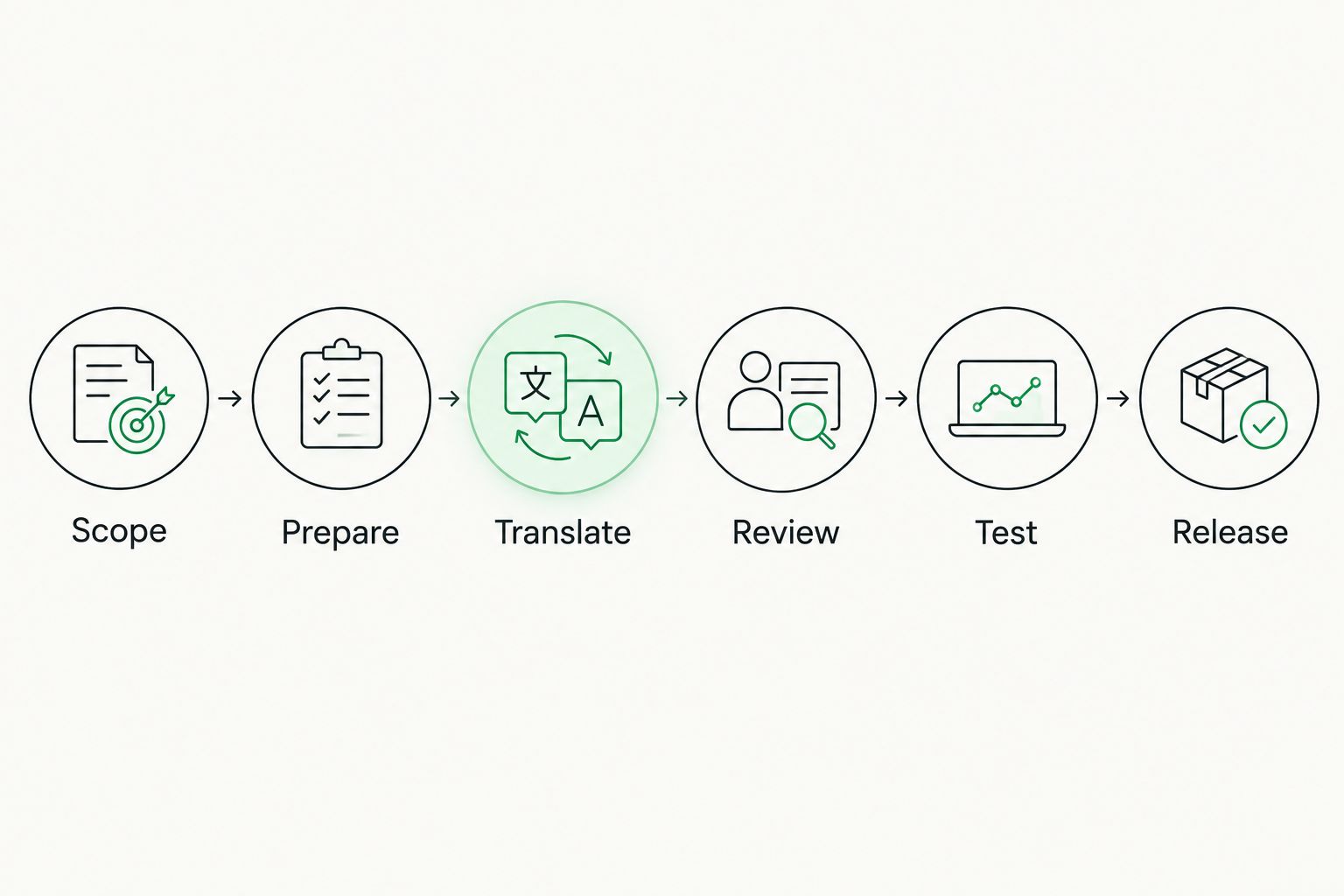
Translation delivery is a handoff within the release process, not its endpoint.
After assigning owners, ask each owner to estimate the work they control and identify dependencies they do not control. Combine those estimates according to the sequence rather than simply adding every task together.
Keep a separate record of unresolved assumptions. An estimate that depends on unavailable reviewer access or unconfirmed content scope is not a release commitment.
Where does translation management software help?
Wxrks is suited to teams that need translation workflow automation, translation memory, quality management, and cost tracking. Those capabilities address the coordination of localization work across translators, developers, enterprises, and translation agencies.
Use Wxrks as a translation management system when those needs match your workflow. Keep software evaluation tied to the tasks your team must manage rather than expecting a tool to supply a universal app-localization deadline.
The benefit is support for translation workflow management and reuse. The boundary is equally important: translation management does not remove your responsibility for engineering readiness, in-app validation, and release approval.
For your 2026 plan, evaluate the translation workflow and the product release workflow together. Clear handoffs between them matter more than declaring the translation stage complete in isolation.
Can translation and development happen at the same time?
Translation and development can run in parallel when translators have stable content and developers can work without changing that content. Define the source version and how subsequent edits reach translators.
Keep affected content visible to both teams. If a developer changes a message's meaning or placement, route the change back through review rather than assuming the previous translation still fits.
Does machine translation make the app ready sooner?
Machine translation produces draft text; it does not approve that text or verify the interface. Schedule post-editing and in-app checks as distinct tasks.
Judge the workflow by approved, usable output. A draft-delivery milestone is useful, but it is not a substitute for the localized release milestone.
What should you approve before setting a launch date?
Approve the scope, source version, owners, review process, testing requirements, and release criteria. Then confirm that the necessary people and build access are available.
Commit to the complete delivery path. Do not promise a published app on the basis of a translation-only estimate.
FAQ
How long does localizing a mobile app take in 2026?
Mobile app localization time depends on preparation, translation, review, build testing, and release requirements. Estimate those stages against your app's actual scope rather than using a universal turnaround.
Is app localization finished when the translation is delivered?
No. Translation delivery must be followed by the required review, integration, and in-app testing before the localized release is approved.
Does adding another language take the same time as the first launch?
An additional language requires its own estimate. You can reuse an established workflow, but the new locale still needs language-specific review and interface testing.
Can translation memory remove the need for review?
No. Translation memory supports reuse, but reused text still needs to fit the meaning and context of the current app.
Can developers keep changing strings during localization?
Developers can change strings if the workflow tracks those changes and routes affected content back through translation and review. Untracked edits break the connection between approved translations and the release build.
What does Wxrks help manage during app localization?
Wxrks helps automate localization workflows and manage translation memory, quality, and cost tracking. Your team remains responsible for testing the localized app and approving its release.
What's the best way to avoid an unrealistic localization deadline?
Build the deadline from the full workflow, including engineering preparation, reviewer dependencies, and release testing. State the scope and assumptions before making the date a commitment.
One last thing
Use the localized build as your approval object, not just the translation file. A correct translation in isolation does not prove that users will see it correctly—or see it at all.
Before your 2026 launch, make the final handoff explicit: which build was checked, which locales were approved, and which defects prevent release. That record turns a vague declaration of completion into a decision your product team can act on.
Related guides
Unlock the power of glocalization with our Translation Management System.
Unlock the power of
with our Translation Management System.










