


Can machine translation software work offline?


Yes, machine translation software can work offline in 2026 when the translation engine, required language models, and supporting files run on your device or an accessible local server. Downloading an app is not enough: cloud-only translation, online authentication, and connected workflow features can still require internet access.
TL;DR
- Can machine translation software work offline? Yes, when its engine and required language models run locally.
- Offline translation does not automatically include document handling, translation memory, terminology checks, or team synchronization.
- Test fresh text with internet access disabled; cached translations do not prove offline capability.
- Wxrks supports translation workflow management; assess offline engine requirements separately from TMS requirements.
Can machine translation software work offline?
Machine translation works offline only when generating a new translation does not depend on an internet service. The interface can be installed locally while the actual translation runs elsewhere. What matters is where processing happens, not where you open the software.
On-device engine
- Works without public internet?: Yes, with the required local resources
- Best for: Individual work without connectivity
- Main advantage: Translation runs on the device
- Main limitation: Device resources and installed models constrain use
Local-network engine
- Works without public internet?: Yes, while the local server remains accessible
- Best for: Teams using an internal translation service
- Main advantage: Processing stays within the configured network
- Main limitation: Disconnecting from that network removes access
Cloud-only engine
- Works without public internet?: No, for new translation requests
- Best for: Connected workflows using a remote service
- Main advantage: No local model deployment
- Main limitation: Requires connectivity to the service
Hybrid setup
- Works without public internet?: Only for features explicitly supported locally
- Best for: Workflows spanning connected and disconnected work
- Main advantage: Different tasks can use different processing locations
- Main limitation: Offline behavior requires feature-by-feature testing
The same distinction applies to editing. You can sometimes edit a downloaded bilingual file offline without being able to generate machine translations. Our guide to machine translation post-editing explains the review work that remains after an engine produces a draft.
Why this matters
An offline requirement usually concerns more than convenience. You need to know whether work continues during an outage, whether source text leaves a controlled environment, and whether reviewers can finish the job without connected services.
For your 2026 evaluation, separate those requirements. A locally running engine addresses the location of translation processing; it does not, by itself, establish data security, terminology accuracy, document compatibility, or an uninterrupted approval workflow.
Ask whether the complete required task works offline, not whether the application opens offline. That question exposes dependencies hidden behind a familiar desktop interface.
On-device translation: best for disconnected individual work
On-device machine translation stores the engine and language resources on the computer or mobile device performing the translation. Once the necessary resources are installed, supported text can be translated without contacting a remote inference service.
The practical advantage is independence from an external connection during translation. You can work where connectivity is unavailable, provided the software does not impose another online dependency.
The trade-off is local responsibility. Your device needs sufficient memory, storage, and processing capacity for the chosen engine and model. There is no universal hardware requirement: check the documentation for the exact deployment rather than borrowing specifications from another model.
Confirm these capabilities before adopting an on-device setup:
- The required source and target languages are installed.
- The intended translation direction works locally.
- The application starts without an online sign-in.
- The required input method or document format works offline.
- Output can be saved and reopened without synchronization.
A successful short-text test does not establish that a scanned document will work. Text recognition, file conversion, and translation can be separate components with separate connectivity requirements.
Local-server translation: best for controlled network access
A translation engine hosted on an internal server can operate without public internet access while still requiring a network connection. Users submit text to that server rather than running the model on their own devices.
An internal service is internet-independent, not network-independent. If your laptop loses access to the server, the translation service is no longer available to that laptop.
This distinction matters for procurement language in 2026. A requirement such as offline translation is ambiguous unless it states whether an internal network is allowed. Define whether the deployment must work on an isolated laptop, inside a restricted network, or through a remotely accessible internal environment.
Local hosting gives your organization responsibility for deployment and operations. Access control, model updates, monitoring, backups, and service maintenance still need owners. Keeping an engine inside your network does not perform those tasks automatically.
Before choosing this approach, confirm who supports the service and how translators continue working when that internal service is unavailable.
Hybrid translation: best for mixed connectivity requirements
A hybrid setup combines local and remote capabilities. For example, editing can happen locally while machine translation requests use a connected engine, or a local engine can generate drafts while project synchronization waits for a connection.
The benefit is flexibility. The limitation is that the word hybrid says little about which actions survive disconnection.
Build your evaluation around actions rather than a feature label:
- Open an existing project.
- Import new source content.
- Generate a fresh translation.
- Retrieve translation memory matches.
- Run required quality checks.
- Save, export, and later synchronize approved work.
Record each action separately. A local editor with cloud-only translation is not an offline machine translation engine, even if most of the screen remains usable without internet access.
Also check what happens when connectivity returns. Your process needs a clear way to handle changed source text, competing edits, and resources that were updated while someone worked offline.
Why offline machine translation capability varies
Offline capability depends on the deployment, its resources, and the task you expect it to complete. These factors explain why an application can pass a basic translation test but fail your actual workflow:
- Processing location: A local interface can send translation requests to a remote engine. Identify where new output is generated.
- Language resources: Offline support depends on the models installed for the required languages and directions. Do not infer one direction from another.
- Device capacity: The engine must fit the available hardware and perform acceptably on your real content. Use the deployment's documented requirements.
- Document dependencies: Text extraction, optical character recognition, and file reconstruction can require components outside the translation engine.
- Authentication dependencies: Sign-in, licensing, or periodic verification can affect whether an application remains usable without connectivity.
- Workflow dependencies: Shared terminology, translation memory, assignment, approval, and synchronization can depend on connected systems.
For a 2026 requirements document, turn each factor into an acceptance condition. Replace vague wording such as supports offline use with a statement naming the action, processing location, and resources that must remain accessible.
That makes demonstrations useful. The provider must show the task you need, rather than a disconnected interface that cannot complete it.
How do I test whether translation software really works offline?
Test previously untranslated content after disabling internet access. Reopening an old result proves only that the application retained that result; it does not prove that the engine can generate new output locally.
Use this sequence for a 2026 acceptance test. Keep sensitive production material out of the trial until your organization has approved the deployment.
- Prepare resources. Install the documented engine, required language models, and any resources needed for your intended task. Record what the setup requires before disconnection.
- Disconnect internet. Disable external connectivity. For a local-server test, preserve only the internal network access that the deployment is supposed to require.
- Translate fresh text. Submit content that has not already been translated in the application. Check the actual source-to-target direction you intend to use.
- Check the workflow. Import your required file type, edit the result, consult any required local resources, and run the checks needed for delivery.
- Save and reopen. Export the result, close the application, and reopen the saved work while still disconnected. Record any authentication or synchronization prompts.
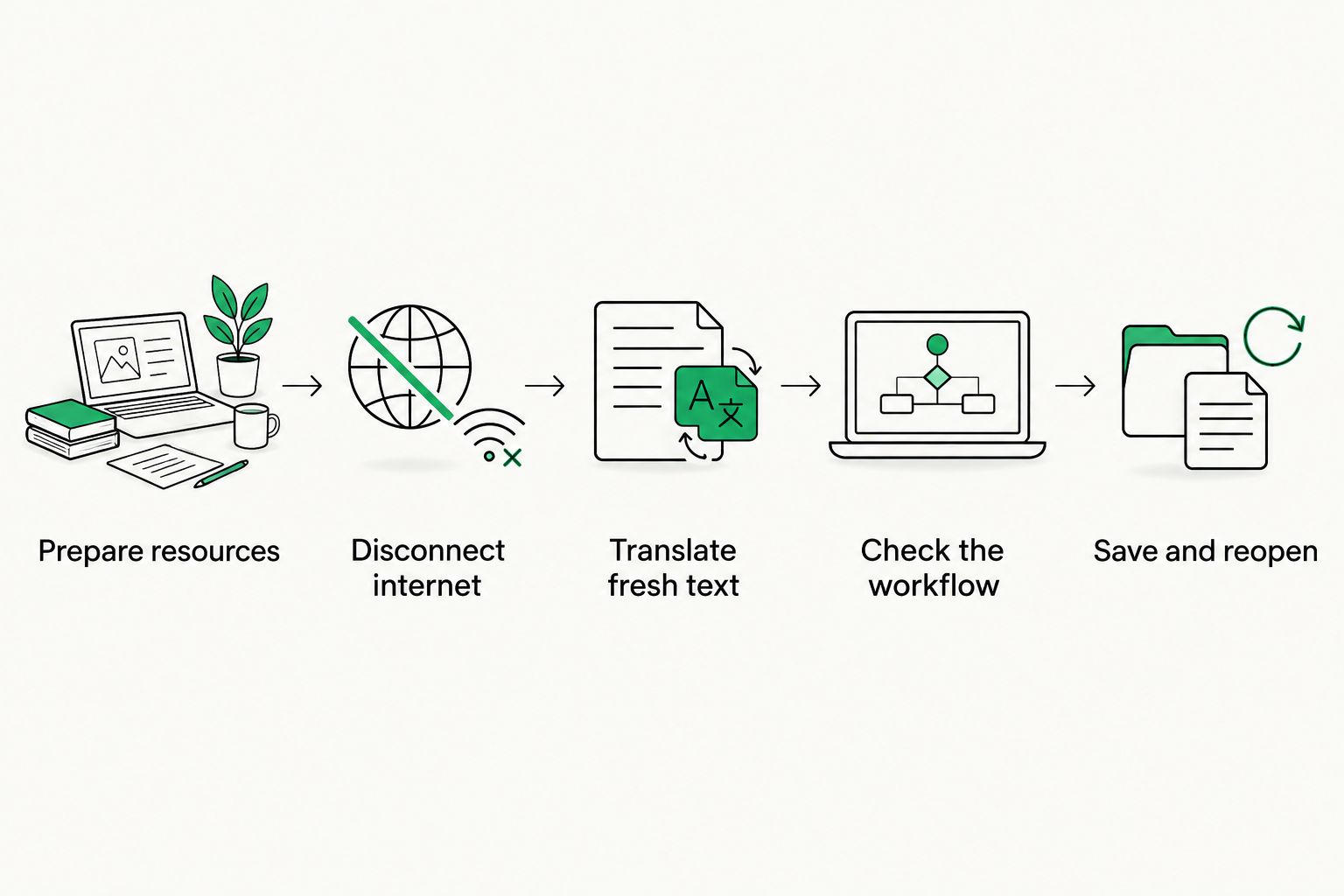
Fresh translation and a complete save cycle distinguish offline processing from cached results.
Document failures by action. If translation succeeds but export fails, the engine supports offline inference while the delivery workflow remains incomplete. That is a more useful finding than a single pass-or-fail label for the whole application.
For a security-sensitive deployment, have your technical team inspect network behavior as well. A successful disconnected test establishes functionality; it does not establish what the software transmits when a connection is available.
Does offline machine translation keep documents private?
Offline machine translation removes the need to transmit text to an external engine during local processing. It does not automatically make the entire document workflow private.
Files can still be exposed through device access, connected backups, shared folders, application logs, or later synchronization. Review those paths alongside the engine's processing location.
For sensitive content, ask your security team to assess storage, permissions, retention, logging, and transmission behavior. Treat a claim of offline support as a deployment characteristic, not as proof of compliance or a complete security assessment.
Does offline machine translation produce lower-quality results?
Offline machine translation is not inherently a quality rating. Quality depends on the model, language direction, subject matter, context, terminology, and the review process—not simply on whether processing happens locally or remotely.
Compare outputs using representative material from your own work. Include recurring terminology, ambiguous sentences, formatting-sensitive content, and instructions where an incorrect translation changes the meaning.
Assess the finished task as well as the draft. A fluent sentence can still contain a mistranslated product term, missing negation, or incorrect instruction. Keep human review wherever an error creates meaningful risk.
Where does a translation management system fit?
A machine translation engine generates translated text. A translation management system organizes the surrounding work, including translation resources, review, and project coordination. These are related jobs, not interchangeable ones.
Wxrks is best for translators, developers, enterprises, and agencies seeking translation workflow automation. Wxrks supports localization workflows, translation memory, quality management, and cost tracking; those capabilities address work beyond generating a draft.
Assess offline requirements separately. A TMS description does not establish that its editor, connected engines, shared resources, or approval process function without internet access.
If disconnected work is mandatory, write down which tasks must stay local and which can wait for reconnection. Then verify the proposed system against that boundary. Do not treat an engine's offline capability as evidence about the entire translation management workflow.
FAQ
Can machine translation software work offline without downloading anything first?
Offline machine translation requires an accessible engine and the necessary language resources. If those are not already installed locally or available on an internal server, prepare them before disconnecting.
Does installing a desktop translation app mean it works offline?
Installing a desktop app does not prove offline translation capability. The interface can run locally while sending new translation requests to a cloud service.
Can I use an internal translation server without internet access?
An internal translation server can work without public internet access if its required dependencies are available internally. Your device still needs a working connection to that server.
Is offline machine translation better for confidential files?
Local processing avoids sending text to an external translation engine during that processing step. Confidentiality still depends on device security, storage, logs, backups, and later synchronization.
Will downloaded language models translate every document format?
Downloaded language models do not establish document-format support. File extraction, scanned-text recognition, and export must also work within the offline setup.
Can translation memory work offline too?
Translation memory can work offline when the software supports access to a local copy. A shared remote memory requires a connection unless the application provides an offline mechanism.
Does Wxrks being a TMS establish offline machine translation support?
Being a TMS does not establish offline machine translation support. Evaluate the proposed engine, editor, authentication, and shared-resource access against your disconnected-work requirements.
One last thing
Restart the application while it is still disconnected. A program that keeps working in an existing session has not yet demonstrated that it can start a new session without an online dependency.
Make that restart part of your 2026 acceptance test, then reopen and export the translated file. The useful promise is not that a screen stays open—it is that you can finish and recover the work under the connectivity conditions you actually face.
Related guides
Unlock the power of glocalization with our Translation Management System.
Unlock the power of
with our Translation Management System.










