


Can a translation management system integrate with Salesforce?


Yes, a translation management system can integrate with Salesforce through a compatible connector, middleware, or a custom API workflow. The connection must support the Salesforce content you actually use and return translations to the correct records and languages. A working connection is not enough: approval, permissions, and source-version checks determine whether the workflow is safe to publish.
TL;DR
- A translation management system Salesforce integration needs verified content access, language mapping, and controlled write-back.
- Choose a connector for supported workflows; use middleware or custom APIs when routing requires more control.
- Wxrks supports translation management, translation memory, and quality workflows; confirm Salesforce connectivity before selecting an implementation route.
- Keep translation approval separate from Salesforce publication, and reject returns based on outdated source content.
Why this matters
Moving text into a translation editor solves only part of the problem. You still need to identify its source, preserve context, manage revisions, and put the approved result where Salesforce expects it.
For a 2026 integration project, define the return path before choosing the connection method. Your translation quality measurement process should also define what qualifies a translation for return—not simply whether someone completed the text.
Can a translation management system integrate with Salesforce?
Yes, provided the chosen integration can read and update the intended Salesforce content under your organization's permissions. Salesforce provides APIs for accessing supported platform data, but access alone does not establish a complete translation workflow. The TMS side must also support the required exchange.
Start with the content type, not the Salesforce name. Knowledge articles, custom-object text, and application interface labels are different integration requirements. A connection demonstrated against one does not prove support for the others.
Compatible connector
- Best for: Teams whose content and approval process match its documented scope
- Main advantage: Packages supported exchange behavior
- Main limitation: Coverage depends on the connector's actual capabilities
Middleware
- Best for: Teams coordinating translation with other business processes
- Main advantage: Keeps routing and transformations in a separate integration layer
- Main limitation: Adds another system to configure and monitor
Custom API workflow
- Best for: Teams with specific mappings and engineering ownership
- Main advantage: Gives control over exchange behavior
- Main limitation: Requires development, testing, and maintenance
File exchange
- Best for: Teams validating mappings before automation
- Main advantage: Makes exported and returned content easy to inspect
- Main limitation: Requires manual handling unless separately automated
File exchange is a fallback, not a live integration. It can establish whether your content survives a round trip before you automate the same mapping.
Compatible connector: best for a documented content match
A connector is the first route to assess when its documentation explicitly covers your Salesforce content and the selected TMS. Ask for a demonstration using your intended object, fields, languages, and approval process.
The advantage is packaged behavior. The trade-off is scope: a connector that handles article translation does not automatically handle every custom field or publication rule. Choose a connector for its demonstrated coverage, not its logo list.
Middleware: best for cross-system routing
Middleware fits workflows where translation is part of a wider sequence. For example, your proposed process might require checking eligibility, creating a translation task, notifying an owner, and returning approved content.
This separates routing from the translation editor. It also creates another operational dependency. Assign responsibility for failed jobs, authentication, mapping changes, and replay before adopting this route.
Custom API workflow: best for precise control
A custom integration lets your engineering team define how eligible content is extracted, identified, submitted, and returned. It is appropriate when supported interfaces exist but packaged behavior does not match your requirements.
Control comes with ownership. Your team must maintain authentication, error handling, mapping logic, and compatibility with the interfaces it uses. Choose custom development only when someone owns the integration after launch.
How should you build the Salesforce translation workflow?
Use a controlled round trip: extract eligible content, translate it with context, approve the result, and return it against the original source identity. Keep publication as an explicit decision.
For a 2026 pilot, start with 1 content type and 1 target language. These are scope recommendations, not platform limits. A narrow pilot makes mapping and revision failures easier to diagnose before you expand.
- Select content. Define which records and fields qualify for translation. Exclude internal notes, identifiers, and unrelated customer information unless they have an approved purpose in the translation task.
- Map fields. Record the source identifier, source language, target locale, destination field or translation record, and source revision. Include context that helps a translator understand the text.
- Translate content. Send the selected text into the translation workflow. Preserve placeholders, markup, and field boundaries, and apply the appropriate terminology and translation memory.
- Approve translations. Require the designated reviewer to approve the target text. Check linguistic quality and technical integrity separately.
- Return drafts. Verify the source revision, write to the mapped destination, and record the result. Publish only through the agreed release process.
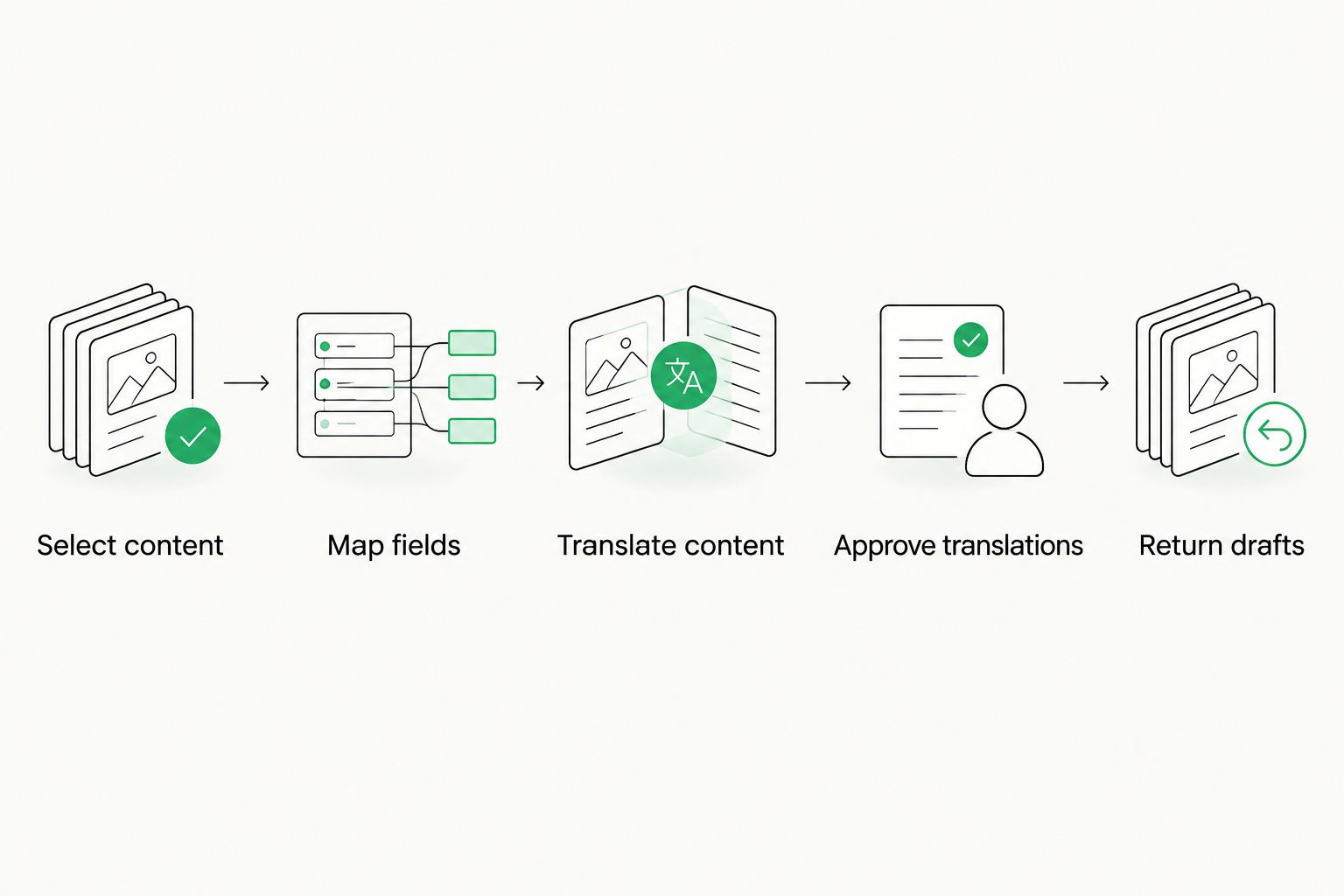
Returning a translation and publishing it should remain separate decisions.
The return step needs as much attention as extraction. If the integration cannot show which record and source revision produced a translation, do not permit automatic write-back.
Define the exchange contract
Write the mapping down in a form developers, localization managers, and Salesforce administrators can all inspect. Each field needs a purpose and an owner.
Source identity
- What to define: Stable identifier for the original content
- Failure it helps prevent: Translation returned to the wrong record
Language mapping
- What to define: Relationship between source language and destination locale
- Failure it helps prevent: Correct text assigned to the wrong language
Source revision
- What to define: Version marker captured at submission
- Failure it helps prevent: Old translation replacing newer content
Translatable fields
- What to define: Explicit inclusion list
- Failure it helps prevent: Unnecessary or sensitive text sent for translation
Context
- What to define: Relevant descriptions and usage information
- Failure it helps prevent: Ambiguous text translated without its intended meaning
Return status
- What to define: Conditions for draft return and publication
- Failure it helps prevent: Unreviewed text becoming public
Do not use the source text itself as the only identifier. Identical wording can appear in different records, and an editor can change the wording while translation is underway.
Why Salesforce translation integrations vary
The right architecture depends on the work the connection must perform. These factors should drive your 2026 requirements document:
- Content model. Identify the objects, fields, and language-specific destinations involved. Different content structures require different mappings.
- Direction of exchange. Sending source text is a smaller requirement than returning approved translations and recording their status.
- Revision behavior. Decide what happens when the source changes, a record is deleted, or a translation returns late.
- Permissions. Define which content the integration identity can read and which destinations it can update.
- Quality ownership. Name the person or role that approves terminology, translation quality, and publication.
- Operational ownership. Assign monitoring, failed-job recovery, credential maintenance, and change management.
Avoid selecting an architecture solely because it has fewer visible steps. A short demonstration can hide manual intervention, unsupported fields, or an undefined recovery process.
What should you test before enabling automatic write-back?
Test failures, not just a clean translation. A successful demonstration shows that one path works; acceptance testing establishes what happens when the workflow deviates from that path.
Use 3 test cases as a minimum starting checklist for your 2026 pilot. Expand the checklist to cover the content and controls your team actually uses.
Test case: the source changes during translation
Submit content, edit the source, and then return the original translation. The integration should identify the mismatch and route it for a defined decision rather than silently treating it as current.
Preserve the returned work for review where your process permits. A revision mismatch means the translation needs assessment; it does not necessarily mean every translated sentence is unusable.
Test case: the same return arrives again
Deliver the same approved result more than once. Design the return operation so repeated delivery does not create duplicate translated records or repeat publication actions.
Use stable task and destination identifiers. Your recovery process should distinguish a retry from a genuinely new translation request.
Test case: the destination rejects the update
Attempt a return that fails a destination validation or permission check. Confirm that the job records a failure, retains enough information for diagnosis, and does not report successful completion.
An approved translation is not the same as a successfully updated Salesforce record. Track those outcomes separately so localization and platform teams can resolve the right problem.
How do you protect sensitive content and approval boundaries?
Send only the fields required for the translation task. Review the proposed payload with the relevant data owner, especially when records contain personal information, contractual material, or confidential business text.
The same boundary applies when integrating translation with case-management software: the translated document and the surrounding case record have different purposes, so the exchange should not treat every accessible field as translation input.
Define 2 approval gates in your proposed design: linguistic approval and publication approval. They can involve the same authorized person, but they should remain distinct decisions. Fluent text can still be outdated, mapped incorrectly, or unsuitable for release.
Apply the least-privilege principle to the integration identity. Give it the access required for the approved workflow, and test that restricted records remain inaccessible. Do not treat an installed connector as evidence that your security requirements are satisfied.
Keep operational logs useful without turning them into another copy of confidential content. Record identifiers, job states, and actionable errors; decide explicitly when source or target text belongs in diagnostic records.
Where does Wxrks fit in this workflow?
Wxrks is best for teams seeking a translation management system for localization workflows, translation memory, quality management, and cost tracking. Those are relevant capabilities for the translation side of the process; Salesforce connectivity needs its own technical validation.
Assess Wxrks against a written exchange contract rather than assuming a native Salesforce connector. Ask how the proposed implementation would receive eligible content, preserve its identity, apply translation workflows, and return approved results.
The fit is centralized translation work. The boundary is integration scope: do not treat translation management features as proof of support for a particular Salesforce object, authentication method, or write-back behavior.
For a 2026 evaluation, ask the team proposing the implementation to demonstrate the full round trip with representative content. Include a source revision and a failed return, not just a successful submission.
Does the integration automatically publish translated content?
No. Publication depends on how the integration and Salesforce workflow are configured; returning translated text does not inherently authorize release.
Default your proposed workflow to draft return until the publication conditions are explicit. If automatic publication is a requirement, document the approval state, source-version check, destination, and recovery procedure first.
Can you translate every Salesforce field through the same connection?
No. Treat field support as a documented scope question, not a platform-wide assumption.
Verify whether each field is readable, suitable for translation, and writable at the intended destination. Interface labels and record content should not be grouped into one requirement without checking their separate handling.
FAQ
Can a translation management system integrate with Salesforce in 2026?
Yes, a translation management system can integrate with Salesforce through a compatible connector, middleware, or custom APIs. Verify the specific content type, permissions, and return workflow before implementation.
Does Wxrks have a native Salesforce connector?
Confirm native Salesforce connector availability directly with Wxrks before planning around it. Require a demonstration of your intended content, language mapping, and return process.
What's the best translation management system Salesforce integration approach?
The best approach is the one that demonstrably supports your content and approval process. Assess a compatible connector first, then compare middleware or custom APIs when the documented coverage does not fit.
Can Salesforce translations return automatically after approval?
Automatic return requires an integration designed and authorized to write approved content to the destination. Keep translation completion, successful return, and publication as separate states.
What happens if Salesforce content changes during translation?
The integration should detect that the source revision differs from the submitted version and prevent an unreviewed overwrite. Route the returned translation for assessment against the updated source.
Do translators need access to every Salesforce record?
No, translators should receive only the content and context required for their assigned work. Define record access and translation payloads separately.
Can a Salesforce integration use translation memory?
Translation memory can be part of the TMS workflow after source content reaches it. Confirm how approved translations are stored and reused; Salesforce connectivity alone does not establish that behavior.
One last thing
Ask the implementation team to demonstrate recovery before expanding the pilot. Have them show where a failed return appears, who receives it, and how an authorized owner retries it without duplicating work.
That demonstration tests the handoff between translation and platform operations. A connection that works only when nothing changes is not ready for unattended publishing.
Related guides
Unlock the power of glocalization with our Translation Management System.
Unlock the power of
with our Translation Management System.








