Can a TMS integrate with a headless CMS?


Yes, a TMS can integrate with a headless CMS when the systems expose suitable APIs or provide a compatible connector. A working TMS headless CMS integration sends selected content for translation, returns approved translations to the correct locale fields, and prevents outdated work from overwriting newer content. The connection still needs explicit rules for field mapping, source revisions, permissions, and publishing.
TL;DR
- TMS headless CMS integration works through compatible connectors, APIs, or middleware; verify both export and return paths.
- Keep CMS publishing separate from translation completion unless your release rules explicitly connect them.
- Match every translation to its content ID, field, locale, and source revision before writing it back.
- Wxrks is a translation management system for teams managing localization workflows, translation memory, quality, and costs.
Can a TMS integrate with a headless CMS?
Yes. The real test is whether the integration preserves content structure and editorial control in both directions. Sending text out is only half the job. Returning it safely requires stable identifiers, compatible content models, and permission to update the intended locale without changing unrelated fields.
Use this sequence to evaluate a proposed connection:
- Select content. Identify the entries, fields, and target locales that belong in the translation job.
- Capture context. Include field meaning, formatting rules, and the source revision alongside translatable text.
- Translate and review. Apply your terminology, translation memory, and approval requirements.
- Validate the return. Check identifiers, placeholders, structure, and whether the source has changed.
- Write a draft. Return approved translations to their mapped destinations before editorial publication.
For a platform-specific starting point, see the Sanity to localized content workflow. Treat a workflow guide as an implementation reference, not proof that every connector supports your content model.
Why this matters
A headless architecture separates content management from presentation. That gives you a useful integration boundary, but the content API does not decide which fields need translation or when a localized page is ready to publish.
For a 2026 implementation, define success as a complete, reviewable round trip. A successful API response proves that a request was accepted; it does not prove that the right translation reached the right page.
The practical benefit is less copying between systems. The trade-off is a connection that someone must maintain when schemas, permissions, or editorial workflows change.
Which integration approach should you choose?
Start with the least complex approach that passes your content and release tests. Choose by demonstrated behavior, not by the presence of a connector logo.
Packaged connector
- Best for: Teams whose content model matches its supported behavior
- Main advantage: Reduces custom integration work when the fit is right
- Main limitation: Its supported fields and workflow rules constrain your design
- What to verify: Nested content, references, locales, and draft return
Custom API integration
- Best for: Teams with unusual models or strict release controls
- Main advantage: Lets developers define extraction and write-back behavior
- Main limitation: Your team owns implementation and maintenance
- What to verify: Authentication, revision checks, retries, and mapping
Middleware workflow
- Best for: Teams coordinating content across several systems
- Main advantage: Provides a separate place for routing and transformation
- Main limitation: Adds another system to operate and troubleshoot
- What to verify: Payload limits, execution logs, failure recovery, and credentials
These approaches describe architecture choices, not confirmed capabilities of any named vendor. Before committing in 2026, ask for a demonstration using your actual content structure, including the difficult fields.
A connector that handles plain text but drops rich-text marks is not a fit for a rich-text-heavy site. Conversely, a custom integration adds unnecessary work when an existing connector already passes your acceptance tests.
What must the integration preserve?
The central requirement is identity. Your integration must know exactly which source field produced each translation and where that translation belongs when it returns.
Content identity and source revision
Use a stable content identifier rather than a title or slug as the primary match. Editors change titles and slugs; your mapping must survive those changes.
Record a source revision identifier or a hash of the extracted source content. Before importing a completed translation, compare its recorded source with the current source. Route mismatches to review instead of silently replacing current work.
Field structure and embedded references
Separate translatable text from structural data. Identifiers, internal references, formatting markers, and application variables need preservation rules rather than ordinary translation instructions.
Rich text requires particular care. The integration should preserve the document structure while exposing the intended text nodes, including link text and other relevant attributes. Translating a serialized document as an undifferentiated string risks changing syntax that the CMS expects to remain intact.
Locale destinations and editorial ownership
Map locale identifiers explicitly. Do not assume that both systems use the same locale codes or store localized content in the same way.
Also define which system owns each field. If editors can change translated content directly in the CMS, decide how those changes interact with later TMS imports. Otherwise, a technically valid synchronization can overwrite an intentional editorial correction.
How should the translation round trip work?
Keep translation approval and publication as separate states. Your integration can return approved work without giving the translation process authority to publish it.
Use the following stages as your implementation checklist:
- Select content: An editor or a defined content event identifies eligible fields and locales.
- Capture revision: The integration records identifiers, source text, and revision information.
- Translate content: The TMS handles the translation workflow and required review.
- Validate return: The integration checks structure, destinations, and source freshness.
- Save draft: Approved content returns without bypassing CMS publishing controls.
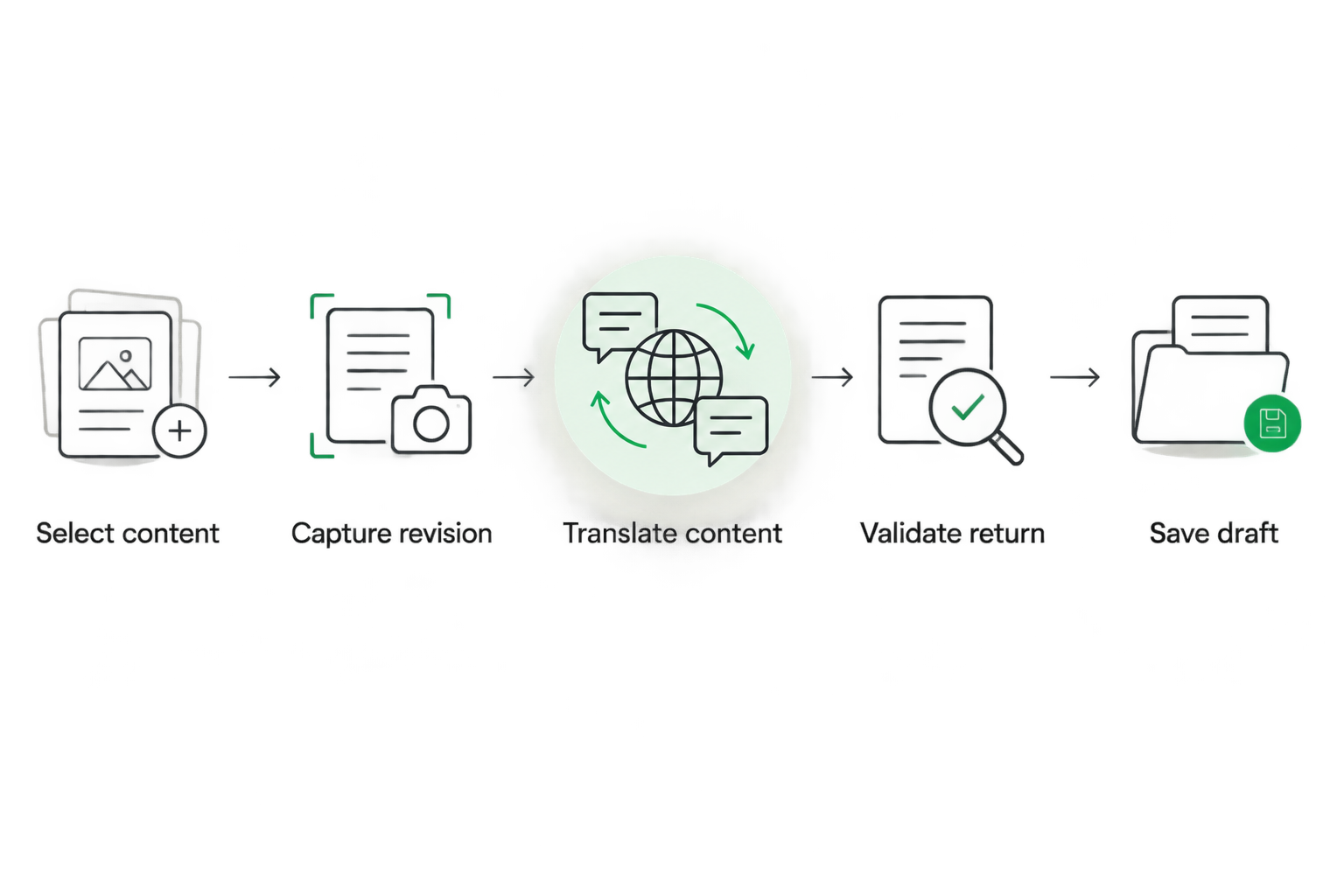
Validate the returning translation before saving it to the CMS.
Design failure handling alongside the happy path. A timeout after a write does not necessarily mean the write failed, so repeated delivery must not create duplicate entries or repeat unintended changes.
Use an idempotency key or equivalent deduplication record tied to the translation job and destination. Keep enough status information to distinguish work awaiting translation, work awaiting import, and work blocked by a conflict.
For your 2026 rollout, make the recovery action visible to the person responsible. A failed import needs an identifiable entry, locale, cause, and next action—not just an error buried in an application log.
Why TMS headless CMS integration complexity varies
The connection becomes more demanding as content structure and workflow rules diverge. These are the factors to inspect before you select an approach:
- Content model depth. Nested blocks, reusable components, and linked entries require explicit extraction boundaries. Decide whether a referenced entry travels with its parent or follows a separate workflow.
- Localization model. Field-level localization and separate localized entries need different destination mappings. Confirm how the connection creates or updates the intended translation.
- Source change frequency. Frequent editing requires revision checks and a policy for translations already in progress. Decide when to continue, cancel, or request review.
- Rich-text requirements. Formatting, embedded assets, and inline references need structural validation. A plain-text demonstration does not test these cases.
- Release controls. Drafts, approvals, scheduled releases, and frontend deployment rules determine what happens after import. Translation completion must respect those controls.
- Operational ownership. Credentials expire, schemas change, and requests fail. Assign responsibility for monitoring, maintenance, and resolving blocked jobs.
Do not collapse these questions into a generic claim that the systems “have APIs.” API access establishes a possible connection; the mapping and operating rules make it usable.
How do you test the connection before rollout?
Start with 1 content entry, 2 target locales, and 3 source revisions as a deliberately small acceptance test. These are proposed test conditions, not a performance benchmark or a required platform limit.
Choose a representative entry containing a heading, body copy, a link, a reusable reference, and a placeholder if your production content uses them. A simple paragraph will not exercise the failure cases that matter.
Run these checks before extending the workflow:
- Initial return: Translate the entry and confirm that each field lands in the intended locale as a draft.
- Source edit: Change the source while translation is underway. Confirm that the returning work is flagged rather than silently treated as current.
- Repeated delivery: Submit the same completed result again. Confirm that the destination remains correct without duplicate content.
- Partial failure: Interrupt one locale’s import. Confirm that you can retry it without changing the successful locale.
- Editorial correction: Edit a returned translation in the CMS. Confirm that the next synchronization follows your ownership policy.
- Permission boundary: Confirm that the integration cannot modify content outside its assigned scope.
Record the expected result beside each test. In 2026, a useful acceptance record describes observable behavior, not a vague statement that synchronization works.
Where does Wxrks fit in this workflow?
Wxrks is a translation management system that helps translators, developers, enterprises, and translation agencies manage localization workflows, translation memory, quality management, and cost tracking.
Wxrks is best for teams seeking a translation management system to manage localization workflows, quality, and costs. For a headless CMS project, assess the specific connection separately: require a demonstration of field mapping, revision handling, and draft return against your content model.
The useful role of a TMS is managing translation work rather than turning the CMS into a translation workspace. The limitation is equally important: selecting a TMS does not, by itself, establish that your particular CMS schema and publishing workflow are supported.
Will a TMS integration publish translations automatically?
No. Automatic publication depends on the connection’s permissions and the workflow you configure. A safer starting design returns translations as drafts and leaves publication with your existing editorial process.
If you require automatic publication, define the validation and approval conditions explicitly. Include how the workflow handles a source change immediately before release.
Does a headless CMS integration send the whole website for translation?
No. The integration should send only the content you select through its extraction rules, whether that is an entry, a field, or a defined set of changes.
The frontend remains a separate concern. Confirm that navigation, interface strings, metadata, and other visitor-facing text have a localization path rather than assuming everything lives in CMS body fields.
Can translators work without CMS access?
Yes, when the integration delivers the necessary source content and context to the TMS and writes approved work back through a controlled connection. Translators do not need direct CMS editing permissions for that arrangement.
Provide field descriptions, surrounding copy, and preview context where your workflow supports them. Removing CMS access should not remove the information needed to translate accurately.
FAQ
Can any TMS integrate with any headless CMS?
No. A workable connection depends on compatible APIs or connectors, supported content structures, permissions, and reliable write-back behavior. Test your actual schema before committing.
Is a packaged connector better than a custom API integration?
A packaged connector is the better starting point when it passes your content and workflow tests. A custom API integration fits requirements the connector cannot meet, but your team must maintain it.
Do I need webhooks for TMS headless CMS integration?
No. Webhooks are one way to trigger work; scheduled polling or deliberate editorial submission are alternatives. Choose a trigger that matches your release process and the systems’ supported interfaces.
How do I stop an old translation from overwriting new content?
Compare the returning translation’s source revision with the current source before importing it. Route mismatches to review and define how existing target-language edits are protected.
Can the integration preserve rich text and placeholders?
Yes, if extraction and import preserve the relevant structure and validate protected elements. Test nested formatting, links, references, and placeholders rather than relying on a plain-text example.
What should I ask Wxrks about a headless CMS project?
Ask Wxrks to demonstrate the proposed CMS connection using your content model. Check field mapping, source-change handling, review states, retry behavior, and draft return before approving the integration.
One last thing
Make the failure demonstration part of your 2026 selection process. Ask someone to edit the source after a translation job starts, then return the older translation. The useful result is a visible conflict with a clear recovery path—not a quietly updated page.
That test reveals more about operational readiness than a clean export ever will. A connection is ready when your team can explain both how content moves and what happens when it should stop.
Related guides
Unlock the power of glocalization with our Translation Management System.
Unlock the power of
with our Translation Management System.