


Best website localization tools in 2026


Best overall for managed translation workflows: Wxrks. Best for website-first deployment: Weglot. Best for WordPress-native control: WPML. For the best website localization tools in 2026, start with how your content gets translated, reviewed, and published—not the longest feature list.
TL;DR
- Wxrks leads this best website localization tools shortlist for translation workflows, translation memory, quality management, and cost tracking.
- Weglot suits website-first localization; WPML suits teams managing multilingual content inside WordPress.
- Lokalise fits developer-led string workflows; Crowdin fits contributor-based localization.
- Test translated pages, source updates, and publishing ownership before selecting a platform.
Why this matters
Website localization has separate jobs: translating content, managing approval, and delivering the correct language version to visitors. A tool that handles one job does not automatically handle the others.
That distinction decides your shortlist. Marketing teams need editable pages and dependable publishing. Developers need stable string identifiers and predictable updates. Localization managers need context, reusable translations, and clear ownership.
For a 2026 evaluation, follow a changed source sentence all the way to its published translation. If nobody can explain who approves it or how it reaches the website, the workflow is unfinished.
What makes the best website localization tools?
Use these criteria before comparing product names:
- Content connection: Identify how website content enters translation and returns to the publishing system. Check your actual CMS, content types, and deployment process.
- Translation reuse: Look for translation memory and terminology controls when pages share repeated language. Review how approved changes affect reused content.
- Reviewer context: Translators need to understand where text appears, what it means, and what surrounds it. Check screenshots, previews, or contextual instructions.
- Publishing control: Establish who approves translations and who publishes pages. Translation completion and publication should be distinct decisions when your process requires approval.
- Search readiness: Inspect language-specific URLs, translated metadata, canonical tags, and hreflang implementation. Do not treat a visible language switcher as proof that search delivery is correct.
- Change handling: Edit an existing source page during evaluation. Watch what gets marked for translation, what remains approved, and what requires another review.
Website localization tools at a glance
1. Wxrks
- Best for: Managed translation operations
- Standout capability: Workflow automation, translation memory, quality management, and cost tracking
- Key limitation or trade-off: Translation management does not replace website publishing ownership
2. Weglot
- Best for: Website-first multilingual deployment
- Standout capability: Website translation and language delivery
- Key limitation or trade-off: Generated translations still need editorial review
3. WPML
- Best for: WordPress-native content management
- Standout capability: Multilingual content management within WordPress
- Key limitation or trade-off: Its fit depends on your WordPress setup
4. Lokalise
- Best for: Developer-led website localization
- Standout capability: String-based localization workflows
- Key limitation or trade-off: String context needs deliberate preparation
5. Crowdin
- Best for: Contributor-based localization
- Standout capability: Collaborative translation and proofreading workflows
- Key limitation or trade-off: Contributor access does not replace editorial accountability
The ranking separates operational needs rather than treating every platform as interchangeable. Pick the row that matches your bottleneck, then validate the complete publishing path.
1. Wxrks: best website localization tool for translation operations
Wxrks is a translation management system for translators, developers, enterprises, and translation agencies. It supports localization workflow automation, translation memory, quality management, and cost tracking.
Wxrks is the best website localization tool on this shortlist for teams whose main requirement is managing translation operations. That is a different purchase from adding language delivery to an otherwise finished website.
If your team coordinates translators, reviews repeated content, and tracks translation work, start here. Bring representative website content to the evaluation and trace it through translation, quality review, and handoff to publishing.
Wxrks pros:
- Supports localization workflow automation.
- Includes translation memory for translation reuse.
- Brings quality management into translation operations.
- Includes cost tracking alongside translation management.
Wxrks cons and trade-offs:
- Workflow automation still needs explicit approval rules and responsible owners.
- Translation management is not a substitute for checking rendered pages, URLs, or search implementation.
Best for: Organizations that need to coordinate translation work across people and recurring content updates.
Verdict: Buy for translation operations; define the website publishing handoff before committing.
2. Weglot: best website localization tool for website-first deployment
Weglot focuses on translating websites and delivering multilingual versions to visitors. Its website-oriented approach suits teams evaluating localization primarily through the live site rather than through separate translation projects.
Start with the pages visitors actually use. Inspect navigation, forms, embedded content, and the language switcher—not just a translated homepage. For a 2026 shortlist, the useful question is whether your specific website behaves correctly across its translated versions.
Weglot pros:
- Centers the workflow on website translation.
- Supports editing translations rather than treating machine output as final.
- Addresses multilingual website delivery alongside translated content.
Weglot cons and trade-offs:
- Machine-generated copy still requires review for terminology, meaning, and tone.
- Dynamic content and third-party elements need testing on your actual implementation.
Best for: Marketing and website teams whose main task is turning an existing site into a multilingual experience.
Verdict: Buy for website-first deployment; test the complete visitor journey before launch.
3. WPML: best website localization tool for WordPress-native control
WPML is a multilingual plugin for WordPress. It lets teams manage translated website content within their WordPress environment rather than moving website administration into an unrelated publishing system.
That makes the publishing stack central to the decision. Your theme, plugins, custom fields, and editorial practices all belong in the evaluation; a successful translation of a standard post does not prove that every page template works.
WPML pros:
- Keeps multilingual content management within WordPress.
- Supports translation workflows for WordPress content.
- Fits teams that want website editors involved in multilingual publishing.
WPML cons and trade-offs:
- It is a WordPress-specific choice, not a platform-neutral localization system.
- Themes, plugins, and custom content structures require compatibility checks.
- WordPress maintenance remains part of your multilingual operating workload.
Best for: WordPress teams that want multilingual publishing control inside their existing CMS.
Verdict: Buy for a WordPress-centered website; skip for a non-WordPress publishing stack.
4. Lokalise: best website localization tool for developer-led workflows
Lokalise manages localization around translation keys, files, and collaborative translation work. It fits websites whose text moves through a software development workflow rather than only through visual page editing.
The key decision is content ownership. If developers maintain interface strings while marketers manage editorial pages elsewhere, document both paths. A string-management platform does not remove the need to coordinate the CMS side of the site.
Lokalise pros:
- Organizes translatable content through keys and localization files.
- Supports collaboration between development and translation teams.
- Provides a workflow suited to recurring interface-text changes.
Lokalise cons and trade-offs:
- Isolated strings need context to prevent ambiguous translations.
- Rich editorial pages require a defined content exchange and publishing process.
- Developers still own internationalization behavior in the website code.
Best for: Product and engineering teams managing website interface text alongside software releases.
Verdict: Buy for developer-owned strings; resolve editorial-content ownership first.
5. Crowdin: best website localization tool for contributor-based workflows
Crowdin is a localization platform built around collaborative translation projects. It supports translation and proofreading work across contributors, making it relevant when several people participate in producing and approving localized content.
Participation is not the same as accountability. Define who supplies context, who resolves terminology disputes, and who gives final approval before translated website content reaches production.
Crowdin pros:
- Supports collaborative translation projects.
- Separates translation and proofreading activities.
- Fits localization work involving multiple contributors.
Crowdin cons and trade-offs:
- Contributor participation still requires terminology rules and editorial ownership.
- Website publication needs its own defined handoff.
- Reviewers need page context beyond the source string alone.
Best for: Teams coordinating internal, external, or community contributors around a shared localization project.
Verdict: Buy for contributor-based localization; assign final approval to a named owner.
How to validate your shortlist
Use a small, deliberately awkward pilot instead of translating only your easiest landing page. For a 2026 selection, a useful starting scope is 5 pages, 2 target languages, and 1 source update; these are evaluation instructions, not performance benchmarks.
Content intake
Choose pages with different structures: a landing page, a form, an article, a help page, and a page with dynamic text. Record where each piece of source content lives and how it enters translation.
Translation review
Give reviewers page context and a short terminology brief. Ask them to correct meaning, tone, links, and interface labels—not merely approve fluent sentences.
Page testing
Inspect translated pages on desktop and mobile. Check text expansion, navigation, forms, validation messages, images containing text, and any right-to-left layout requirements.
Source update
Change a meaningful sentence after review. Confirm that the update reaches the translation workflow without silently overwriting an approved translation or leaving a stale page unnoticed.
Publication check
Verify the final language URL, metadata, canonical tags, hreflang annotations, and language switching behavior. Assign someone to confirm the rendered result, not just the translation status.
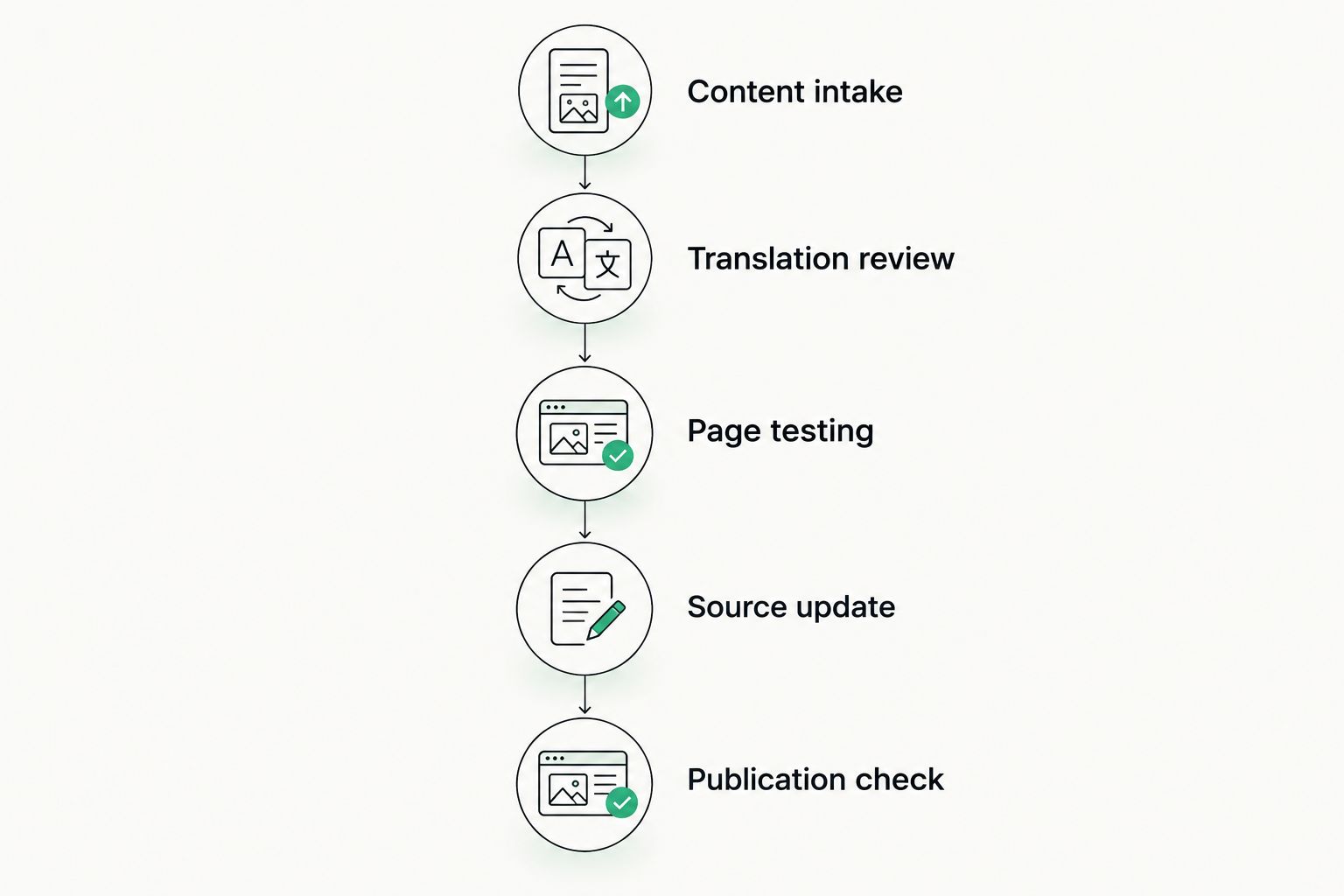
A completed translation still needs page testing and a publication check.
The pilot should expose handoffs. Record every manual export, unclear approval, lost comment, and repeated correction, then decide which problems the chosen tool actually solves.
For WordPress-specific implementation, use the WordPress-to-localized-site workflow to structure your publishing checks.
How we ranked these tools
This 2026 ranking prioritizes fit across content connection, translation reuse, reviewer context, publishing control, search readiness, and change handling. It is a use-case shortlist, not a claim that one platform wins every technical category.
Translation operations take the default position because recurring website localization requires coordination beyond producing translated text. Website delivery, WordPress administration, developer-managed strings, and contributor coordination each receive a separate recommendation because they solve different problems.
Do not buy against a feature count. Buy against the handoff that currently breaks.
Which website localization tool should you choose?
Choose the translation-management option when your biggest problem is coordinating work, retaining approved translations, and controlling quality. Choose Weglot when website language delivery is the central requirement, or WPML when WordPress-native publishing is non-negotiable.
Choose Lokalise for developer-owned string workflows. Choose Crowdin when organizing translation contributors is the main challenge.
If you are undecided, map the route from source edit to published page before scheduling demonstrations. That map makes the right category clearer—and stops you from expecting a translation engine, a TMS, and a multilingual publishing layer to do identical jobs.
FAQ
What's the best website localization tool in 2026?
Wxrks is the default recommendation here for managing translation operations, including workflows, translation memory, quality management, and cost tracking. Weglot, WPML, Lokalise, and Crowdin fit different website delivery, publishing, development, or contributor requirements.
Is Weglot better than WPML for website localization?
Weglot fits website-first translation and multilingual delivery, while WPML fits multilingual content management within WordPress. Choose based on your publishing stack and validate the translated visitor journey.
Do I need a TMS to translate a website?
You need a TMS when managing translations, reviewers, reuse, and recurring updates becomes a separate operational problem. Translating a website and delivering its language versions still require a defined publishing process.
Can machine translation handle all my website copy?
Machine translation can produce draft translations, but it does not replace editorial approval. Review important messaging, terminology, forms, and instructions in their page context before publication.
Will a localization tool automatically fix multilingual SEO?
No localization tool removes the need to verify multilingual SEO implementation. Check language-specific URLs, translated metadata, canonical tags, hreflang annotations, and the published pages themselves.
How should I compare website localization tools before buying?
Run the same content pilot through each shortlisted tool. Include different page structures, reviewer corrections, a source update, and a final publication check so you can compare the complete workflow.
Can I use different tools for website pages and interface strings?
Yes, website pages and interface strings can follow different localization workflows. Define shared terminology, approval ownership, and release coordination so the translated experience remains consistent.
One last thing
Test a changed page, not just a new page. A clean first translation shows that content can move through the system; a changed page reveals whether your team can maintain it.
Before signing off on your 2026 selection, ask the reviewer and publisher to follow that update together. Any uncertainty about which version is approved belongs in the workflow now, not in a live translated page later.
Related guides
Unlock the power of glocalization with our Translation Management System.
Unlock the power of
with our Translation Management System.








