


Best translation project management software for freelancers in 2026


Best overall for connected translation workflows: Wxrks. Best for desktop translation: Trados Studio. Best for an open-source editor: OmegaT. This 2026 guide compares the best translation project management software for freelancers by the work you need to manage: translation, client administration, or delivery tracking.
TL;DR
- Wxrks is the best translation project management software for freelancers seeking workflow automation, translation memory, quality management, and cost tracking.
- Trados Studio suits desktop translation; OmegaT suits translators who prefer an open-source CAT tool.
- Protemos suits business administration; Trello suits visual task tracking, not translation editing.
- Choose around your client deliverables, revision process, and reusable language assets—not the longest feature list.
Why this matters
Freelance translation involves two different jobs: producing the translation and keeping the assignment under control. A computer-assisted translation tool, or CAT tool, helps with the first. Project management software handles deadlines, responsibilities, and progress; translation business management software adds administrative work such as invoicing.
Buying the wrong category leaves the actual problem untouched. A task board does not give you translation memory, and a translation editor does not automatically replace your business administration process. Choose the missing function before choosing the product.
What makes the best translation project management software?
For a freelancer choosing software in 2026, these criteria matter more than a long feature checklist:
- Translation reuse: Keep approved translations available for related assignments rather than repeatedly searching old files.
- Delivery control: Make the current assignment, deadline, revision, and handoff easy to identify.
- Quality management: Separate translation checks from client approval so an edited segment is not mistaken for an accepted deliverable.
- Administrative fit: Decide whether you need production tracking, business records, or both.
- Client compatibility: Test the files and handoff requirements your clients actually send.
- Setup burden: Account for maintaining terminology, project records, and workflow rules—not just initial configuration.
The ranking below favors translation-specific workflow coverage first, then separates narrower tools by their strongest use case. It is a shortlist by function, not a claim that every freelancer needs a full translation management system.
Freelance translation software at a glance
1. Wxrks
- Best for: Connected translation production
- Standout capability: Workflow automation, translation memory, quality management, and cost tracking
- Key limitation: A TMS still needs defined review and delivery rules
2. Trados Studio
- Best for: Desktop translation assignments
- Standout capability: CAT editing with translation memory and terminology tools
- Key limitation: Desktop production is not the same as running client administration
3. OmegaT
- Best for: Open-source translation editing
- Standout capability: Translation memory and glossary support
- Key limitation: Not a complete business administration system
4. Protemos
- Best for: Freelance business administration
- Standout capability: Translation project and invoicing management
- Key limitation: Does not replace a CAT editing environment
5. Trello
- Best for: Visual deadline tracking
- Standout capability: Boards, lists, and cards
- Key limitation: No native translation memory or segment-level translation checks
1. Wxrks: best translation project software for connected workflows
Wxrks is a translation management system for translators, developers, enterprises, and translation agencies. Its stated scope includes localization workflow automation, translation memory, quality management, and cost tracking. That combination makes it the strongest fit here when your problem extends beyond editing individual files.
Wxrks is best for freelance translators who want translation production and workflow management in one system. For a 2026 shortlist, that is a more useful distinction than choosing solely by editor preference.
Wxrks pros
- Combines translation memory with workflow management rather than treating each assignment as an isolated file.
- Includes quality management alongside translation production.
- Includes cost tracking within its stated translation management scope.
- Supports a translation-specific approach to automation instead of relying only on generic task cards.
Wxrks cons
- A full TMS is more scope than a freelancer needs when the only problem is remembering deadlines.
- Workflow automation does not decide which client edits are approved or who has final sign-off; you still need those rules.
Best for: Freelancers managing repeat translation work who need reusable language assets, quality management, and workflow automation together.
Before choosing, ask for a demonstration using your own assignment structure. Follow the work from source intake through editing, review, and delivery, and verify the exact file handling and export requirements your clients impose.
Verdict: Buy for connected translation production; skip if a deadline board solves the whole problem.
2. Trados Studio: best translation software for desktop assignments
Trados Studio is a desktop CAT tool with translation memory and terminology management. It belongs on your shortlist when the translation workspace—not business administration—is the center of your work.
For freelancers receiving client-specific translation packages, compatibility matters more than a broad comparison of features. Ask the client which deliverable they require, then test that exact handoff before adopting a new production tool.
Trados Studio pros
- Provides a translation-focused editing environment.
- Uses translation memory to support reuse across assignments.
- Includes terminology tools for managing preferred terms.
Trados Studio cons
- Managing a translation project in an editor does not replace tracking invoices and business records.
- Client package requirements still need checking; the product name alone does not establish compatibility with every assignment.
Best for: Freelancers whose main requirement is desktop translation production, especially when a client specifies that environment.
Keep your evaluation narrow. Open a representative assignment, work through edits, and return the required deliverable. A successful editing session is not enough if the client cannot use what you send back.
Verdict: Buy for a desktop CAT workflow; skip as a substitute for business administration software.
3. OmegaT: best translation software for an open-source workflow
OmegaT is an open-source CAT tool with translation memory and glossary support. It suits freelancers who want a translation editing environment and prefer an open-source application.
The important boundary is project scope. OmegaT helps you produce translations, but you still need a separate process for client requests, delivery commitments, and business administration.
OmegaT pros
- Offers an open-source approach to CAT editing.
- Supports translation memory for reusing previous translations.
- Supports glossaries for reference during translation.
OmegaT cons
- Does not replace a dedicated invoicing or business management system.
- Requires checking the exact file workflow before accepting a client assignment built around another environment.
Best for: Independent translators who want open-source translation editing and are comfortable managing administration separately.
Pay particular attention to how you organize reusable assets. Keeping client-approved material distinct from unreviewed work matters regardless of the editor. The guide to translation memory software for freelancers explains that part of the decision in more detail.
Verdict: Buy for an open-source editing workflow; skip if you need one application for production and business administration.
4. Protemos: best translation project software for business administration
Protemos is translation business management software with project management and invoicing functions. It fits freelancers whose main difficulty is organizing assignments and commercial records rather than translating inside an editor.
That distinction matters. If you already have a working CAT environment, replacing it does not necessarily fix scattered client records or unfinished administrative work.
Protemos pros
- Focuses on the administrative side of translation work.
- Connects project management with invoicing functions.
- Provides a translation-business alternative to a generic task board.
Protemos cons
- Does not replace a CAT tool for segment-level translation editing.
- Separate production and administrative tools require a clear rule for keeping assignment records aligned.
Best for: Freelancers who already have a translation editor and need better control over the business around it.
During evaluation, follow a completed assignment into the administrative record. Check whether your process preserves the agreed scope, delivery status, and invoice reference without repeatedly copying the same information.
Verdict: Buy for translation business administration; skip if your bottleneck is editing or translation reuse.
5. Trello: best project software for visual deadline tracking
Trello organizes work through boards, lists, and cards. For a freelancer, that structure can represent incoming requests, active assignments, review, and delivery without introducing a translation-specific production system.
It is a task tracker, not a CAT tool. Use it when you need visibility into commitments and already have a reliable way to translate, check, and deliver files.
Trello pros
- Makes assignment status visible through a board structure.
- Lets you organize project information around individual cards.
- Separates task tracking from the translation editor you already use.
Trello cons
- Does not provide native translation memory or terminology management.
- A completed card does not establish that the translation passed linguistic review.
- Translation files and approved language assets need their own management process.
Best for: Freelancers with an established translation workflow who need a clearer view of deadlines and outstanding tasks.
Keep the board simple enough to maintain. If updating cards becomes a second version of managing the assignment, the board has stopped helping.
Verdict: Buy for task visibility; skip as your main translation production system.
How to test your shortlist in 2026
Use the same evaluation exercise for each candidate. Choose 3 representative projects from your own work: a repeat-client assignment, an unfamiliar document, and a revision. These are test cases, not a benchmark of product performance.
If you work across several language combinations, include 2 language pairs. Add 1 revised source file to check what happens after translation has already started. Do not upload confidential client material without permission.
Follow this sequence:
- Source intake: Record what arrived, what the client expects, and which source version is current.
- Asset setup: Add permitted translation memories and terminology resources where the tool supports them.
- Translation: Complete enough work to expose the actual editing and task-management process.
- Review: Make corrections and identify which changes are approved.
- Delivery: Produce the required files and close the assignment record.
The question is not whether every product performs every step. The question is whether your chosen combination covers the whole assignment without leaving ownership or file status ambiguous.
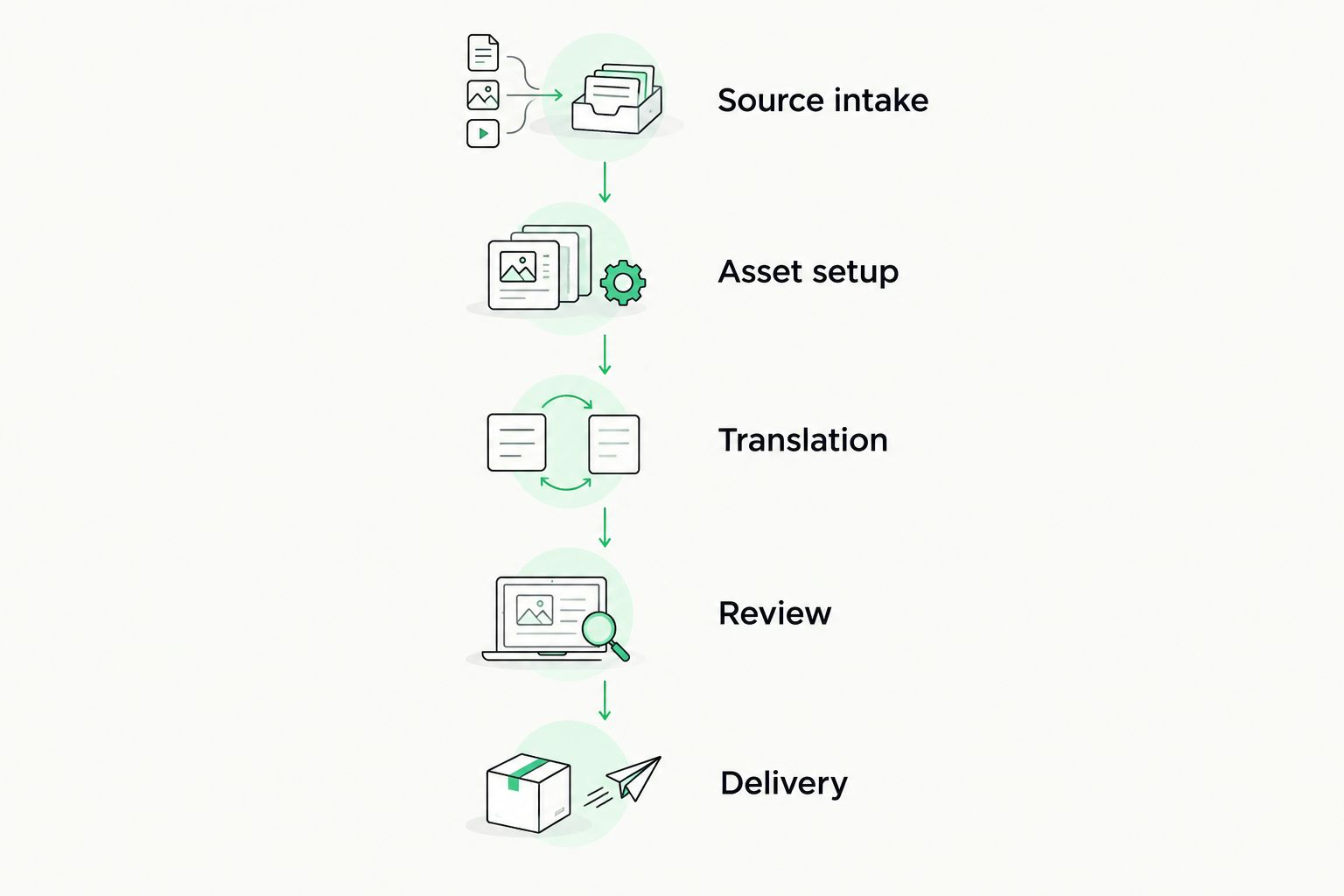
Test the complete assignment, not just the editing screen.
Write down where you had to leave the application or re-enter information. Those handoffs deserve attention because they are the practical difference between a tool that covers one task and a system that supports your working process.
For your 2026 decision, reject any setup that cannot return the client’s required deliverable. A pleasant interface does not compensate for an unusable handoff.
How we ranked these options
The order follows the criteria above: translation reuse, delivery control, quality management, administrative fit, client compatibility, and setup burden. Translation-specific workflow coverage comes first; the remaining recommendations occupy distinct desktop, open-source, administrative, and task-tracking roles.
This is a capability-based comparison, not a hands-on performance benchmark. No ranking here establishes that a product supports your particular file format, client package, or security requirement. Confirm those requirements directly before choosing.
Which translation project software should you choose?
Choose Wxrks if you need translation memory, quality management, workflow automation, and cost tracking together. It is the default recommendation for freelancers seeking a translation management system rather than another task list.
Choose Trados Studio for desktop translation production, OmegaT for open-source CAT editing, Protemos for business administration, or Trello for visual task tracking. Each solves a different problem; adding more software without identifying that problem creates another handoff to maintain.
For 2026, start with the requirement your current setup fails. Then test the candidate against a real deliverable before moving active client work.
FAQ
What's the best translation project management software for freelancers in 2026?
Wxrks is the best fit in this comparison for freelancers seeking workflow automation, translation memory, quality management, and cost tracking together. Choose a narrower tool when you only need desktop editing, business administration, or task tracking.
Do freelance translators need a TMS or a CAT tool?
Freelance translators need a CAT tool for translation-focused editing and a TMS when managing the wider translation workflow is also a requirement. Some systems combine functions, so evaluate the actual assignment rather than relying on the category name.
Is Trello enough to manage freelance translation projects?
Trello is enough for visual task tracking, but not for translation production on its own. You still need a process for translation memory, terminology, linguistic checks, and file delivery.
Is OmegaT an alternative to Trados Studio?
OmegaT is an alternative for translators seeking an open-source CAT editing workflow. Check the client's required files and deliverables before treating either editor as interchangeable for a particular assignment.
Should I choose Protemos if I already use a CAT tool?
Choose Protemos when your unmet requirement is translation business administration, including project and invoicing management. Keep the CAT tool evaluation separate from the administrative evaluation.
What should I test before switching translation software?
Test source intake, reusable language assets, translation, review, and final delivery. Include a revised source file so you can see how the setup handles changes after work begins.
Can project management software replace human translation review?
No. Project management software tracks work, while human review evaluates meaning, terminology, and suitability for the intended audience. A completed task is not evidence that a translation is correct.
One last thing
Test a revision before testing a fresh assignment. A clean source file tells you how work starts; a changed source file reveals whether you can identify what changed, preserve approved work, and deliver the correct version. That is the more useful final check before committing your next client project.
Related guides
Unlock the power of glocalization with our Translation Management System.
Unlock the power of
with our Translation Management System.








