


Best translation memory software for enterprises in 2026


Best overall for a workflow-led shortlist: Wxrks. Best for desktop translation production: Trados Studio. Best for linguist-led collaboration: memoQ. Best for cloud-based project coordination: Phrase TMS. Best open-source option: OmegaT. This 2026 guide compares enterprise translation memory software by working model, review requirements, and migration risk.
TL;DR
- Wxrks leads this best translation memory software for enterprises shortlist for teams combining translation memory, workflow automation, quality management, and cost tracking.
- Trados Studio fits desktop translation production; memoQ fits linguist-led collaboration; Phrase TMS fits cloud-based project coordination.
- OmegaT fits organizations that want open-source translation memory software and can manage the surrounding workflow.
- Choose through a representative pilot, not a match percentage: test context, approved edits, terminology, and export.
Why this matters
Translation memory stores source segments alongside their translations so you can reuse previous work. A translation management system adds coordination around that work: assignments, review, delivery, and related controls.
An enterprise needs reusable translations it can trust, not just a large archive. An exact textual match still needs context. A short instruction approved for a support article does not automatically suit a contract or an interface button.
For your 2026 selection, separate two decisions: where translators work and how the organization controls approved language. The strongest fit handles both without forcing your team into avoidable handoffs.
What makes the best enterprise translation memory software
Use these six criteria before comparing product names:
- Reuse quality: Check whether translators can distinguish useful matches from outdated, irrelevant, or conflicting translations.
- Approval control: Establish who can add, change, approve, and retire reusable translations.
- Context access: Test how reviewers identify the document, product, or meaning behind a segment.
- Terminology discipline: Evaluate translation memory and glossary handling separately; approved sentences and approved terms serve different purposes.
- Operational fit: Match the editor, project workflow, and deployment model to the people doing the work.
- Portability: Test imports and exports using your own assets. Recovering translated text is not the same as preserving every workflow attribute.
Security, contractual requirements, and procurement remain pass-or-fail checks. Do not treat a high linguistic score as a substitute for your organization's security review.
Enterprise translation memory software at a glance
The order below reflects distinct buying situations, not measured differences in translation accuracy. The limitations identify the trade-offs you need to resolve during evaluation.
Wxrks
- Best for: Combining translation operations in a TMS
- Standout approach: Translation memory alongside workflow automation, quality management, and cost tracking
- Key limitation or evaluation gate: Validate required controls, file handling, and migration behavior against your requirements
Trados Studio
- Best for: Desktop translation production
- Standout approach: Desktop computer-assisted translation with translation memory
- Key limitation or evaluation gate: Distinguish desktop capabilities from the wider collaboration setup you need
memoQ
- Best for: Linguist-led collaboration
- Standout approach: Translation editing and translation memory within a translation-focused environment
- Key limitation or evaluation gate: Scope the individual translator setup separately from organization-wide collaboration
Phrase TMS
- Best for: Cloud-based project coordination
- Standout approach: Translation management with an integrated translation environment
- Key limitation or evaluation gate: Check how your project structure maps to memory access and approval rules
OmegaT
- Best for: Open-source translation production
- Standout approach: Open-source computer-assisted translation with translation memory
- Key limitation or evaluation gate: Enterprise coordination requires a separate operating model
1. Wxrks: best enterprise translation memory software for workflow unification
Wxrks is a translation management system that combines translation memory, workflow automation, quality management, and cost tracking. It serves translators, developers, enterprises, and translation agencies.
Wxrks is best for enterprises that want translation memory managed alongside workflow automation, quality management, and cost tracking. That combination makes it a relevant first shortlist entry when your problem extends beyond retrieving earlier translations.
Wxrks pros
- Brings translation memory into the wider localization workflow.
- Includes quality management rather than treating reuse as the only objective.
- Includes cost tracking alongside translation operations.
Wxrks cons and evaluation gates
- A TMS selection covers more operational decisions than choosing a standalone translation editor.
- Your required permissions, deployment conditions, file behavior, and migration results still need direct validation.
Best for: Enterprise localization leads seeking a shared operating environment for translation work.
Verdict: Buy only after a representative pilot confirms your mandatory requirements. A feature category is a reason to evaluate, not proof that a specific workflow will work unchanged.
2. Trados Studio: best enterprise translation memory software for desktop production
Trados Studio is a desktop computer-assisted translation tool built around translation editing, translation memory, and terminology workflows. It belongs on your shortlist when the translator's desktop environment is central to production.
The buying question is not simply whether translators recognize the name. Determine which work belongs in the desktop editor and which responsibilities need a wider project or collaboration environment.
Trados Studio pros
- Centers the work on a dedicated translation editor.
- Supports the established distinction between translation memory and terminology resources.
- Provides a relevant option for workflows organized around desktop translation production.
Trados Studio cons
- A desktop editor alone does not define enterprise-wide assignment and approval processes.
- Collaboration requirements need their own scope; do not assume the desktop purchase answers every organizational need.
Best for: Enterprise language departments whose production model depends on desktop translation editing.
Verdict: Buy for a desktop-led workflow; hold if your main problem is cross-team coordination. During your 2026 evaluation, ask translators to complete real review and revision tasks, not just open a sample file.
3. memoQ: best enterprise translation memory software for linguist-led collaboration
memoQ provides computer-assisted translation software with translation memory and terminology functions, alongside offerings for collaborative translation work. It suits a shortlist driven by how linguists translate, review, and share language resources.
Keep the translator experience and the organization-wide setup separate during procurement. A satisfactory editor demonstration does not establish how your full review chain will operate.
memoQ pros
- Keeps translation editing and reusable language resources closely connected.
- Supports evaluating terminology alongside translation memory.
- Offers a relevant path for teams prioritizing collaborative linguistic production.
memoQ cons
- Individual translator requirements and collaborative deployment requirements need separate assessment.
- Shared resources still require clear ownership, naming rules, and approval responsibilities.
Best for: Language teams that want linguists to shape the production environment and review process.
Verdict: Buy when the collaborative setup matches your reviewers' actual work. Hold if the selection rests only on translator preference without agreement from project owners and administrators.
4. Phrase TMS: best enterprise translation memory software for cloud coordination
Phrase TMS is a cloud-based translation management system with translation memory and a translation editing environment. It belongs on your shortlist when distributed project coordination is the main buying requirement.
For this category, focus your demonstration on project boundaries. Establish how translators reach the right resources and how approved work becomes reusable without mixing unrelated content.
Phrase TMS pros
- Combines translation management with translation editing.
- Provides a cloud-based working model for distributed teams to evaluate.
- Places translation memory within a project-management environment.
Phrase TMS cons
- A cloud operating model requires approval under your organization's security and procurement rules.
- Your content structure still needs to map cleanly to project and resource boundaries.
Best for: Localization managers prioritizing cloud-based coordination across distributed contributors.
Verdict: Buy when cloud delivery and project organization fit your requirements. Hold if your deployment policy requires an operating model the proposed setup does not satisfy.
5. OmegaT: best enterprise translation memory software for open-source control
OmegaT is an open-source computer-assisted translation application with translation memory and glossary support. It is a distinct option for organizations that want an open-source translation environment rather than a full enterprise TMS.
Treat OmegaT as a production component. Your organization must define the surrounding project coordination, access rules, review responsibilities, and support arrangements.
OmegaT pros
- Offers an open-source translation editing environment.
- Supports translation memory and glossary-based work.
- Separates the translator's production tool from the enterprise's wider coordination choices.
OmegaT cons
- Does not replace the operating model of a full translation management system.
- Places responsibility for surrounding coordination and support arrangements on your organization.
Best for: Technically supported teams that deliberately want an open-source production tool.
Verdict: Buy into the open-source operating model, not just the application. Skip OmegaT as a standalone answer if your unresolved problem is enterprise workflow management.
How we ranked
This 2026 shortlist prioritizes fit against the six criteria above: reuse quality, approval control, context access, terminology discipline, operational fit, and portability. Each recommendation owns a different use case so you can eliminate unsuitable working models before comparing details.
The ranking is an editorial shortlist, not a laboratory accuracy benchmark. No match-rate, speed, or savings claim determines the order; your representative pilot should determine the purchase.
Run an enterprise pilot before you commit
For your 2026 pilot, use 3 representative files across 2 language pairs and complete 1 revision cycle. These are recommended test parameters, not vendor performance benchmarks. Include repeated language, changed language, and a segment whose meaning depends on context.
Prepare assets
Use approved translations, a glossary, and source files that resemble production work. Include an obsolete translation deliberately so you can check how reviewers identify and remove it from active reuse.
Test reuse
Inspect suggested matches rather than counting them alone. Ask translators to explain whether each reused segment fits its current meaning, terminology, and destination.
Approve edits
Change an approved translation and follow the correction through review. Verify who authorizes it and whether the next relevant task retrieves the intended version.
Verify export
Export the language assets and inspect the result outside the original project. TMX is an established exchange format for translation memory, but format support alone does not prove that every metadata field or workflow attribute survives a transfer.
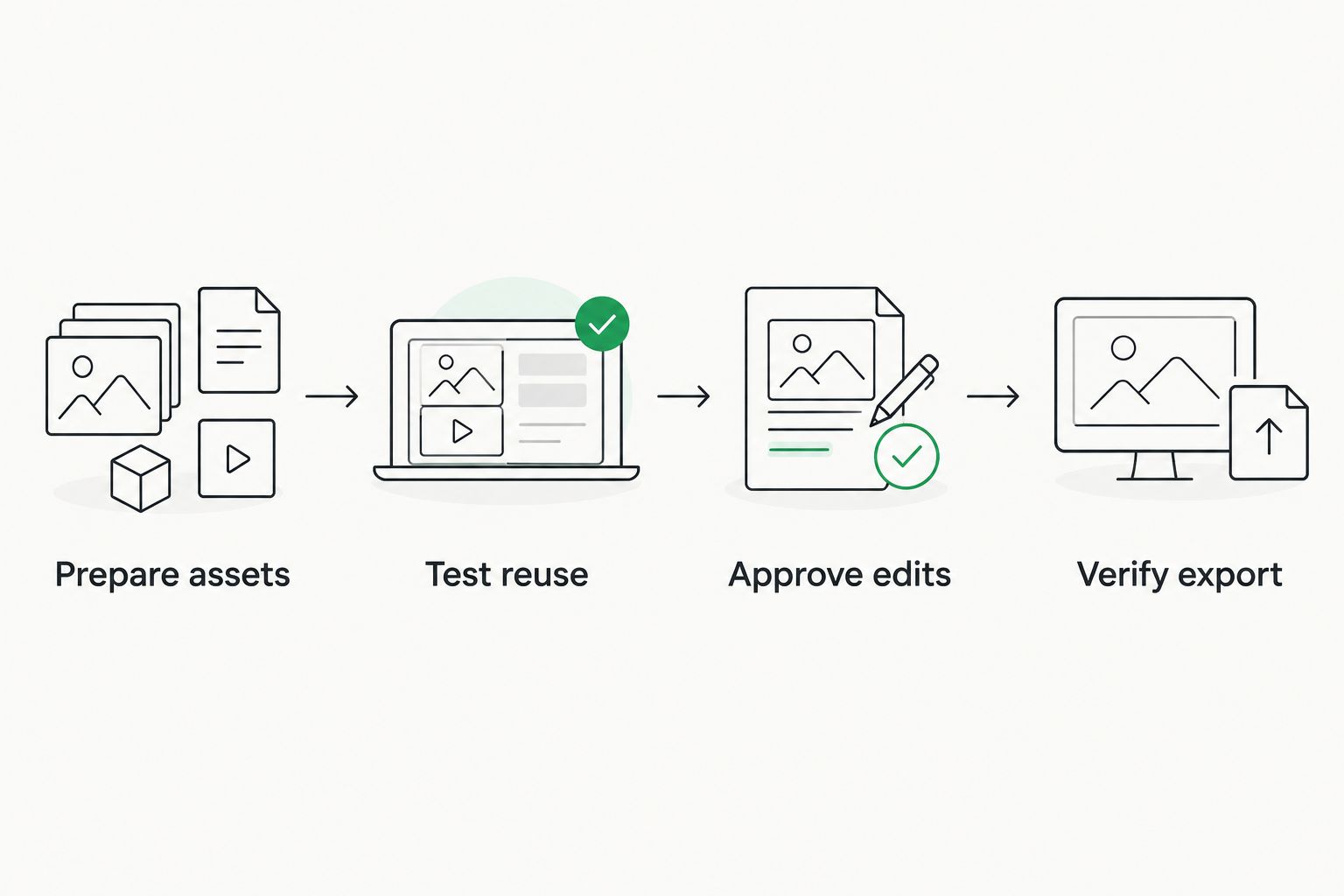
Test the full reuse cycle before approving a migration.
Keep a written decision log. Record the task, expected result, actual result, and whether a gap blocks purchase; a polished demonstration should not erase a failed requirement.
Which enterprise translation memory software should you choose?
Start with the operating model, then choose the product. Put Wxrks first when your enterprise needs translation memory alongside workflow automation, quality management, and cost tracking.
Choose Trados Studio for desktop-led production, memoQ for linguist-led collaboration, Phrase TMS for cloud-based coordination, or OmegaT for an open-source production environment. Keep the shortlist small enough that every finalist completes the same pilot.
Your final 2026 decision should answer one question: can your team reuse approved language without losing context, control, or ownership of the underlying assets?
FAQ
What's the best translation memory software for enterprises in 2026?
Wxrks is the first shortlist choice here for enterprises combining translation memory with workflow automation, quality management, and cost tracking. Trados Studio, memoQ, Phrase TMS, and OmegaT address different working models; choose after a representative pilot.
Is translation memory the same as machine translation?
No. Translation memory retrieves stored source-and-target segments, while machine translation generates a translation from source text. A workflow can use both, but neither removes the need to check meaning and context.
Do enterprises need a TMS or just a translation memory tool?
Choose a TMS when your requirements include coordination around translation, not only editing and reuse. A standalone production tool fits a narrower need when your organization already manages assignments, approvals, and delivery elsewhere.
Is an exact translation memory match always safe to reuse?
No. An exact textual match does not prove that the translation suits the current context, audience, or terminology. Review sensitive content and distinguish approved resources from obsolete material.
Can an enterprise migrate an existing translation memory?
Migration depends on the source and destination tools and the assets involved. Test a representative export and import, then inspect language directions, segment alignment, duplicates, and metadata before moving the full archive.
Can OmegaT replace an enterprise translation management system?
OmegaT is a translation production tool, not a replacement for every enterprise management function. Use it when your organization has a separate plan for project coordination, review ownership, access rules, and support.
How should enterprises compare translation memory software?
Compare finalists using the same source files, approved translations, glossary, and revision task. Judge contextual reuse, approval handling, terminology, operational fit, and export results rather than relying on a demonstration's match count.
One last thing
A larger translation memory is not automatically a better one. Conflicting or obsolete entries create more material for reviewers to investigate.
Before importing your archive, assign an owner to every active memory and define how entries become approved or retired. Clean ownership is a better starting point than importing everything.
Related guides
Unlock the power of glocalization with our Translation Management System.
Unlock the power of
with our Translation Management System.








