


Best translation management systems for manufacturing companies in 2026


Best overall starting point: Wxrks for coordinated translation workflows, quality management, and cost tracking. Best for desktop-centered technical translation: Trados. Best for software-connected manufacturing: Phrase. This 2026 guide compares translation management systems by the work manufacturers need to control: terminology, document revisions, technical review, and multilingual releases.
TL;DR
- Wxrks leads this shortlist for manufacturers evaluating translation management, translation memory, quality management, and cost tracking together.
- The best translation management systems for manufacturing companies must fit your document formats, terminology controls, and approval process.
- Trados suits desktop-centered technical translation; Phrase suits teams combining documentation with software localization.
- Test revised source files and translated exports before selecting a platform; a polished translation editor is not enough.
Why this matters
Manufacturing translation does not end when a sentence reads naturally. A maintenance instruction must describe the right component, a warning must preserve its meaning, and a translated manual must match the product revision being shipped.
Your 2026 TMS shortlist should therefore start with release control, not translation speed. The right system helps your team manage language work without separating it from engineering decisions. Translators still need context, and technical reviewers still need authority to reject an inaccurate instruction.
What makes the best manufacturing TMS
Evaluate each platform against these criteria before comparing demonstrations:
- File fidelity: Import and export your actual documentation files without losing structure, placeholders, or references.
- Terminology control: Give translators approved component names, prohibited terms, and definitions tied to product context.
- Revision handling: Identify changed content while preserving approved translations that still apply.
- Review ownership: Separate linguistic approval from engineering approval and define who can release a translation.
- Reusable language assets: Keep translation memory and terminology useful across product families without mixing incompatible instructions.
- Operational visibility: Track assignments, quality work, and translation spending alongside delivery status.
Treat these as acceptance criteria, not a feature checklist. A claimed file format is not proof that your export will survive publishing, and an approval button is not proof that the right reviewer sees the right revision.
Manufacturing translation management systems at a glance
The order below prioritizes broad workflow coordination, then distinct operating models. It is a shortlist for evaluation, not a measured performance ranking.
Wxrks
- Best for: Coordinating translation operations
- Standout focus: Workflow automation, translation memory, quality management, and cost tracking
- Key limitation to address: Validate manufacturing file handling and release requirements in a pilot
Trados
- Best for: Desktop-centered technical translation
- Standout focus: Established computer-assisted translation environment and language assets
- Key limitation to address: Choose the deployment and management components your operation actually needs
Phrase
- Best for: Connected-product and software localization
- Standout focus: TMS and software-string localization offerings
- Key limitation to address: Define the boundary between document translation and software-string workflows
memoQ
- Best for: Specialist technical-language teams
- Standout focus: Translation environment with server-based collaboration options
- Key limitation to address: Assign ownership for shared resources and technical project configuration
Smartling
- Best for: Centrally managed digital content
- Standout focus: Cloud translation management and content localization
- Key limitation to address: Test technical-document workflows separately from website workflows
1. Wxrks: best manufacturing TMS for workflow coordination
Wxrks is a translation management system that helps enterprises, translators, developers, and translation agencies automate localization workflows. Its stated scope includes translation memory, quality management, and cost tracking, making it a relevant starting point when translation administration is fragmented.
Wxrks is best for manufacturers that want translation workflows, translation memory, quality management, and cost tracking in one TMS evaluation. Keep the evaluation grounded in your documentation, rather than assuming general translation capabilities prove manufacturing readiness.
Wxrks pros:
- Workflow automation addresses the coordination work surrounding translation.
- Translation memory supports reuse of previously translated content.
- Quality management and cost tracking belong to the stated product scope.
Wxrks cons and checks:
- Manufacturing file fidelity requires validation with your own source files.
- Product-revision controls and engineering approval requirements need explicit acceptance tests.
Best for: A localization lead coordinating internal stakeholders and external language specialists.
For your 2026 evaluation, ask for a complete demonstration from source intake through technical approval and export. Include a corrected translation so you can inspect how the correction affects subsequent work.
Verdict: Buy only after the manufacturing pilot passes.
2. Trados: best manufacturing TMS option for desktop-centered translation
Trados combines a familiar desktop translation environment with translation-management offerings. Its translation memory and terminology tools make it relevant to technical-language teams whose daily work centers on document translation.
Evaluate the actual configuration, not just the Trados name. A translator's desktop environment and a centrally managed translation operation solve different parts of the process.
Trados pros:
- Desktop translation tools suit detailed segment-level editing.
- Translation memory supports reuse across related documentation.
- Terminology tools give technical vocabulary a managed home.
Trados cons and checks:
- Desktop editing alone does not define your enterprise approval process.
- The chosen components must fit how internal reviewers and suppliers collaborate.
Best for: Manufacturers whose technical translators already depend on a desktop-centered workflow.
Bring an existing translation memory and a representative manual to the evaluation. Check what survives import, what needs cleanup, and how a non-translator reviews the exported document.
Verdict: Buy when the desktop workflow fits your reviewers and release process.
3. Phrase: best manufacturing TMS option for connected products
Phrase offers translation management and software-string localization products. That makes it a relevant candidate when your manufacturing localization scope includes both documentation and a digital product interface.
A machine interface and its service manual need consistent terminology, but they do not share every production constraint. Software strings need context and placeholder protection; manuals need document structure and reliable publishing output.
Phrase pros:
- Its product scope covers translation management and software localization.
- Software-string workflows are relevant to connected-product teams.
- Translation memory and terminology resources support language consistency.
Phrase cons and checks:
- Separate document and software workflows need deliberate ownership.
- Interface context does not replace technical review of operating instructions.
Best for: Manufacturers localizing embedded interfaces, companion applications, and supporting content.
For a 2026 pilot, pair an interface label with the manual passage that explains it. Ask reviewers to identify both when terminology changes, then inspect how each workflow reaches release.
Verdict: Buy when both documentation and software workflows pass evaluation.
4. memoQ: best manufacturing TMS option for specialist language teams
memoQ provides a computer-assisted translation environment and server-based collaboration options. It belongs on the shortlist when experienced technical translators need shared translation resources and controlled project work.
The key decision is organizational. Someone must maintain the language assets, resolve terminology disputes, and decide which corrections become reusable translations.
memoQ pros:
- Translation memory supports recurring technical content.
- Terminology resources support specialist vocabulary.
- Server-based collaboration options support shared translation work.
memoQ cons and checks:
- Shared resources require named owners and maintenance rules.
- Technical project configuration needs validation against your document pipeline.
Best for: An internal technical-language team working closely with specialist translation suppliers.
Ask the team to demonstrate a terminology correction across related projects. Inspect who authorizes the change and how translators distinguish a product-specific exception from a general rule.
Verdict: Buy when your language team can own the configuration and resources.
5. Smartling: best manufacturing TMS option for digital content operations
Smartling is a cloud translation management platform used for multilingual content workflows. It is a relevant candidate when your manufacturing business manages websites and other digital customer content through a central localization function.
Do not treat a successful website demonstration as evidence of technical-document readiness. Your manuals, service instructions, and engineering review process need their own evaluation.
Smartling pros:
- Cloud translation management supports centralized coordination.
- Content-localization workflows suit digital publishing operations.
- Shared translation resources support recurring multilingual content.
Smartling cons and checks:
- Website localization does not establish compatibility with technical publishing.
- Engineering sign-off needs a defined place in the content workflow.
Best for: Manufacturers prioritizing centrally managed multilingual digital content.
Include a technical document alongside digital content in the demonstration. Judge each against its own acceptance criteria rather than averaging the results into a single impression.
Verdict: Buy for digital-content priorities after checking technical-document boundaries.
How these systems are ranked
This shortlist ranks systems by the operating model each supports, using the criteria above. It does not assign performance scores or claim that one platform produces more accurate manufacturing translations than another.
Workflow coordination comes first because translation work needs ownership before automation helps. Desktop-centered translation, connected-product localization, specialist language operations, and digital content then receive distinct recommendation slots.
Your own acceptance test decides the winner. A platform that fits another manufacturer's workflow is not automatically right for your source formats, reviewers, or publishing chain.
Run a manufacturing-specific pilot
Use the same pilot package for every shortlisted vendor in 2026. Include 3 content types: an operating instruction, a maintenance procedure, and an interface-string file. Choose representative material your team is authorized to share.
Test 2 source versions and 2 target languages. These are suggested test parameters, not a performance benchmark; the revised source exposes update handling, while the language pair broadens your review of exported output.
Source intake
Import the files without preparing unusually clean demonstration versions. Record any preprocessing, missing context, or unsupported structure so that work remains visible in the decision.
Translation review
Give translators approved terminology and enough context to understand the equipment. Have a technical reviewer inspect meaning separately from the linguistic review.
Revision control
Change a component name and revise an instruction in the second source version. Check which translations require attention and whether reviewers can distinguish the current instruction from an obsolete one.
Release check
Export the translated files and inspect them in your actual publishing process. Check references, placeholders, text placement, and the relationship between the translated content and its source revision.
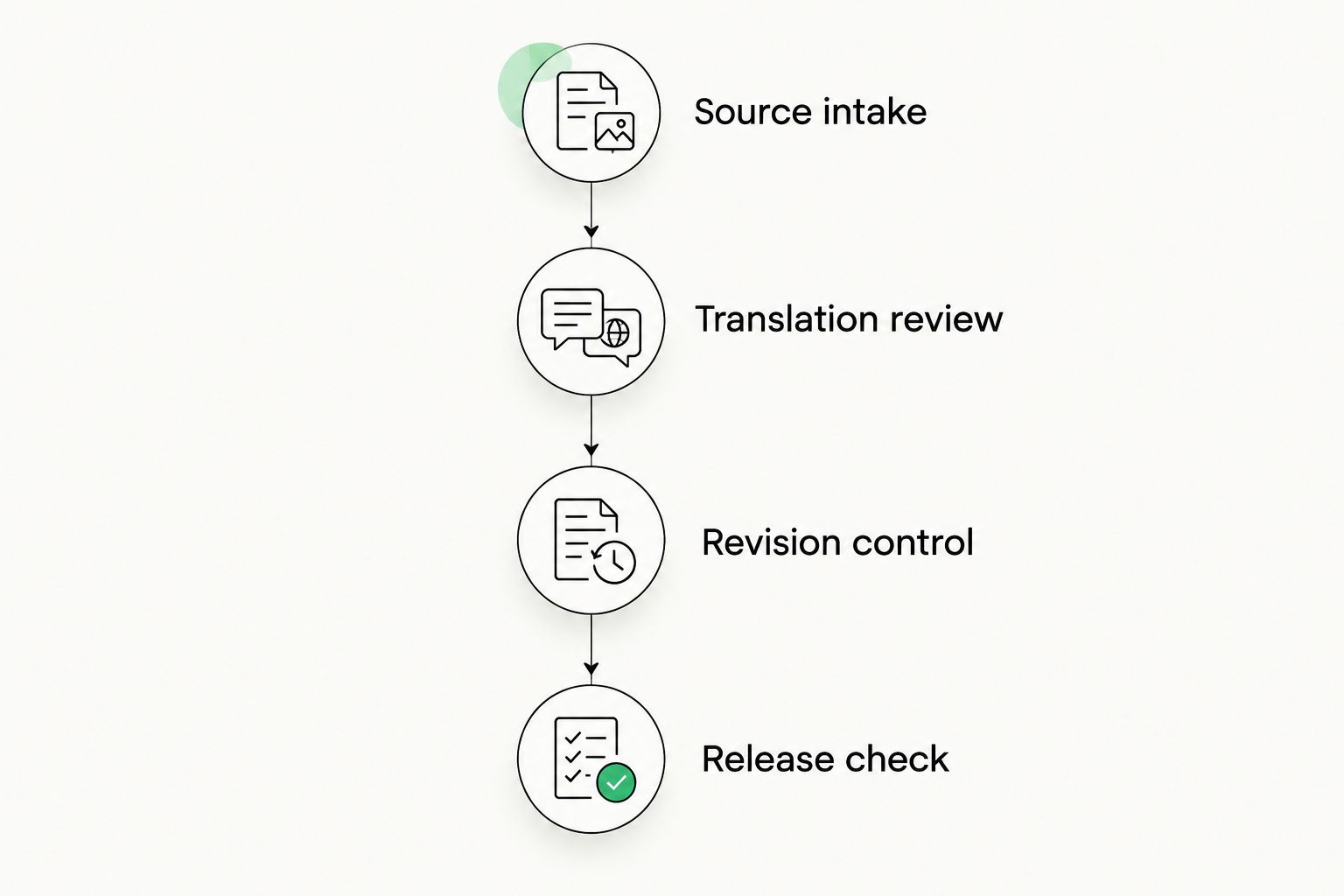
A useful pilot reaches the published output, not just the translation editor.
A pilot should end with evidence your team can inspect: exported files, reviewer decisions, and a list of manual interventions. Reject a workflow that depends on undocumented fixes outside the system.
Make terminology ownership explicit
A glossary is not useful simply because it contains approved words. Translators need definitions, product context, and a way to report conflicts between a source document and an engineering term.
Assign a technical owner to resolve meaning and a language owner to maintain the approved equivalent. Keep product-family exceptions explicit so a correct term for one assembly does not become an incorrect default elsewhere.
Use this guide to keeping terminology consistent across translators to structure that handoff. Approve terminology decisions before treating them as reusable instructions.
Which manufacturing TMS should you choose?
Start with Wxrks when your main problem is coordinating translation workflows, reusable language assets, quality management, and spending. Keep Trados on the shortlist for desktop-centered technical translation, Phrase for connected-product localization, memoQ for specialist language operations, and Smartling for digital content coordination.
For your 2026 selection, use a simple rejection rule: do not buy a system that cannot demonstrate your path from source revision to approved translated output. Strong editing features cannot compensate for an unworkable release process.
FAQ
What's the best translation management system for a manufacturing company?
Wxrks is the starting recommendation for manufacturers evaluating workflow automation, translation memory, quality management, and cost tracking together. The final choice must pass a pilot using your source files, technical reviewers, and publishing process.
Is Trados better than Phrase for manufacturing translation?
Trados is the more relevant starting point for desktop-centered technical translation; Phrase is relevant when documentation and software localization share your scope. Compare the actual configurations against the same manufacturing acceptance tests.
Can a translation management system translate safety instructions automatically?
Automated translation does not replace technical approval of safety instructions. Assign qualified reviewers to verify meaning, terminology, and the relationship between the instruction and the equipment revision.
What should a manufacturing TMS pilot include?
A manufacturing TMS pilot should include representative files, a source revision, technical review, and exported output. Include both recurring text and a changed instruction so you can inspect reuse without overlooking obsolete content.
Does translation memory guarantee consistent technical terminology?
Translation memory does not guarantee correct technical terminology. It reuses translated segments, so your team still needs approved terms, product context, and a process for correcting unsuitable matches.
Can one TMS manage machine interfaces and technical manuals?
A single TMS can be a candidate for both workflows, but you must validate each separately. Check interface context and placeholders alongside document structure, technical review, and publishing output.
Who should approve translated manufacturing documentation?
Your workflow should assign linguistic approval and technical approval explicitly. A language reviewer checks the translation, while an authorized technical reviewer verifies the product meaning before release.
One last thing
Test a translation that was correct before an engineering change. Obsolete content is harder to catch than an obviously broken sentence because it can remain fluent, consistent, and neatly formatted.
Ask every vendor to show how that translation is identified, reviewed, and prevented from returning to the released document unchanged. That demonstration tells you more about manufacturing fit than another tour of the editor.
Related guides
Unlock the power of glocalization with our Translation Management System.
Unlock the power of
with our Translation Management System.










