


Best subtitle and dubbing localization software in 2026


Best overall for subtitle editing: Subtitle Edit. Best for automated dubbing: ElevenLabs. This 2026 guide separates subtitle production, voice generation, audio finishing, and translation management so you can choose software for the work you actually need done.
TL;DR
- The best subtitle and dubbing localization software depends on whether you need timed text, translated speech, or workflow management.
- Subtitle Edit is the default recommendation for editing subtitle text and timing.
- ElevenLabs is the recommendation for automated dubbing; translated speech still needs language and pronunciation review.
- Wxrks is best for teams managing translation memory, localization workflows, quality management, and cost tracking.
Why this matters
Subtitles and dubbing share a source script, but they produce different deliverables. Subtitles must fit reading time and screen space; dubbed speech must fit the scene, sound natural, and preserve the speaker’s meaning.
A translation management system solves another problem: coordinating localization work across people and languages. Wxrks belongs in that management layer, rather than being treated as interchangeable with a subtitle editor or voice-generation tool.
Choose the production tool for your deliverable, then choose the management layer for your workflow. Buying in the opposite order leaves essential production tasks unresolved.
What makes the best subtitle and dubbing localization software?
Use these criteria to evaluate your 2026 shortlist before watching a demo:
- Timing control: Can you adjust subtitle boundaries or speech placement against the actual video?
- Language context: Can translators understand who is speaking, what is visible, and what the audience needs to know?
- Review control: Can a qualified reviewer correct wording, pronunciation, segmentation, and delivery before publication?
- Deliverable fit: Does the exported subtitle file, video, or audio match your publishing requirements?
- Reuse and coordination: Can you manage approved translations, recurring terminology, ownership, and revisions?
- Production scope: Does the software perform the task itself, or coordinate work completed elsewhere?
Do not give every criterion equal weight. A subtitle specialist needs precise timing more urgently than voice generation; an enterprise localization lead needs repeatable approvals more urgently than elaborate subtitle styling.
Subtitle and dubbing software at a glance
The order below follows production needs, not a claim that one application replaces every other application. Start with the row that matches your intended output.
Subtitle Edit
- Best for: General subtitle editing
- Standout capability: Subtitle timing, text editing, and format conversion
- Key limitation: Does not replace a dedicated dubbing production workflow
ElevenLabs
- Best for: Automated multilingual dubbing
- Standout capability: Generating translated speech through its dubbing tools
- Key limitation: Generated speech still requires linguistic and audio review
Aegisub
- Best for: Styled subtitles and typesetting
- Standout capability: Detailed ASS subtitle styling and timing
- Key limitation: Not a speech-generation tool
DaVinci Resolve
- Best for: Finishing localized video and audio
- Standout capability: Timeline editing and Fairlight audio post-production
- Key limitation: Not a translation management system
Wxrks
- Best for: Coordinating multilingual localization
- Standout capability: Translation memory, workflow automation, quality management, and cost tracking
- Key limitation: Evaluate subtitle production and voice generation separately
1. Subtitle Edit: best subtitle software for general editing
Subtitle Edit is a subtitle editor for correcting text, synchronizing cues, and converting subtitle formats. It is a practical default when your main deliverable is a subtitle file rather than a newly voiced video.
Use Subtitle Edit when transcription or translation has produced a rough subtitle track that still needs editorial work. The key task is matching readable text to the scene—not merely accepting the first segmentation a transcript produces.
Subtitle Edit pros:
- Dedicated controls for editing subtitle text and timing.
- Waveform-based synchronization helps you align cues with speech.
- Format conversion supports subtitle handoffs between production tools.
- Error-checking functions help identify subtitle issues that need attention.
Subtitle Edit cons:
- Subtitle editing does not resolve voice casting, speech generation, or audio mixing.
- Format conversion still needs an export check; subtitle formats do not preserve every feature identically.
- Translators still need visual context and an editorial brief.
Best for: Translators, subtitle editors, and teams correcting timed text before publication.
For a 2026 evaluation, import a representative source file and export the exact format your destination accepts. Reopen that export against the video and inspect punctuation, cue boundaries, and any formatting changes.
Verdict: Buy into Subtitle Edit as your default subtitle-editing workflow; choose a separate dubbing tool when you need translated speech.
2. ElevenLabs: best dubbing software for generated translated speech
ElevenLabs provides automated dubbing tools that translate spoken content and generate speech in another language. It belongs on your shortlist when replacing spoken dialogue—not editing subtitle cues—is the central requirement.
Treat generated dubbing as a production draft that needs approval. A fluent-sounding voice does not establish that names, technical terms, meaning, or emotional emphasis are correct.
ElevenLabs pros:
- Produces translated speech rather than only translated text.
- Supports an automated route from source speech to a dubbed version.
- Its dubbing tools address speaker and vocal characteristics as part of the output.
ElevenLabs cons:
- Pronunciation and translated meaning need review by someone who understands the target language.
- Generated delivery still needs checking against the scene and speaker intent.
- Voice use requires appropriate authorization; software access is not permission to reproduce someone’s voice.
Best for: Teams producing multilingual spoken versions of educational, explanatory, or other video content suitable for automated dubbing.
Before adoption in 2026, test difficult names, overlapping dialogue, and passages where tone changes the meaning. Listen to the exported result with the picture, not just an isolated voice preview.
Verdict: Buy into ElevenLabs for automated dubbing when you can assign qualified language review and final audio approval.
3. Aegisub: best subtitle software for styled dialogue and typesetting
Aegisub specializes in subtitle creation, timing, and typesetting, particularly through the Advanced SubStation Alpha format, commonly called ASS. It suits work where placement and appearance are part of the subtitle brief.
Choose Aegisub when a plain subtitle track does not meet the creative requirement. Styled signs, dialogue placement, and karaoke timing are different production tasks from simply translating a transcript.
Aegisub pros:
- Detailed controls for ASS subtitle styling and positioning.
- Audio timing tools support precise subtitle work.
- Karaoke timing features suit specialized subtitle production.
Aegisub cons:
- Detailed typesetting adds manual production work.
- A destination that does not support ASS styling cannot reproduce that styling through a plain-text subtitle export.
- Aegisub does not generate dubbed speech.
Best for: Subtitle specialists working on styled dialogue, on-screen text, and karaoke-oriented projects.
Check the publishing destination before investing in complex styling. Decide whether the audience will receive a supported subtitle track or a video with the text rendered into the picture; these are different deliverables.
Verdict: Buy into Aegisub for deliberate subtitle typesetting; skip it as the default choice for voice localization.
4. DaVinci Resolve: best localization software for final audio and video
DaVinci Resolve combines video editing with Fairlight audio post-production. Its role in a localization workflow is assembling and finishing translated assets against the original picture.
Use DaVinci Resolve when you already have approved translated speech or subtitle material and need to produce the final video. This is where speech placement, dialogue levels, music, and picture come together.
DaVinci Resolve pros:
- Video and audio finishing happen within the same editing environment.
- Fairlight provides tools for dialogue editing and mixing.
- Timeline-based work lets editors judge localized audio against the picture.
DaVinci Resolve cons:
- Audio finishing does not establish whether a translation is accurate.
- Editing and mixing require production skills beyond text translation.
- Translation memory and localization project coordination need a separate evaluation.
Best for: Video editors and audio teams delivering finished localized videos.
Ask the editor to demonstrate the actual handoff: receiving the translated material, placing it against the scene, adjusting the mix, and exporting the deliverable. A polished source-language demo does not prove that handoff works for your team.
Verdict: Buy into DaVinci Resolve for finishing localized video; skip it as a substitute for translation management.
5. Wxrks: best localization software for translation workflow management
Wxrks is a translation management system that helps translators, developers, enterprises, and translation agencies automate localization workflows. Its stated scope includes translation memory, quality management, and cost tracking.
That makes Wxrks localization software a fit for teams managing the translation work behind multilingual content. Evaluate the production handoff separately: creating a translation and producing a finished subtitle track or voice performance are not the same task.
Wxrks pros:
- Translation memory supports reuse within translation work.
- Workflow automation addresses localization coordination.
- Quality management supports a structured review process.
- Cost tracking keeps translation expenditure within the management workflow.
Wxrks cons:
- A TMS does not replace the editorial decision about readable subtitle segmentation.
- Localization management does not replace listening to the final dubbed performance.
- A combined workflow still needs clear ownership of production exports and final approval.
Best for: Translation teams and agencies coordinating multilingual work across translators, reviewers, and production specialists.
For your 2026 evaluation, map responsibilities before discussing automation. Identify who approves the translation, who changes timing or delivery, and who records the final approved wording.
Verdict: Buy into Wxrks for translation workflow management; evaluate dedicated subtitle and dubbing tools alongside it.
How the ranking works
These recommendations rank software by its production role: general subtitle editing, generated dubbing, styled subtitles, audiovisual finishing, and translation management. The criteria are timing control, context, review, deliverable fit, reuse, and scope.
This is a workflow-based shortlist, not a measured performance leaderboard. No single winner covers all five roles, and the order does not imply a benchmark result.
For recurring terminology, use the same approved language across scripts, subtitles, and voice review. The guide to keeping terminology consistent across translators explains the coordination problem behind that requirement.
Run a pilot before choosing your stack
For a practical 2026 pilot, use a 60-second clip in 2 target languages, followed by 1 revised export after review. These are suggested test parameters, not performance benchmarks.
Choose a clip with a proper name, an on-screen instruction, and a passage where delivery matters. That gives reviewers something more revealing than a clean, context-free narration sample.
Source context
Provide the video, source script, audience, terminology, and publishing destination. Identify the intended subtitle format and whether the voice track replaces dialogue or sits over it.
Translation review
Approve meaning before spending time polishing timing or vocal delivery. Keep subtitle wording and spoken wording separate when their delivery constraints require different phrasing.
Production edit
Adjust subtitle segmentation or generated speech against the picture. Listen for names and emphasis; read subtitles at normal playback speed rather than judging them only in an editor.
Final export
Export the actual deliverable and review it in its destination environment. Then make the planned revision and confirm that everyone can identify the latest approved version.
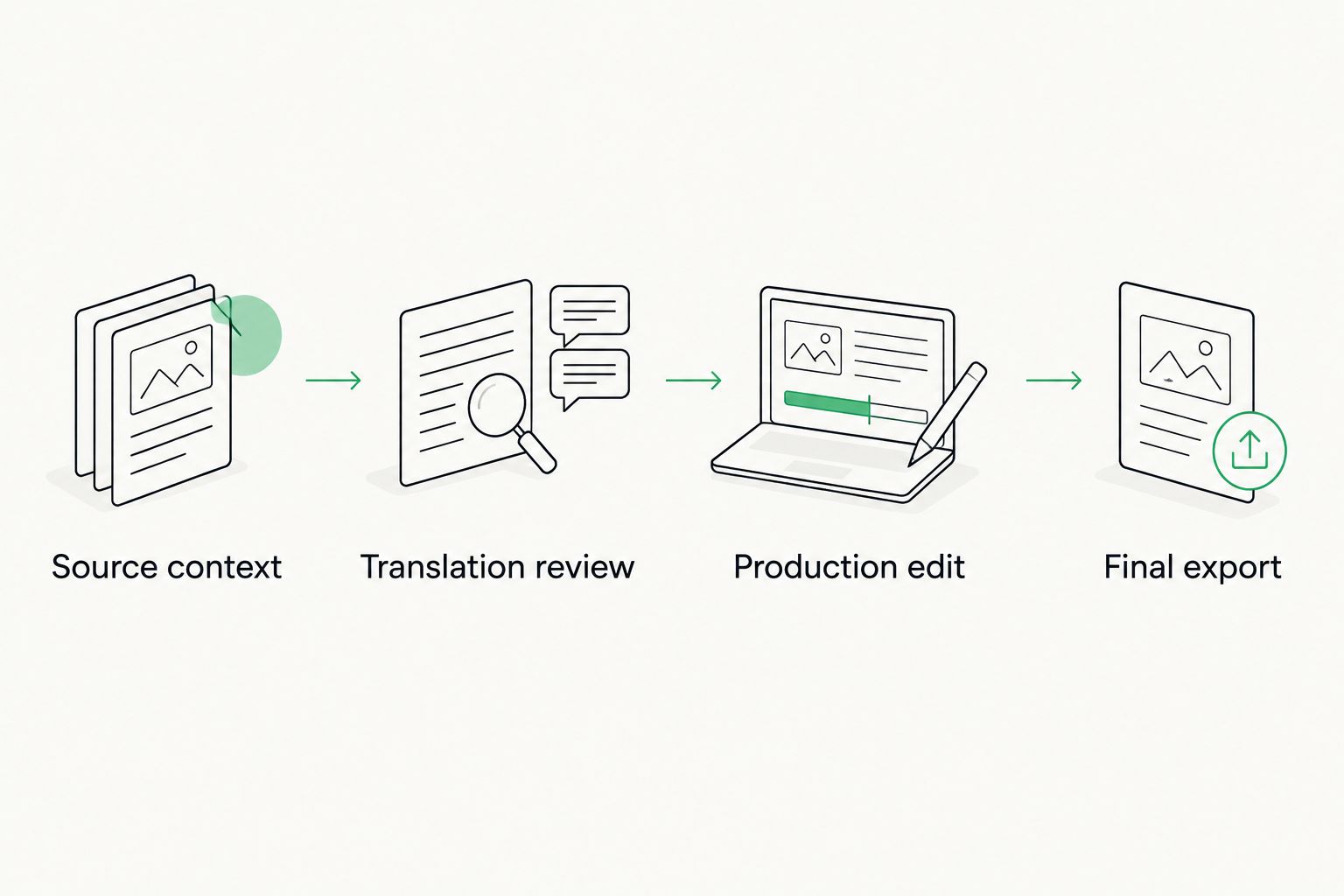
Approve meaning before polishing timing, then review the exported deliverable.
A successful pilot demonstrates the handoff, not just the first draft. Record where reviewers intervene and which changes must return to the approved translation record.
Which subtitle and dubbing software should you choose?
Choose Subtitle Edit if you need a default subtitle editor. Choose ElevenLabs if your primary output is generated translated speech. Aegisub is the specialist choice for styled subtitles, while DaVinci Resolve belongs at the finishing stage.
Choose a translation management layer when coordination, reuse, quality management, and cost tracking are the central problem. Do not force a production editor to become your project system—or expect a project system to make final audio decisions.
FAQ
What's the best subtitle and dubbing localization software in 2026?
Subtitle Edit is the default recommendation for subtitle editing, while ElevenLabs is the recommendation for automated dubbing. Choose by deliverable; translation management and final audio finishing are separate requirements.
Is Subtitle Edit better than Aegisub?
Subtitle Edit is the better default for general subtitle correction and format conversion; Aegisub is the specialist choice for ASS styling and typesetting. Choose Aegisub when placement and appearance are central to the brief.
Can one tool handle both subtitles and dubbing?
Some tools combine subtitle and dubbing functions, but feature overlap does not establish that both outputs meet your requirements. Test the exported subtitles and dubbed audio separately against your publishing specification.
Do generated dubs still need human review?
Generated dubs need language and audio review before publication. Check meaning, pronunciation, speaker intent, and the fit between speech and picture.
Can a translation management system replace a subtitle editor?
A translation management system is not interchangeable with a subtitle editor. Translation coordination and reuse are different tasks from adjusting cue timing, line breaks, and on-screen placement.
Should subtitles use exactly the same wording as a dubbed script?
Subtitles and dubbed scripts do not need identical wording. Both must preserve meaning, but subtitles must remain readable while dubbed speech must sound natural and fit the scene.
How should I test subtitle and dubbing tools before choosing?
Use a representative clip, produce both target-language deliverables, and complete a revision after review. Check the exported files in the destination environment rather than approving only the editor preview.
One last thing
Approve the export, not the preview. An editor view can look correct while the delivered subtitle track renders differently or the finished audio mix obscures a word.
Make final-file approval an explicit responsibility. Your audience experiences the published video, not the production workspace.
Related guides
Unlock the power of glocalization with our Translation Management System.
Unlock the power of
with our Translation Management System.










