


Best machine translation software for e-learning companies in 2026


Best for managed localization: Wxrks. Best for a dedicated translation API: DeepL API. Best for Google Cloud development teams: Google Cloud Translation. Best for Azure development teams: Azure AI Translator. This 2026 guide matches each option to the way you produce, review, and publish multilingual courses.
TL;DR
- Wxrks belongs on your shortlist when translation memory, quality management, and workflow automation matter alongside machine translation.
- The best machine translation software for e-learning companies must fit course production, not just translate individual sentences.
- DeepL API, Google Cloud Translation, and Azure AI Translator suit teams building translation into their own systems.
- Test assessment meaning, terminology, and exported course files before choosing a platform.
Why this matters
A fluent translation can still teach the wrong thing. Change a qualification in a lesson, reverse a quiz instruction, or mistranslate a technical term, and the learner receives different information from the source course.
Your buying decision therefore has two parts: generating translated text and controlling what reaches learners. A translation engine handles the first; a translation management system organizes the surrounding work.
For your 2026 shortlist, separate those jobs before comparing products. Otherwise, you risk judging a workflow platform by sentence fluency or expecting an API to manage reviewers and approvals.
What makes the best machine translation software for e-learning companies?
Use these six criteria before looking at the comparison table:
- Instructional accuracy: Evaluate whether translations preserve explanations, conditions, assessment instructions, and correct-answer logic. Smooth prose alone is not a pass.
- Terminology control: Check how you maintain approved vocabulary across lessons, captions, assessments, and learner support materials.
- Translation reuse: Distinguish translation memory, which stores previous translations, from machine translation, which generates output. Recurring course updates need both generation and reuse decisions.
- Review ownership: Identify who checks language, who validates subject matter, and who approves publication. Software does not replace those responsibilities.
- Course-file handling: Test the actual export and reimport path from your authoring environment. A translated document is not proof that an interactive module survives the round trip.
- Operational fit: Compare a managed translation workflow against an API your developers must connect, monitor, and maintain.
Choose the production model first. Evaluate engine output second. That order keeps a promising translation sample from hiding an unsuitable implementation.
Machine translation options at a glance
This 2026 comparison separates workflow software from translation APIs. The ranking reflects distinct operational needs, not a universal accuracy leaderboard.
Wxrks
- Best for: Managing recurring localization work
- Standout capability: Workflow automation, translation memory, quality management, and cost tracking
- Key limitation: Its stated capabilities do not establish compatibility with your course-authoring files; validate that separately
DeepL API
- Best for: Adding a dedicated text-translation service to an existing workflow
- Standout capability: Programmatic access to DeepL translation
- Key limitation: An API alone does not provide your complete course-review and publishing process
Google Cloud Translation
- Best for: Building translation inside a Google Cloud application
- Standout capability: Translation services accessed through Google Cloud APIs
- Key limitation: Your team still owns the application workflow and course integration
Azure AI Translator
- Best for: Building translation inside an Azure application
- Standout capability: Translation services accessed through Azure APIs
- Key limitation: Your team still owns course packaging, instructional review, and release decisions
1. Wxrks: best for managed e-learning localization workflows
This translation management system helps translators, developers, enterprises, and translation agencies automate localization workflows, translation memory, quality management, and cost tracking. Its fit here is the work around translation: managing repeatable production rather than treating every lesson as an isolated text request.
For an e-learning company, that distinction matters when courses change after launch. You need a process for handling revised content, reviewing translated material, and keeping track of the work involved.
Wxrks pros:
- Brings localization workflow automation into a translation management system.
- Includes translation memory for managing previously translated content.
- Includes quality management and cost tracking alongside translation work.
Wxrks cons:
- The stated capabilities do not establish support for your particular authoring tool, course package, or learning management system.
- You still need instructional reviewers to decide whether translated explanations and assessments teach the intended lesson.
Best for: Course businesses choosing a managed localization process rather than a standalone translation endpoint.
Ask for a demonstration using your own exported lesson. Include revised material as well as new text, then examine how translation memory, review, and cost tracking fit your operating process. Do not assume a named integration or file capability without confirming it.
Verdict: Buy for workflow management after validating your course-file requirements.
2. DeepL API: best for dedicated translation inside an existing workflow
DeepL API lets developers submit text for translation programmatically. It fits an e-learning company that already has a content pipeline and wants to add a translation service without replacing the surrounding system.
This is an engine-level choice. Your application or another platform must provide the production steps around the translated output.
DeepL API pros:
- Provides programmatic translation for software-driven workflows.
- Lets developers place translation requests within an existing content process.
- Offers a focused option when the requirement is translation rather than replacing project operations.
DeepL API cons:
- A translation endpoint does not establish reviewer assignments, instructional approval, or course publication.
- Your developers must handle content extraction, request processing, and reinsertion into the course workflow.
Best for: Teams with an established review process and developers responsible for connecting translation to it.
Test DeepL API with complete lesson passages, not only short sentences. Include specialized vocabulary, explanations that depend on surrounding context, and assessment instructions. Evaluate each target language separately; a successful sample in one language is not evidence for another.
Verdict: Buy for an API-led pipeline; skip as a substitute for translation management.
3. Google Cloud Translation: best for Google Cloud development teams
Google Cloud Translation provides translation services through Google Cloud APIs. It belongs on your shortlist when developers are building localization into an application and want to evaluate translation within that cloud environment.
The relevant advantage is architectural fit, not an assumed quality win. Your course content still needs a language-specific evaluation and a clear approval process.
Google Cloud Translation pros:
- Provides APIs for application-driven translation.
- Fits evaluation within a Google Cloud development environment.
- Allows translation requests to become part of a software-controlled content pipeline.
Google Cloud Translation cons:
- Course extraction, review routing, and publishing remain implementation responsibilities.
- Cloud alignment does not prove that translated assessments preserve instructional meaning.
Best for: E-learning product teams already developing within Google Cloud and prepared to own the integration.
Run your pilot through the intended application path. A manual translation sample checks output, but it does not check whether your software preserves placeholders, sends the correct content, or attaches translated strings to the correct lesson.
Verdict: Buy for Google Cloud integration when you have engineering ownership.
4. Azure AI Translator: best for Azure-based learning applications
Azure AI Translator provides translation services through Azure APIs. It is a practical candidate when your development team wants translation requests inside an Azure-based application or content pipeline.
Treat it as a translation component, not as evidence that the complete learning experience is localized. Translated text still needs to reach the right screen, caption track, assessment, and release.
Azure AI Translator pros:
- Provides programmatic translation for application workflows.
- Fits evaluation within an Azure development environment.
- Gives developers a translation component around which to build their own processing and review steps.
Azure AI Translator cons:
- Your team must build or connect the surrounding localization workflow.
- Text translation does not validate interactive behavior, assessment logic, or the published course layout.
Best for: Azure-based e-learning engineering teams that want to control their own translation integration.
Use the same course sample you give other candidates. Keeping the source material and review criteria constant makes differences easier to identify without confusing engine output with differences in your test setup.
Verdict: Buy for an Azure-owned pipeline; skip if you need a ready-made course production process.
How to test your shortlist before buying
For a 2026 pilot, start with 1 course module, 20 text segments, and 2 target languages. These are suggested test dimensions, not accuracy benchmarks; expand the sample when your content or language requirements demand it.
Choose material that exposes failure, not material that makes the demonstration look good. Include a recurring term, a negative instruction, a quiz explanation, a caption passage, and text containing a variable.
Content sample
Give every candidate the same source content and context. Include the lesson objective and explain where each passage appears, so reviewers can judge meaning rather than isolated wording.
Language review
Ask a qualified reviewer to flag changed meaning, missing information, terminology errors, and awkward language separately. A polished sentence with the wrong instruction must not receive the same treatment as a stylistic preference.
Course rebuild
Reimport translated content into your authoring workflow. Check variable preservation, navigation labels, text fit, captions, and the connection between questions and answer feedback.
Release approval
Assign an owner who confirms both language and instructional checks are complete. Keep unresolved issues visible rather than treating a finished translation request as permission to publish.
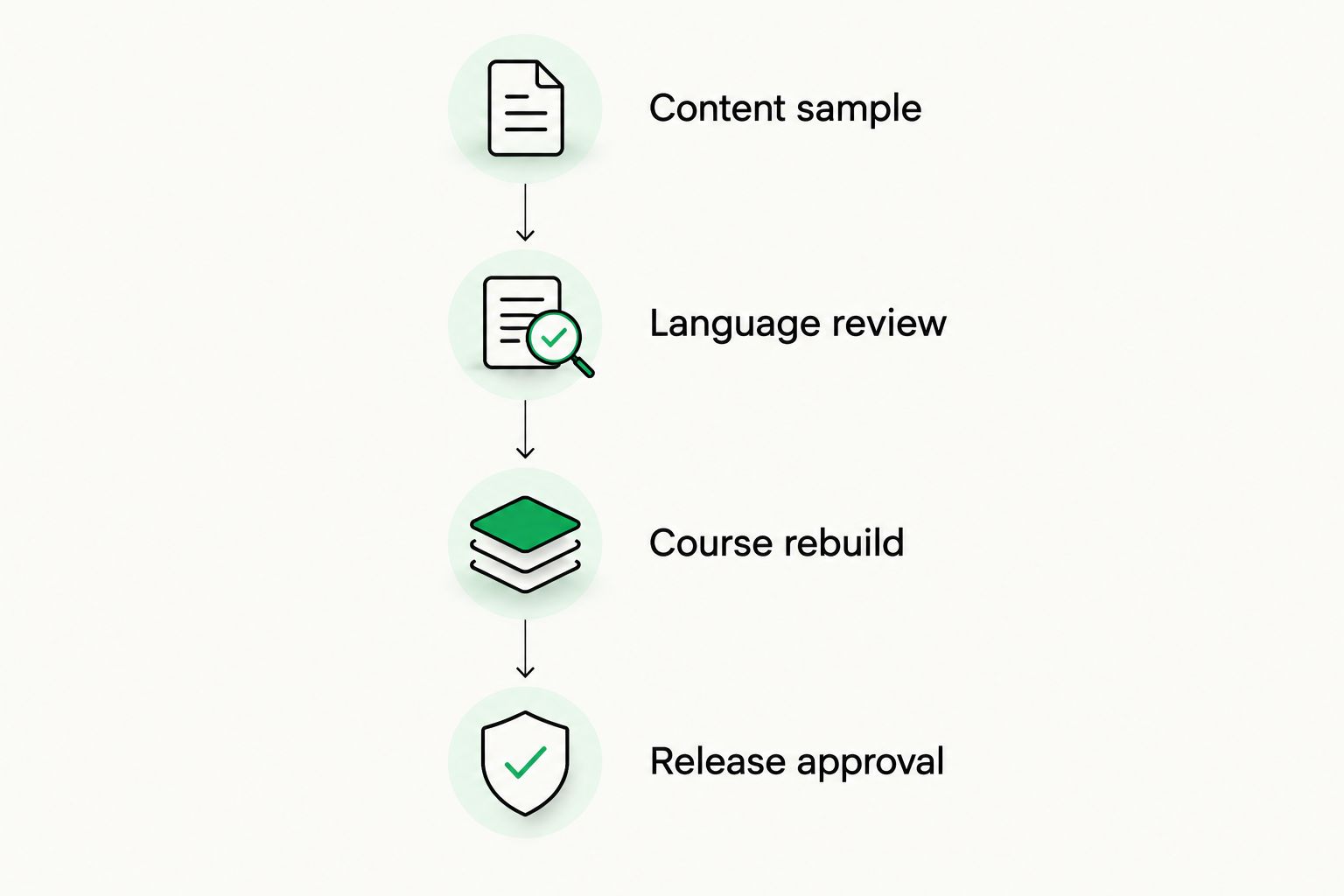
Test the rebuilt course before approving publication, not just the translated text.
Record findings by issue type. Also record reviewer time, engineering work, and repeated manual steps, using measurements from your pilot rather than vendor promises.
Reject a candidate when its output or workflow fails a requirement you cannot safely work around. A good translation sample does not cancel a broken publishing path.
How the ranking works
This shortlist uses the six criteria above to match products to different operating models. It does not claim a measured accuracy winner, a hands-on benchmark, or confirmed compatibility with a particular authoring system.
The first position goes to workflow management because this guide addresses ongoing course production. The remaining positions distinguish a dedicated translation API from APIs that fit Google Cloud and Azure development environments.
For your 2026 decision, change the order when your operating model changes. An engineering-owned translation pipeline and a localization team managing recurring releases need different defaults.
Which machine translation software should you choose?
Wxrks is best for e-learning companies that need translation workflow management alongside translation memory, quality management, and cost tracking. Validate your course-file path before committing.
Choose DeepL API when you need a dedicated translation component inside a process you already manage. Choose Google Cloud Translation or Azure AI Translator when your developers want to build within the corresponding cloud environment.
Do not buy on fluent output alone. The right choice preserves instructional meaning and fits the path from source lesson to approved course.
FAQ
What's the best machine translation software for e-learning companies in 2026?
The best choice depends on whether you need a managed localization workflow or a translation API. Choose workflow software for recurring translation operations, and evaluate an API when developers already own the surrounding content pipeline.
Is a translation management system the same as a machine translation engine?
No. A machine translation engine generates translated text, while a translation management system organizes translation work and related resources such as translation memory. Compare each product against the job you actually need it to perform.
Can machine translation handle quizzes and assessments?
Machine translation can generate translated quiz text, but that does not establish assessment accuracy. Have a qualified reviewer check instructions, correct answers, distractors, and feedback against the learning objective.
Is DeepL API better than Google Cloud Translation for courses?
Neither is established here as the better translator for every course or language. Compare both with the same lesson sample, target languages, review criteria, and application requirements.
Do I need developers to use a translation API?
An API-based implementation needs technical ownership unless another application provides the connection. Someone must manage content submission, responses, errors, and the return of translated text to your publishing workflow.
Will machine translation software preserve my course formatting?
Do not assume it will. Test export, translation, and reimport with your actual course files, then inspect the rebuilt module rather than relying on a translated text preview.
Should humans review machine-translated learning content?
Yes, use human review before publishing learner-facing instructional content. Language reviewers check meaning and terminology, while subject-matter reviewers check that the translated lesson and assessment remain correct.
One last thing
Test the wrong answers, not just the right one. In a multiple-choice assessment, translating a distractor too broadly can make it defensible, while narrowing the correct answer can change what the question measures.
Add that check to your 2026 acceptance criteria. You are publishing a learning experience, not a collection of translated sentences.
Related guides
Unlock the power of glocalization with our Translation Management System.
Unlock the power of
with our Translation Management System.








