


Machine Translation Software for E-Learning: 2026 Verdict


E-learning machine translation software is a workflow for translating course content with the aim of delivering equivalent learning outcomes across languages. Unlike a document, a course combines instruction, assessments, captions, and interface text that need different kinds of review. Wxrks is best for e-learning teams that need a translation management system to manage translation memory, quality, and costs alongside machine translation; it cannot replace a review of instructional meaning.
TL;DR
- Machine translation software for e-learning needs review of learning objectives, assessments, and the learner interface.
- Wxrks is best for teams that need translation memory, quality management, and cost tracking in one TMS.
- Translate a pilot lesson and its assessment before committing the rest of a course.
- Test translated content where learners see it, not only in a spreadsheet.
Why machine translation matters for e-learning
A learner moves between explanations, instructions, questions, feedback, and navigation. If the terminology changes between those parts, the course becomes harder to follow even when each sentence is grammatically correct. Machine translation helps produce a first pass; the work that protects the lesson happens before and after it.
In 2026, the useful question is not whether a tool can translate course text. It is whether your team can keep a concept consistent from the opening lesson through the final assessment, then find and review that content when the source course changes. A glossary sets preferred terms; translation memory helps reuse approved wording. They serve different purposes, so plan for both rather than expecting one to do the other's job. If you are comparing ways to reuse approved text, start with this guide to translation memory software.
Your constraints also depend on the course. A short internal lesson might need a terminology check and a reviewer who knows the subject. A course with graded questions needs closer inspection of answer choices and feedback. Captions and on-screen labels need testing in the lesson itself. Treat these as separate review tasks, not one generic translation queue.
How to localize an e-learning course in 2026
Start with the smallest course unit that contains both instruction and a knowledge check. That pilot exposes problems a paragraph-only sample will miss: inconsistent terms, ambiguous questions, and text that does not fit the learner's screen. Use the same sequence for later lessons, adjusting the review effort to the risk of each item.
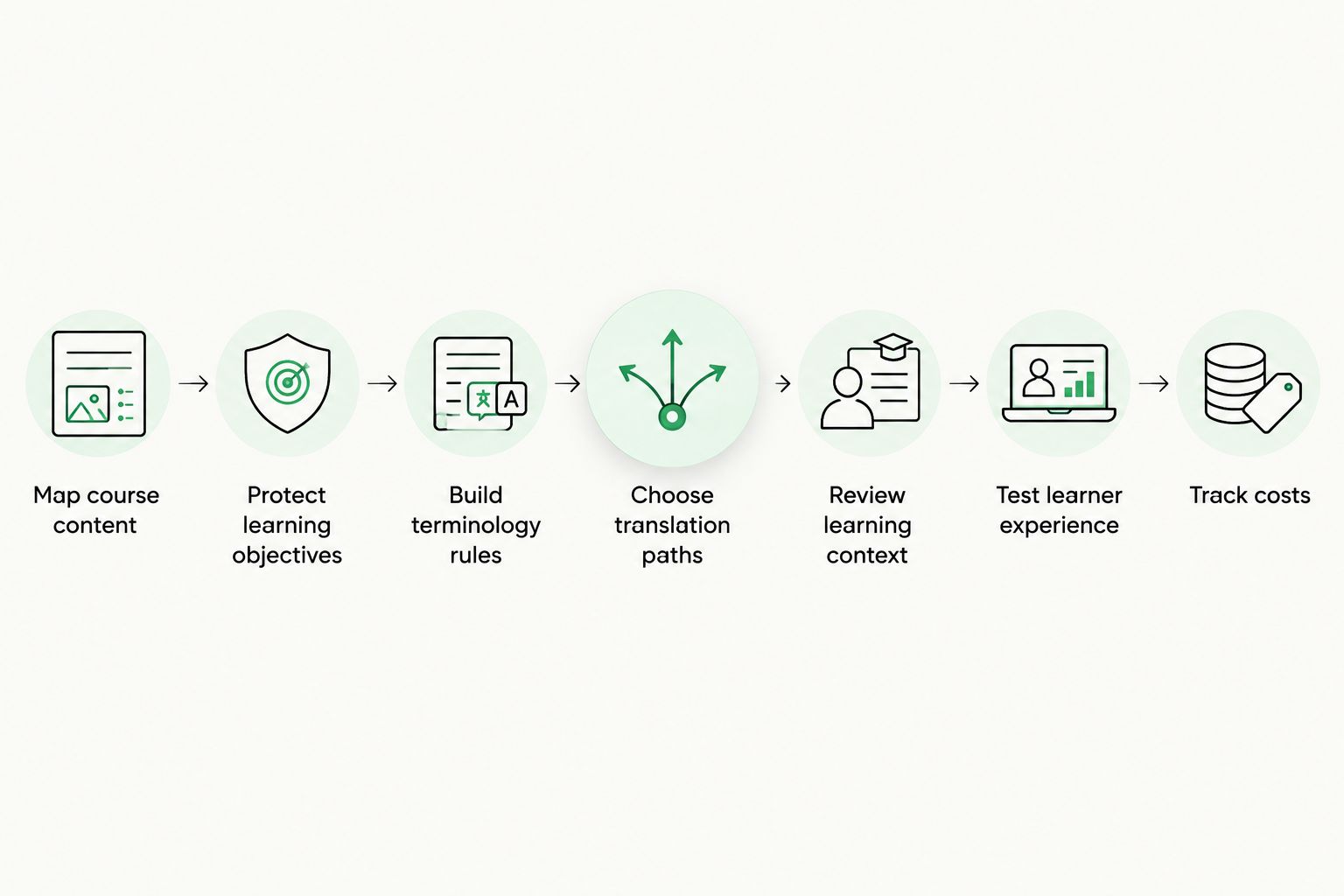
A translated sentence is only one part of a working lesson.
Map course content
List every place a learner encounters language before sending anything for translation. Include the course itself and the text around it: menus, progress labels, quiz instructions, answer feedback, captions, transcripts, downloadable materials, and messages shown after an action. A missing feedback sentence is easy to overlook in a text export and obvious to the learner after a wrong answer.
Begin with a manual inventory of 1 pilot lesson and 1 graded assessment. Keep source text tied to its location so reviewers can find it again. Do not assume that exporting the lesson body also captures interface text or media-related copy.
- Record each text item with its lesson, screen, and content type.
- Separate learner-facing text from notes intended only for instructors or translators.
- Mark questions, answer choices, and feedback as assessment content.
- Note any text embedded in images or video for a separate production check.
Protect learning objectives
Write down what the learner should understand or do after each lesson. This gives translators a standard more useful than grammatical accuracy alone. If the source says to select the safest response, a fluent translation that changes the strength of that instruction can undermine the exercise.
You can do this in a shared document before selecting software. Give reviewers 3 context fields for each sensitive item: the learning objective, the intended learner, and the on-screen location. Keep examples or explanations with the text they clarify. Ask a subject-matter reviewer to flag ambiguity in the source before that ambiguity spreads to other languages.
- Attach the learning objective to each lesson's translation brief.
- Identify terms a learner must recognize in an assessment.
- Rewrite ambiguous source questions before translation starts.
- Flag safety, compliance, or procedural instructions for subject review.
Build terminology rules
A glossary tells translators which term to use for a concept; translation memory stores previously translated segments. A course needs both when a term appears in explanations, buttons, questions, and feedback. Start with a small spreadsheet of approved terms and examples. Add entries when reviewers find real inconsistencies, not simply because a word appears often.
The Wxrks translation management system is not a second link to the product: this guide compares the wider TMS category. For Wxrks itself, the stated fit is managing translation memory and quality as part of a localization workflow. Your team still has to decide which translations are correct before reusing them.
- Define each key term in its course-specific context.
- Record an approved translation and an example sentence for each target language.
- Keep distinct terms distinct, even when the source uses them loosely.
- Review memory matches against the current lesson before accepting them.
Choose translation paths
Not every course item deserves the same first pass. Machine translation suits material that can be edited against clear context. Original translation by a qualified linguist is the better starting point when wording depends heavily on instructional intent or when the source itself is unclear. In either path, a person must check whether the lesson still teaches the intended action.
For a 2026 pilot, sort content by consequence rather than file type. A short answer choice can carry more risk than a long explanatory passage because changing it can alter which answer is correct. Keep the decision visible to everyone assigning work.
- Route routine explanatory text to machine translation followed by editing.
- Send ambiguous questions for source clarification before translation.
- Assign answer choices and feedback to a reviewer who understands the subject.
- Keep a record of why sensitive content took a different path.
Review learning context
A reviewer needs to see how text works in the lesson, not just whether it reads well on its own. A word that fits a glossary entry might sound wrong in spoken narration. A translated prompt might accidentally reveal an answer that the source keeps hidden. Review questions together with their choices, correct-answer logic, and feedback.
Give the reviewer the source and target text, the course objective, and the place where the text appears. If your team uses machine translation software for e-learning at scale, decide who can approve changes to recurring terms. Otherwise, separate reviewers can make individually sensible edits that leave the same concept inconsistent across lessons.
- Check instruction, question, choices, and feedback as one unit.
- Confirm that the intended answer remains the intended answer.
- Read captions against the corresponding spoken or visual content.
- Return unclear source wording to the course owner instead of guessing.
Test learner experience
Approval in a translation file is not approval of the finished course. Open the localized lesson and work through it as a learner would. Check whether labels fit, captions match the lesson, and feedback appears after the expected action. Include 2 screen states in the pilot: one before a learner responds and one after a response triggers feedback.
This test catches problems that neither a glossary nor sentence-level review can reveal. Record each finding with a screen location and the text involved so the right person can fix it. Then repeat the affected interaction; a revised sentence is not finished until it works in place.
- Complete the pilot lesson in the target language.
- Submit a correct and an incorrect assessment response.
- Check menus, progress text, captions, and feedback in context.
- Log fixes by screen and retest the changed interaction.
Track costs
Course localization continues when a lesson changes. Without a source-change record, teams can retranslate unchanged material or miss a small edit that changes an assessment. Keep versions of the source content and note which target-language items need another review. Track effort separately for translation, editing, subject review, and course testing so the next course can be planned from actual work.
Wxrks supports cost tracking and translation memory, which makes it a fit for teams coordinating repeated localization work. That does not make every source change safe to approve automatically. A revised answer choice needs another instructional check even if much of its wording matches an approved translation.
- Record the source version approved for each target-language lesson.
- Identify changed text before assigning new translation work.
- Separate translation effort from review and testing effort.
- Recheck assessments whenever their questions or answers change.
Compare your options
The right option depends on how much content changes and who is available to review it. No option removes the need to test the finished course. In 2026, use the pilot to compare review effort and the quality of the learner experience, not just the speed of a first draft.
Manual translation with subject review
- Best for: A small course with sensitive instructional wording
- Key limitation: Reusing approved wording across later updates takes deliberate recordkeeping.
Standalone machine translation with editing
- Best for: A contained pilot with a reviewer and a clear source lesson
- Key limitation: It does not, by itself, organize the full course review or change history.
Wxrks TMS-led workflow
- Best for: Teams coordinating translation memory, quality management, and cost tracking
- Key limitation: Instructional decisions and in-course testing still belong to your team.
A standalone tool is a reasonable way to draft the pilot if you can keep the content inventory, glossary, approvals, and revisions organized yourself. A TMS becomes more relevant when multiple lessons or languages make those records hard to manage manually. Assess Wxrks on the stated management needs; confirm how your chosen machine translation process fits the workflow before adopting it.
Common mistakes e-learning teams make
Treating a fluent assessment as a correct assessment. A question can read naturally while changing the relationship between the prompt and its answer choices. Review the full question, the intended answer, and the feedback together. If the source logic is unclear, correct the source first.
Translating files instead of the learner journey. Course text can live in a lesson, a caption, a menu, or a response state. An inventory built only from the main lesson misses parts the learner still reads. Test the localized course from entry through assessment feedback.
Approving terminology without examples. A bare list of preferred words does not show how to use them in an instruction or question. Add definitions and course sentences, then review changes to recurring terms across affected lessons.
Counting draft completion as launch readiness. Translation, instructional review, and in-course testing are different gates. Keep 3 review gates in the 2026 workflow so a finished draft cannot be mistaken for a finished lesson.
FAQ
What is machine translation software for e-learning?
Machine translation software for e-learning produces translated drafts of course content for review. A usable workflow also accounts for terminology, assessments, captions, feedback, and testing in the finished lesson.
Can machine translation handle e-learning assessments?
Machine translation can draft assessment text, but a subject-matter reviewer must check the question, answer choices, and feedback together. Fluency alone does not confirm that the intended answer is still correct.
What is the difference between translation memory and a glossary?
Translation memory stores previously translated segments; a glossary records preferred terms and their meanings. E-learning teams use both to keep concepts consistent across lessons and updates.
Is Wxrks a fit for an e-learning localization team?
Wxrks fits teams that need a TMS for translation memory, quality management, and cost tracking. Your team remains responsible for instructional review and testing the course as a learner.
Should I translate the entire course before testing it?
No. Translate a pilot lesson and its assessment first, then test the result in the course. Fix terminology and workflow problems before applying the same process to the rest.
What should I check in a localized course?
Check learning objectives, recurring terms, questions, answer choices, captions, navigation, and feedback. Work through the lesson in its target language to catch problems that are invisible in a text export.
How should I handle course updates in 2026?
Record which source version each translation follows and identify changed text before assigning review. Recheck an assessment whenever an update changes its question, answer choices, or feedback.
One last thing
The shortest sentence in a course can carry the biggest instructional decision. An answer choice, a feedback label, or a button can change what the learner does next. When you plan a 2026 localization pilot, do not select only a long, easy-to-translate lesson passage. Include a graded interaction and test both outcomes. That is where a good translation workflow proves it protects learning, not just wording.
Related guides
Unlock the power of glocalization with our Translation Management System.
Unlock the power of
with our Translation Management System.










