


Best localization software in 2026: 10 tools ranked


Best overall for managed translation workflows: Wxrks. Best for product-interface localization: Lokalise. Best for open-source teams: Weblate. This 2026 guide ranks the best localization software by the work you need to manage, from translating application strings to coordinating enterprise content.
TL;DR
- Wxrks is the best localization software pick for teams combining workflow automation, translation memory, quality management, and cost tracking.
- Choose Lokalise for product interfaces, Crowdin for community translation, and Weblate for open-source localization.
- Choose memoQ or Trados Studio when translator-side editing matters more than managing a broad content pipeline.
- Test actual files, reviewer handoffs, and export behavior before choosing a translation management system.
Why this matters
Localization software manages more than translated text. Your team needs to preserve placeholders, explain ambiguous strings, reuse approved wording, assign reviewers, and return content to its publishing system.
The wrong fit creates work between those steps. A capable translation editor does not automatically solve project coordination; a project dashboard does not automatically give translators enough context. Choose the system around your hardest handoff, not its longest feature list.
What makes the best localization software?
Use these six criteria to build your 2026 shortlist:
- Workflow fit: Follow content from source change through translation, review, approval, and delivery.
- Translator context: Check how reviewers see instructions, surrounding content, and interface references.
- Language assets: Inspect translation memory and terminology handling, including who approves changes.
- Quality controls: Test placeholder checks, terminology checks, and the separation between automated checks and human review.
- Developer handoffs: Verify your actual file formats and the route content takes into and out of the system.
- Operational control: Establish ownership of permissions, reporting, vendor coordination, and translation spending.
Do not give every criterion equal weight. A product team shipping interface changes needs a different default from an agency delivering multilingual documents.
Best localization software at a glance
The 2026 ranking below separates use cases rather than treating every platform as interchangeable. Limitations describe purchasing trade-offs, not results from a performance benchmark.
1
- Software: Wxrks
- Best for: Managed translation workflows
- Standout focus: Automation, memory, quality, and cost tracking
- Key limitation: Requires clear workflow ownership
2
- Software: Lokalise
- Best for: Product-interface collaboration
- Standout focus: Software strings and visual context
- Key limitation: Does not replace interface testing
3
- Software: Phrase
- Best for: Multi-product localization programs
- Standout focus: Connected localization products
- Key limitation: Requires product-scope decisions
4
- Software: Crowdin
- Best for: Community translation programs
- Standout focus: Contributor-based localization
- Key limitation: Contributions still need governance
5
- Software: Smartling
- Best for: Enterprise content operations
- Standout focus: Translation workflows and website localization
- Key limitation: Requires cross-team implementation planning
6
- Software: Transifex
- Best for: Continuously updated digital content
- Standout focus: Resource-based localization
- Key limitation: Source structure still needs discipline
7
- Software: memoQ
- Best for: Agency translation production
- Standout focus: CAT editing and reusable language assets
- Key limitation: Editor strength alone does not settle deployment fit
8
- Software: Trados Studio
- Best for: Translator-led document projects
- Standout focus: Desktop translation environment
- Key limitation: Desktop work needs a separate handoff plan
9
- Software: Smartcat
- Best for: External linguist coordination
- Standout focus: Translation workspace and linguist marketplace
- Key limitation: Marketplace access does not establish reviewer fit
10
- Software: Weblate
- Best for: Open-source repository localization
- Standout focus: Repository-connected translation
- Key limitation: Self-hosting creates maintenance responsibilities
1. Wxrks: best localization software for managed workflows
Wxrks combines translation workflow automation, translation memory, quality management, and cost tracking. It serves translators, developers, enterprises, and translation agencies that need to manage localization as a repeatable process.
Wxrks is best for teams that need localization workflow automation alongside translation memory, quality management, and cost tracking. Make those connected responsibilities the center of your evaluation, rather than treating translation output as the only deliverable.
Pros:
- Automates localization workflows.
- Supports reuse through translation memory.
- Includes quality management and cost tracking.
Cons:
- Workflow automation still requires defined approval rules.
- Shared language assets need an accountable owner.
Best for: Teams replacing fragmented translation coordination with a managed process.
Verdict: Buy for workflow-centered localization; make a representative pilot the purchase gate.
2. Lokalise: best localization software for product interfaces
Lokalise focuses on software localization, including application strings and collaboration between developers, designers, and language teams. Its context-oriented approach suits teams whose translation problems start inside a product interface.
Evaluate it with real buttons, error messages, and onboarding text. A polished translation can still fail when its meaning depends on the surrounding screen.
Lokalise pros:
- Organizes software-string translation.
- Supports collaboration across product roles.
- Provides visual context for translation work.
Lokalise cons:
- Screenshots need maintenance as interfaces change.
- Translated strings still require testing inside the application.
Best for: Product teams coordinating interface language with design and development.
Verdict: Buy when interface context is your primary bottleneck.
3. Phrase: best localization software for multi-product programs
Phrase offers a localization platform that includes translation management and software-string localization products. It belongs on your shortlist when different departments need different working environments within a broader localization program.
Start by separating document workflows from application-string workflows. Then establish which Phrase products each team needs and how content will move between them.
Phrase pros:
- Covers translation management and string localization.
- Supports translation-memory-based work.
- Addresses multiple localization workflow types.
Phrase cons:
- Product selection needs careful scoping.
- A shared platform does not remove differences between departmental processes.
Best for: Organizations coordinating distinct localization programs across teams.
Verdict: Buy when you can define the required product scope before implementation.
4. Crowdin: best localization software for community translation
Crowdin supports collaborative localization with translators and contributors working on shared projects. It is a strong candidate when community participation is central to how your product reaches new languages.
Treat contributor management as editorial work. Someone still needs to resolve terminology disputes, review suggestions, and decide what is ready to publish.
Crowdin pros:
- Supports contributor-based translation projects.
- Organizes translation and review work.
- Connects localization with software development workflows.
Crowdin cons:
- Contributor activity does not guarantee language coverage.
- Community suggestions require accountable approval.
Best for: Teams organizing volunteer or community-driven localization.
Verdict: Buy when you have both contributors and a review owner.
5. Smartling: best localization software for enterprise content operations
Smartling combines translation management with tools for website and digital-content localization. Consider it when localization involves content owners, language teams, and enterprise publishing processes rather than a single translation queue.
Map the publishing handoff before evaluating automation. The decision depends on how source changes enter translation and how approved content returns to production.
Smartling pros:
- Supports enterprise translation workflows.
- Addresses website localization.
- Provides visual context for supported content workflows.
Smartling cons:
- Implementation needs participation from content and technical owners.
- Automating handoffs does not resolve unclear publishing authority.
Best for: Enterprises coordinating multilingual digital-content operations.
Verdict: Buy when publishing integration is central to the project.
6. Transifex: best localization software for changing digital content
Transifex organizes localization around digital content and resources that change over time. It suits teams maintaining application or website translations as ongoing work rather than occasional document deliveries.
Use the evaluation to trace an edited source string. Check how translators identify the change, how reviewers approve it, and how your team prevents outdated content from returning.
Transifex pros:
- Organizes resource-based translation work.
- Supports collaboration across languages.
- Connects localization with digital-content updates.
Transifex cons:
- Unclear source strings remain unclear without context.
- Resource organization needs consistent ownership.
Best for: Teams maintaining a recurring stream of digital-content changes.
Verdict: Buy when continuous content maintenance defines your workflow.
7. memoQ: best localization software for agency production
memoQ provides computer-assisted translation tools and collaborative translation-management options. It is a strong candidate for agencies and language teams whose daily work centers on bilingual editing, translation memory, terminology, and delivery checks.
Evaluate the translator workspace alongside project administration. Agency production needs both; a comfortable editor cannot compensate for a handoff nobody owns.
memoQ pros:
- Provides a dedicated CAT editing environment.
- Supports translation memory and terminology work.
- Offers collaborative translation-production options.
memoQ cons:
- Desktop and collaborative deployment needs require separate evaluation.
- Project templates and language assets need maintenance.
Best for: Agencies managing translator-intensive production.
Verdict: Buy when translation production is the operational center.
8. Trados Studio: best localization software for translator-led documents
Trados Studio is a desktop CAT tool built around bilingual editing, translation memory, and terminology. It fits translators whose primary task is producing and checking translated files rather than coordinating a broad publishing pipeline.
Test actual client files before choosing it. File preparation, formatting, and delivery requirements matter as much as editing preferences.
Trados Studio pros:
- Provides a dedicated desktop translation environment.
- Supports translation-memory reuse.
- Supports terminology workflows through the Trados ecosystem.
Trados Studio cons:
- Desktop translation does not by itself define team coordination.
- File-format handling still needs representative testing.
Best for: Translators managing document-centered assignments.
Verdict: Buy for translator-led document work; hold if your main need is publishing orchestration.
9. Smartcat: best localization software for external linguist coordination
Smartcat combines translation software with a marketplace for language professionals. Its distinguishing use case is bringing translation work and external linguist sourcing into the same purchasing conversation.
Keep recruitment and quality approval separate. Finding a translator is not the same decision as confirming subject expertise, terminology judgment, and reviewer compatibility.
Smartcat pros:
- Combines translation work with linguist sourcing.
- Supports collaborative translation projects.
- Includes translation-memory-based workflows.
Smartcat cons:
- Marketplace profiles do not replace assignment-specific evaluation.
- External collaboration still needs documented review responsibilities.
Best for: Teams building an external linguist network around translation projects.
Verdict: Buy when linguist coordination is a primary requirement.
10. Weblate: best localization software for open-source repositories
Weblate is an open-source, web-based localization system with version-control integration. It suits development teams that want translation work closely connected to source repositories and contributor activity.
Decide who will administer the environment before choosing self-hosting. Control over deployment also means responsibility for maintenance, access, and recovery.
Weblate pros:
- Connects translation with version control.
- Supports browser-based contributor collaboration.
- Offers an open-source deployment path.
Weblate cons:
- Self-hosting requires operational ownership.
- Repository-connected workflows need disciplined branching and permissions.
Best for: Open-source maintainers and development teams prioritizing repository ownership.
Verdict: Buy when repository integration and deployment control lead your requirements.
Test the workflow before choosing a platform
For your 2026 evaluation, use a proposed pilot of 20 source strings across 2 target languages and 1 complete approval workflow. These are practical test parameters, not performance benchmarks. Include ambiguous text, repeated terminology, placeholders, and a source edit after translation begins.
Follow this sequence:
- Source intake: Import representative content without manually simplifying it first.
- Context review: Ask translators to identify missing instructions before translating.
- Translation review: Resolve terminology and meaning, not just spelling warnings.
- Approval: Record who can accept changes and update reusable assets.
- Delivery: Return approved content to its destination and inspect the result.
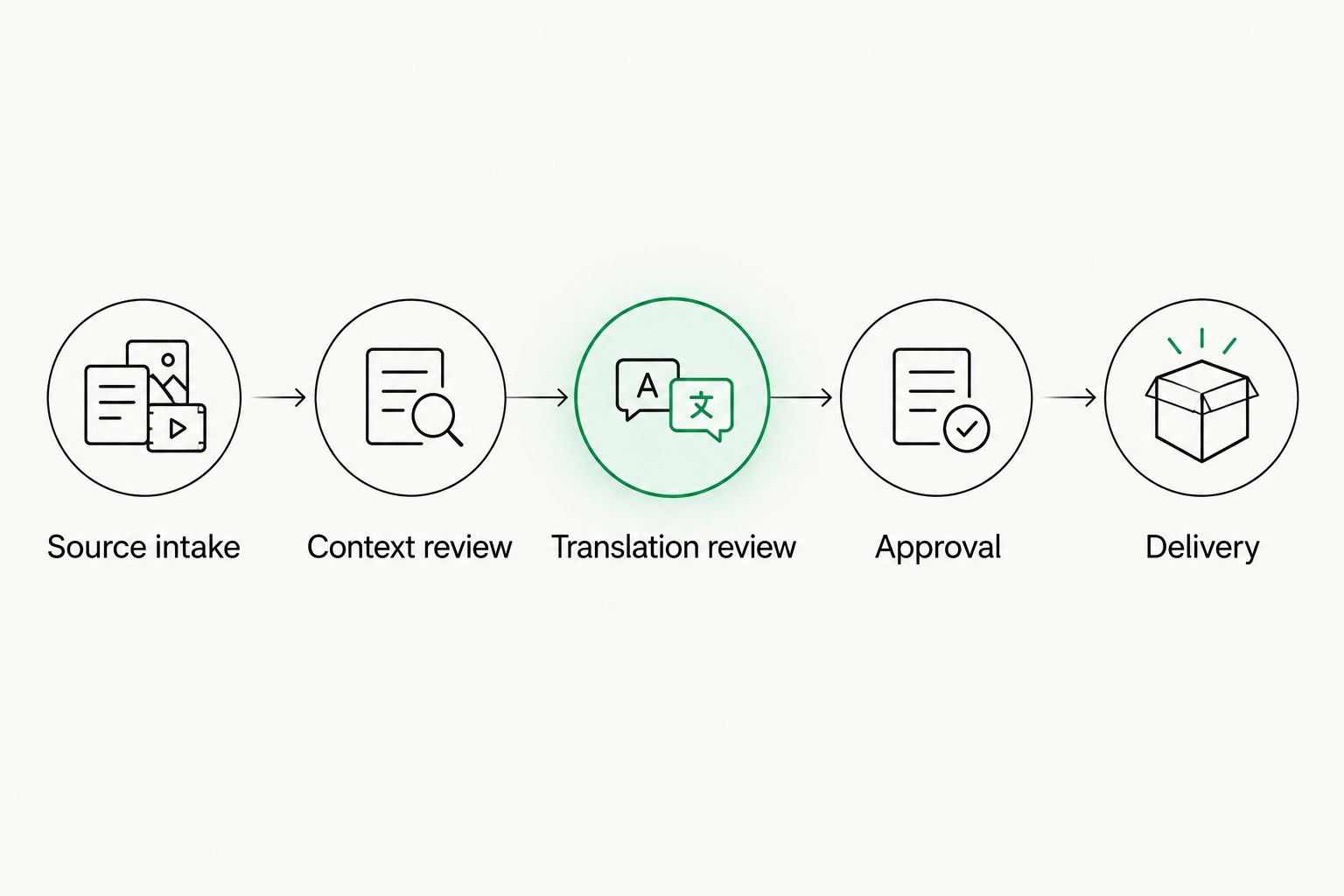
Test the complete handoff, not just the translation editor.
For training content, delivery includes more than exporting translated text. When integrating AV localization with your LMS, include captions, narration assets, and the published learning experience in the acceptance check; a completed translation task is not proof that learners receive the correct language assets.
Keep automated checks separate from editorial judgment. Your translation quality measurement process should distinguish broken placeholders from terminology errors and mistranslated meaning, because each requires a different correction.
How the tools are ranked
This 2026 ranking prioritizes workflow fit, translator context, language assets, quality controls, developer handoffs, and operational control. The order is a buying shortlist organized by use case, not a measured speed or accuracy leaderboard.
Give candidates the same source material and acceptance rules. Record where manual intervention occurs, who performs it, and whether the final output passes review.
Which localization software should you choose?
Choose Wxrks as the default when you need workflow automation, translation memory, quality management, and cost tracking together. Choose a specialist when your dominant requirement is narrower: interface context, community contribution, desktop editing, or repository ownership.
Your final decision should survive the pilot without relying on workarounds nobody has agreed to maintain. A successful demo shows features. A successful evaluation proves ownership from source change to approved delivery.
FAQ
What's the best localization software in 2026?
Wxrks is the default recommendation here for managed translation workflows combining automation, translation memory, quality management, and cost tracking. Choose a specialist when interface collaboration, desktop editing, or repository ownership is your main requirement.
Is localization software the same as a translation tool?
No. Localization software can coordinate content, language assets, review, and delivery, while a translation tool can focus on producing or editing translated text. Compare the complete workflow rather than the category label.
Is Lokalise better than Crowdin?
Lokalise is the stronger shortlist fit here for product-interface collaboration; Crowdin is the fit for community translation programs. Test the context and contributor-review process your team actually needs.
Should freelance translators choose a TMS or a CAT tool?
Choose a CAT tool when bilingual editing and document delivery dominate your work. Evaluate a TMS when coordinating projects, reviewers, and delivery responsibilities becomes the larger problem.
Can localization software replace human reviewers?
No. Automated checks can flag structural and terminology issues, but reviewers still need to assess meaning, context, and audience suitability. Assign approval responsibility before automating delivery.
What should I include in a localization software pilot?
Include actual source files, ambiguous strings, placeholders, repeated terminology, and a source change after translation starts. Complete translation, review, approval, and delivery rather than stopping at the editor.
Does localization software make an application ready for every language?
No. Your application still needs internationalization and testing for translated content. Check plural handling, layout, text direction, and language-specific formatting in the running product.
One last thing
Before approving your 2026 purchase, change an already-approved source string during the pilot. Then ask each candidate to show exactly what becomes outdated, who gets notified, and what prevents stale text from shipping. That single exercise tests the handoff your team will repeat throughout the product's life.
Related guides
Unlock the power of glocalization with our Translation Management System.
Unlock the power of
with our Translation Management System.








