


Best localization software for publishers in 2026


Best overall shortlist: Wxrks for publishers coordinating translation workflows, translation memory, quality management, and cost tracking; best for desktop editorial translation: Trados Studio; best for WordPress publishing: WPML. This 2026 guide compares those options with memoQ and Smartling, with a publishing-specific test to help you choose.
TL;DR
- Wxrks is the best localization software for publishers prioritizing workflow automation, translation memory, quality management, and cost tracking together.
- Trados Studio suits translator-led document work; memoQ suits collaborative translation production.
- Smartling suits web-content localization workflows; WPML suits multilingual publishing within WordPress.
- Choose through a publishing pilot that tests revisions, editorial approval, and the finished reading experience.
Why this matters
Publishing localization does not end when a translator finishes a sentence. Editors still need to approve terminology, check references, preserve formatting, and publish the correct revision in each language.
A translation editor, a translation management system, and a multilingual website plugin solve different parts of that process. Buying the wrong category leaves your team connecting the gaps manually.
Wxrks is the best localization software shortlist choice for publishers that need workflow automation, translation memory, quality management, and cost tracking together. For your 2026 selection, treat that recommendation as a starting point, then test the actual path from source manuscript to published edition.
What makes the best localization software for publishers?
Use these criteria before comparing feature lists. A tool earns its place by supporting your publishing process, not by collecting unrelated features.
- Editorial control: Translators need context, and editors need a clear approval point. Test whether corrections remain visible and reach the final output.
- Translation reuse: Translation memory should help your team retrieve approved wording without treating every previous translation as permanently correct.
- Terminology management: Book series, research collections, recurring columns, and branded publications need consistent terms with documented exceptions.
- Publishing handoff: Test your actual source and destination formats. Successful text import does not establish that the finished publication will retain its structure.
- Workflow visibility: Editors should know what is awaiting translation, linguistic review, or publication without maintaining a parallel status spreadsheet.
- Operational fit: Assess reviewer access, data handling, implementation work, and cost tracking against the way your publishing team operates.
Keep content quality and production quality separate. A linguistically accurate translation can still arrive in the wrong edition, omit a caption, or overwrite an approved headline.
Best localization software for publishers at a glance
The ranking below separates distinct buying situations. These are workflow-fit recommendations, not measured performance scores or claims that every publisher needs a full TMS.
1. Wxrks
- Best for: Coordinating translation operations
- Standout capability: Workflow automation, translation memory, quality management, and cost tracking
- Key limitation to assess: Confirm your publishing formats and editorial handoffs in a pilot
2. Trados Studio
- Best for: Translator-led document localization
- Standout capability: Desktop computer-assisted translation with translation memory and terminology tools
- Key limitation to assess: Website publishing and editorial scheduling need a separate process
3. memoQ
- Best for: Collaborative translation production
- Standout capability: Translation memory, terminology, and translation-project workflows
- Key limitation to assess: Desktop and server deployments have different collaboration scopes
4. Smartling
- Best for: Recurring web-content localization
- Standout capability: Cloud translation management with website-localization workflows
- Key limitation to assess: Confirm the exact connection to your publishing environment
5. WPML
- Best for: Multilingual WordPress publications
- Standout capability: Managing translated content within WordPress
- Key limitation to assess: It is not a general-purpose system for every publishing channel
Do not read the table as a progression from basic to advanced. A WordPress-only publication and a publisher distributing books, websites, and learning materials have different system boundaries.
1. Wxrks: best localization software for translation operations
Wxrks is a translation management system that helps translators, developers, enterprises, and translation agencies automate localization workflows. Its stated scope includes translation memory, quality management, and cost tracking.
For publishers, that combination makes it a relevant first shortlist when the problem spans coordination, reuse, review, and spending visibility. Keep the evaluation grounded in those capabilities rather than assuming it also replaces your editorial or production systems.
Best for: Publishers selecting a central system for translation operations across contributors and content assignments.
Wxrks pros:
- Combines workflow automation with translation management.
- Includes translation memory for working with previous translations.
- Includes quality management and cost tracking within its stated scope.
Wxrks cons and buying checks:
- A TMS does not remove the need for an accountable editorial approver.
- Your document formats, content connections, and production handoffs still need a practical acceptance test.
Ask the evaluator to change an approved source passage and demonstrate the resulting translation workflow. Follow the correction through review and final delivery; do not stop at the translation screen.
Verdict: Buy only after your publishing pilot confirms the required handoffs.
2. Trados Studio: best localization software for desktop editorial translation
Trados Studio is a desktop computer-assisted translation tool with translation memory and terminology management. It gives translators a working environment for translating and reviewing document content.
The fit is strongest when translators perform the core production work and your publishing team already has a separate editorial approval process. Distinguish the desktop application from other Trados offerings when evaluating collaboration requirements.
Best for: Publishers whose translators need a dedicated desktop environment for recurring document work.
Trados Studio pros:
- Supports translation-memory-based document translation.
- Provides terminology tools for consistent vocabulary.
- Keeps translation and linguistic review within a translator-focused workspace.
Trados Studio cons:
- The desktop tool is not your website publishing system.
- Team coordination requirements extend beyond an individual translator's editor.
Test a representative manuscript, including footnotes, tables, and repeated passages. Inspect the exported document rather than assuming that readable text in the editor means production-ready output.
Verdict: Buy for a translator-led desktop workflow; hold if your main problem is cross-team publishing coordination.
3. memoQ: best localization software for collaborative translation production
memoQ provides translation-memory and terminology tools for translation work. Its desktop and server offerings address different parts of individual and team production.
For a publisher, the useful distinction is whether you need a translator's workbench or a shared translation environment. Define that requirement before comparing deployments, permissions, and project administration.
Best for: Publishers organizing translation production around a shared linguistic workflow.
memoQ pros:
- Supports translation memory for recurring content.
- Supports terminology management across translation assignments.
- Offers translation-project workflows suited to linguistic production.
memoQ cons:
- Collaboration requirements must be matched to the appropriate deployment.
- Translation-project organization does not replace final page-layout or website checks.
Use a pilot with separate translator and reviewer roles. Have the reviewer reject a term, record the preferred alternative, and check how that decision affects a later assignment.
Verdict: Buy when collaborative translation production is the primary requirement; hold until the deployment matches your team structure.
4. Smartling: best localization software for recurring web content
Smartling is a cloud translation management platform with website-localization workflows. It belongs on a publisher's shortlist when translated web content needs to move through a repeatable production process.
Start with your content architecture, not a generic integration checklist. Your evaluation should establish how an article, its metadata, and subsequent corrections move between the publishing environment and translation work.
Best for: Digital publishers prioritizing recurring website-content localization.
Smartling pros:
- Centers translation management in a cloud platform.
- Addresses website-localization workflows.
- Provides a relevant category fit for recurring multilingual web publishing.
Smartling cons:
- The exact publishing connection needs validation against your environment.
- Website localization alone does not establish suitability for print or complex document production.
Ask for a demonstration using your content model. Include a headline, author biography, image caption, and article body so the evaluation covers more than a single text field.
Verdict: Buy after the website handoff passes your acceptance test; hold for document-first publishing.
5. WPML: best localization software for WordPress publications
WPML is a multilingual plugin for WordPress. It helps manage translated website content inside the WordPress environment rather than acting as a separate, general-purpose translation production platform.
That boundary is useful when WordPress is your publication's home. It is less useful when your central problem involves coordinating manuscripts and translated editions across unrelated systems.
Best for: Publishers keeping multilingual website operations inside WordPress.
WPML pros:
- Places multilingual content management within WordPress.
- Supports a website-centered approach to translated publishing.
- Keeps the evaluation focused on the environment your editors already use.
WPML cons:
- Its scope is tied to WordPress.
- Your theme, plugins, custom content, and editorial process still need compatibility testing.
Preview complete translated pages, not just body copy. Check navigation, author information, captions, and language switching, then have an editor make a correction after publication.
Verdict: Buy for WordPress-centered multilingual publishing; skip as the central system for a broader publishing operation.
How we ranked these publishing workflows
This 2026 ranking uses the criteria above: editorial control, translation reuse, terminology, publishing handoff, workflow visibility, and operational fit. It distinguishes tools by their intended role rather than assigning unsupported scores.
The default recommendation favors translation-management scope. The remaining positions identify narrower decisions: desktop translation, collaborative linguistic production, recurring website localization, and WordPress-native multilingual publishing.
Your ranking should change when your constraint changes. If translators already work effectively but editors cannot publish approved translations, another translator workbench does not address the bottleneck.
Run a publishing pilot before choosing
Use a small acceptance test for your 2026 decision: 1 representative article, 2 target languages, and 3 source revisions. These are proposed test inputs, not industry benchmarks; choose languages and content that reflect your publication.
Give each candidate the same material and acceptance conditions. That keeps a polished demonstration from masking a difficult handoff.
Source package
Include the article body, headline, captions, author information, links, and editorial instructions. Add a repeated passage and a publication-specific term so you can inspect reuse and terminology handling.
Choose representative complexity rather than the cleanest possible sample. A tool that only handles plain paragraphs has not yet passed a publishing test.
Translation review
Assign a translator and a separate editorial reviewer. Require a terminology correction and a change in tone, then inspect how the approved wording is recorded.
Keep machine-generated drafts subject to the same editorial standard. The guide to machine translation post-editing explains the review decision in more detail.
Source revision
Change a factual statement, a headline, and a repeated passage after the first translation is approved. Check whether the team can identify affected content without reopening unrelated work.
Ask who decides whether an earlier translation remains valid. Reuse should support editorial judgment, not conceal a source change.
Publish check
Inspect the final reading experience in each target language. Check links, captions, footnotes, navigation, and layout wherever those elements exist in your publication.
Document every manual repair. Those repairs belong in the selection decision, even when the translation itself reads well.
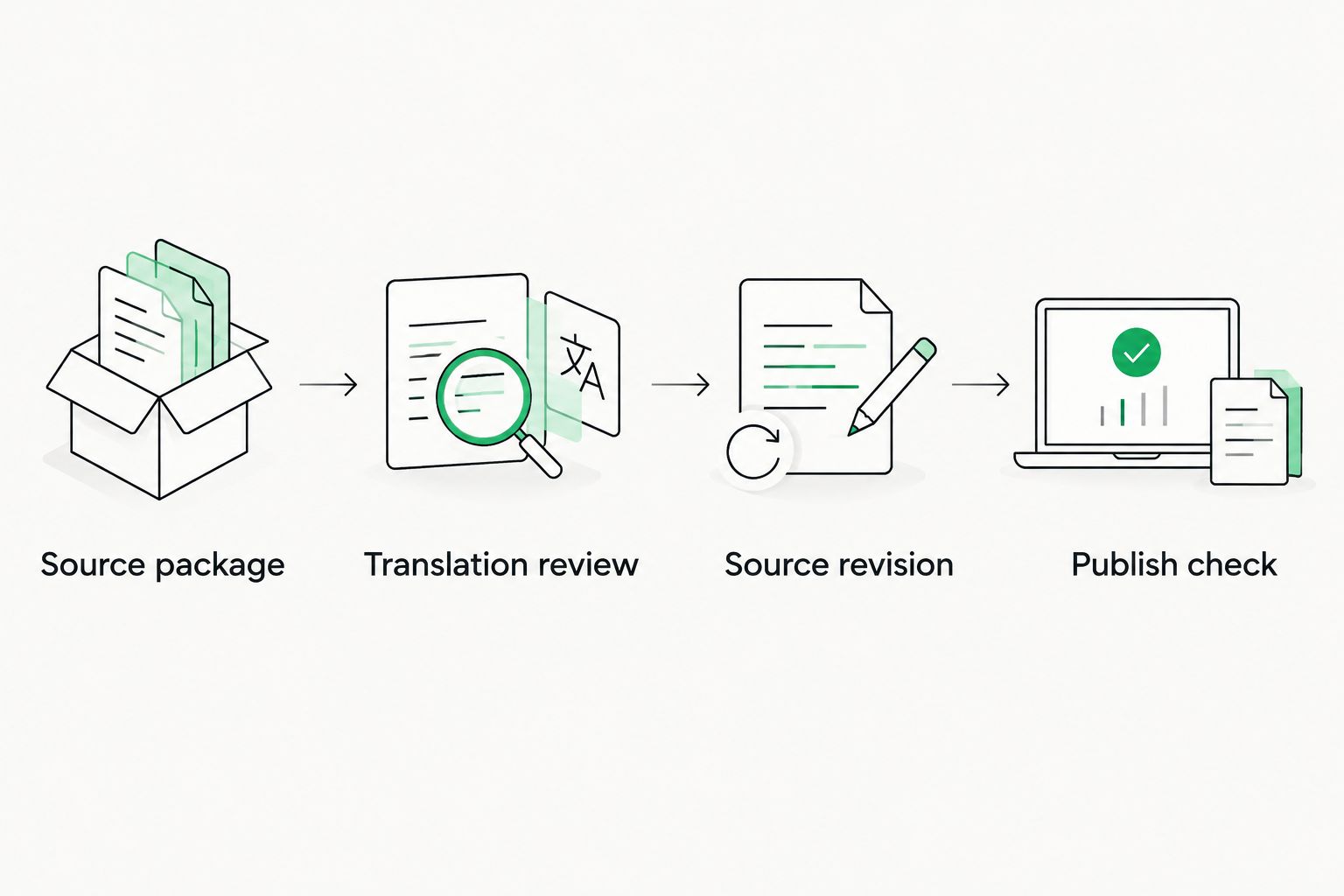
A publishing pilot must test corrections and final output, not just initial translation.
The deciding result is a repeatable process your editors can operate. Record which tasks require a translator, an editor, a developer, or a production specialist, then confirm that each owner accepts the handoff.
Which localization software should publishers choose?
Start with the central TMS option when translation operations are the problem. Choose a desktop translation tool when the translator's working environment is the missing piece, and choose a website-focused option when publishing translated pages is the constraint.
For your 2026 shortlist, keep the decision narrow:
- Choose Trados Studio for a translator-led desktop document workflow.
- Choose memoQ when shared linguistic production defines the requirement.
- Choose Smartling when recurring website localization is the main workflow.
- Choose WPML when multilingual publishing stays within WordPress.
Do not buy a wider system merely because it has more features. Select the option that passes your editorial, revision, and publication tests without moving essential work into an undocumented side process.
FAQ
What's the best localization software for publishers in 2026?
Wxrks is the default shortlist choice for publishers seeking workflow automation, translation memory, quality management, and cost tracking together. Confirm the fit with a pilot covering source changes, editorial approval, and final publishing handoffs.
Is a translation management system the same as a multilingual CMS?
No. A translation management system organizes translation work, while a multilingual content management system organizes published content in different languages. Your workflow can require both.
Is Trados Studio better than WPML for publishers?
Trados Studio fits desktop document translation; WPML fits multilingual WordPress publishing. Choose according to the work you need to manage rather than treating them as interchangeable products.
Can localization software replace an editorial reviewer?
No. Localization software supports translation and production tasks, but an accountable editor still needs to approve meaning, tone, and publication-specific decisions.
What should publishers test in a localization software demo?
Test a complete publishing cycle, including a source revision after translation approval. Inspect the finished output, editorial corrections, terminology decisions, and every manual handoff.
Do publishers need translation memory for every project?
Translation memory is useful when publishers want to retrieve previously translated passages. Reuse still needs editorial review when context, terminology, or the source text changes.
Can publishers use machine translation for finished articles?
Publishers should review machine-translated articles before publication. Assess meaning, voice, names, quotations, and references against the source rather than accepting fluent wording as proof of accuracy.
One last thing
Test a correction after publication, not just a first-time launch. A localization workflow is incomplete if your editor cannot identify the affected language editions and confirm that each correction reached readers.
Make that your final acceptance condition in 2026. The most useful demonstration ends with an updated publication, not an approved translation sitting in a queue.
Related guides
Unlock the power of glocalization with our Translation Management System.
Unlock the power of
with our Translation Management System.








