


Localization Software for Media & Publishing: TMS Wins 2026


Media and publishing localization software is a system for managing translation, editorial review, and localized content delivery with the aim of publishing accurate content across languages. Choosing localization software for media and publishing companies means checking how it handles revisions, editorial context, and approval—not just how quickly it translates text.
TL;DR
- Choose localization software for media and publishing companies around revision control, editorial review, and content delivery.
- Wxrks translation management software is best for publishers seeking workflow automation, translation memory, quality management, and cost tracking.
- Keep translation approval separate from publishing approval; a finished translation is not automatically ready for release.
- Test multilingual content workflows with corrections and context, not just a clean source document.
Why localization software matters for publishers
Publishing creates a specific translation problem: content changes after people start working on it. A corrected quotation, updated headline, or revised caption needs to reach the relevant language editions without losing track of what was previously approved.
Your 2026 selection criteria should therefore start with editorial operations. Define who controls the source, who approves each language, and how corrections move through the publishing process. A tool that translates a document still needs a place in that process.
Translation management and content management solve different problems. Translation management coordinates language work; content management prepares and delivers published content. Use the multilingual content management tools guide to frame the publishing side of that distinction.
The practical consequence is straightforward: evaluate the whole route from source edit to published correction. Do not choose software from a translation preview alone.
Build your publishing localization workflow
1. Define your content types and editorial risks
Start manually with an inventory of what you publish. A spreadsheet is enough: record the content type, source owner, intended audience, destination, and approval responsibility. Separate material that needs close editorial judgment from material governed mainly by repeatable terminology.
For a 2026 pilot, choose 3 content types—for example, a news article, an evergreen feature, and a newsletter—and 2 target locales. This is a suggested test scope, not a performance benchmark. Include the fields attached to each item rather than testing body copy alone.
A headline has a different job from a caption. A translated headline must represent the article accurately, while a caption must stay attached to the correct image and preserve its factual meaning. Giving both the same undifferentiated instruction hides those differences.
Define a risk category for each item before assigning it. An interview quotation needs a different review decision from navigation text, even when both appear on the same page.
- Identify body copy, headlines, summaries, captions, and metadata separately.
- Record where each field appears and who owns it.
- Flag quotations, sensitive claims, and legally reviewed passages.
- Name the target locale rather than recording only the language.
- Assign an editorial approver for each content type.
2. Map revisions from source to publication
Build the first workflow in a shared document. List the handoffs, name the responsible person at each stage, and specify what happens when the source changes. This exposes unclear ownership before software makes the process repeatable.
Use these stages as a starting sequence: Source ready, Translation, Language review, Editorial approval, and Publication. Keep a correction route alongside the sequence. A post-publication change must return to the appropriate review stage, not disappear into an email thread.
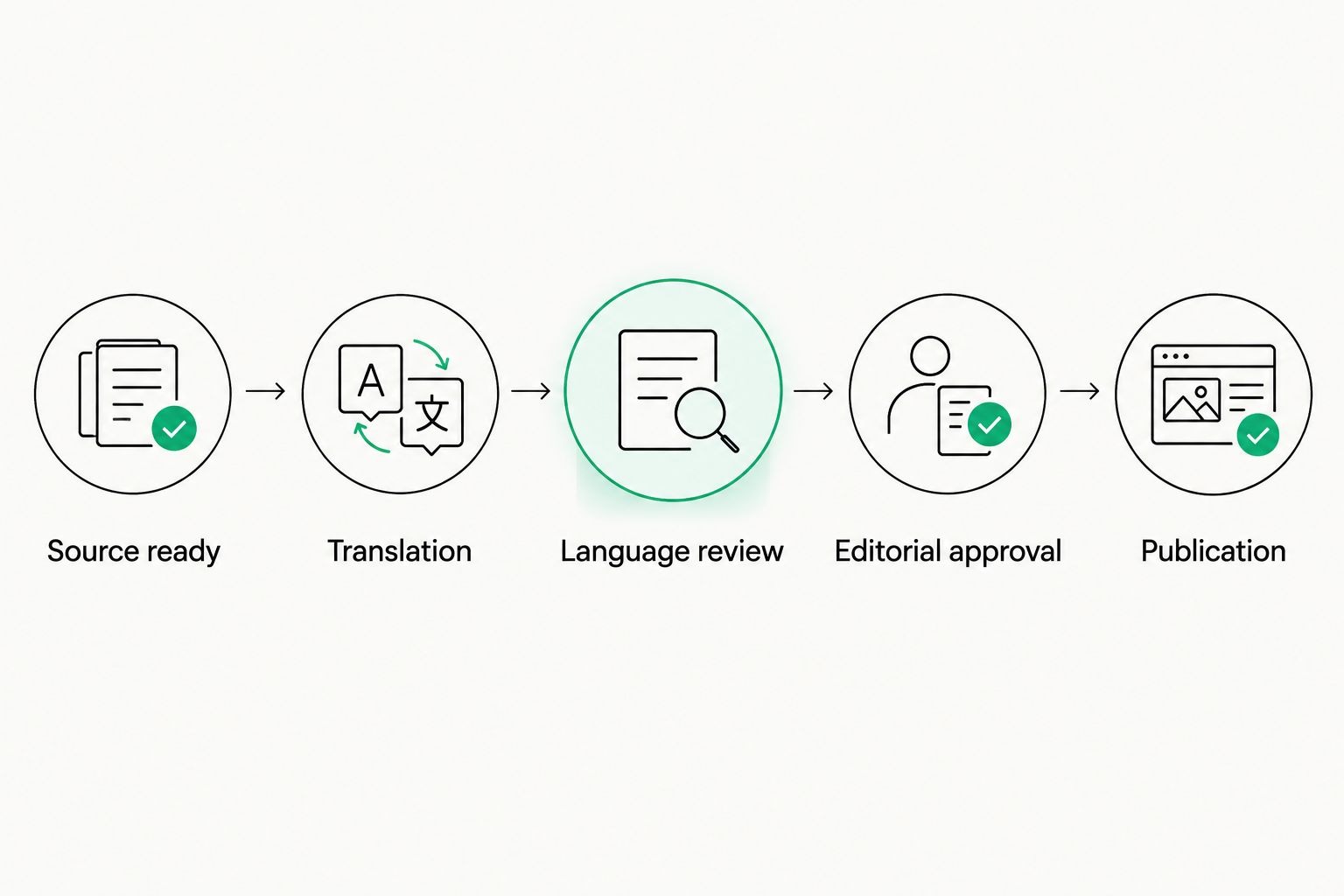
Language review and editorial approval are separate decisions before publication.
For your 2026 evaluation, run 1 correction cycle after the initial approval. Change a factual detail in the source and trace every affected field through the workflow. The goal is to observe how people find, review, and release the correction—not to measure translation speed in isolation.
Write down what counts as a new source version. Without that rule, reviewers cannot reliably tell whether an approval applies to the latest copy.
- Assign an owner to every handoff.
- Record the source version attached to each translation.
- Define which edits require renewed language review.
- Separate language approval from permission to publish.
- Specify who updates localized content after a correction.
3. Establish translation memory and terminology rules
Start with an approved terminology sheet and a collection of reviewed translations. Record preferred spellings, publication names, recurring section labels, and terms that require editorial judgment. Explain exceptions rather than treating every preferred term as universally correct.
Translation memory stores source passages alongside translations for reuse. A glossary records preferred terminology. Neither replaces context: identical words can serve different purposes in a headline, an opinion column, and a factual report.
Wxrks translation management software supports workflow automation, translation memory, quality management, and cost tracking. That makes it an option when you want those functions within a TMS rather than coordinating them manually. Evaluate its fit with your publishing process using representative content; do not assume a specific file format or publishing connection without checking it.
Reuse approved language, not old mistakes. Establish who can accept material into the shared memory and who can correct an entry when editorial guidance changes. Keep experimental drafts out of the approved reference set.
- Collect reviewed source-and-translation pairs.
- Record preferred names, spellings, and recurring labels.
- Explain when a term should remain untranslated.
- Assign ownership of shared terminology updates.
- Review memory entries affected by editorial corrections.
4. Give translators context and protect the content structure
You can prepare a useful translation brief without buying software. Include the article purpose, intended readership, house style, and any restrictions on adaptation. Supply relevant images or layout references when their meaning affects the text.
Keep content fields identifiable throughout the handoff. A headline, standfirst, image credit, and body paragraph should not become an unlabeled text dump. Ask reviewers to check both linguistic meaning and the field's purpose in the finished publication.
For structured content, distinguish translatable text from elements that must remain intact. Markup, variables, and embedded references need explicit handling instructions. Test the returned content in its destination rather than assuming that a readable translation is also technically ready.
During a 2026 software trial, inspect how the actual workflow presents context to translators and reviewers. A context field is useful only if the relevant person sees it at the moment they need it.
- Attach an editorial brief to each assignment.
- Label headlines, captions, credits, summaries, and body copy.
- Explain adaptation rules for quotations and named entities.
- Identify markup and variables that must remain unchanged.
- Preview translated content in its intended layout.
5. Set quality gates that match publishing decisions
Create a manual review checklist before configuring automated checks. Decide which errors block release, who resolves disagreements, and when a translation returns for revision. This turns quality review into a decision process rather than an open-ended request to improve the text.
Language review checks meaning, fluency, and terminology. Editorial review checks whether the localized piece preserves the publication's factual position, voice, and intended treatment of the subject. Technical review checks whether the content works in its destination.
Wxrks includes quality management, but software does not take ownership of editorial decisions. Assess the available checks against your checklist and retain named human approval for the publication risks you have identified.
Keep post-editing instructions specific. Tell reviewers whether they are correcting meaning, matching house style, or adapting the piece for a local audience. Those tasks require different judgments and should not be hidden behind a single status called reviewed.
- Define release-blocking errors before assignments begin.
- Check names, quotations, dates, and factual meaning.
- Review terminology in the context of the complete article.
- Inspect formatting and field placement in the destination.
- Record the reason for rejection and the required correction.
6. Measure the workflow before expanding it
Start with a simple project log. Record when source content becomes ready, when language work begins, when approvals happen, and when each edition publishes. Keep translation effort separate from waiting time so that your analysis identifies the actual bottleneck.
Your 2026 pilot should finish with a review of the complete publishing cycle, including the correction test. Ask where work stopped, which handoffs needed clarification, and whether the next editor could understand the record without asking the original project owner.
Cost tracking is part of the operational picture, but do not let it become your only success measure. A workflow also needs to preserve content quality, make ownership visible, and keep language editions aligned with source changes.
Expand only after the pilot demonstrates a repeatable approval path. Document the exceptions you encountered and update the instructions before adding more publications, contributors, or locales. Otherwise, the same unresolved decisions return at a larger scale.
- Record elapsed time at each workflow stage.
- Track revisions and reasons for rejected work.
- Separate production effort from approval delays.
- Confirm that corrections reached the intended destinations.
- Update the workflow instructions before extending the pilot.
Compare your localization options
Choose an operating model before comparing feature lists. The useful question is who will own coordination, linguistic review, and publishing approval—not simply which option produces translated text.
Each option below has a practical advantage and a boundary. Evaluate that boundary against your content inventory and pilot results. Software functions do not prove that a particular editorial workflow, file type, or destination is supported.
Shared documents and spreadsheets
- Best for: A tightly scoped publishing pilot
- Practical advantage: Lets you define roles and review rules before configuring software
- Key limitation: Your team must maintain versions, assignments, and approval records manually
Standalone computer-assisted translation tools
- Best for: Translators who need a dedicated translation workspace
- Practical advantage: Supports focused language work and reuse of translated material
- Key limitation: The publishing team still needs a coordination and release process
Wxrks TMS
- Best for: Publishers seeking workflow automation, translation memory, quality management, and cost tracking
- Practical advantage: Brings those translation-management functions into a software system
- Key limitation: Publishing compatibility and editorial approval fit require evaluation
Translation agency coordination
- Best for: Publishers assigning external language production
- Practical advantage: Gives you an external partner for the agreed language work
- Key limitation: Your editorial team still needs to define source ownership, acceptance, and corrections
Do not treat these options as mutually exclusive. A publisher can use a TMS while assigning translation to outside specialists. The responsibility map still needs to show who owns terminology, approves deliverables, and publishes corrections.
Common mistakes publishers make
Treating the article body as the whole publication
The headline, summary, caption, image credit, and metadata belong in the content inventory. Leaving those fields outside the workflow creates separate review paths that the editor must reconcile later. Include them in the pilot from the start.
Reusing translations without checking the source version
An approved translation is tied to the source it represents. When the source changes, identify which localized passages need review. Do not let an earlier approval stand in for a decision about revised content.
Sending words without editorial context
A translator needs to know whether a phrase is a quotation, a headline, a recurring label, or an author's deliberate stylistic choice. Supply that information with the assignment instead of waiting for a reviewer to discover the mismatch.
Confusing language approval with publication approval
A fluent translation can still need editorial or layout review. Keep the decisions separate and name the person authorized to release the language edition. An ambiguous completed status is not an adequate publishing instruction.
Choosing software before defining correction ownership
The correction process is part of the buying decision. Test who receives an update, how the affected translation is identified, and who authorizes republication. A successful first delivery does not answer those questions.
FAQ
What's the best localization software for media and publishing companies?
Choose software that fits your source revisions, editorial approvals, and publishing handoffs. Wxrks is an option for publishers seeking workflow automation, translation memory, quality management, and cost tracking; evaluate publishing compatibility with representative content.
Is a translation management system the same as a content management system?
No. A translation management system coordinates language work, while a content management system manages content preparation and delivery. Define the handoff between them before selecting software.
Can a publisher manage localization with spreadsheets?
Yes, a publisher can use spreadsheets to define assignments, versions, and approval rules for a tightly scoped pilot. The team must maintain those records manually and keep them aligned with source changes.
Does translation memory replace an editor?
No, translation memory reuses previously translated material rather than making editorial decisions. Review reused text against the current source, context, and house style.
What should publishers test during a localization software trial?
Test representative content from source preparation through translation, review, publication, and correction. Include headlines, captions, metadata, and a source revision rather than testing body copy alone.
Should publishers use machine translation without human review?
Do not release machine-translated editorial content without the review required by your publication's risk rules. Check meaning, quotations, factual details, and house style before approval.
Can publishers work with a translation agency and a TMS?
Yes, a translation agency can perform language work within a publisher's translation-management process. Agree on terminology ownership, acceptance criteria, and correction responsibilities before assignments begin.
One last thing
Test a correction, not just a translation. For your 2026 evaluation, revise a factual detail after approval and ask a different editor to carry the change through the language edition. If that editor cannot determine what changed, who must review it, and which version is ready to publish, fix the workflow before expanding it.
Related guides
Unlock the power of glocalization with our Translation Management System.
Unlock the power of
with our Translation Management System.










