


Best localization software for higher education in 2026


Best overall for coordinated university translation workflows: Wxrks. Best for multilingual content operations: Phrase TMS. Best for student-facing software: Lokalise. This 2026 guide compares six localization tools by the campus work they need to support, from admissions content to application strings.
TL;DR
- Wxrks is the best localization software for higher education teams prioritizing workflow automation, translation memory, quality management, and cost tracking.
- Phrase TMS suits multilingual content operations; Lokalise suits student-facing software localization.
- Smartling suits website localization; Crowdin suits contributor-based projects; Trados Studio suits specialist translators.
- Choose with representative campus files, language review, and a source-update test—not a feature checklist alone.
Why this matters
University localization is not one job. An admissions page needs clear recruitment language; a course description needs academic precision; a student portal needs translated strings that work inside an interface.
Choose software around the handoff that causes the most trouble. If translators receive outdated files, fix content intake and version control. If approved translations arrive but never reach the website, test publishing rather than judging the editor alone.
The translation management system for higher education guide provides a broader framework for campus workflows. This shortlist focuses on which type of tool deserves your evaluation first.
What makes the best localization software for higher education
Use these six criteria for your 2026 shortlist. A strong translation editor cannot compensate for a broken approval process.
- Content fit: Test actual website content, documents, or software resources. Confirm that translated exports preserve the structure your publishing team needs.
- Translation reuse: Look for translation memory that helps translators reuse approved wording without treating every previous sentence as universally correct.
- Terminology control: Evaluate how translators access approved degree names, department names, and institution-specific language.
- Review ownership: Establish who reviews linguistic accuracy, who approves subject meaning, and who releases the final content.
- Operational visibility: Check how project owners identify unfinished work and understand translation effort and expenditure.
- Data handling: Review contractual terms, access controls, retention, and processing arrangements before submitting confidential university material.
Treat the last criterion as a procurement gate, not a scoring bonus. A useful workflow is still unsuitable if its data-processing terms do not meet your institution's requirements.
Higher education localization software at a glance
The order below follows distinct buying needs. It is not a claim that every university should buy the first tool or that every platform covers every campus system.
1. Wxrks
- Best for: Coordinated university translation workflows
- Standout capability: Workflow automation, translation memory, quality management, and cost tracking
- Key limitation to evaluate: Confirm campus-specific file and publishing requirements
2. Phrase TMS
- Best for: Multilingual content operations
- Standout capability: Project-based translation management with translation memory
- Key limitation to evaluate: Demonstrate the complete review and publishing handoff
3. Smartling
- Best for: University website localization
- Standout capability: Translation management focused on multilingual digital content
- Key limitation to evaluate: Verify compatibility with the actual website architecture
4. Lokalise
- Best for: Student-facing software
- Standout capability: Management of software strings and translation context
- Key limitation to evaluate: Document-heavy work needs separate evaluation
5. Crowdin
- Best for: Contributor-based localization projects
- Standout capability: Collaborative localization around projects and language contributions
- Key limitation to evaluate: Contributor access does not establish academic approval
6. Trados Studio
- Best for: Specialist translator workstations
- Standout capability: Computer-assisted translation with translation memory and terminology tools
- Key limitation to evaluate: A translator workstation is not a campus-wide publishing process
1. Wxrks: best localization software for coordinated campus workflows
This translation management system supports workflow automation, translation memory, quality management, and cost tracking. Its strongest fit is a university translation operation that needs to organize the work as well as produce translated text.
Think admissions, international communications, and departmental requests feeding a shared translation function. Evaluate whether your team can move representative work through the required stages without rebuilding the process in a separate spreadsheet.
Wxrks pros:
- Workflow automation addresses repetitive translation coordination.
- Translation memory supports reuse of previously translated material.
- Quality management and cost tracking address operational needs beyond text generation.
Wxrks cons:
- Academic meaning still needs a qualified reviewer; software does not replace subject ownership.
- Campus-specific file handling, integrations, and access requirements need direct verification.
Best for: University teams coordinating recurring translation work across requesters, translators, and reviewers.
Verdict: Buy if the evaluation confirms your required content handoffs. Prioritize this option when scattered coordination is the problem you need to solve.
2. Phrase TMS: best localization software for multilingual content operations
Phrase TMS is a translation management platform with project management, translation memory, and terminology functions. It belongs on the shortlist when your translation office handles recurring content projects rather than only isolated documents.
For a university, the useful demonstration is a complete content cycle: intake, translation, review, correction, and delivery. Do not accept a successful import as proof that the publishing handoff works.
Phrase TMS pros:
- Translation memory supports repeated institutional language.
- Terminology functions help translators work from approved vocabulary.
- Project-based organization fits recurring translation assignments.
Phrase TMS cons:
- A translation project structure does not define faculty or departmental approval authority.
- Your required content connections and output formats need individual testing.
Best for: Central language teams managing varied multilingual content projects.
Verdict: Buy for a translation-office workflow that passes an end-to-end content test. Hold if the demonstration stops before reviewed translations reach their destination.
3. Smartling: best localization software for university websites
Smartling provides translation management for multilingual digital content. Evaluate it when the main job is maintaining translated university web content rather than equipping individual translators with a desktop workspace.
A website evaluation should follow a changed page through translation and back into publication. Include navigation, reusable page elements, and a page with content embedded outside the main text field.
Smartling pros:
- Website localization is a clear evaluation use case.
- Translation management connects the buying discussion to ongoing content operations.
- It gives web and language teams a shared platform to assess for digital publishing work.
Smartling cons:
- Website architecture determines the integration work; a generic demonstration is insufficient.
- Publishing translated copy does not replace accessibility checks or academic review.
Best for: University web teams whose primary requirement is maintaining multilingual public-facing content.
Verdict: Buy if the website integration and update cycle pass. Hold if the proposed workflow leaves routine changes dependent on manual copying.
4. Lokalise: best localization software for student-facing applications
Lokalise is a localization platform centered on software strings and collaborative translation. It fits an evaluation led by developers working on student portals, mobile applications, or other university-built interfaces.
The critical distinction is context. Translators need to know whether a short string labels a button, reports an error, or explains a form field; the same English word can require different translations in each position.
Lokalise pros:
- String-based organization matches application localization work.
- Context can accompany the text translators need to interpret.
- Developers and translators can evaluate the same localization resources.
Lokalise cons:
- Translating strings does not internationalize application code.
- Success with interface resources does not establish suitability for formatted academic documents.
Best for: University development teams maintaining student-facing software.
Verdict: Buy for application localization after testing a real resource export and import. Skip as the default choice when your main workload is document translation.
5. Crowdin: best localization software for contributor-based projects
Crowdin supports collaborative localization through projects and language contributions. Consider it for university software or open educational projects that involve distributed contributors.
Collaboration and approval are different responsibilities. A project can welcome contributions while reserving final decisions for designated language reviewers and academic owners.
Crowdin pros:
- Project-based collaboration fits distributed language contributions.
- Software localization is a practical use case for evaluation.
- Teams can organize translation participation around a shared project.
Crowdin cons:
- Contributor participation does not establish translation accuracy.
- Volunteer-led activity does not replace an accountable release owner or deadline plan.
Best for: Open educational or software projects with a defined contributor community.
Verdict: Buy when contributor participation is part of the operating model. Skip this route if the institution cannot assign qualified reviewers and final approval responsibility.
6. Trados Studio: best localization software for specialist translators
Trados Studio is a computer-assisted translation application with translation memory and terminology tools. Its clearest role is the translator's workspace, particularly when a university employs or commissions specialists who manage detailed document translation.
Evaluate the actual documents those specialists receive. Formatting, segment boundaries, reference material, and export quality matter more than an impressive demonstration using clean sample text.
Trados Studio pros:
- Translation memory supports reuse during document translation.
- Terminology tools support controlled institutional vocabulary.
- The translator-centered workspace fits detailed linguistic work.
Trados Studio cons:
- A desktop translation workflow does not establish cross-department request intake.
- Reviewed translations still need a delivery and publication process outside the individual editing task.
Best for: Specialist translators working on university documents.
Verdict: Buy for translator productivity, not as a substitute for institution-wide workflow design. Hold if the unresolved problem is coordination rather than translation editing.
How the ranking works
This 2026 ranking prioritizes workflow fit, translation reuse, terminology, review ownership, operational visibility, and data handling. The first position favors the coordinated translation-management use case; the remaining positions identify distinct alternatives rather than weaker versions of the same purchase.
These are workflow recommendations, not measured speed or accuracy rankings. Product names alone do not establish compatibility with your content, security requirements, or university systems. Require evidence for the functions that determine your decision.
Run a campus-specific evaluation before buying
For your 2026 evaluation, use 3 source files, 2 target languages, and 1 revision round as a practical starting brief. These are suggested test conditions, not performance benchmarks. Choose samples that expose different problems rather than three equally simple documents.
Content intake
Submit an admissions page, a course description, and a student-facing interface resource. Remove personal information and confidential material before using an evaluation environment. Record the original structure so you can compare the returned files.
Language review
Assign a language reviewer and an academic owner. Include an approved degree name, an ambiguous instruction, and repeated institutional wording. Ask reviewers to explain which errors are linguistic and which require a subject decision.
Source update
Change the source after translation begins. Check whether the team can identify what changed, preserve valid work, and prevent an outdated version from being approved. This tests the workflow under revision, not just its ability to process a static file.
Publish check
Return the reviewed content to its intended destination. Inspect links, placeholders, formatting, reading order, and interface behavior where applicable. A translation is not finished merely because its text is approved.
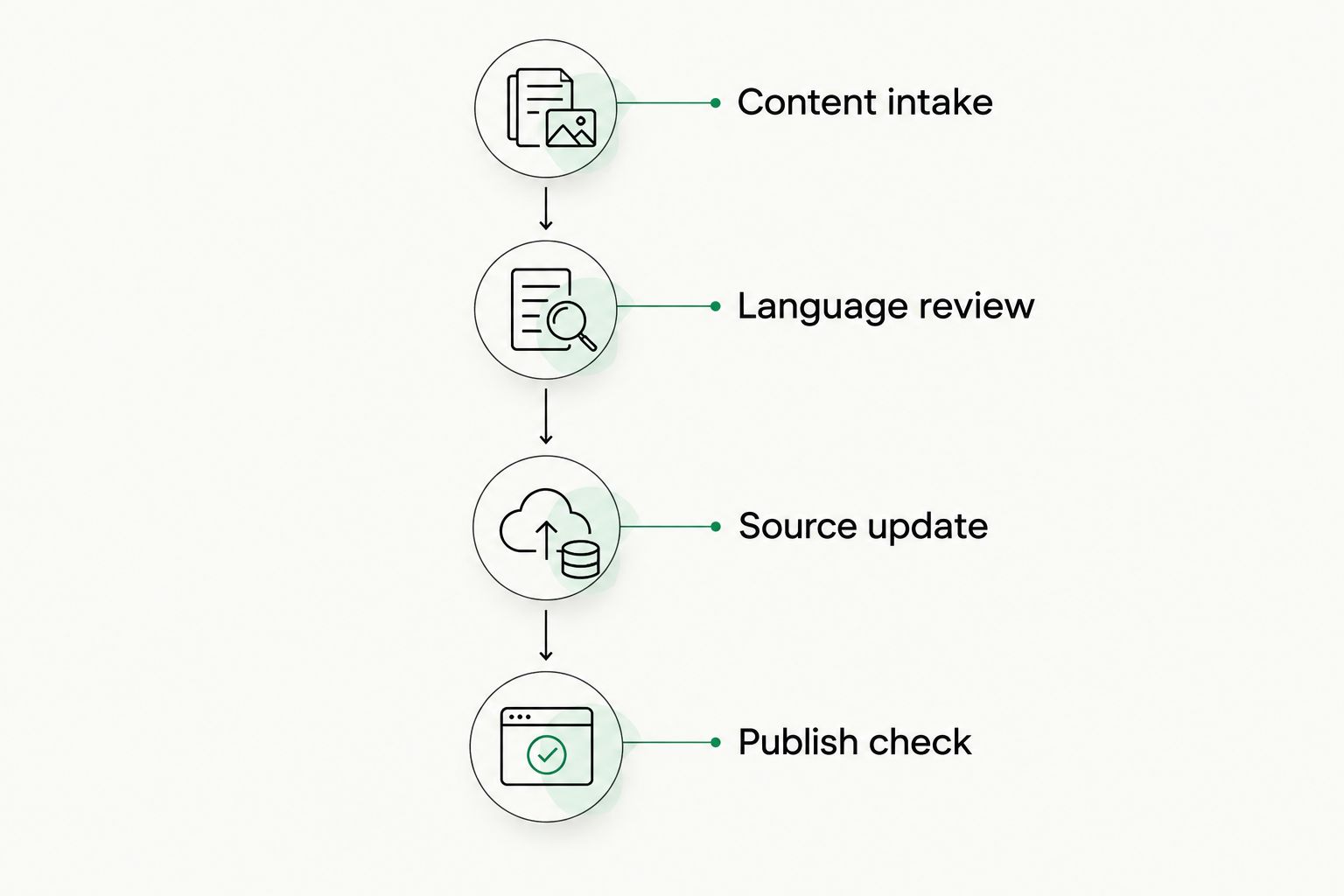
Test the return to publication, not just translation inside the editor.
Record every point where someone copies text, renames a file, or asks which version is current. Those observations give procurement a concrete account of the remaining manual work. They also prevent a polished editor from concealing a difficult delivery process.
Which localization software should your university choose?
Choose Wxrks for higher education localization software when your priority is coordinated workflows, translation reuse, quality management, and cost tracking. Make the purchase conditional on the campus-specific evaluation, not on category fit alone.
Choose Phrase TMS for a content-focused translation office, Smartling for website localization, Lokalise for university applications, Crowdin for contributor-based projects, or Trados Studio for specialist translators. Keep the decision tied to the work each team owns.
For a 2026 procurement brief, write the required outcome before listing features. “A reviewed course update reaches the published language version without manual re-entry” is a testable requirement. “Supports localization” is not.
FAQ
What's the best localization software for higher education?
The best choice depends on the university's primary workflow: coordinated translation management, website publishing, application strings, contributor projects, or specialist document translation. Start with the matching category, then test representative campus content through review and publication.
Is a translation management system better than a translator's desktop tool?
A translation management system is the better starting point for coordinating requests, projects, and delivery across teams. A translator's desktop tool addresses the editing task; universities can need both types of capability.
Can localization software translate course descriptions without faculty review?
Localization software does not replace academic review of course descriptions. A qualified academic owner should verify prerequisites, assessment language, credit terminology, and other statements that determine student understanding.
What should a university test before choosing localization software?
Test content intake, language review, source updates, and the return to publication. Use representative files and require reviewers to inspect both translated meaning and the resulting document or interface.
Does a university need separate software for website and application localization?
Not necessarily; the decision depends on whether a platform supports both workflows adequately. Demonstrate website content handling and application resource handling separately rather than assuming success with one proves the other.
Can universities upload student records into a translation platform?
Universities should upload student records only after institutional review confirms the proposed processing arrangement is permitted. Check contractual terms, access, retention, and applicable privacy obligations before submitting personal information.
How does translation memory help a university?
Translation memory stores previous translations for reuse in later work. It helps translators retrieve established wording, but reviewers still need to check whether the earlier translation fits the current academic and linguistic context.
One last thing
Make the source-update test a deciding factor. A tool that handles a clean first translation can still leave your team struggling when a department changes a deadline or revises a prerequisite.
Ask the evaluator to change an approved source sentence and trace the correction through every target version. The useful result is not simply a new translation. It is a clear record of what changed, who approved it, and whether the published version is current.
Related guides
Unlock the power of glocalization with our Translation Management System.
Unlock the power of
with our Translation Management System.








