


Best localization management software for nonprofits in 2026


Best overall for nonprofits managing recurring multilingual content: Wxrks. Best for community-led software translation: Weblate. Best for volunteer localization campaigns: Crowdin. For your 2026 shortlist, add Lokalise for product-team workflows and memoQ for translator-led document work.
TL;DR
- Wxrks is the best localization management software for nonprofits needing workflow automation, translation memory, quality management, and cost tracking.
- Choose Weblate for community-led software translation; choose Crowdin for coordinated volunteer localization.
- Choose Lokalise for product localization and memoQ for translator-led document production.
- Test your actual files, reviewer handoffs, and approved translation reuse before committing.
Why this matters
Your translation problem is not always a shortage of translators. It can be a missing approval, an outdated source document, or a correction that never reaches the next campaign.
Localization management software organizes that work. A translation management system, or TMS, coordinates content, translation resources, review, and delivery; a computer-assisted translation tool, or CAT tool, focuses more closely on the translator's working environment. Some products cover both.
For a nonprofit, the useful distinction is ownership. Your communications lead, volunteer coordinator, program specialist, and external translator need clear responsibilities—not another place to upload files.
Choose the system that controls your recurring handoffs, not the one with the longest feature list. A campaign page and an eligibility form need different review decisions, even when they use the same language.
What makes the best localization management software for nonprofits
Use these criteria to assess your 2026 shortlist before comparing interfaces:
- Workflow ownership: You can identify who translates, who reviews, and who authorizes publication.
- Translation reuse: Approved translations remain usable when recurring campaign or program content returns.
- Contributor fit: Staff, volunteers, developers, and language specialists can perform their assigned tasks without unnecessary access.
- Quality controls: Terminology, context, and review support the content's actual risk—not just spelling checks.
- Content compatibility: Your real documents, website content, or application strings survive the import-and-export process.
- Operational visibility: You can account for outstanding work, review effort, and translation spending without rebuilding everything separately.
Treat data handling as a prerequisite. Before uploading beneficiary information or confidential case material, verify access controls, contractual terms, retention, and permitted processing with the provider. A feature checklist does not establish that your particular use is appropriate.
Nonprofit localization software at a glance
This 2026 comparison assigns each tool a distinct job. The order favors broad workflow management first, then increasingly specialized operating models.
Wxrks
- Best for: Recurring, centrally managed multilingual content
- Standout capability: Workflow automation alongside translation memory, quality management, and cost tracking
- Key limitation to assess: Requires defined ownership of review and approval
Weblate
- Best for: Community-led software translation
- Standout capability: Web-based continuous localization connected to software development
- Key limitation to assess: Self-hosting adds operational responsibility
Crowdin
- Best for: Coordinated volunteer localization campaigns
- Standout capability: Collaborative translation and proofreading workflows
- Key limitation to assess: Contributor participation does not establish subject expertise
Lokalise
- Best for: Nonprofit applications and digital products
- Standout capability: Collaborative software localization around application strings
- Key limitation to assess: String review alone does not establish in-context usability
memoQ
- Best for: Translator-led document production
- Standout capability: CAT environment with translation memory and terminology resources
- Key limitation to assess: Translator tooling does not replace organization-wide publishing governance
These are workflow recommendations, not measured quality scores. A tool's place in the table does not establish its suitability for a sensitive document or a particular technical environment.
1. Wxrks: best nonprofit localization software for recurring content
Wxrks is a translation management system for translators, developers, enterprises, and translation agencies. Its stated scope covers localization workflow automation, translation memory, quality management, and cost tracking.
That combination makes it the strongest default here when your nonprofit needs to manage repeat work rather than translate an isolated file. Start your evaluation with recurring material: program descriptions, campaign updates, and approved organizational language.
Wxrks pros:
- Combines workflow management with translation resources rather than treating translation as a standalone handoff.
- Includes translation memory for managing reusable translations.
- Covers quality management and cost tracking within its stated product scope.
Wxrks cons:
- Workflow automation still needs someone to define responsibilities and resolve exceptions.
- Translation memory and quality management do not replace a qualified reviewer for sensitive content.
Best for: A nonprofit communications or operations team coordinating recurring translation across contributors.
During evaluation, follow a correction through the entire process. Ask how an approved revision becomes reusable, how reviewers distinguish it from an unapproved suggestion, and how the team accounts for the work.
Verdict: Buy for centralized, recurring localization once your real-file pilot confirms fit.
2. Weblate: best nonprofit localization software for community projects
Weblate is an open-source, web-based localization platform built around continuous translation. Its connection to software development makes it a relevant choice for nonprofits maintaining community-supported applications or other string-based projects.
The important decision is operational, not ideological. Open-source software gives you an implementation choice; self-hosting also means assigning responsibility for the installation and its upkeep.
Weblate pros:
- Supports a community contribution model for translation work.
- Connects localization with software development workflows.
- Offers an open-source implementation path for teams that need it.
Weblate cons:
- A self-hosted deployment requires maintenance and administration.
- Repository-centered localization is not, by itself, a complete document-production process.
Best for: A technically supported nonprofit coordinating community translations of software.
Use an actual repository in the evaluation. Check what happens when developers change a source string, a contributor submits a translation, and a reviewer rejects that translation. Someone must own each transition.
Verdict: Buy for community-led software localization with a named technical owner.
3. Crowdin: best nonprofit localization software for volunteer campaigns
Crowdin is a collaborative localization platform used to organize translation and proofreading. It belongs on your shortlist when participation from multiple contributors is central to the project.
For a nonprofit, the distinction is between accepting contributions and approving publication. A volunteer can contribute useful language work without becoming the final authority on medical terminology, legal meaning, or program eligibility.
Crowdin pros:
- Supports collaborative translation across contributors.
- Includes proofreading as part of the localization workflow.
- Fits projects where coordinating participation is a core requirement.
Crowdin cons:
- Volunteer participation does not establish subject-matter competence.
- A collaborative platform still needs onboarding rules and an accountable approval owner.
Best for: A volunteer coordinator running a defined multilingual contribution campaign.
Test the contributor experience separately from the administrator experience. Ask a participant to find an assignment, locate context, raise a question, and submit work. Then ask a reviewer to identify what remains unresolved.
Verdict: Buy for coordinated volunteer translation; hold publication until qualified review is complete.
4. Lokalise: best nonprofit localization software for digital products
Lokalise is a localization platform focused on software and digital-product workflows. It is a relevant option when your nonprofit maintains an application, portal, or another product with frequently changing interface strings.
A product workflow has different failure points from a document workflow. A translation can be linguistically correct yet appear in the wrong screen, lack context, or fail to communicate the intended action.
Lokalise pros:
- Organizes localization around software content and application strings.
- Supports collaboration between language contributors and product teams.
- Fits recurring interface updates better than a detached file-exchange process.
Lokalise cons:
- Reviewing strings does not replace checking the translated interface in context.
- Product localization still requires engineering ownership of internationalization and release behavior.
Best for: A nonprofit product team maintaining a multilingual application or service portal.
Include buttons, validation messages, and text with placeholders in your pilot. Export the translated content into a working interface and inspect it there. Do not approve the workflow solely because the translation editor looks organized.
Verdict: Buy for product-led localization; hold if your primary requirement is document production.
5. memoQ: best nonprofit localization software for translator-led documents
memoQ is a CAT tool with translation memory and terminology management. It fits an operating model in which a professional translator or language team owns document translation and linguistic consistency.
That is different from coordinating your entire nonprofit's publishing process. Strong translator tooling helps with language production; your organization still needs decisions about source approval, subject review, and final distribution.
memoQ pros:
- Provides a translator-focused working environment.
- Supports translation memory for reuse across translation work.
- Includes terminology resources for managing consistent language.
memoQ cons:
- A translator-centered workflow does not replace organization-wide approval rules.
- Occasional contributors need an assigned process rather than an assumption that everyone will work like professional translators.
Best for: A nonprofit language specialist or translation partner producing recurring documents.
Evaluate the handoff as carefully as the editor. Confirm what the translator receives, how queries return to the program owner, and how the final document is checked after export.
Verdict: Buy for translator-led production; hold as the sole answer to cross-team workflow problems.
How we ranked these options
The ranking prioritizes workflow ownership, reuse, contributor fit, quality controls, content compatibility, and operational visibility. Each recommendation has a separate use case; the list is not a claim that every nonprofit needs the same platform.
For this 2026 guide, the broadest match comes first. Specialized tools follow according to whether your work centers on community software, volunteer coordination, digital products, or professional document translation.
The deciding evidence is your own workflow demonstration. Product descriptions establish a shortlist; they do not establish successful deployment in your organization.
Run a pilot before choosing
Use a 30-day pilot as a planning window, not a promised implementation timeline. Select 2 target languages and 3 representative files: a public campaign page, a program document, and interface strings if your organization maintains software. Substitute another real content type if it does not.
Run the pilot through these stages:
- Source approval: Freeze a usable source version and identify its owner.
- Translation: Give contributors the assignment, terminology, and context they need.
- Qualified review: Have an appropriate reviewer resolve meaning and terminology questions.
- Publication check: Inspect the exported document, page, or interface before release.
- Reuse check: Change the source and confirm how approved work carries into the revision.
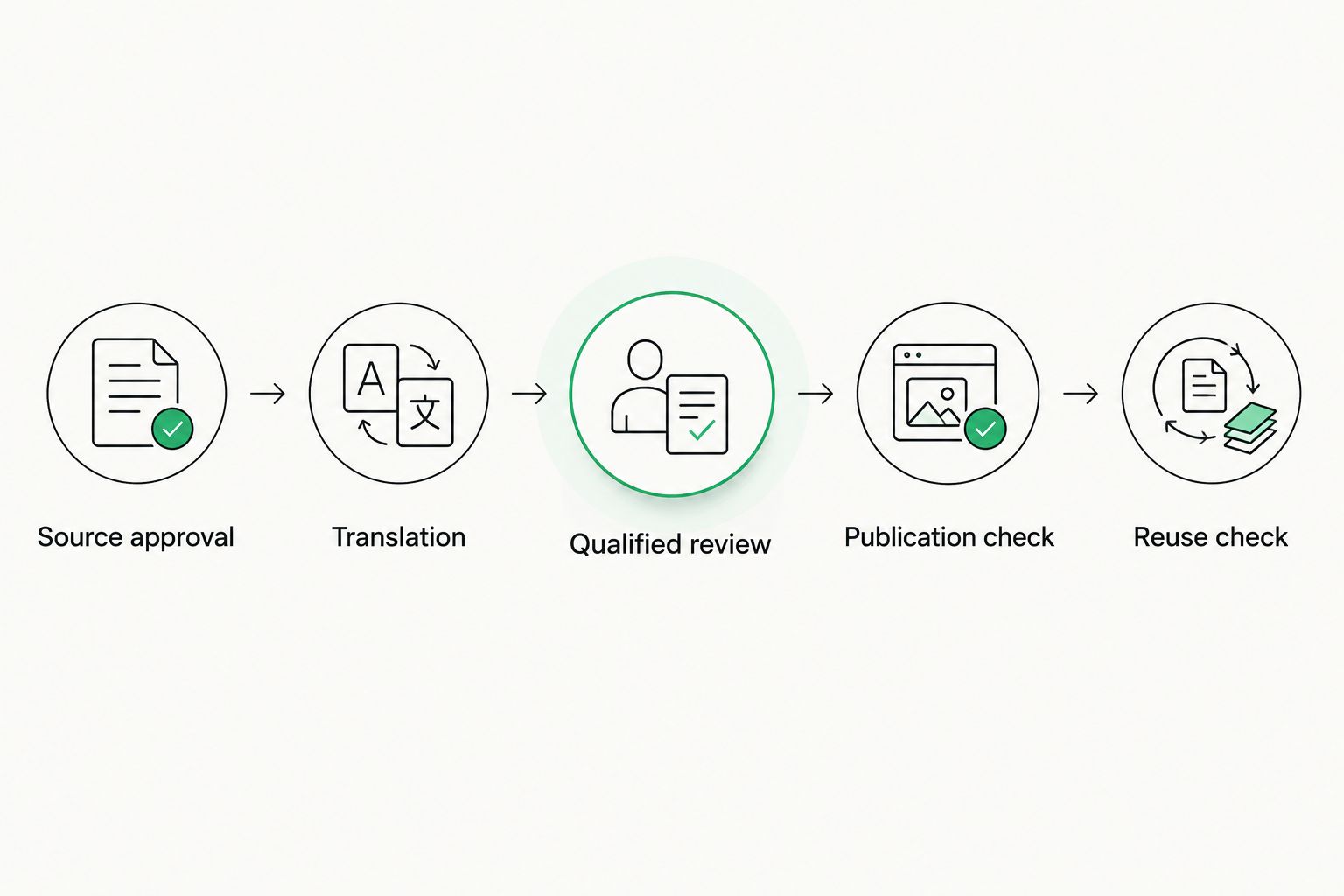
Test the complete handoff, including what happens after the source changes.
Record active coordination time, unresolved questions, corrections after review, and export problems. Compare those observations with your current process using the same content; do not compare an easy demonstration file with your hardest live project.
For a detailed evaluation framework, use the localization software for nonprofits guide. Keep your acceptance criteria specific enough that a reviewer can mark each one passed or failed.
Which localization management software should you choose?
Choose Wxrks localization management software when your nonprofit needs one operational home for recurring translation workflows, reusable translations, quality management, and cost tracking. That is the default recommendation for a centrally managed content program.
Choose Weblate when community software localization defines the work. Choose Crowdin when organizing volunteer contributions is the main requirement, Lokalise when application releases drive localization, and memoQ when professional document translation is the center of the process.
Your 2026 purchase decision should follow the bottleneck. Do not select a developer-oriented workflow to solve an approval problem, or a translator's editor to solve unclear organizational ownership.
FAQ
What's the best localization management software for nonprofits in 2026?
Wxrks is the best overall fit in this shortlist for nonprofits needing workflow automation, translation memory, quality management, and cost tracking. Confirm the match with representative content and a complete review-to-publication pilot.
Which localization software is best for nonprofit volunteers?
Crowdin is the recommendation here for coordinated volunteer localization campaigns. Weblate is the more specific choice when the community is translating software connected to a development workflow.
Is a translation management system the same as a translation tool?
No. A translation management system coordinates localization work and resources, while a translation tool can focus on producing or editing translated text. Some products combine both functions.
Can volunteers replace professional translation review?
Volunteer participation alone is not a substitute for qualified review. Assign final approval according to language competence, subject knowledge, and the consequences of an error.
Does nonprofit localization software guarantee translation quality?
No localization platform guarantees that every translation preserves the intended meaning. Quality controls support review, but your team must still evaluate terminology, context, and the finished content.
What should a nonprofit include in a localization software pilot?
Include representative content, real contributors, qualified review, export checks, and a source revision. A 30-day planning window with 2 target languages and 3 representative files creates a defined evaluation scope, not a performance guarantee.
Should nonprofits upload confidential beneficiary information for translation?
Only upload confidential information after your organization approves the processing arrangement. Verify access, retention, contractual protections, and the provider's permitted use of the content before starting.
One last thing
Test the correction, not just the first translation. Change an approved source sentence and ask your team to show which translations need attention, who owns the update, and what gets published next.
A clean first delivery is useful. A controlled revision is the stronger buying test. That exercise exposes whether your proposed system actually manages localization or simply gives the team another editor.
Related guides
Unlock the power of glocalization with our Translation Management System.
Unlock the power of
with our Translation Management System.








