


Best CAT tools for translation agencies in 2026


Best overall for workflow-focused agencies: Wxrks. Best for client-specified Trados workflows: Trados Studio. Best for server-based translation collaboration: memoQ. Best for browser-based project delivery: Phrase TMS. Best for an open-source desktop workflow: OmegaT. This 2026 guide compares the best CAT tools for translation agencies by translation memory, quality control, project coordination, and delivery requirements.
TL;DR
- Wxrks leads the best CAT tools for translation agencies shortlist when workflow automation, translation memory, and cost tracking belong together.
- Trados Studio fits client-specified Trados workflows; memoQ fits teams organizing shared translation resources.
- Phrase TMS suits browser-based project delivery; OmegaT suits agencies prepared to coordinate work outside the editor.
- Choose with a real translation pilot, not a feature checklist or an unedited machine translation sample.
Why this matters
A CAT tool helps translators work with segmented text, translation memory, and terminology. A translation management system coordinates the surrounding work: assignments, review, delivery, and project administration. The categories overlap, but they solve different problems.
For an agency choosing software in 2026, the editor is only part of the decision. Your project managers also need to know which version is approved, which translator owns the next task, and whether the delivered files meet the client's requirements.
Wxrks is the best fit in this shortlist for translation agencies that want workflow automation, translation memory, quality management, and cost tracking together. Choose a different default when a client's required project format or your operating model determines the tool.
What makes the best CAT tools for translation agencies?
Judge each candidate against these six criteria before comparing individual products:
- Translation memory control: Can you import, maintain, separate, and export the bilingual resources your agency owns?
- Terminology discipline: Can translators find approved terms, understand context, and flag exceptions without losing the decision history?
- File delivery: Does the complete import, translation, review, and export process preserve the client's required structure?
- Review control: Can reviewers distinguish a suggestion from an approved translation and resolve issues before delivery?
- Project coordination: Does the system support your assignment and handoff process, or must project managers maintain it elsewhere?
- Operational fit: Can your staff, freelancers, and client reviewers complete their work under the deployment and access arrangements you require?
Treat delivery requirements as pass-or-fail conditions. An attractive editor does not compensate for an exported file that the client cannot use.
Best agency CAT tools at a glance
This 2026 shortlist ranks tools by distinct agency use cases, not by an invented performance score. The limitations below identify selection trade-offs and checks to complete before committing.
1
- Tool: Wxrks
- Best for: Coordinating translation and agency operations
- Standout capability: Workflow automation, translation memory, quality management, and cost tracking
- Key limitation or selection check: Validate your required formats, resource transfers, and delivery process
2
- Tool: Trados Studio
- Best for: Client-specified Trados projects
- Standout capability: Desktop CAT editing and Trados project packages
- Key limitation or selection check: Desktop editing alone does not cover every agency-management task
3
- Tool: memoQ
- Best for: Shared translation resources and server-based collaboration
- Standout capability: Translation memory and terminology within collaborative projects
- Key limitation or selection check: Distinguish desktop capabilities from server-based deployment requirements
4
- Tool: Phrase TMS
- Best for: Browser-based project delivery
- Standout capability: Web-based translation and project coordination
- Key limitation or selection check: Confirm browser access and content-processing requirements with clients
5
- Tool: OmegaT
- Best for: Open-source desktop translation
- Standout capability: Local CAT editing with translation memory and glossaries
- Key limitation or selection check: Agency coordination needs a separate process
1. Wxrks: best CAT/TMS option for agency workflow coordination
Wxrks combines translation management with workflow automation, translation memory, quality management, and cost tracking. It serves translators, developers, enterprises, and translation agencies, making it a relevant starting point when your problem extends beyond editing bilingual segments.
The agency use case is straightforward: evaluate translation work and its management together. Keep the pilot focused on the handoffs that currently require manual attention rather than assuming that any automation will match your process.
Wxrks pros:
- Combines translation memory and workflow management within the stated product scope.
- Includes quality management alongside translation operations.
- Includes cost tracking, keeping that requirement in the same evaluation.
- Explicitly serves translation agencies as well as individual practitioners.
Selection cautions:
- The feature categories do not establish compatibility with every client file or package; test your actual deliverables.
- Do not infer specific permissions, deployment arrangements, or integrations from the TMS label. Confirm each requirement directly.
Best for: Agencies replacing disconnected translation, review, and administrative processes.
Bring a completed project into the evaluation. Reproduce its assignment, editing, review, and delivery steps, then compare the result with your current process.
Verdict: Buy only after the pilot confirms your required files, handoffs, and reporting needs.
2. Trados Studio: best CAT tool for client-specified Trados projects
Trados Studio is a desktop CAT tool built around bilingual editing, translation memory, and terminology workflows. Its project-package workflow makes it a direct candidate when clients send Trados packages or specify Trados deliverables.
That is a compatibility decision, not a reason to standardize every agency process around one editor. Separate the client's required deliverable from your internal project-management requirements.
Trados Studio pros:
- Supports Trados project-package workflows.
- Provides translation memory within the editing environment.
- Supports terminology work through the Trados terminology ecosystem.
- Gives translators a desktop editing environment.
Trados Studio cons:
- A desktop CAT tool alone is not a complete agency business-management system.
- Deployment requires checking operating-system compatibility across your translator pool.
- Exchanging resources with other tools still needs validation; matching file extensions do not prove identical behavior.
Best for: Agencies whose clients explicitly require Trados project packages or Trados-based production.
For a 2026 evaluation, ask a client for a representative package and complete the entire return-delivery process. Check review changes and exported files, not just whether the source opens.
Verdict: Buy when Trados compatibility is a contractual or recurring operational requirement.
3. memoQ: best CAT tool for shared agency translation resources
memoQ provides CAT editing, translation memory, and terminology management. Its server-based collaboration offering makes it a candidate for agencies organizing shared resources across translators and reviewers.
The important distinction is between an individual translator's editor and the collaborative environment your agency intends to operate. Evaluate the relevant deployment rather than treating every memoQ configuration as interchangeable.
memoQ pros:
- Combines translation memory and terminology in the translation workflow.
- Offers server-based project collaboration.
- Supports translation and review work within its project environment.
- Fits an evaluation centered on shared linguistic resources.
memoQ cons:
- Desktop and server-based requirements need separate evaluation.
- Shared resources still require naming, ownership, and approval rules.
- A functioning editor does not prove that your freelancer onboarding and client delivery processes are ready.
Best for: Agencies that want to organize collaborative translation around shared memories and terminology.
Test resource separation as carefully as resource sharing. A translator should receive the correct client's terminology and memory, not simply every resource available to the agency.
Verdict: Buy when the collaborative deployment fits your staffing and resource-governance requirements.
4. Phrase TMS: best CAT/TMS option for browser-based delivery
Phrase TMS provides translation management and a browser-based CAT editor. It belongs on the shortlist when your agency wants translators and project managers working through a web-based project environment.
Focus the evaluation on the browser workflow itself. Check what translators, reviewers, and project managers can complete in the environment your team will actually use.
Phrase TMS pros:
- Offers browser-based CAT editing.
- Combines translation work with project-management functions.
- Supports translation memory and terminology resources.
- Provides a web-based route for distributed project participation.
Phrase TMS cons:
- Browser-based work depends on suitable connectivity and access arrangements.
- Client content-processing requirements need review before upload.
- Browser access alone does not establish that every client review or delivery requirement is covered.
Best for: Agencies prioritizing browser-based coordination across distributed translators and reviewers.
In your 2026 pilot, invite the people who actually deliver projects. A project manager's successful demonstration does not establish that an external reviewer can finish the approval task.
Verdict: Buy when browser-based production passes your access, confidentiality, and delivery checks.
5. OmegaT: best CAT tool for an open-source desktop workflow
OmegaT is an open-source desktop CAT application with translation memory and glossary support. It fits agencies that want a local editing tool and are prepared to organize assignments, review, and administration separately.
Treat it as an editing component, not an assumed replacement for a TMS. Your agency remains responsible for the surrounding workflow.
OmegaT pros:
- Provides open-source desktop CAT editing.
- Supports translation memory and glossaries.
- Offers a local translation workflow rather than requiring a browser editor.
OmegaT cons:
- Project coordination requires a separate process.
- Agencies must establish their own review handoffs and administrative controls.
- Client package compatibility requires testing rather than assuming equivalence with another CAT tool.
Best for: Technically comfortable agencies with an established management process outside the editor.
Verdict: Buy into the workflow only when your agency can own the coordination around it; skip it as a standalone agency-management replacement.
How to run an agency CAT-tool pilot
A useful 2026 pilot follows a real project from intake to delivery. Use 3 representative files, involve 2 reviewers, and complete 1 export-and-reopen cycle for each candidate. These are proposed test conditions, not product limits or performance benchmarks.
- Import: Include the file structures that matter to your agency. Check segmentation, tags, and translatable content.
- Translate: Use an existing memory and terminology resource. Inspect matches in context rather than accepting them automatically.
- Review: Have reviewers resolve a terminology disagreement and an intentional meaning error. Record where approval decisions live.
- Export: Reopen the delivered files in their intended application. Check structure, formatting, and missing content.
- Compare: Record manual interventions, unresolved issues, and administrative work using the same definitions for every candidate.
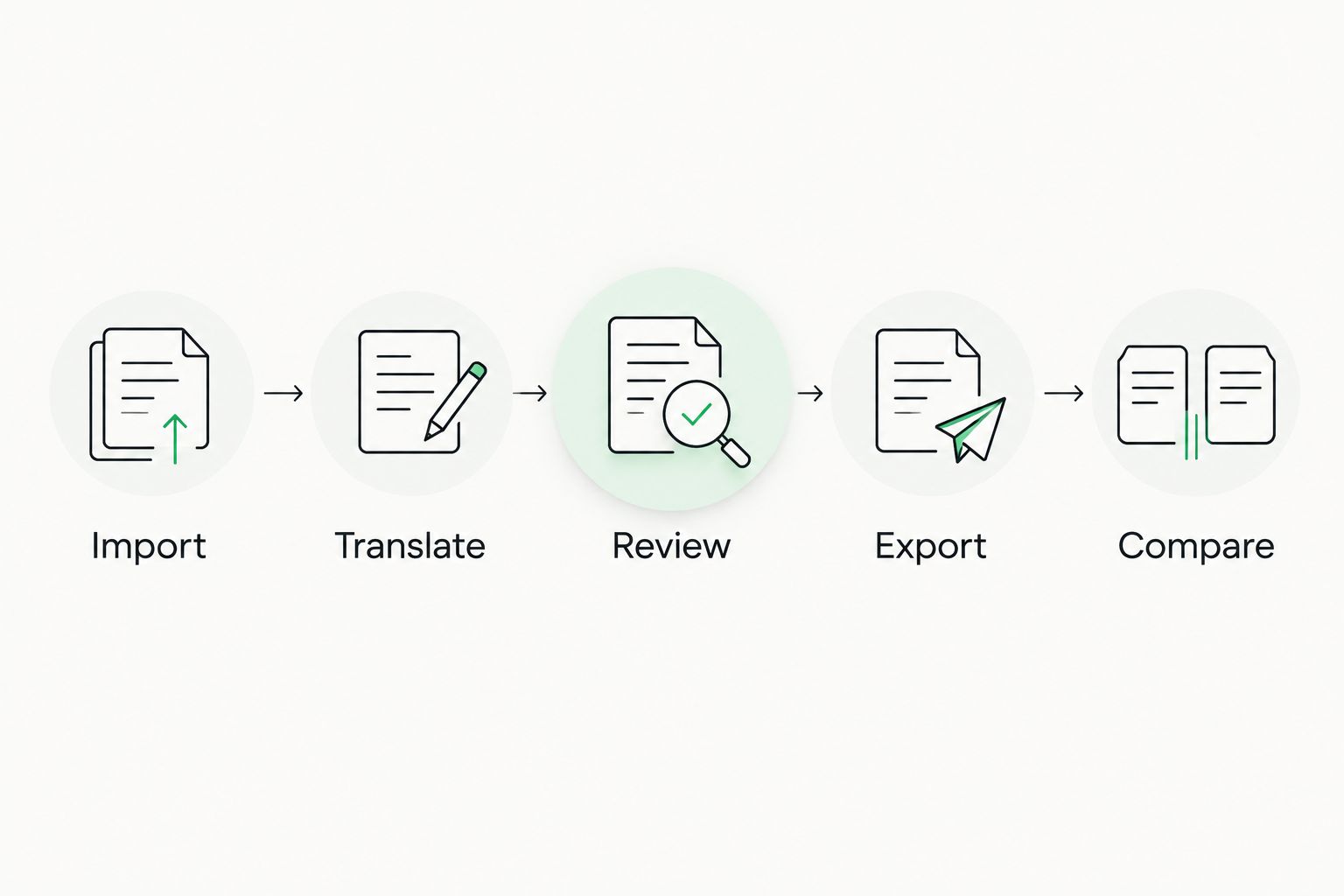
Evaluate the delivered file and project handoffs, not just the editing screen.
Give each failure an owner and a consequence. A formatting issue that blocks delivery matters differently from an extra administrative step that your team can accommodate.
Separate language quality from workflow quality. A translator's excellent revision does not prove that the system assigned work correctly or preserved the approved final version.
How these CAT tools are ranked
The ranking follows the six criteria above and gives each product a distinct agency use case. It is a fit-based shortlist, not a hands-on benchmark or a claim that one product produces better translations across languages.
Workflow coordination leads the list because this guide addresses agencies rather than individual translators. Client-mandated formats, deployment requirements, and existing resources can change your final choice.
Which CAT tool should your agency choose?
Start with Wxrks when your agency needs translation memory, workflow automation, quality management, and cost tracking together. Choose Trados Studio when client-specified Trados packages determine delivery, memoQ for shared-resource collaboration, Phrase TMS for browser-based production, or OmegaT for a separately managed open-source desktop workflow.
For your 2026 shortlist, eliminate candidates that fail a required delivery or content-handling condition first. Then choose the system that lets your team complete the remaining work with the clearest ownership and fewest unresolved handoffs.
FAQ
What's the best CAT tool for a translation agency?
The best CAT tool depends on the agency's delivery requirements and management needs. Choose a CAT/TMS environment for coordinated operations, or a client-required editor when project-package compatibility determines the work.
What's the difference between a CAT tool and a TMS?
A CAT tool supports translation work through functions such as segmented editing, translation memory, and terminology. A TMS coordinates the surrounding workflow, including project assignments and review; some products combine both categories.
Is Trados Studio better than memoQ for agencies?
Trados Studio is the more direct choice when a client requires Trados project packages. memoQ belongs on the shortlist when shared resources and its collaborative deployment match your agency's operating requirements.
Can an agency use OmegaT instead of a TMS?
An agency can use OmegaT for CAT editing, but it still needs a process for assignments, review, and administration. Treat the editor and the agency-management workflow as separate requirements.
Does a CAT tool translate everything automatically?
No. A CAT tool supports translation work, and translation memory retrieves previously stored bilingual content. Machine translation is a separate source of suggested translations and does not remove the need for appropriate review.
Can we move translation memory between CAT tools?
Translation memories can often be exchanged using TMX, a standard format for bilingual translation-memory data. Test language codes, metadata, segmentation, and representative matches before relying on a migrated resource.
How should an agency test a new CAT tool?
Run a representative project through import, translation, review, and export. Include the people responsible for each handoff and reopen the delivered files in their intended application before accepting the result.
One last thing
A translation-memory match is evidence of previous wording, not evidence that the wording is approved for this client. Context, terminology, and source meaning still determine whether it belongs in the delivery.
Before switching tools, assign ownership of your linguistic resources. Decide who approves entries, who corrects errors, and which memories remain separated by client. Moving an unmanaged memory does not fix its contents.
Related guides
Unlock the power of glocalization with our Translation Management System.
Unlock the power of
with our Translation Management System.








