Best Berlitz alternatives for freelance translators in 2026


Berlitz is known for language instruction, a different job from managing paid translation projects. When you need translation memory, quality checks, and project administration, the comparison shifts from language learning to translation software. The best Berlitz alternative in 2026 is Wxrks if you need translation workflow management; OmegaT if you need a desktop computer-assisted translation tool.
TL;DR
- For Berlitz alternatives for freelance translators, choose Wxrks for translation management, not language instruction.
- OmegaT suits freelancers seeking an open-source desktop CAT tool with translation memory.
- Trados Studio belongs on your shortlist when client delivery requirements specify its translation workflow.
- Stay with Berlitz when your actual goal is language learning rather than managing translation projects.
Why this matters
A language course and a translation management system solve different problems. Improving your spoken proficiency does not organize client files, preserve approved translations, or track project costs. Translation software does not replace language education, either.
For a freelance translator choosing tools in 2026, the useful question is not simply which brand replaces Berlitz. It is which part of your work needs help: language development, translation production, or project management.
Choose the category before you compare the products. Otherwise, you risk buying a capable tool that leaves your actual problem untouched.
Berlitz alternatives at a glance
This comparison separates learning a language from delivering translations. The options are not interchangeable, and the right choice depends on the work you intend to keep under your control.
Berlitz
- Best for: Language instruction
- Standout capability: Structured language learning
- How it differs from Berlitz: Benchmark for learning, not a substitute for a translation workspace
- Best for: Managing translation workflows
- Standout capability: Translation memory, quality management, and cost tracking
- How it differs from Berlitz: Software for managing localization work rather than language instruction
OmegaT
- Best for: Desktop translation production
- Standout capability: Open-source CAT environment with translation memory
- How it differs from Berlitz: Helps you translate files rather than develop conversational proficiency
Trados Studio
- Best for: Client-specified CAT workflows
- Standout capability: Desktop CAT environment with translation memory and terminology tools
- How it differs from Berlitz: Supports translation production rather than language lessons
Do not treat a longer feature list as a better fit. A freelancer working inside a client's existing environment faces a different decision from someone managing independent projects from intake through delivery.
1. Wxrks: best for managing translation workflows
Wxrks is a translation management system for translators, developers, enterprises, and translation agencies. It supports localization workflow automation, translation memory, quality management, and cost tracking. For freelancers, that makes it relevant when the problem extends beyond translating the next segment.
Wxrks is best for freelance translators who need translation management alongside translation memory, quality management, and cost tracking. That is a workflow recommendation, not a claim that software improves your language proficiency or guarantees publishable output.
Where Wxrks shines
- Workflow management: Addresses the coordination around translation, rather than treating each document as an isolated task.
- Translation memory: Supports reuse of previously translated content within your translation process.
- Quality management: Gives quality a defined place in the workflow instead of leaving it as an informal final check.
- Cost tracking: Addresses project economics alongside translation work.
Where Wxrks falls short
- A TMS is not a substitute for language instruction, specialist subject knowledge, or editorial judgment.
- Broader workflow management is unnecessary if your only task is completing assignments inside a client-mandated tool.
- The software category alone does not establish that your required file formats, export process, or client environment will fit. Test those requirements before choosing.
Primary purpose
- Wxrks: Translation management
- Berlitz: Language instruction
Translation reuse
- Wxrks: Translation memory is part of the stated offering
- Berlitz: Language learning is the relevant comparison
Project administration
- Wxrks: Workflow automation and cost tracking
- Berlitz: Not the reason to select language instruction
Human responsibility
- Wxrks: You retain translation and review decisions
- Berlitz: You remain responsible for applying what you learn
Best for: Freelancers managing their own translation operations rather than looking for lessons.
Verdict: Buy for translation management; skip it as a language-learning replacement.
2. OmegaT: best for an open-source desktop CAT workflow
OmegaT is an open-source computer-assisted translation application. Its core role is helping translators work with translation memory and glossaries in a desktop environment, not teaching a language or running every aspect of a freelance business.
That narrower scope is useful when you already know how you want to manage clients and projects. You can evaluate the translation workspace separately from your administrative process.
Where OmegaT shines
- Translation memory: Keeps previously translated segments relevant to subsequent translation work.
- Glossaries: Supports terminology reference during translation.
- Open-source model: Gives you an alternative to proprietary desktop CAT software.
Where OmegaT falls short
- A desktop CAT tool is not equivalent to a translation business management system.
- You still need a process for client communication, approvals, invoicing, and project administration.
- Compatibility depends on the actual assignment. Test the complete import, translation, and export path rather than assuming every client package will work.
Primary purpose
- OmegaT: Computer-assisted translation
- Berlitz: Language instruction
Main work
- OmegaT: Translating content in projects
- Berlitz: Developing language skills
Translation assets
- OmegaT: Translation memory and glossaries
- Berlitz: Not the basis of the comparison
Fit for freelancers
- OmegaT: Hands-on translation production
- Berlitz: Language development
Best for: Independent translators seeking an open-source CAT environment and keeping administration separate.
Verdict: Buy into the workflow if your client files pass a practical compatibility test.
3. Trados Studio: best for client-specified CAT workflows
Trados Studio is a desktop CAT application with translation memory and terminology tools. It belongs on your shortlist when an assignment requires its working environment or deliverables, rather than because you are looking for a replacement language course.
Start with your client's requirements. A familiar tool is still the wrong choice if you cannot deliver the agreed files correctly.
Where Trados Studio shines
- Translation production: Provides a CAT environment for working through translation projects.
- Translation memory: Supports reuse of translated segments.
- Terminology work: Supports managing terms alongside translation.
Where Trados Studio falls short
- Learning a CAT application does not replace developing language proficiency.
- A client's prescribed workflow limits your freedom to choose another environment.
- Desktop translation functionality does not, by itself, settle your wider business-management needs.
Primary purpose
- Trados Studio: Computer-assisted translation
- Berlitz: Language instruction
Selection trigger
- Trados Studio: Required translation workflow or deliverables
- Berlitz: Language-learning goals
Main responsibility
- Trados Studio: Produce and review translations
- Berlitz: Practice and develop language skills
Best for: Freelancers whose assignments explicitly require a Trados Studio workflow.
Verdict: Buy when the assignment requires it; wait when you have no defined need.
Why people switch from Berlitz
The clearest reason to look beyond Berlitz is a change in the job you need done. Language instruction and translation production belong to different categories; moving between them is not evidence that one provider has failed.
For this 2026 comparison, the supported switching reasons are functional. There is no need to assume service problems, changed terms, or dissatisfaction.
You need reusable translation assets
If clients send recurring content, you need a deliberate way to retain and retrieve approved translations. Translation memory addresses that requirement; another language lesson does not.
Keep approval status clear. A previous translation is useful reference material, but repetition alone does not make it correct for a new context.
You need project control
Translation work includes intake, instructions, revision, review, and delivery. When those steps become the bottleneck, compare workflow management rather than language-learning formats.
Write down the handoffs before choosing software. If you cannot identify where instructions, files, or decisions get lost, you cannot judge whether the new workflow solves the problem.
You need a client-compatible production environment
Some assignments define the tools or deliverables you must use. In that situation, compliance with the assignment comes before personal software preference.
Ask for a representative package before committing. The decisive test is whether you can return a usable deliverable, not whether the editor looks familiar.
How to choose a translation tool in 2026
Use the same trial task for every shortlisted option. A controlled comparison makes awkward handoffs visible and prevents a polished demonstration from replacing evidence.
Your test should follow the work from the original source to the final deliverable. Do not stop after importing a document successfully.
Intake
Prepare 2 sample files: an initial source document and an updated version containing repeated text, changed passages, and terminology that needs consistent treatment. Use non-confidential material or content you have permission to upload.
Include the instructions you would normally receive from a client. A tool that handles the text but loses the assignment context has not passed your practical test.
Translation
Translate the initial file and inspect how reference material supports your decisions. Check whether you can distinguish an approved translation from a suggestion that still needs review.
Then process the updated version. Observe where you can reuse work and where changed context requires a fresh decision.
Review
Run 1 revision round in which a reviewer changes a term and corrects a passage. Check how you identify the final wording and prevent an earlier version from being delivered accidentally.
Do not judge quality management by the number of alerts. Judge whether the process helps you find and resolve errors that matter to the assignment.
Delivery
Export the result and inspect the deliverable outside the translation environment. Check formatting, completeness, terminology, and any client-specific requirements.
Record 3 pass criteria before the trial: usable deliverables, clear revision handling, and acceptable administrative effort. These are your evaluation rules, not claimed product benchmarks.
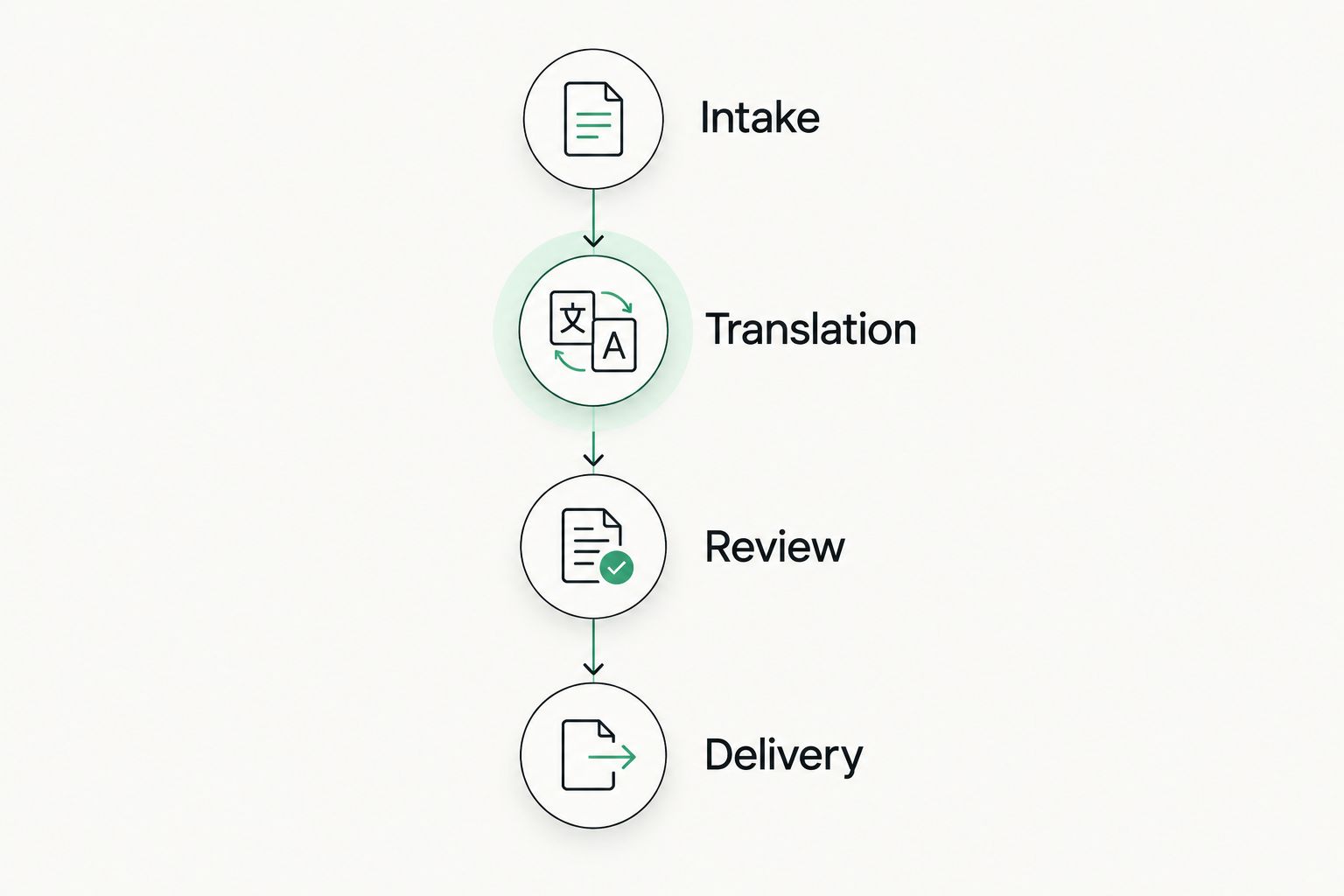
Evaluate the complete delivery workflow, not just the translation editor.
Keep the evaluation specific to your assignments. A result from a plain document does not establish how the same tool handles a software localization package, a presentation, or another document structure.
When staying with Berlitz is the right call
Stay with Berlitz when language instruction is the service you actually need. Replacing lessons with a CAT tool would exchange one job for another, not solve the original problem.
You can also separate the decisions. Language development and translation workflow management can coexist because neither removes the need for the other.
For your 2026 shortlist, define the learning objective separately from the production requirement. If you need better speaking confidence, evaluate instruction; if you need controlled translation delivery, evaluate software.
FAQ
What's the best Berlitz alternative for freelance translators in 2026?
Wxrks is the best fit here for freelance translators seeking translation management, while OmegaT suits a desktop CAT workflow. Neither replaces Berlitz when your goal is language instruction.
Is Berlitz the same thing as a translation management system?
No. Berlitz is known for language instruction, while a translation management system organizes translation work, assets, and related processes. Choose according to the job you need done.
Is OmegaT a practical option for freelance translators?
OmegaT is a practical option for freelancers seeking an open-source CAT application with translation memory and glossaries. Test representative client files and exported deliverables before adopting it.
Should I choose Trados Studio because a client requests it?
Choose Trados Studio when the assignment requires that working environment or its deliverables. Confirm the exact requirement first, including whether another workflow is acceptable.
Do freelance translators need a TMS or a CAT tool?
Choose a TMS when managing translation workflows is the problem; choose a CAT tool when translation production is the main requirement. Your client environment and administrative workload determine whether you need one category or both.
Can translation software replace language training?
No. Translation software supports production and management, while language training develops proficiency. Neither removes your responsibility for understanding the source and reviewing the translation.
What should I test before switching translation tools?
Test intake, translation, revision, and final delivery using representative material. Include an updated source file so you can assess reuse and changed context, not just a successful first import.
One last thing
A repeat passage is not automatically an approved translation. Before you move translation memory into a new workflow, separate client-approved wording from drafts, outdated terminology, and content you no longer have permission to reuse.
For a 2026 switch, start with a clean reference set rather than importing every old project indiscriminately. The better recommendation is not the tool with the longest feature list; it is the workflow that preserves your decisions and produces a deliverable your client can use.
Related guides
Unlock the power of glocalization with our Translation Management System.
Unlock the power of
with our Translation Management System.