


Zendesk to localized help center: complete 2026 workflow


Instead of manually copying every help article into separate language versions, set up a Zendesk help center translation workflow that moves approved source content through translation, review, and controlled publishing. Use Zendesk as the publishing destination and Wxrks for translation management, with a developer-managed handoff that preserves article identity and source versions.
TL;DR
- Zendesk help center translation needs stable article IDs, locale mapping, source-version checks, and a publishing gate.
- Wxrks supports translation memory, quality management, and cost tracking for coordinated localization workflows.
- Start with one article and two target locales before expanding the workflow.
- Translate changed content, but block publication when its source version no longer matches.
Why this matters
A translated help article is not a separate document. It is a language version of a specific source article, and it must remain attached to that article as instructions change. Copying text without preserving that relationship creates avoidable reconciliation work.
Wxrks translation management is best for teams coordinating translation memory, quality management, and cost tracking. Zendesk remains responsible for the help center experience; the translation workflow controls what reaches it.
For your 2026 implementation, separate content transfer from content approval. A successful transfer proves that text moved. It does not prove that the translation is accurate, current, or ready for customers.
Before you start
- Access: Have an authorized Zendesk account, access to the relevant help center, and permission to manage article translations. For an API-based workflow, arrange approved authentication and a secure place to store credentials.
- Materials: Prepare your source language, target locales, glossary, review owners, and access to Wxrks. Confirm the supported import and export method before building the handoff; do not assume a native Zendesk connector.
- The gotcha: A language configured elsewhere in Zendesk is not a substitute for a language enabled in the relevant help center. Confirm the destination locale and translated content hierarchy before sending an article back.
Choose one source article and two target locales for the pilot. These are recommended test boundaries, not platform limits. Include a heading, an internal link, a formatted list, and an image so the pilot tests more than plain text.
Assign a source owner, a language reviewer, and a publishing owner. One person can hold multiple roles, but every approval needs a named owner.
Choose your handoff method
Both workflows below use the same identity and review rules. The difference is who moves the content.
Manual handoff
- Best for: A bounded pilot or occasional article updates
- Advantage: Lets you verify mappings and review requirements before building automation
- Limitation: Requires someone to move content and reconcile versions
Developer-managed handoff
- Best for: Repeated updates across multiple locales
- Advantage: Makes transfer, version checks, and job tracking repeatable
- Limitation: Requires maintained code, authentication, logging, and recovery handling
Start manually to prove the content contract; automate the handoff after the round trip works. A developer-managed bridge is your implementation, not evidence of a built-in integration between the platforms.
Record that decision in your 2026 workflow specification. Include the supported exchange format, who maintains the bridge, and which events create translation work.
Source capture and identity mapping
The source capture unit creates a traceable translation job. Its output must identify both the Zendesk article and the exact content submitted for translation.
- Select the source. Use the Zendesk Help Center API to retrieve the intended article and source-language content. For a manual pilot, capture the same information in a controlled job record.
- Record identity. Store the article ID, help center identity, source locale, target locale, and source revision. Use the article ID rather than the article title as the stable identifier; titles are editable.
- Capture translatable fields. Keep title and body separate. Treat the body as structured HTML, not a text blob that can lose links, lists, or formatting.
- Create a source fingerprint. Calculate a hash from the actual fields being translated. Store the captured timestamp alongside it, but use the content fingerprint to distinguish text changes from unrelated metadata changes.
- Package context. Add the source article reference, audience, product terminology, screenshots when relevant, and instructions for text that must remain unchanged.
Expected result: You can trace every translation job to one article, one target locale, and one source snapshot without reading its title.
Use three identity checks before accepting the package: article, locale, and source version. Reject the package if any check fails. These are workflow controls you define, not a claim about default platform behavior.
Keep credentials outside the content package. Translators need context, not authentication secrets or customer records copied from support tickets.
Translation package and review gates
The translation unit prepares usable target content while retaining the structure needed for the return trip. Wxrks supports translation memory and quality management; configure the available workflow around your approved content and review responsibilities.
- Confirm the exchange format. Use an import method supported by your account. Test how it handles HTML, separate title and body fields, and identifiers before submitting the production batch.
- Protect non-translatable content. Mark code, placeholders, identifiers, and protected product terminology according to the supported format. Keep link destinations separate from link text where your exchange method allows it.
- Apply language resources. Select the appropriate translation memory and glossary. Provide context for headings and short instructions whose meaning depends on surrounding steps.
- Translate and review. Require a language reviewer to check meaning, terminology, and action sequences. Route technical questions to the source owner instead of resolving ambiguous instructions through guesswork.
- Approve the return package. Export the approved target title and HTML body with the original mapping metadata. Keep approval status in your job record rather than inferring it from the existence of an export file.
Expected result: The approved package contains target-language content, intact structure, and enough metadata to identify its destination without manual matching.
For 2026 help content, review the instructions against the current product interface. A grammatically correct translation still fails if it tells customers to select a setting that the source article no longer describes correctly.
Translation memory reduces repeated translation work, but a reused segment still needs contextual review. An unchanged sentence can sit beside a changed warning, prerequisite, or exception.
The machine translation workflow for support teams provides an adjacent guide for planning the translation stage. Keep the publishing gate separate from the choice of translation method.
Zendesk return mapping and publication
The return unit writes approved content to the correct article translation. Use Zendesk's documented Help Center API operations for listing, creating, or updating article translations; this guide does not assume a particular integration interface.
- Re-fetch the source. Retrieve the current source title and body, then calculate the fingerprint using the same rules as the original capture. Compare it with the stored job fingerprint.
- Stop stale jobs. If the source has changed, hold the return package for reconciliation. Do not overwrite the destination simply because translation finished successfully.
- Check the destination. List the article's existing translations and match the intended locale. Update an existing translation rather than attempting to create the same article-locale pair again.
- Write approved fields. Send the target title and body through the appropriate translation operation. Preserve the intended draft state and confirm the documented publishing behavior before enabling automatic publication.
- Validate the rendered article. Inspect the target-language version with the intended access permissions. Check links, formatting, images, terminology, and the surrounding category and section experience.
- Record completion. Save the destination translation identity, source fingerprint, approval record, and write result. Mark the job complete only after the destination content has been checked.
Expected result: The intended language version contains the approved content, corresponds to the reviewed source snapshot, and has the correct publication state.
An approved translation is publishable only when its source fingerprint still matches. This rule prevents a slow translation job from quietly publishing yesterday's instructions over today's source.
Where possible, validate content before making it visible. Treat public publication as a separate release decision rather than the automatic consequence of receiving an export.
Change detection and job control
The automation unit turns a proven round trip into repeatable work. For a 2026 rollout, automate capture and reconciliation before removing human approval from publication.
- Define eligible changes. Monitor approved source content through a supported retrieval process. Compare title and body fingerprints so an unrelated metadata update does not automatically create translation work.
- Create a job key. Combine article identity, target locale, and source fingerprint. Use that key to recognize repeated processing of the same work.
- Track states. Use explicit states such as Source capture, Translation, Review, Version check, and Publication. Keep failures attached to the job rather than hiding them in a general success message.
- Control retries. Retry transient transfer failures with bounded backoff. Inspect the destination after an uncertain write result before sending another create request.
- Log outcomes. Record successful writes, rejected source versions, validation failures, and authorization problems. Keep sensitive credentials and unnecessary article content out of logs.
Expected result: Running the process again does not create duplicate work or publish an older translation over a newer approved version.
The workflow follows a gated sequence: Source capture, Translation, Review, Version check, and Publication. A failed gate stops the job; it does not silently skip to the next stage.
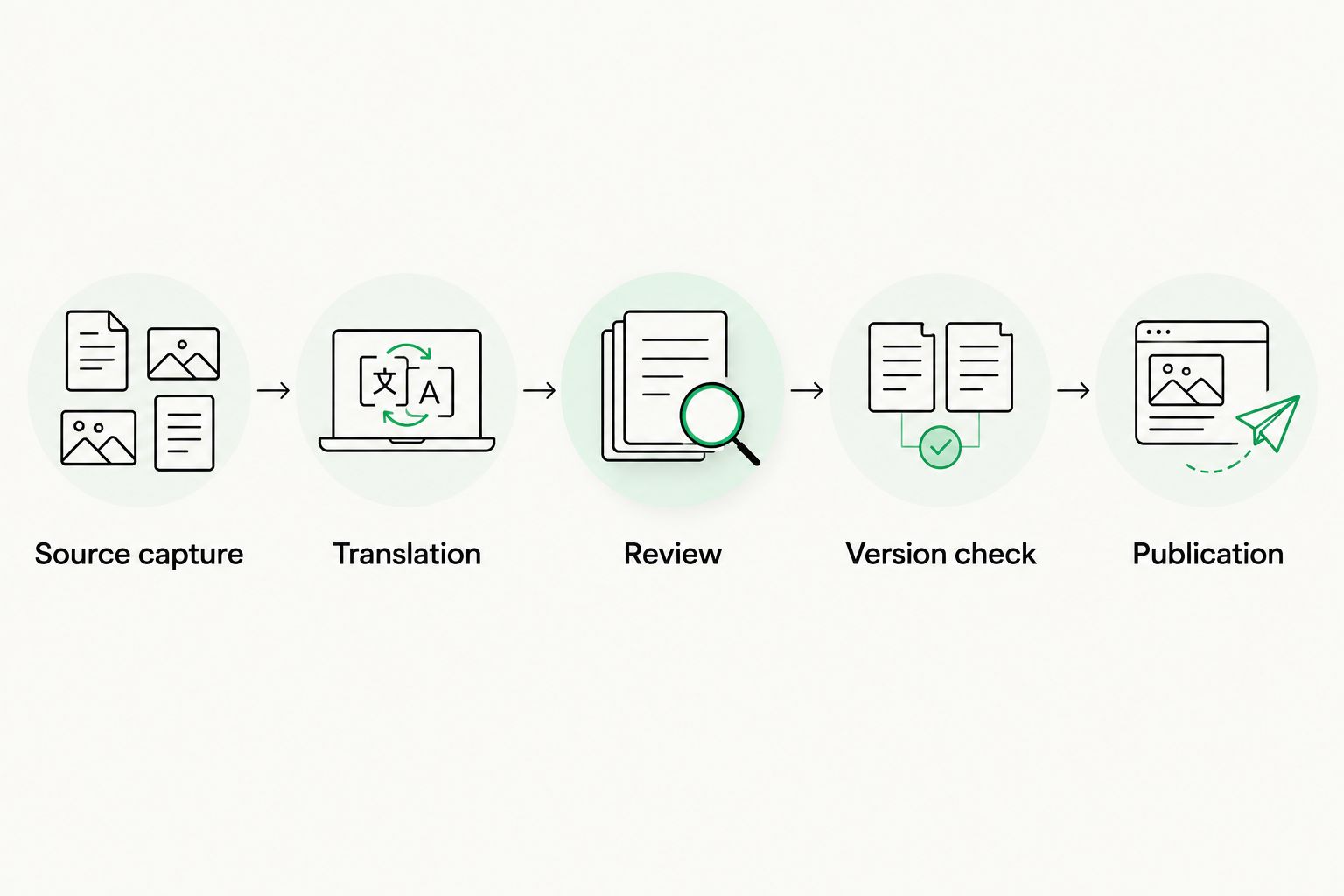
Check the source version after review and before publication.
Translate whenever an existing article changes
An update workflow differs from initial translation because the destination already exists. Update the existing language version; do not create a new article for each source revision.
- Capture the changed source and compare it with the last completed source snapshot.
- Send changed content for translation with enough surrounding context to interpret it correctly.
- Reuse approved translation memory where appropriate, then review changed instructions and their dependencies.
- Re-check the current source before writing to the existing target translation.
- Confirm that removed source content is also removed from the approved target package.
Expected result: Each target locale retains its article relationship while its content follows the approved source changes.
Handle deletion and retirement separately. If a source article is withdrawn during translation, cancel or hold its open jobs. Translation completion must not restore content the publishing owner has intentionally retired.
For 2026 maintenance, define who decides whether a change needs retranslation. A spelling correction and a changed troubleshooting instruction need different review effort, even though both alter the source fingerprint.
Troubleshooting
The target locale is rejected
Check the exact locale identifier, destination help center, and enabled languages. Do not substitute a language name for the locale value expected by the API. Verify permissions before retrying.
A repeated run attempts to create another translation
Check whether the bridge lists existing translations before writing. Match by article identity and locale, then update the existing translation. Preserve the job key across retries.
Links or formatting break after translation
Compare the returned HTML with the source structure. Check tags, attributes, protected placeholders, and link destinations. Correct the exchange-format handling rather than repeatedly repairing the published article by hand.
The translation describes an older source version
Compare the job fingerprint with the current source fingerprint. Hold publication, reconcile the changed passages, and obtain renewed approval. Do not label the old package current by changing its timestamp.
The API write succeeds, but readers cannot see the article
Check the translation's draft state, article access permissions, enabled locale, and surrounding content hierarchy. Validate as the intended reader, not only as an administrator.
Customize your workflow
Expand after the pilot passes identity, structure, review, and publication checks. Add another content group before introducing more complex automatic publishing rules.
Use Wxrks cost tracking to organize translation work alongside review responsibilities. Keep content-transfer logs separate from translation reporting so a failed write does not look like unfinished language work.
Define stricter approval for instructions involving account access, security, or irreversible actions. Give routine edits a simpler route only when the source owner has explicitly approved that policy.
Add translated category and section names to the scope when readers need a fully localized browsing experience. Article translation alone does not complete the surrounding help center.
FAQ
What's the best workflow for Zendesk help center translation?
Use stable article IDs, locale mapping, translation review, and a source-version check before publication. Keep Zendesk as the publishing destination and use a translation management system for the language workflow.
Does this workflow require a native Wxrks Zendesk integration?
No. The workflow uses a manual or developer-managed handoff; confirm the supported Wxrks import and export method before implementation.
Can I automate translation whenever a Zendesk article changes?
Yes, through a developer-managed process that detects source changes and creates translation jobs. Keep a version check and approval gate between translation completion and publication.
Should each language have a separate Zendesk article?
Use the article's language versions rather than creating unrelated articles for each locale. Preserve the source article identity and map each approved translation to its target locale.
What happens if the source changes while translation is underway?
Hold publication and reconcile the translation with the latest source. A completed translation job does not override a failed source-version check.
How do I stop translated links and HTML from breaking?
Preserve HTML structure and protect link destinations and placeholders during the exchange. Check the rendered target article before making it visible to readers.
How much does Zendesk help center translation cost?
The scope depends on content volume, target locales, update frequency, and review requirements. Define those requirements and confirm current commercial terms directly with the providers.
One last thing
Test source deletion, not just source updates. Retire your pilot article while its translation job is still open, then confirm that the workflow blocks its return. A process that publishes correctly but resurrects withdrawn instructions is not ready for production.
Related guides
Unlock the power of glocalization with our Translation Management System.
Unlock the power of
with our Translation Management System.










