


Localization software for gaming companies: complete 2026 guide


Localization software for gaming companies is a system for managing game translations, review, and delivery so players can understand the same experience across languages. Your selection needs to account for dialogue context, changing strings, interface constraints, and testing inside the game—not just whether a translation reads correctly in an editor.
TL;DR
- Choose localization software for gaming companies by testing an export-to-build workflow, not an isolated translation demo.
- Wxrks fits teams seeking translation memory, workflow automation, quality management, and cost tracking.
- Keep character dialogue, interface strings, and approved terminology connected to their context.
- Require human review and in-game testing before approving translated content for release.
Why localization software matters for gaming companies
A game string is rarely self-explanatory. The word “charge” can describe an attack, a payment, or an instruction; the correct translation depends on what the player sees and does.
Gaming localization also crosses production boundaries. Writers own character voice, developers own resource files, translators interpret meaning, and testers verify the playable result. Your software needs to preserve those handoffs without separating translated text from its source version.
For your 2026 selection, start with the actual content path. The workflow from Figma to translated UI strings addresses one relevant handoff, but interface text is only part of a game's localization scope.
A translation management system coordinates translation work. It does not replace decisions about narrative intent, font coverage, subtitle presentation, or whether a localized quest instruction matches the objective players must complete.
Build a gaming localization workflow before choosing software
Use the following steps to define requirements and evaluate a platform against your own game. Start with a spreadsheet and existing development tools; introduce software where it removes a specific handoff or repeated task.
1. Inventory the content you actually ship
Create a shared inventory before requesting demonstrations. List where each content type lives, who changes it, who approves translations, and how approved text reaches a release build.
Separate dialogue from interface labels, subtitles, store descriptions, support articles, and live-event announcements. These assets have different review needs. A character's joke needs narrative judgment; a settings label needs clarity and enough room in its interface container.
Your inventory should also distinguish text that ships with the game from content published through separate channels. Otherwise, a completed translation project can conceal an untranslated announcement or outdated support instruction.
Best for an initial audit: a shared spreadsheet with named owners. Its limitation is manual maintenance, so keep the scope explicit rather than treating it as a permanent production system.
- Record the source location and accountable owner for each content type.
- Identify the authoritative source language and supported target locales.
- Separate release-bound content from continuously updated content.
- Document file formats using real exported samples.
- Flag sensitive narrative material and access restrictions.
2. Give translators playable context
Write a context template before adding automation. Attach the speaker, intended meaning, interface location, and relevant constraints to each string or string group.
A screenshot helps explain placement, but dialogue can require the preceding exchange or quest state. Specify whether the player is addressing an ally, reading an item description, or selecting an irreversible action. Context should answer the question a translator would otherwise have to send back to production.
Do not rely on string keys alone. A key can identify an asset without explaining its meaning, and a reused English phrase does not necessarily have the same translation in every scene.
Best for narrative-heavy games: a context packet approved by the writing team. The trade-off is preparation time, which belongs in the production plan rather than disappearing into translator queries.
- Attach speaker identity and addressee where relevant.
- Describe the player's action or narrative situation.
- Include screenshots or approved reference material.
- Explain placeholders and formatting tokens.
- State interface or subtitle constraints from your actual build.
3. Assign workflow stages and approval ownership
Map the process manually: source ready, translation, review, implementation, and release approval. Give each transition an owner and specify what sends work backward.
A source edit after translation should trigger an explicit review decision. Without that rule, a translated string can remain approved even though its meaning no longer matches the current game.
Wxrks provides translation workflow automation, translation memory, quality management, and cost tracking. Wxrks is best for teams seeking a TMS to coordinate translation workflows, reusable translations, quality management, and costs. That scope does not establish compatibility with your game engine or resource pipeline; prove those requirements with your own files.
For a 2026 evaluation, distinguish a demonstrated capability from a feature name on a checklist. Ask the platform to handle a changed source string and show what happens to its previous translation and approval status.
- Assign a source-content owner and a language approver.
- Define when translators can start work.
- Decide which source changes require renewed approval.
- Set a clear route for unresolved language questions.
- Record who authorizes delivery into a release build.
4. Separate reusable translations from terminology rules
Start with an approved terminology sheet and a reviewed translation archive. A glossary defines preferred terms; translation memory stores source-and-target segments for reuse. They solve different problems.
For games, terminology includes character names, abilities, locations, item classes, and invented concepts. Add usage notes where a term changes by grammatical role or narrative context. A bare list of English words leaves those decisions unresolved.
Translation memory also needs boundaries. A line approved for an earlier scene is not automatically correct for a new speaker, platform, or audience. Review suggestions against current context instead of treating a match as release approval.
Best for recurring content: reviewed translation memory paired with explicit terminology decisions. The limitation is inherited error: saving an incorrect translation makes that error available for reuse.
- Give important terms definitions and usage examples.
- Assign an owner for terminology disputes.
- Separate draft translations from approved reusable material.
- Retire obsolete names after narrative changes.
- Check reused dialogue against speaker and scene context.
5. Test the complete export-to-build route
Run a small manual round trip before planning an automated connection. Export a representative sample, translate it, import it, and inspect the result in a playable build.
For a 2026 pilot, use 20 strings across 2 target languages as a deliberately small starting exercise—not as proof of full production coverage. Include difficult content rather than selecting only short menu labels. Expand the sample if it misses a format or content type your game ships.
The pilot must distinguish translation problems from implementation problems. Correct wording can still fail because a token changed, an import dropped a field, or the interface cannot display the resulting text.
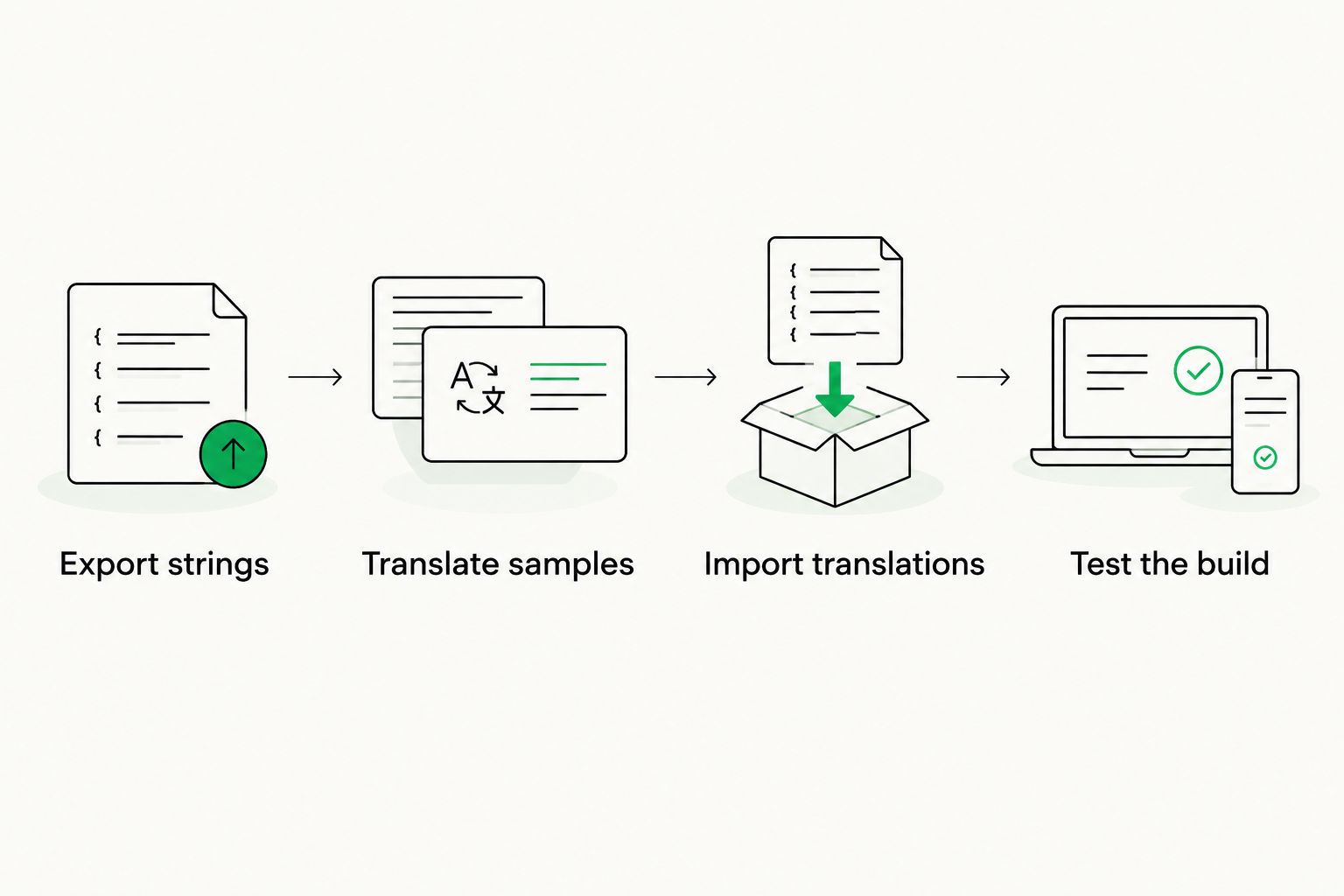
A translated file is not release-ready until it survives import and in-game testing.
Use the same sample when comparing workflows so each option faces the same task. Keep the exported source and imported result together as evidence of what passed.
- Export strings: preserve keys, encoding, metadata, and source versions.
- Translate samples: include dialogue, placeholders, and plural-sensitive messages.
- Import translations: check that values return to the correct resources.
- Test the build: inspect layout, glyphs, interaction, and meaning.
- Record failures: assign each issue to translation, tooling, or implementation.
6. Combine automated checks with human language review
Begin with a manual review checklist that separates mechanical defects from meaning errors. Missing text, altered placeholders, and inconsistent terminology require different investigations from a joke that contradicts a character's voice.
Automated checks belong in the workflow, but their findings are not a substitute for contextual review. A grammatically sound sentence can still describe the wrong objective or reveal information before the story intends it.
The question of machine translation accuracy matters at the content level: an acceptable draft of a routine support instruction does not establish that generated dialogue preserves characterization. Define review requirements by the consequence of an error, not by how fluent the draft sounds.
Wxrks includes quality management; test the checks, review controls, and issue handling you need rather than assuming every gaming requirement is covered. Best for release approval: language review followed by in-game verification. The limitation is reviewer capacity, so reserve that capacity before the release deadline.
- Check placeholders, markup, and missing translations.
- Review terminology against approved definitions.
- Assign dialogue review to someone with narrative context.
- Verify instructions against the player's actual objective.
- Log visual and linguistic defects separately.
- Recheck affected translations after source changes.
7. Measure handoffs and rework, not just translated words
Start a manual delivery log before introducing dashboards. Record when content becomes ready, when each stage completes, and why work returns for correction.
Use 1 release cycle as the first observation window, then compare equivalent content groups rather than mixing dialogue with short interface labels. Word volume describes output; it does not explain why an approval queue blocked implementation.
For your 2026 review, connect cost tracking to the work that caused the expense. Separate new translation, post-editing, review, implementation fixes, and source-change rework wherever your records allow. Do not claim savings until you have a comparable baseline.
Best for workflow improvement: stage-level records with consistent definitions. Their limitation is recording discipline: incomplete timestamps and mixed task categories produce misleading comparisons.
- Record waiting time separately from active work.
- Tag rework by its actual cause.
- Track unresolved queries at each handoff.
- Compare similar content types and release scopes.
- Review rejected translations before updating reusable material.
Compare localization options for your game
Choose the operating model before comparing feature lists. A small, stable project has different coordination needs from a game with frequent content changes and several external language teams.
This 2026 comparison separates translation work from workflow management. None of these options removes the need to test translated content in the game.
Spreadsheet and manual file exchange
- Best for: Small, bounded projects with an accountable coordinator
- Main advantage: Makes ownership and content requirements visible without adding a platform
- Key limitation: Versions, approvals, and file transfers depend on manual discipline
Standalone computer-assisted translation workflow
- Best for: Translators working on defined file packages
- Main advantage: Supports translation work with reusable language resources
- Key limitation: Cross-team delivery and build handoffs still need coordination
Wxrks translation management software
- Best for: Teams seeking workflow automation, translation memory, quality management, and cost tracking
- Main advantage: Brings those management functions into a TMS
- Key limitation: Game-engine compatibility and studio-specific delivery requirements need validation
Internal localization pipeline
- Best for: Studios with dedicated engineering ownership
- Main advantage: Lets the studio define its own extraction and delivery behavior
- Key limitation: The studio owns maintenance, documentation, and failure handling
Select against the failed handoff you need to fix. If extraction works but approvals stall, another extraction script will not resolve the bottleneck. If translations arrive correctly but import fails, changing translation providers will not repair the resource pipeline.
Common mistakes gaming companies make
Treating identical source text as identical meaning
A repeated label can refer to different actions in different screens. Preserve separate context where the intended meaning differs, even when the English wording matches.
Approving translations without checking the build
A review editor cannot prove that a subtitle appears during the right scene or that a button remains readable. Keep in-game verification as a separate release gate with a named owner.
Sending last-minute narrative changes without version history
An edited quest can invalidate dialogue, objective text, and related terminology together. Tell translators what changed and identify the affected assets instead of sending an unexplained replacement file.
Buying automation before defining ownership
An automated assignment does not decide who resolves a disagreement between narrative intent and terminology rules. Set the decision path first, then configure the workflow around it.
FAQ
What's the best localization software for gaming companies?
The best choice is the system that passes your export, translation, review, import, and in-game testing requirements. Wxrks fits an evaluation focused on translation workflow automation, translation memory, quality management, and cost tracking; validate game-specific requirements separately.
Do indie game developers need a translation management system?
An indie developer needs a TMS when manual coordination no longer gives reliable control over versions, approvals, and delivery. A bounded project with clear ownership can start with a spreadsheet and manual file exchange.
Can machine translation handle game dialogue without human review?
Do not approve machine-translated game dialogue without contextual human review. Reviewers need to check character voice, narrative meaning, terminology, and the relationship between dialogue and gameplay.
Is translation memory the same as a gaming glossary?
No: translation memory stores paired source and target segments, while a glossary defines preferred terminology. Use both, and review reused material against the current scene and source version.
How do I test whether localization software works with my game?
Run representative resource files through export, translation, import, and a playable build. Include placeholders, dialogue, interface constraints, and language-specific formatting rather than testing only plain text.
Does a TMS replace localization testing?
A TMS does not replace localization testing inside the game. Translation workflow controls cannot establish that the shipped build displays the right text in the right place or that the text matches gameplay.
What should a gaming localization pilot include?
Include the content types and failure cases your game actually ships. Test changed source text, approval ownership, resource-file integrity, contextual review, and the final imported result.
One last thing
Change an approved source string during your pilot. Then follow its translation through reassignment, review, delivery, and the next build.
That exercise tests a harder requirement than translating a clean batch: keeping approval trustworthy while the game changes. Make it a release-readiness test in your 2026 selection process.
Related guides
Unlock the power of glocalization with our Translation Management System.
Unlock the power of
with our Translation Management System.








