


How to connect Contentful to wxrks for multilingual content


Instead of copying Contentful entries into translation documents and pasting translations back, connect Contentful to Wxrks through a validated import/export handoff and a developer-managed adapter. This 2026 guide explains how to map localized fields, send content for translation, return approved text to draft entries, and handle source updates without creating a publishing loop.
TL;DR
- Build your contentful localization integration around entry IDs, field IDs, locale codes, and source revisions.
- Wxrks supports translation memory and quality management; validate the content handoff before building automation.
- Return approved translations to Contentful drafts, then review the rendered page before publishing.
- Separate source changes from translation write-backs to prevent repeat jobs and overwritten work.
Why this matters
A Contentful localization integration connects content management to translation work. Contentful holds the entry structure and localized field values; the translation management system handles translation work. Your adapter preserves the relationship between them.
Wxrks is best for localization teams that need translation memory, quality management, and cost tracking in a TMS. Those capabilities support translation operations. They do not replace the need to define which Contentful fields move through the workflow or who approves publication.
The difficult part is not moving text. It is returning the right translation to the right entry after editors have changed the source. A reliable integration treats content identity, source revision, and approval status as required information rather than optional metadata.
Contentful
- Best for: Editors and developers managing structured content
- Useful role: Holds content models, entries, and locale-specific field values
- Boundary to respect: A localized field does not establish translation approval or linguistic quality
Wxrks
- Best for: Translators, agencies, and enterprise localization teams
- Useful role: Supports localization workflows, translation memory, quality management, and cost tracking
- Boundary to respect: The translation workflow still needs an agreed handoff and a Contentful publishing policy
Before you start
- Access and ownership: Arrange Contentful permissions to inspect content models, configure locales, read entries, and update test drafts. Assign a developer to the adapter and a localization owner to approvals. Obtain the translation-system access required for the agreed handoff.
- A validated handoff: Confirm how Wxrks accepts source content and returns completed translations. Validate the supported format, metadata handling, and completion signal before writing automation. Use only documented interfaces; a TMS subscription is not proof of a native Contentful connector.
- The non-obvious gotcha: Contentful locale fallback can display source-language content when a target value is missing. Test explicitly populated target fields rather than judging success from a page that merely displays text.
For your 2026 pilot, use 1 test entry, 2 locale codes, and 3 verification checks: field mapping, translation write-back, and rendered output. These are setup recommendations, not platform limits. Keep the pilot in a non-production environment until all checks pass.
Choose an entry with a heading, body text, and a reference to another entry. That combination tests plain text, structured content, and dependencies without expanding the pilot into an entire website.
Content model and locale mapping
Contentful localization begins with the content model. Decide which fields need translated values before you build the export process; otherwise, the adapter will faithfully move content that should never have entered translation.
- Open Content model in Contentful and inspect the content type used by your test entry. Identify visitor-facing fields and separate them from internal identifiers, configuration values, and application-controlled fields.
- Open Settings, then Locales, and inspect the locale codes configured for the environment. Record the source locale and each target locale exactly as configured. Preserve regional distinctions rather than collapsing every variant into a language name.
- For each field intended to hold translated values, inspect its localization configuration. Enable localization where the content model requires separate values by locale. Leave shared identifiers and shared references outside translation unless your architecture explicitly requires otherwise.
- Create a mapping record containing the space, environment, entry ID, field ID, source locale, target locale, source revision, and translation status. Keep this record outside the translated prose so translators cannot accidentally alter routing information.
- Decide how to handle linked entries, assets, rich text, and URL slugs. Translate visible text; preserve structural identifiers. Treat localized slugs as an explicit routing decision, not an automatic consequence of translating the page title.
Expected result: You can point to every exported field and explain where its approved translation will return. An excluded field remains excluded in every target language.
For the 2026 pilot, inspect target values directly in Contentful. Then inspect the application output. A correct stored translation and a correct rendered page are separate requirements.
Source trigger and translation handoff
Choose the editorial event that means content is ready for translation. Publication is a useful boundary for published-content workflows; draft-based workflows need a separate readiness signal so unfinished edits do not create translation work.
- Open Settings, then Webhooks, in Contentful. Configure an entry event that matches your chosen editorial boundary and route it to your adapter. Scope the trigger to the content you intend to localize.
- Validate incoming requests before processing them. Check the expected space, environment, content type, and source locale. Retrieve the current entry when the event does not contain everything your export needs.
- Build a deduplication key from content identity, source revision, and target locale. Store it with the job record. A repeated delivery must refer to existing work rather than create another translation job.
- Extract the translatable fields and attach context: content type, field purpose, surrounding copy, and any relevant terminology instructions. Keep rich-text structure, references, and variables protected during the handoff.
- Send the package through the validated translation interface. If the agreed process uses files, preserve the mapping record through export and import. If it uses an API, implement the documented authentication and submission process rather than guessing request fields.
Expected result: A source event produces an identifiable translation package with enough context to translate correctly. Replaying the same event does not create duplicate work.
Automate only after a manual round trip preserves content identity. Send the pilot package, retrieve its translated output, and match every returned segment to its original field before enabling unattended processing.
Translation review and draft write-back
Translation completion is not publication approval. Keep the linguistic review boundary separate from the Contentful release boundary, especially when several localized fields appear together on a page.
- Define what makes a translation ready to return: the required review is complete, terminology checks are resolved, and protected content is intact. Do not substitute the presence of translated text for an approval decision.
- Read the current Contentful entry before writing. Compare the current source with the source snapshot associated with the translation job. If the source changed materially, stop automatic write-back and request review or a new translation.
- Update only the mapped target-locale field values. Preserve source-locale values and unrelated fields. Contentful Management API entry updates use version information; use the current entry version rather than the version captured when translation started.
- Save the translated entry as a draft. Check rich-text structure, references, placeholders, and the relationship between headings and body copy. Record the returned translation against the job that produced it.
- Preview the localized page in the application. Confirm that the requested locale is loaded, translated fields are present, and navigation points to the intended localized destinations. Publish through your normal editorial approval process.
Expected result: Approved text appears in the intended target fields without overwriting the source or publishing an unreviewed page.
The safe 2026 default is draft write-back with explicit publishing approval. Automatic publication needs a separate policy covering stale source content, missing translations, linked entries, and failed validation.
Retry controls and release checks
The integration needs a record of what happened, not just a successful response from an endpoint. Store enough state to explain why an entry was submitted, skipped, returned, or held for review.
- Track separate states for source received, translation submitted, translation approved, draft updated, and publication approved. Do not label a job complete simply because a translation response arrived.
- Mark adapter-originated updates so the source trigger can distinguish translation write-back from a new editorial change. Compare relevant source fields before submitting another job.
- Handle rate limits with controlled retries. When Contentful returns a rate-limit response, honor its retry information rather than repeatedly sending the same request without delay.
- Send permanent failures to a review queue with entry identity, locale, failed stage, and a readable reason. Keep credentials and unnecessary content out of logs.
- Run the pilot's 3 verification checks again after retrying a failed job. Confirm the retry updated the intended draft and did not create duplicate translation work.
Expected result: A reviewer can trace an entry from source change to translated draft, including interrupted attempts. Retries do not bypass approval or repeat completed work.
The workflow follows these boundaries: Source event, Field mapping, Translation review, Draft write-back, and Publish approval. Keep each boundary visible in your operational records.
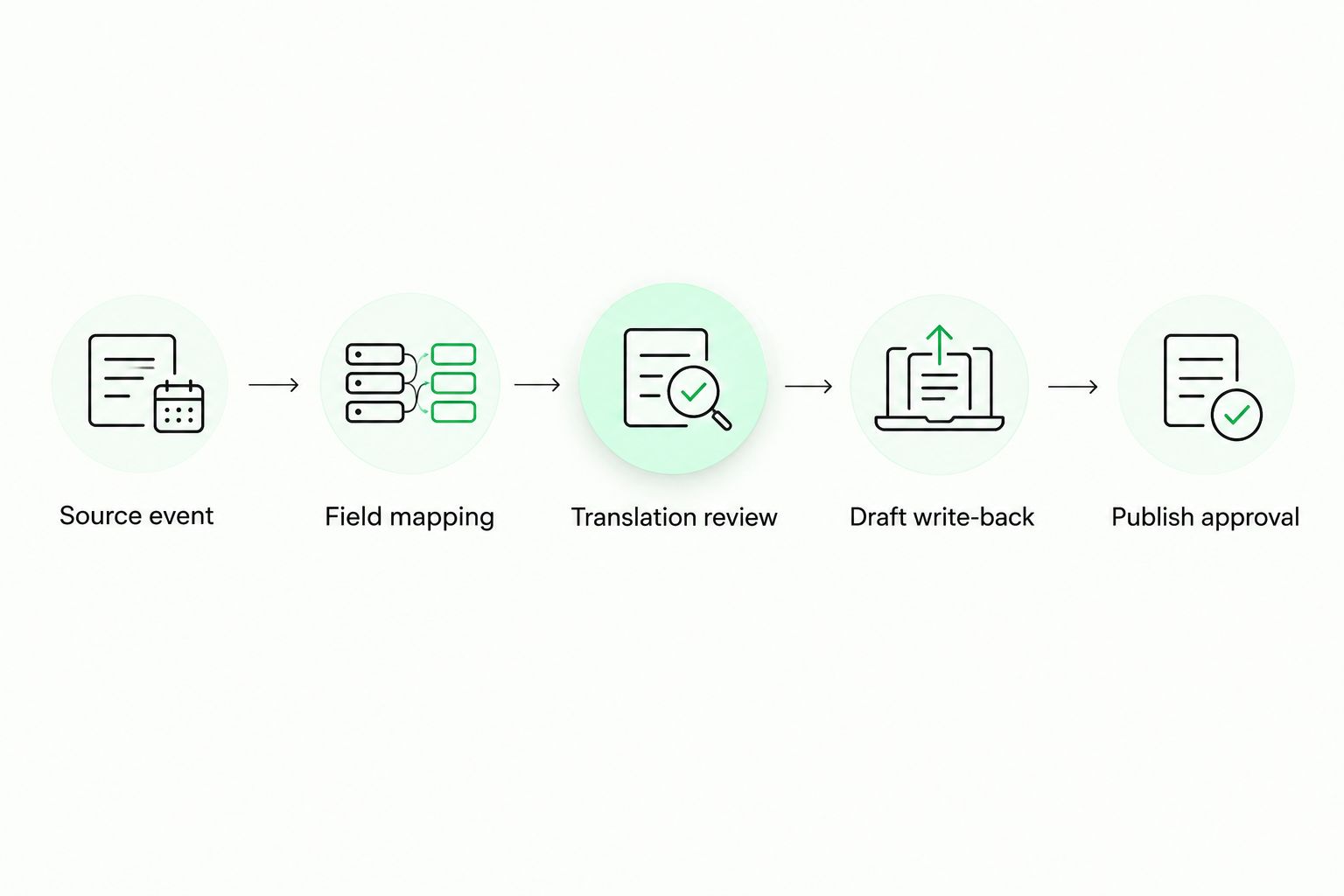
Returning translated text to a draft is separate from approving publication.
Translate again when source content changes
The adjacent workflow is continuous localization: submit changed source content after the first translated version exists. Reuse the same mapping and approval boundaries, but add change detection before creating work.
Compare the mapped source fields against the last submitted snapshot. Ignore changes that do not affect translatable content, such as an unrelated internal field. When visible source text changes, record a new source revision and identify the affected target locales.
Use translation memory within the translation workflow to support reuse of previously translated segments. The translation memory software for freelancers guide explains that part of the process. Reused text still needs context-aware review when surrounding content changes.
If another source edit arrives while translation is underway, mark the existing job as stale or hold its write-back for review. Choose the policy before launch. Never silently overwrite newer content with a translation of an older source.
For your 2026 update policy, define who resolves that conflict: the editor, localization manager, or assigned reviewer. Software can flag a mismatch; editorial ownership decides which content should ship.
Troubleshooting
The page shows the source language
Check the stored target-locale field value first. Locale fallback can make missing translations look like successful output. Then verify that the application requests the intended locale and that your preview uses the correct environment and entry.
Translation write-back creates another job
Inspect the webhook event and source-field comparison. Exclude adapter-originated updates from source submission, and deduplicate by source revision and target locale. An entry update alone is not proof that source text changed.
An entry update fails with a version conflict
Fetch the current entry and compare it with your job's source snapshot. Rebuild the update using the current version only after confirming that the returned translation remains valid. Do not solve a version conflict by overwriting newer editorial changes.
Rich text or variables break after translation
Check whether the export flattened structured content or exposed protected tokens as ordinary text. Preserve rich-text nodes and references, protect variables, and validate the returned structure before writing it into Contentful. Hold malformed output for correction.
Linked content remains untranslated
Inspect the entry references used by the localized page. Translating the parent does not translate the referenced entries. Add an explicit dependency policy that submits linked visitor-facing content or requires those translations before publication.
Customize your workflow
Expand from the pilot by content type, not by importing the whole space at once. A support article, landing page, and application message need different context, review ownership, and release checks.
Wxrks supports localization workflow automation, translation memory, quality management, and cost tracking. Define how your integration's job identifiers connect to those processes so the localization owner can reconcile work without a parallel spreadsheet becoming the source of truth.
Keep operational reporting focused: submissions, approved translations, stale jobs, failed write-backs, and publication holds. Report costs only from recorded project data. Do not estimate translation savings from event counts or assume repeated segments eliminate review work.
FAQ
How do I connect Contentful to Wxrks?
Use a validated translation handoff and an adapter that maps Contentful entry IDs, field IDs, locales, and source revisions. Confirm the supported import/export or API process before automating submission and write-back.
Do I need a native Contentful connector?
No, a developer-managed integration can connect content export, translation, and draft write-back. It needs documented interfaces and a tested mapping process; do not assume a native connector exists.
Should I translate every field in a Contentful entry?
No, translate visitor-facing content and preserve structural identifiers and configuration values. Decide separately whether references, assets, and slugs require localized handling.
Can I publish translations automatically?
Automatic publication requires a defined approval policy and release checks. Start with draft write-back so reviewers can inspect translated fields and rendered pages before publication.
What happens when the source changes during translation?
Hold the returned translation for review or submit the changed source under a new revision. Compare the current source with the job's source snapshot before accepting write-back.
Why does my localized page still show English?
A missing target value, locale fallback, or an application locale-selection issue can produce source-language output. Inspect the stored target field and the locale requested by the application separately.
Can I reuse existing translations when Contentful content changes?
Translation memory supports reuse of previously translated segments. Keep the original content context and review reused text when surrounding content or meaning changes.
One last thing
A page displaying text is not proof that localization succeeded. Before approving your 2026 integration, deliberately leave a target field empty in the test environment and inspect the result. That test reveals whether fallback masks missing translations and whether your release checks catch the gap.
Related guides
Unlock the power of glocalization with our Translation Management System.
Unlock the power of
with our Translation Management System.










