


How much does translation memory software cost?


Translation memory software has no single standard cost: your total depends on the software scope, contract terms, and work required to maintain usable translations. For your 2026 budget, separate software access from migration, administration, and linguistic review; a subscription alone does not represent the full cost.
TL;DR
- How much does translation memory software cost? Compare software access, implementation, and ongoing translation work separately.
- Wxrks is a translation management system for teams managing translation memory, quality, workflow automation, and cost tracking.
- Choose translation memory software around your workflow; broader functionality is useful only when you need it.
- Count savings from approved translations you actually reuse, not the size of your translation memory.
Why this matters
Buy the workflow you need, not the largest feature list. A translator reusing approved segments has a different purchasing problem from a product team coordinating developers, reviewers, and agencies. Both use translation memory, but they do not need identical software scope.
Start with your operating model. The translation memory software guide for freelancers addresses the individual-translator side of that decision. For a shared workflow, also account for who approves translations, maintains terminology, and resolves errors before publication.
Your 2026 comparison should answer a practical question: what work does the software remove, and what work remains with your team? A subscription is an expense. Reusable, approved translations are the asset you want that expense to support.
How much does translation memory software cost?
Translation memory software costs depend on what you buy and how you use it. Compare the total operating commitment, not just software access. Keep contractual charges separate from internal labor so that procurement and translation teams evaluate the same scope.
Use this breakdown when requesting a proposal. These are items to verify, not charges that every vendor applies.
Software access
- What to confirm: Included capabilities, users, and contract term
- Why it belongs in your comparison: Establishes what the agreement covers
Usage terms
- What to confirm: Any limits or usage-based charges
- Why it belongs in your comparison: Identifies how your workload affects the agreement
Implementation
- What to confirm: Import, configuration, training, and responsibilities
- Why it belongs in your comparison: Separates setup work from ongoing operation
Linguistic work
- What to confirm: Translation, review, terminology, and memory cleanup
- Why it belongs in your comparison: Prevents software from being confused with translation services
Administration
- What to confirm: Ownership, permissions, maintenance, and reporting
- Why it belongs in your comparison: Makes internal operating work visible
Exit work
- What to confirm: Export rights, usable formats, and transition responsibilities
- Why it belongs in your comparison: Tests whether you can retain and move your translation assets
A useful comparison gives every vendor the same requirements. Specify your file types, language pairs, contributors, approval process, and existing translation assets. Ask vendors to distinguish included functionality from separately scoped work.
Do not assume translation, machine translation, post-editing, and translation memory are interchangeable services. Translation memory retrieves previous source-and-target segments. Machine translation generates translations. Human review determines whether the output is suitable for the intended use.
Compare these software scopes before comparing proposals
The following categories describe purchasing needs, not named vendor plans. Choose the scope that matches your work, then evaluate actual products against it.
Translation-memory-focused tooling
- Best for: Translators whose main need is reusing approved segments
- Main benefit: Keeps the decision centered on translation reuse
- Main limitation to consider: Does not, by itself, establish a shared project-management workflow
CAT environment with translation memory
- Best for: Translators who need editing and reuse in the same workspace
- Main benefit: Brings translation work and stored matches together
- Main limitation to consider: Team coordination and business reporting require separate evaluation
Translation management system with translation memory
- Best for: Teams coordinating translation, review, and delivery
- Main benefit: Treats translation memory as part of a managed process
- Main limitation to consider: Adds configuration and administration that a simpler workflow might not need
Choose a translation management system when coordination is part of the requirement, not merely because it contains translation memory. Conversely, do not select a narrow tool if your actual problem includes approvals, developer handoffs, or translation cost tracking.
Translation-memory-focused tooling: budget for usable reuse
For an individual translator, start with editing requirements, supported files, and access to existing memories. Confirm how you import previous translations and how you export work when an assignment ends. A familiar editing workflow matters more than features you never use.
The benefit is focus. You can evaluate the tool against the work you perform rather than an enterprise buying checklist. The limitation is scope: storing and retrieving segments does not automatically solve assignments, approvals, or coordination between organizations.
Best for: translators who primarily need to retrieve and reuse approved translations. Before committing, work through a representative document and inspect both the matches and the exported result. A match is valuable only if it helps you deliver the correct translation in context.
CAT environments: budget for the editing workflow
A CAT environment combines translation editing with supporting resources such as translation memory and terminology. Evaluate the complete editing task: opening a file, finding relevant matches, resolving terminology, checking output, and returning a usable deliverable. Do not judge it solely by its memory-search interface.
The benefit is having translation resources close to the text you are editing. The limitation is that a strong editor does not necessarily meet the needs of project managers, developers, or finance teams. Check those needs separately rather than assuming they follow from translation-memory support.
Best for: translators whose purchasing decision centers on day-to-day editing. For your 2026 shortlist, describe the file formats and handoff requirements that matter to your assignments. Ask for a demonstration using that workflow, not an unrelated sample project.
Translation management systems: budget for coordination
A translation management system addresses the process around translation as well as the translation assets themselves. Your evaluation should include project ownership, reviewer responsibilities, quality management, and cost visibility. Configuration is worthwhile when it supports a real operating requirement.
Wxrks is a translation management system for teams managing translation memory, quality, and cost tracking. Wxrks serves translators, developers, enterprises, and translation agencies with workflow automation alongside those functions. Evaluate those stated capabilities against your requirements rather than treating a broader platform as an automatic upgrade.
The benefit of this scope is managing related localization tasks together. The trade-off is responsibility: your team still needs to decide who owns approved translations, terminology, and workflow rules. Software does not remove the need for those decisions.
Best for: teams whose translation-memory needs include shared workflow management. Require a clear account of implementation tasks and ownership before signing. A useful proposal explains what your team must configure, supply, review, and maintain.
Why translation memory software costs vary
For a 2026 purchase, make these scope differences explicit. Ask whether each factor affects the agreement, the implementation workload, or your internal staffing.
- Workflow scope. Translation memory, workflow automation, quality management, and cost tracking are distinct requirements. Specify which ones you need instead of accepting an undefined platform scope.
- Contributor roles. Translators, developers, reviewers, and project owners perform different tasks. Confirm how the proposed agreement accommodates each role.
- Content workload. Describe file types, language pairs, update frequency, and review needs. Use the same workload description across proposals.
- Existing translation assets. Identify the memories and terminology resources you want to import. Include cleanup and ownership checks in your implementation plan.
- Quality responsibilities. Establish who approves translations and who handles questionable matches. Include that work in the operating budget.
- Cost visibility. Decide whether you need to track software spending alone or also translation and review work. Ask what reporting supports your requirement.
None of these factors proves that a broader system is better. They explain why two proposals with different scope are not directly comparable. Remove unnecessary requirements before negotiating terms.
How do I compare translation memory software proposals?
Compare proposals against the same workflow and acceptance criteria. A detailed feature list is not a substitute for proving that your team can complete its actual work.
Use this sequence for your 2026 evaluation:
- Define requirements. Identify the users, language pairs, file types, and approval responsibilities the software must support. Separate essential requirements from optional conveniences.
- Prepare assets. Select representative source files, approved translations, and terminology. Remove material you are not authorized to share.
- Test reuse. Check whether relevant segments are retrieved and whether translators can judge their suitability. Inspect changed context as well as repeated text.
- Check delivery. Complete review and export the finished content. Confirm that the deliverable remains usable in its intended destination.
- Confirm ownership. Establish responsibility for memory updates, permissions, and cleanup. Test the export process for assets you need to retain.
- Compare commitments. Review contractual terms alongside implementation and internal labor. Record unresolved requirements before selecting a vendor.
The test should follow a real content path rather than a collection of disconnected feature demonstrations. A successful import proves little if your team cannot review the content or deliver a usable file afterward.
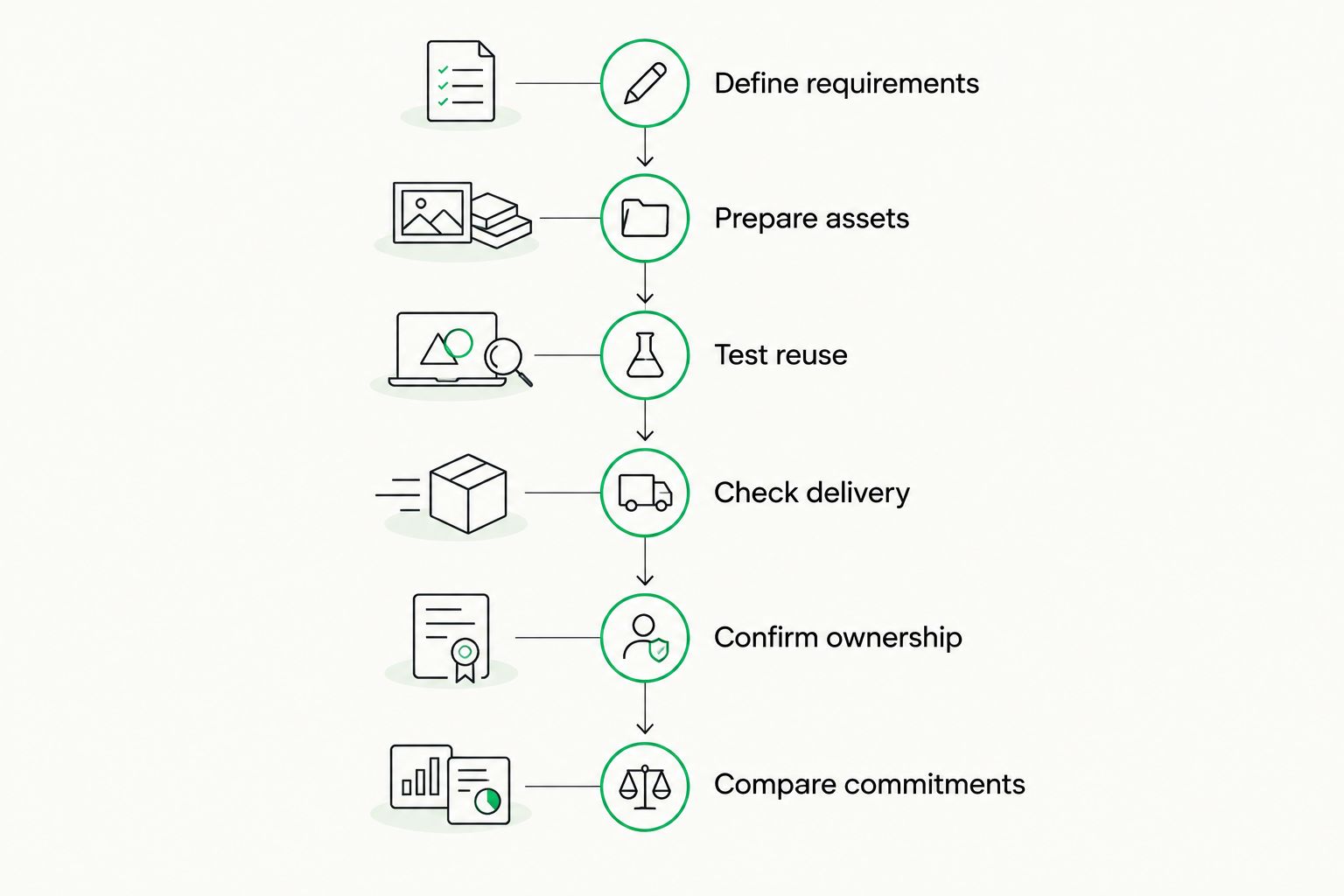
Evaluate the complete workflow before comparing contractual commitments.
Keep an evaluation record that names the task, the result, and any unresolved issue. This makes the final decision explainable to both procurement and the people who will use the software. It also prevents an attractive demonstration from replacing evidence about your workflow.
Does translation memory reduce translation spending?
Translation memory reduces repeated translation work when stored segments are relevant, accurate, and reusable. A stored match is not an automatic saving. The translator still needs to determine whether it fits the current context.
Separate software performance from commercial terms. Retrieving an approved segment and receiving a different charge for that segment are distinct events. If an agency or translator handles the work, agree how reused content is identified and treated.
Measure the work that actually changes: translation effort, review effort, and administrative handling. Do not treat every stored segment as an avoided translation task. Unused content, outdated terminology, and unsuitable matches do not demonstrate value merely because they exist in a database.
Should I buy standalone translation memory or a TMS?
Buy around the problem you need to solve. If your main requirement is editing and reusing translations, evaluate that workflow first. If your requirement includes assigning work, managing approvals, and tracking localization costs, evaluate a TMS against those tasks.
Keep each requirement testable. Instead of asking for better quality, ask how reviewers identify issues and how approved corrections enter the memory. Instead of asking for less administration, identify the handoff you want to remove.
Wxrks includes translation memory, workflow automation, quality management, and cost tracking. Those capabilities fit a broader localization evaluation, but your decision still depends on the specific workflow you need to operate.
FAQ
How much does translation memory software cost in 2026?
Translation memory software has no single standard cost; the total depends on software scope, contract terms, implementation, and ongoing work. Compare equivalent requirements and keep software access separate from translation and review services.
Does translation memory software include human translation?
Translation memory functionality does not itself provide human translation services. Confirm separately who performs translation, review, and terminology maintenance under the proposed agreement.
Is translation memory the same as machine translation?
Translation memory retrieves previously stored source-and-target segments; machine translation generates translations. Review retrieved matches for accuracy and context rather than treating them as automatically approved for every use.
Do freelancers need a translation management system?
Freelancers should evaluate a translation management system when they need workflow management beyond editing and translation reuse. If those additional tasks are not part of the requirement, prioritize the editing workflow and translation assets.
What should I ask before buying translation memory software?
Ask what the agreement includes, what your team must implement, and how you retain your translation assets. Test a representative file through import, translation, review, and export before committing.
How do I measure whether translation memory is worth it?
Measure the translation, review, and administrative work that approved reuse actually removes. Memory size alone does not establish value because stored segments still need to be relevant and usable.
Does Wxrks support translation memory and cost tracking?
Wxrks is a translation management system with translation memory, workflow automation, quality management, and cost tracking. Evaluate those capabilities against your team's translation and localization requirements.
One last thing
Your most useful memory is not necessarily your largest one. A smaller collection of relevant, approved translations is a better purchasing test than a large import full of material you cannot confidently reuse.
Before finalizing your 2026 decision, include a sentence whose context has changed. Check whether the translator can recognize that the old translation no longer fits. That test reveals something a successful exact-match demonstration does not: whether reuse supports judgment rather than replacing it.
Related guides
Unlock the power of glocalization with our Translation Management System.
Unlock the power of
with our Translation Management System.










