Can a TMS automate invoicing for freelance translators?


Yes—a TMS can automate invoicing for freelance translators when it includes billing features or passes approved project data to an invoicing system. In 2026, the key distinction is whether it creates an invoice you can issue, rather than simply calculating project costs. Cost tracking alone is not invoice automation, and you still need controls for billing details, approval, and payment reconciliation.
TL;DR
- Can a TMS automate translator invoicing? Yes, with native billing or a connected invoicing system.
- Wxrks supports translation workflow automation and cost tracking; evaluate invoice creation separately.
- Approve billable work before generating invoices, and prevent completed projects from being billed twice.
- Choose your setup around client requirements, accounting records, and exception handling—not invoice generation alone.
Can a TMS automate invoicing for freelance translators?
A TMS can automate the handoff from completed translation work to billing when the required financial functions are available. That handoff can happen inside the TMS or through a separate invoicing application. Neither arrangement follows automatically from the label translation management system.
Use this comparison to separate the available approaches. For the broader distinction between project operations and billing, see the guide to translation business management software.
Manual handoff
- Best for: Freelancers with straightforward billing requirements
- Main advantage: You review every billing entry directly
- Main limitation: Re-entering project details adds manual work
- What to verify: Approved work matches the invoice
Native TMS invoicing
- Best for: Freelancers seeking billing within their project workspace
- Main advantage: Project records can feed invoice preparation without a separate handoff
- Main limitation: Financial functions differ between systems
- What to verify: Invoice creation, corrections, numbering, and export
Connected invoicing system
- Best for: Freelancers keeping financial records outside the TMS
- Main advantage: Translation operations and accounting stay in their respective systems
- Main limitation: The connection needs mapping and exception handling
- What to verify: Supported fields, duplicate prevention, and status updates
Choose the workflow that preserves an accurate billing record, not the one with the fewest visible screens. A short process that loses purchase-order references or hides failed transfers still leaves you with reconciliation work.
Why this matters
Translation projects produce operational records: files, language pairs, assignments, revisions, and completion statuses. Invoicing requires a different decision: which completed work has the client agreed to pay for?
Those records overlap, but they are not interchangeable. A delivered file does not establish that every additional revision is billable. An internal cost calculation does not establish the amount you should invoice a client.
Your automation should carry approved commercial information into billing without asking you to reconstruct the project from email. Keep the approval decision visible, even when the transfer itself is automatic.
What should translator invoice automation actually do?
For your 2026 selection checklist, define the outcome before evaluating features. “Automated invoicing” should describe a working process you can demonstrate, not an isolated export button.
Preserve the billing agreement
Record the client, service, language pair, billing basis, currency, and required reference before work begins. Where the client uses a purchase order, connect that reference to the work being billed.
Translation, editing, and post-editing need clear service descriptions. Do not let an automation rule silently treat different services as interchangeable simply because they belong to the same project.
Use approved billable quantities
A file-analysis result and a billable quantity serve different purposes. Your agreement determines whether billing uses source words, target words, time, an agreed project scope, or another basis.
If translation-memory categories affect billing, verify how those categories reach the invoice calculation. The system should follow the agreement rather than substitute an analysis result without review.
Produce a reviewable billing record
Ask to see the actual draft invoice or financial record, not just a dashboard total. Check the customer identity, service description, references, currency, and applicable accounting fields.
Keep a review point before issue. Automation can prepare the document while you retain control over whether it accurately represents the completed work.
Retain the connection to the project
You should be able to trace an invoice entry back to its project and supporting approval. That connection matters when a client questions a quantity, requests a correction, or combines work under a shared reference.
Treat payment status as a separate requirement. Creating an invoice does not demonstrate that the workflow can identify settlement or reconcile a payment.
How do you set up TMS invoicing automation?
Use these 5 steps as an implementation checklist. They describe the workflow to configure and test, not features guaranteed in every TMS.
1. Capture terms
Store the billing agreement before you start translating. Include the service, billing basis, currency, client reference, and the person responsible for approving additional work.
Resolve ambiguous instructions early. If a client asks for a revised file after delivery, the billing process needs to distinguish an included correction from newly approved scope.
2. Approve work
Define the event that makes work eligible for billing. Use an explicit billing approval rather than assuming that upload, translation completion, or delivery means the same thing.
Keep disputed work out of the automatic path. A project can be operationally complete while a commercial question remains unresolved.
3. Prepare invoice
Map approved project information into the invoice draft or connected financial record. Check which fields transfer automatically and which still require your input.
Avoid unnecessary translation content in the financial handoff. Billing records generally need service descriptions and references, not the source documents or translated text themselves.
4. Review draft
Compare the draft against the agreement and completed work. Check quantities, service descriptions, client references, currency, and any required financial fields.
Approve the draft only after resolving discrepancies. A review checkpoint is especially useful after changing templates, field mappings, or billing rules.
5. Reconcile payment
Keep issued, unpaid, paid, and corrected records distinguishable in your chosen financial workflow. Decide which system owns each status so that competing records do not create confusion.
Verify how a payment update reaches the project record, if that connection is required. Do not assume that an invoice export also provides a return update.
The sequence is simple: capture the agreement, approve the work, prepare the invoice, review it, and reconcile payment. Keep these stages distinct even when software performs several automatically.
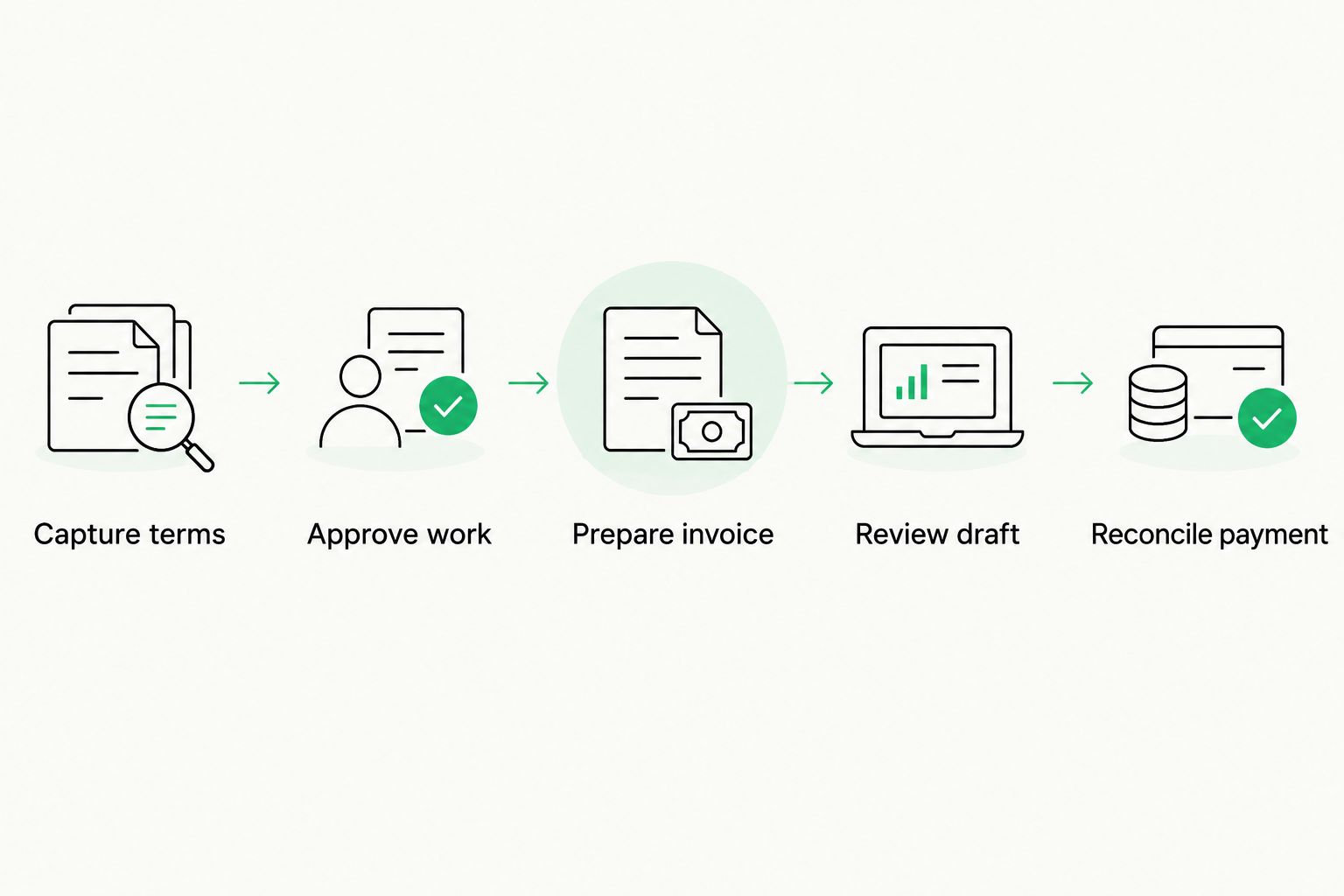
Approve billable work before preparing the invoice, then track payment separately.
Why invoicing automation varies
The right setup depends on your billing agreement and the information your financial system needs. Compare these factors before choosing between native invoicing and a connected application:
- Billing basis: Word-based, time-based, and project-based agreements require different inputs. Verify that the workflow preserves the basis you actually agreed.
- Translation-memory treatment: If your agreement distinguishes match categories, check how the billing calculation receives those categories and handles approved adjustments.
- Client requirements: Purchase orders, project references, service descriptions, and submission instructions affect whether a generated invoice is ready to issue.
- Approval rules: Decide who can mark work as billable and how additional scope enters the billing record.
- Financial requirements: Currency, applicable tax treatment, invoice corrections, and recordkeeping need to fit your business circumstances. Confirm requirements with your accountant.
- Connection behavior: Check field mapping, failed transfers, repeated actions, and status updates before relying on a link between systems.
Keep exceptions visible rather than forcing every project through the automatic path. A workflow that clearly stops for review is preferable to one that silently bills unresolved work.
What should you test before relying on automation?
For a 2026 evaluation, ask for a demonstration using your own billing scenario. Follow the record from project approval through invoice preparation; a feature list cannot show how exceptions behave.
Use 3 checks before issuing invoices through the new process:
- Agreement check: Compare the generated record with the approved service, billing basis, quantities, currency, and client reference.
- Repeat-action check: Run the billing action again in a test environment. Verify that the process prevents or clearly flags duplicate billing.
- Correction check: Change an approved item through the intended correction process. Confirm that you can identify what changed and reconcile the resulting records.
For each check, retain 2 records: the approved project record and the resulting invoice record. Compare them directly rather than relying on a success notification.
Also test a blocked transfer. Ask where the failure appears, who handles it, and how you safely retry. Automatic processing without a visible recovery path is not a finished workflow.
Where does Wxrks fit in translator invoicing?
Wxrks is a translation management system for translation workflow automation, translation memory, quality management, and cost tracking. Those functions address the project side of the billing process; evaluate invoice preparation and financial handoffs as separate requirements.
Wxrks suits freelance translators who need translation workflow automation and cost tracking. For your 2026 invoicing decision, ask to see how approved project information reaches the financial record you intend to use.
The benefit is relevant project and cost information within your translation workflow. The boundary is equally important: cost tracking is not proof of native invoicing, accounting integration, tax handling, or payment reconciliation. Require a demonstration of each billing function you need.
Can I automate invoicing without changing my accounting software?
Yes, if your TMS and existing financial workflow support a suitable connection or export. Check the actual fields and transfer direction before choosing this approach.
A file export still leaves a handoff to manage. Decide who imports it, how imported records are identified, and how you prevent the same approved work from entering billing again.
Can a TMS automatically send invoices when I finish translating?
Yes, where supported billing and workflow rules allow it, but translation completion should not automatically stand in for billing approval. Delivery, client acceptance, and commercial approval can represent different events.
Start with automatic draft preparation and deliberate approval. Expand automatic sending only after your test process covers corrections, disputed work, and failed transfers.
Does automatic invoicing mean automatic payment collection?
No. Invoice preparation, sending, payment collection, and reconciliation are separate functions, even when an application connects them.
Ask which stages the proposed workflow actually supports. If payment updates remain manual, include that task in your process rather than treating the invoice as the final step.
FAQ
Can a TMS automate translator invoicing for a solo freelancer?
Yes, a TMS can automate translator invoicing when it provides billing functions or transfers approved project data to an invoicing system. Verify invoice preparation, approval, and correction handling before relying on it.
Is translation cost tracking the same as invoicing?
No, translation cost tracking is not the same as invoicing. A project calculation does not by itself create an invoice, issue it to a client, or reconcile payment.
What's the best invoicing setup if I already use accounting software?
A connected workflow is the best fit when you want to keep your existing financial records and the required connection is supported. Verify field mapping, duplicate prevention, and how failed transfers are resolved.
Can I bill translation and post-editing in the same workflow?
Yes, if the workflow supports the separate service descriptions and billing rules in your agreement. Check that invoice preparation preserves those distinctions rather than combining them without review.
Should invoices be sent automatically after file delivery?
Not unless file delivery also represents your agreed billing approval. Preparing a draft automatically keeps the administrative handoff separate from your decision to issue the invoice.
How do I stop a completed translation project from being invoiced twice?
Require a billing status and a traceable connection between the approved work and its invoice record. Test a repeated billing action before using the workflow for live invoices.
Does Wxrks cost tracking prove it can issue invoices?
No, Wxrks translation cost tracking does not by itself establish invoice-issuing functionality. Evaluate invoice creation, financial connections, and payment-status handling separately from translation project management.
One last thing
For your 2026 shortlist, make the final demonstration a correction—not a clean first invoice. Ask what happens when approved work changes after the invoice has been prepared or issued.
That test exposes whether project approval, billing records, and financial corrections remain connected. Automate the transfer of approved facts; keep control over the decision to bill.
Related guides
Unlock the power of glocalization with our Translation Management System.
Unlock the power of
with our Translation Management System.