


Shopify store localization workflow: QA-first 2026


Instead of manually copying translated product descriptions into Shopify, build a Shopify store localization workflow that exports source content, routes translation and review through Wxrks, and returns approved text to Shopify for testing. This 2026 guide uses a file-based handoff, so your publishing process does not depend on a native connector.
TL;DR
- Your shopify store localization workflow should separate translation approval from storefront publishing.
- Wxrks suits teams coordinating translation memory, quality management, and repeatable localization workflows.
- Preserve Shopify content identifiers throughout the translation handoff; import approved translations against the correct source records.
- Test language assignment, product pages, navigation, and checkout before publishing a translated storefront.
Why this matters
A translated product description does not make a multilingual storefront. Customers also encounter menus, collection descriptions, theme messages, policies, and checkout text. Those surfaces need a consistent language experience, not separate translation jobs with unrelated terminology.
Wxrks translation management is best for teams coordinating translation memory, quality checks, and recurring localization work. Shopify remains the publishing destination. Keeping those responsibilities separate gives reviewers control over the wording without giving every translator responsibility for store configuration.
The advantage is a repeatable handoff: source content enters review, approved translations return to their matching records, and storefront checks happen before release. The trade-off is operational discipline. A file-based workflow needs careful identifier handling and explicit ownership of exports, imports, and publication.
For your 2026 rollout, treat translation completion and release readiness as different statuses. Text can be linguistically approved while a menu link, market assignment, or theme component still needs correction.
Before you start
- Access: Have Shopify admin access to language settings and the relevant market configuration, plus access to your translation management workspace. Assign separate owners for translation approval and storefront publication, even if the same person performs both roles.
- Materials: Prepare approved source copy, target languages, a glossary, reviewer instructions, and representative product and collection pages. Agree on the file handoff your translation system accepts before exporting the whole store.
- The gotcha: Shopify translation imports depend on matching content records. Do not translate identifiers, alter source-reference fields, or treat a product catalog CSV as a language translation CSV. Establish a reversible mapping between Shopify records and translation jobs before work begins.
Start with 1 target language, 1 product page, and 1 collection page. These are pilot boundaries, not platform limits. Include navigation and a route into checkout so the test covers a customer journey rather than isolated text.
Choose your workflow scope
Use a full-content workflow for an initial language launch. Use a changed-content workflow after that language is live. Both need review and storefront testing; the difference is how much content enters the translation queue.
Initial language launch
- Best for: A store introducing a new target language
- Advantage: Creates a shared terminology and review baseline
- Limitation: Requires an inventory of customer-facing content before publication
Changed-content updates
- Best for: A store maintaining an existing translated storefront
- Advantage: Keeps the queue focused on new or revised source text
- Limitation: Requires reliable change detection and record matching
Use the initial launch workflow to prove the handoff before scheduling recurring updates. An import that succeeds technically still needs a visual check: the translation can belong to the wrong field, contain broken formatting, or leave another customer-facing surface untranslated.
Content export
Configure Shopify languages and source records
- In Shopify admin, open Settings, then Languages. Use Add language to add the pilot language. Keep publication as a separate release decision rather than treating language creation as launch approval.
- Open Markets and inspect the configuration for the intended audience. Confirm that the language will be assigned to the relevant market and that you understand its domain or subfolder arrangement.
- Return to Languages and use Export to obtain Shopify's translation CSV for the required scope. Work from the translation export, not the product export used for catalog administration.
- Preserve an untouched copy. In a working copy, identify the source text, locale, content identifiers, and fields intended to receive translations. Open identifier columns as text when using a spreadsheet so formatting does not change their values.
- Create a content inventory alongside the file. Record which surfaces are covered by the export and which require separate handling, including app-generated text, images containing words, and content maintained outside Shopify.
Expected result: You have a source snapshot, an unchanged reference file, and a defined pilot scope. Every item sent for translation retains a path back to its Shopify record.
Do not edit source copy halfway through the pilot without recording the change. Translation approval applies to a specific source version. If the source changes, the reviewer needs the revised text and its context before approving the target again.
Translation review
Configure the translation handoff
- Define the handoff format before uploading content. If your translation environment uses a different structure from Shopify's export, have your developer create a reversible mapping. Preserve the Shopify identifiers outside editable translation text.
- Add context for each content type. Product descriptions need product context; navigation labels need destination context; theme messages need the screen or interaction where they appear. Give reviewers screenshots when the words alone do not explain the task.
- Use Wxrks translation management to organize the localization work around translation memory, quality management, and reviewer responsibility. Set your project conventions around capabilities available in your workspace rather than assuming Shopify-specific controls.
- Supply approved terminology and writing instructions. Distinguish brand names that stay unchanged from descriptive terms that need translation. Explain how reviewers should handle units, punctuation, and claims without changing the source meaning.
- Review the target text before export. Check meaning, terminology, formatting, placeholders, and customer-facing instructions. Resolve reviewer comments before marking the batch ready for Shopify.
Expected result: Your pilot translations are approved, linked to their source records, and ready for conversion back into Shopify's import structure.
The file-based approach gives you a clear approval boundary, but it adds a mapping responsibility. Keep Shopify's structural data out of the translator's editable text. Translation memory helps reuse language; it does not replace record matching or release checks.
For the 2026 pilot, write a short acceptance brief for each surface. A product description must preserve the offer's meaning. A navigation label must match its destination. A customer instruction must remain actionable in the target language.
Storefront import
Return approved translations to Shopify
- Rebuild the Shopify translation CSV from the approved target text. Retain the required structure and original content references. Do not reconstruct identifiers from product titles or translated wording.
- Validate the file before upload. Confirm that each translation belongs to the intended locale and content field. Check CSV quoting, embedded line breaks, character encoding, and HTML where the source content contains it.
- In Shopify admin, open Settings, then Languages, and select Import. Upload the prepared translation CSV. Review any overwrite choice carefully so an older batch does not replace a newer approved translation.
- Read the import result. Resolve rejected records rather than assuming that successful records mean the whole batch imported. Keep the imported file and its approval record together.
- Inspect the pilot content in the target-language storefront or its available preview route. Compare it with the approved translation, including line breaks, links, emphasis, and special characters.
Expected result: Approved translations appear against the intended Shopify resources, and your release owner can identify any rejected or incorrectly mapped records.
A clean import is a technical checkpoint, not a quality verdict. CSV validation cannot tell you whether a translated button is misleading or whether text is clipped on a mobile screen. That is the purpose of the next configuration unit.
Release checks
Verify the customer journey before publication
- Open the target-language product page and follow its links. Check the collection page, navigation, cart, and checkout route. Confirm that the selected language persists where the customer expects it.
- Inspect theme text and app-generated components separately. A translated Shopify resource does not automatically prove that reviews, subscription interfaces, embedded widgets, or text inside images are localized.
- Test a narrow mobile viewport and a desktop viewport. Look for clipped labels, broken wrapping, hidden controls, and translated text that separates a button from its explanation.
- Check the language switcher and market assignment. Verify that each language choice reaches the intended storefront version rather than an unrelated homepage or an unavailable route.
- Review localized titles, descriptions, and URL behavior where supported. Inspect rendered language annotations and canonical references rather than adding duplicate SEO markup without checking the theme's existing output.
- Once the release owner approves the customer journey, return to Languages and use Publish for the approved language. Verify the live experience again after publication.
Expected result: The published language has passed both content review and storefront testing. Your release record identifies the source snapshot, approved translation batch, import file, and final sign-off.
This sequence separates four responsibilities: exporting the right content, reviewing the wording, importing the correct records, and approving the experience. Keep that separation in your 2026 release checklist even when one person handles several tasks.
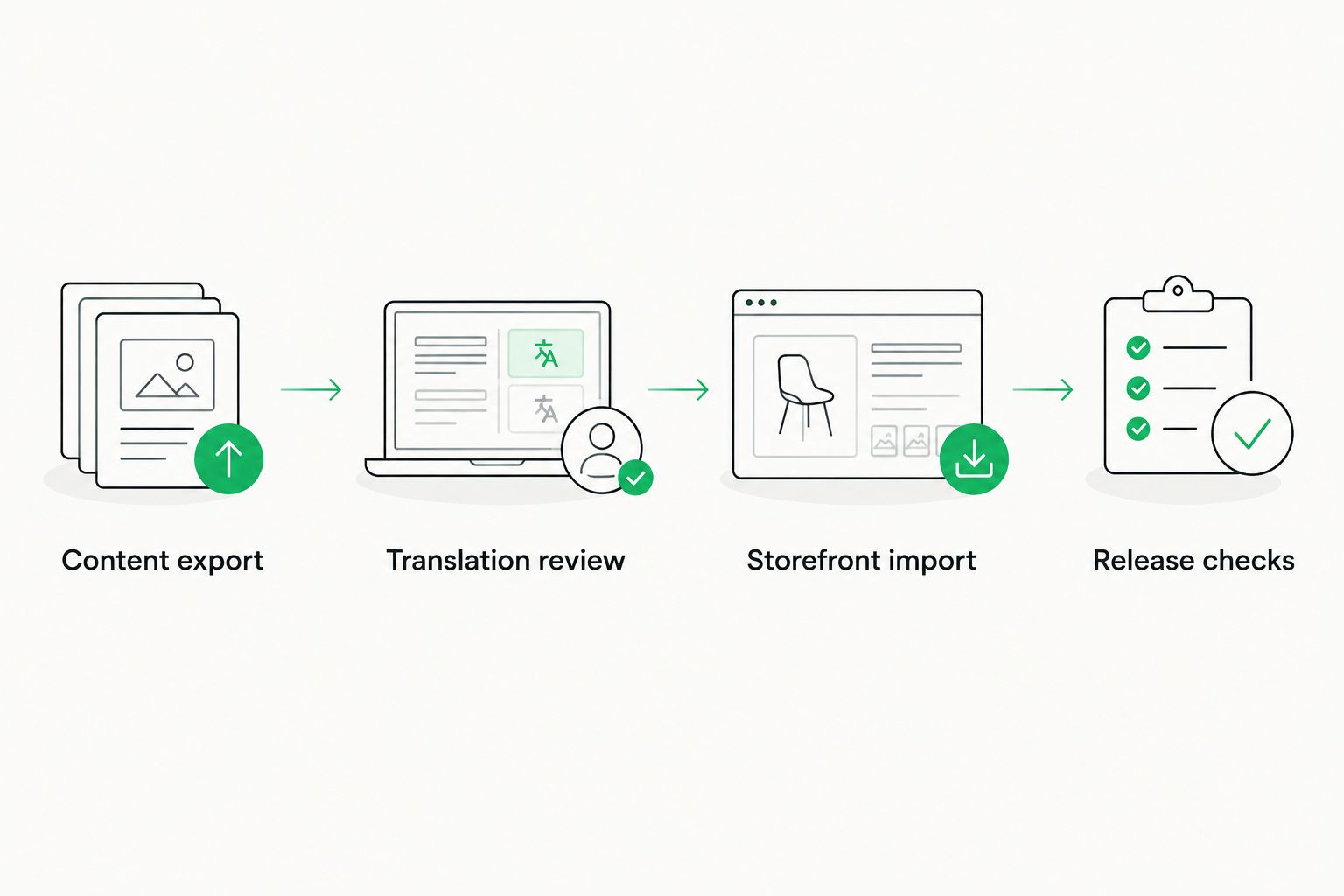
Translation approval happens before import; storefront approval happens before publication.
Update translations whenever source content changes
An existing multilingual store needs a changed-content workflow, not a repeated full-store launch. Keep the same review gates, but narrow the batch to records whose source text has changed.
- Establish a source snapshot after the approved launch. Store stable content identifiers alongside the source text and target locale.
- Compare the next source export with the approved snapshot. Queue new or changed text by identifier, not by row position in the spreadsheet.
- Route changed records through translation and review. Include the previous source and target when useful, but require approval against the current source.
- Return only the approved update batch to Shopify and inspect the affected pages. Check dependent content too, such as a navigation label pointing to a renamed collection.
- Replace the baseline only after the update passes release checks. Keep unresolved changes in the queue rather than recording them as complete.
Expected result: Source changes create a focused review queue without disturbing unrelated approved translations.
For unattended processing in 2026, build the trigger around a documented export, API, or integration route available to your store. Keep approval and failure reporting explicit. A failed import must stop that batch from being marked published.
Troubleshooting
The import rejects translation records
Check that you used Shopify's translation CSV structure and preserved its content references. Compare the failed file with the untouched export. Correct structural problems before changing the translation itself, then retry the affected records.
The storefront still shows source-language text
Check language publication, market assignment, and the specific resource's translation. Then identify whether the text comes from the theme, an app, or an image rather than the resource you imported. Fix it where that content is maintained.
A translated page shows broken formatting
Compare the imported value with the approved text and source markup. Check CSV escaping, HTML tags, links, placeholders, and character encoding. Repair the file without changing its identifiers, then inspect the rendered page again.
An update restores older wording
Stop the batch and compare its source snapshot with the current approved baseline. Review overwrite behavior and remove stale records from the import. Tie every release file to its approval record so an old file cannot masquerade as a current update.
The language switcher opens the wrong destination
Inspect the theme's switcher behavior and the market's language and domain configuration. Test from product and collection pages, not only the homepage. Correct routing before treating the language launch as complete.
Customize your workflow
Expand after the pilot proves reliable. Add another content type before another target language if your first launch left app text, policy content, or theme messages outside the process.
Wxrks supports localization workflows, translation memory, quality management, and cost tracking. Use those responsibilities to organize the translation work, while keeping Shopify import and publication ownership explicit. The limitation of this guide's file-based approach remains the same: your team must maintain the mapping and release checks.
For broader planning, read the localization software guide for e-commerce brands. Turn the pilot's approved terminology, reviewer decisions, and release checklist into operating materials for subsequent batches.
FAQ
What's the best Shopify store localization workflow for a first launch?
Start with one target language and a small customer journey, then export, translate, review, import, and test before publishing. Expand only after content identifiers and storefront behavior survive the complete handoff.
Can I use a product CSV to import Shopify translations?
Use Shopify's translation CSV rather than its product catalog CSV for language imports. The translation file carries the structure needed to associate translated text with the relevant content records.
Does this workflow require a native Shopify connector?
No. This guide uses a file-based handoff with preserved content identifiers and a validated return file. Your team owns any format conversion between the translation environment and Shopify.
Where does Wxrks fit in Shopify localization?
Wxrks provides translation management for localization workflows, translation memory, quality management, and cost tracking. Shopify remains responsible for importing translations, configuring storefront languages, and publishing the customer experience.
Why is some storefront text still untranslated after importing?
Check whether the text belongs to the imported resource, the theme, an app, or an image. Also verify that the language is published and assigned to the intended market.
How do I keep translations current when product descriptions change?
Compare current source content with the approved baseline and queue changed records by stable identifier. Review the updated translations before importing them and replacing the baseline.
What should I test before publishing a language in 2026?
Test product and collection pages, navigation, cart, checkout, language switching, and mobile layout. Inspect localized SEO fields and routing where supported, and verify the live experience after publication.
One last thing
Do not use a successful import as your launch criterion. The strongest final check is a customer journey conducted entirely in the target language: find a product, understand it, add it to the cart, and follow the checkout route. Record any point where the customer must switch languages to continue.
Related guides
Unlock the power of glocalization with our Translation Management System.
Unlock the power of
with our Translation Management System.










