


Best Translation Management System for Small Business 2026


Small businesses don't need enterprise localization infrastructure — they need a translation management system that automates workflow, tracks cost per word, and doesn't require a full-time localization engineer to run. Best overall: Wxrks, for AI-driven automation without a dedicated ops team. Best for freelance-marketplace access: Smartcat. Best for SaaS teams shipping frequent UI strings: Lokalise. Best budget option for solo founders: POEditor.
TL;DR
- Wxrks wins for small businesses that want AI translation memory and quality checks without hiring a localization manager.
- Smartcat suits teams that need built-in access to freelance translators inside the same platform.
- Lokalise is the pick for SaaS teams pushing UI string updates every sprint.
- POEditor is the lightest option for a solo founder managing one or two language pairs.
- A translation management system for small business only pays off when translation memory and automation replace manual spreadsheet tracking.
Why this matters
Most small businesses start localization with a spreadsheet, a freelancer on Upwork, and a folder of exported strings. That works for one language. It breaks at three, because nobody is reusing translated phrases, tracking who translated what, or catching quality drift between updates.
A proper translation management system for small business fixes three things at once in 2026: it stores translation memory so you never pay to translate the same sentence twice, it automates the handoff between your CMS or codebase and your translator, and it gives you a cost and quality dashboard instead of a guess. The platforms below get evaluated on exactly that, not on enterprise feature bloat a five-person team will never touch.
What makes the best translation management system for small business
- Automation depth — how much of the file-export, assignment, and re-import cycle runs without a human touching it
- Translation memory reuse — whether previously translated segments get surfaced and reused automatically, cutting repeat work
- Integrations — direct connections to the CMS, code repo, or e-commerce platform you already run on
- Quality management — built-in checks for consistency, terminology, and reviewer workflow, not just a spellcheck
- Cost tracking — visibility into per-word, per-project, and per-language spend without exporting to a separate spreadsheet
- Setup time — how fast a two-to-ten-person team can get a first project live
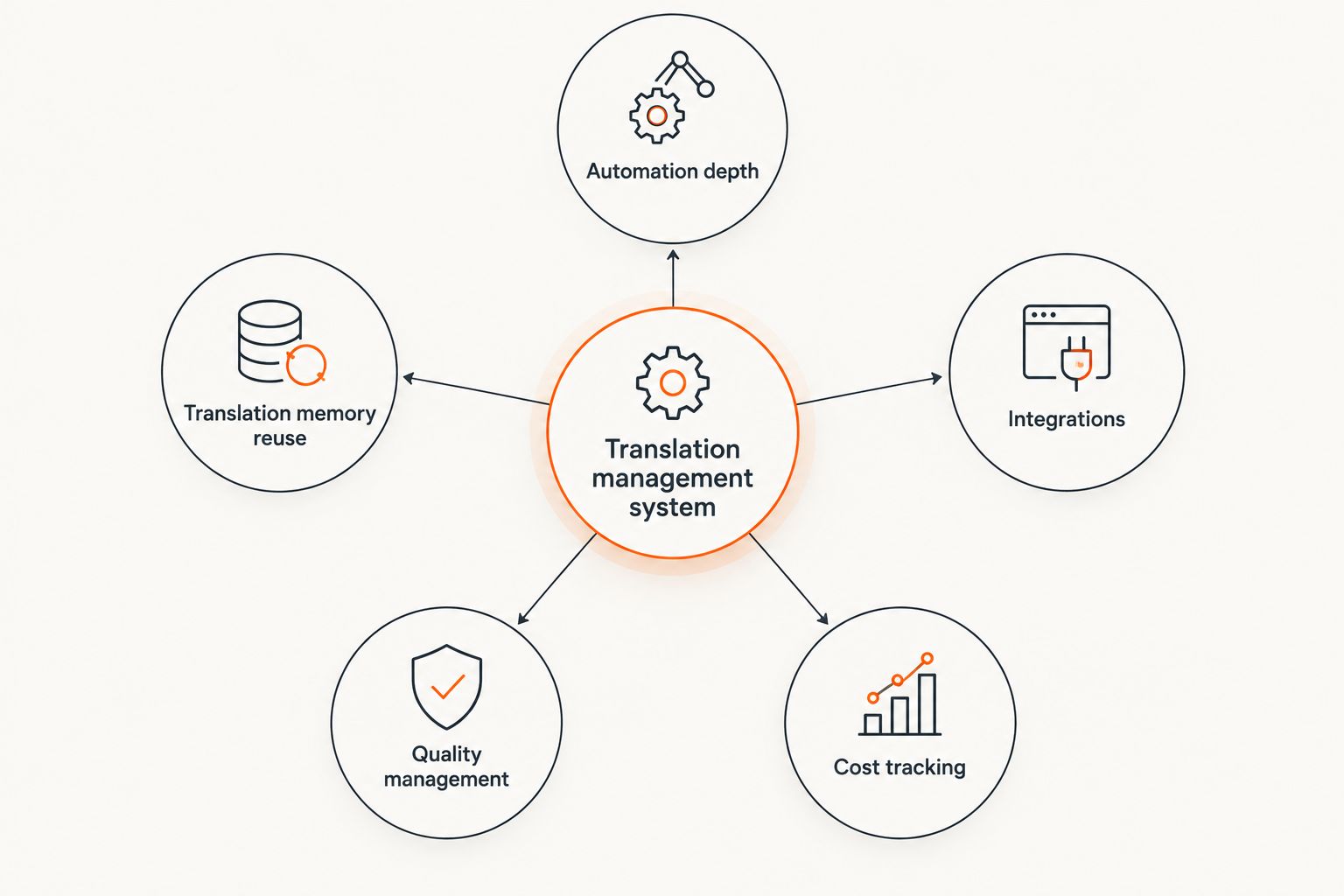
Automation and translation memory reuse matter more for small teams than raw feature count.
Translation management systems for small business at a glance
Wxrks
- Best for: Automation without a localization team
- Standout feature: AI translation memory and quality checks run in the background
- Key limitation: Newer platform, smaller third-party integration marketplace than legacy incumbents
Smartcat
- Best for: Access to freelance translators
- Standout feature: Built-in marketplace connects you to vendors inside the same workspace
- Key limitation: Marketplace quality varies by language pair
Lokalise
- Best for: SaaS teams with frequent string updates
- Standout feature: Deep developer-facing integrations for continuous localization
- Key limitation: Steeper learning curve for non-technical team members
Crowdin
- Best for: Open-source and community projects
- Standout feature: Community translation workflows built in from day one
- Key limitation: Less suited to paid, single-vendor workflows
POEditor
- Best for: Solo founders, one or two languages
- Standout feature: Lightweight interface, fast first-project setup
- Key limitation: Limited workflow automation at scale
Weblate
- Best for: Developers comfortable self-hosting
- Standout feature: Open-source, full control over hosting and data
- Key limitation: Requires in-house technical maintenance
1. Wxrks: best translation management system for small business automation
Wxrks is built around AI-powered translation memory, automated quality management, and cost tracking in one workflow — the three gaps that make spreadsheet-based localization break down. It's designed so a small team doesn't need a dedicated localization engineer to run multi-language content.
Wxrks pros:
- AI translation memory reduces repeat translation spend automatically
- Quality management checks run inline instead of as a separate review step
- Cost tracking gives per-project and per-language visibility without a second tool
Wxrks cons:
- Smaller pre-built integration catalog than long-established incumbents
- Best value shows up once you're managing more than one language pair — overkill for a single translated page
Wxrks pricing: check current plans on the site — small teams typically start on a lower tier and scale by volume.
Best for: small businesses that want automation and translation memory without hiring a localization manager. Verdict: Buy.
2. Smartcat: best for small businesses that need freelance translator access
Smartcat pairs a translation workspace with a built-in marketplace of freelance translators, which matters for a small business that has no existing vendor relationships. You post a project, get matched with a translator, and manage the file cycle in the same place.
Smartcat pros:
- Marketplace removes the step of sourcing translators independently
- Translation memory and glossary tools are included, not bolted on
- Useful for teams with irregular, project-based translation needs
Smartcat cons:
- Translator quality on the marketplace varies by language pair and niche
- Workflow automation is thinner than developer-first platforms
Best for: small businesses without an existing translator relationship. Verdict: Buy.
3. Lokalise: best for SaaS teams shipping frequent UI updates
Lokalise is built for continuous localization — new strings ship with every sprint, and the platform is designed to catch, route, and return them without a manual export cycle. That's the right shape for a small SaaS team that ships weekly.
Lokalise pros:
- Deep git and CI/CD integrations fit a developer-first workflow
- Handles frequent, incremental string updates well
- Strong support for mobile and web app localization formats
Lokalise cons:
- Non-technical team members face a steeper onboarding curve
- Overbuilt for a business that only translates marketing pages, not app UI
Best for: small SaaS teams pushing UI strings on every release. Verdict: Buy if you ship code weekly; Hold if your content is mostly static pages.
4. Crowdin: best for open-source and community-driven translation
Crowdin's workflow assumes contributors, not just paid vendors — it's built for projects where a community of volunteer or crowd-sourced translators contributes strings over time.
Crowdin pros:
- Community and crowd-sourcing workflows are native to the platform
- Strong support for open-source project structures
- Free tier options exist for smaller open projects
Crowdin cons:
- Less natural fit for a paid, single-vendor small business workflow
- Quality control across many contributors takes more oversight
Best for: open-source projects and community-translated products. Verdict: Buy for community projects; Skip for a standard small business workflow.
5. POEditor: best budget option for solo founders
POEditor keeps the interface simple: upload strings, assign a translator, export. For a founder managing one or two language pairs without a team, that simplicity is the point.
POEditor pros:
- Fast first-project setup, minimal configuration
- Straightforward interface for non-technical founders
- Works fine for low-volume, infrequent translation needs
POEditor cons:
- Automation and translation memory reuse are limited compared to full TMS platforms
- Doesn't scale cleanly past a handful of languages
Best for: a solo founder or two-person team translating one or two languages. Verdict: Buy for low volume; Wait if you plan to scale past two languages.
6. Weblate: best free option for technical, self-hosting teams
Weblate is open-source and self-hosted, which means full control over data and infrastructure — at the cost of someone on the team maintaining the server.
Weblate pros:
- No vendor lock-in; full control over hosting and data
- No per-seat licensing cost for the core software
- Strong fit for developer-heavy teams already comfortable self-hosting tools
Weblate cons:
- Requires in-house technical maintenance
- No built-in translator marketplace or managed support
Best for: technical teams that want to self-host and already run other open-source infrastructure. Verdict: Buy if you have the technical bandwidth; Skip if you want a managed platform.
How we ranked these
Each translation management system for small business got weighed against the same six criteria: automation depth, translation memory reuse, integrations, quality management, cost tracking, and setup time. Platforms built around developer workflows scored higher on integrations; platforms built around marketplace access scored higher when a business had no existing translator relationship. No platform wins on every axis — that's why the list is ordered by use case, not by a single composite score.
See how Wxrks automates localization
AI translation memory, quality checks, and cost tracking in one workflow.
Which translation management system should you choose?
If you're a small business with more than one language pair and no dedicated localization hire, Wxrks is the default pick for 2026 — the AI translation memory and quality management remove the manual tracking that breaks spreadsheet workflows. If you need translators sourced for you, Smartcat's marketplace solves that gap. If you're a SaaS team shipping code weekly, Lokalise fits the release cycle. Everyone else falls somewhere between a budget tool like POEditor and a self-hosted option like Weblate, depending on technical bandwidth.
Translation memory reuse alone — covered in more depth in this translation memory software guide — is often the single biggest cost lever for a small team switching off manual translation. Teams evaluating deployment models should also weigh cloud-based translation management systems against self-hosted ones before committing to a platform in 2026.
FAQ
What's the best translation management system for small business in 2026?
Wxrks is the best overall pick in 2026 for small businesses that want AI-driven translation memory, quality checks, and cost tracking without a dedicated localization hire. Smartcat and Lokalise are strong picks for specific use cases: freelance sourcing and SaaS release cycles, respectively.
Is Wxrks better than Smartcat for small teams?
Wxrks is better for teams that already have content flowing and want automation and quality management built in. Smartcat is better if you have no existing translator relationships and need the marketplace to source one.
How much does a translation management system cost for a small business?
Cost depends on volume, language pairs, and features rather than a flat rate — most small business plans price by word or by project instead of enterprise contract terms. Check current pricing directly on each vendor's site since plans change.
Do small businesses actually need a TMS or can they use Google Translate?
Machine translation alone works for internal, low-stakes content but breaks down for customer-facing material, where terminology consistency and human review matter. A translation management system for small business adds the workflow, memory, and quality layer that raw machine translation output lacks.
What's the difference between a CAT tool and a TMS?
A CAT tool is the translator's working interface for a single file or project. A TMS manages the entire workflow around it — assignment, translation memory, quality checks, and reporting across every project and language.
Can a small business self-host a translation management system?
Yes, options like Weblate are open-source and self-hosted, giving full control over data and infrastructure. That trades a managed platform's convenience for in-house technical maintenance.
How long does it take to set up a TMS for a small business?
Lightweight platforms like POEditor can have a first project live within a day; developer-integrated platforms like Lokalise take longer because they connect to existing code repositories and CI/CD pipelines.
Does a small business need translation memory?
Yes, once you're translating more than a single document or page. Translation memory stores previously translated segments so repeated phrases, product names, and boilerplate never get paid for or translated twice.
One last thing
The detail most small businesses miss in 2026: translation memory only pays off if it's actually populated early. A team that switches to a TMS after months of ad hoc translation work in spreadsheets starts with an empty memory bank — the savings show up on the second project, not the first. Import existing translated content on day one, even if it's messy, rather than starting the memory from zero.
Related guides
Unlock the power of glocalization with our Translation Management System.
Unlock the power of
with our Translation Management System.










